Automation
Blocks that steer the flow
Start, Stop flow, Wait, Log, If, Switch and the three loops: when to reach for each one, what to fill in, and the traps that end a run as Failed.
7 min read
Twelve of the 52 nodes never touch the screen. They decide what runs, in what order, how many times, and which way the flow turns when the phone does something you did not plan for. Get these right and the nodes that tap, type and swipe mostly look after themselves.
Most of them are in the FLOW and CONTROL groups of the node library. Two are filed somewhere else, and each one says so where it comes up. When a name is not where you expect it, use the "Search nodes…" box at the top of the library.
Start and Stop flow
Start is where the run begins, and it is the only node with no input — every other node has one. A flow needs one.
Stop flow ends the run at a point you choose, and this is where people get it wrong: you do not need it merely to finish. An output left unconnected already ends the flow successfully. Reach for Stop flow when you want to end a run and say why. Three settings do that:
- Result code — "Success: the flow ends well. Failed: the flow stops and counts as a failed run; the runner sees an error." This is how you mark a run as failed on purpose, for instance when the app answered "wrong password" and carrying on is pointless.
- Message — "Shown in the run result so you know where and why the flow stopped. Variables allowed." So
Login failed for {{account}}tells you which account, not just that something broke. - Capture the screen on stop — keeps a picture of what the phone was showing at that moment.
Wait, and why the box has two ends
Wait pauses. The field is a range, and the hint says why: "The device picks a random value in this range; equal ends wait a fixed amount".
Set both ends to 2000 and every phone waits exactly two seconds. Set 1500–4000 and each phone picks its own number. That matters most when one flow is running on twenty phones at once — see Run one flow on many devices — because identical timing makes twenty phones behave like one machine. Different timing costs you nothing.
Many nodes also carry their own Delay after running (ms), described as "Rest after each run, before moving on" with the same random-range behaviour, so you often do not need a separate Wait at all.
A fixed Wait is always a guess — too short on a slow morning, wasted time on a fast one. When you are waiting for the phone rather than for the clock, use Wait for element instead: see Blocks that read the screen.
Log — the first thing to reach for when a run surprises you
Log writes one line into the run log, and its hint is the whole trick: "Written to the run log — embed {{variables}} to see their values at that moment."
Once a run is over you cannot look inside it. All you have is what it wrote down. So put a Log before and after anything you are unsure of, and put the variables in the message:
before login, account = {{account}}after reading the code, otp = {{otp}}
Now the log tells you both how far the flow got and what it was holding when it got there. Reading it back is covered in Run a flow and watch it.
If — two ways forward
If compares two values and takes the true or false branch. The left side is "Usually a variable, e.g. {{example}}". The two traps are in the other fields.
The right side is never a variable name. The hint says it outright: "Always read as a value, never as a variable name or an expression. To read a variable, wrap it in double braces." Typing count compares against the literal word count. You meant {{count}}.
Numbers compared as text sort wrongly. "As text, "10" sorts before "9"; pick Number for real numeric order." Anything read off a screen arrives as text, so whenever you compare amounts, counts or prices, set Compare as to Number.
There is also Ignore letter case, which saves you from an app that writes "Sign In" in one release and "Sign in" in the next.
Switch — more than two ways
Switch takes one value and gives each case a branch of its own: "Each case is its own branch. Anything that matches none takes the Otherwise branch". Use it where a chain of If nodes would get silly — a status that can be pending, approved or rejected is three cases plus Otherwise, on a single node.
Wire Otherwise every time. It catches the value you did not think of, and sooner or later an app will show you one.
The three loops, and the mistake everyone makes first
A loop is a container, not a wire. If you have used other flow tools your instinct is to draw a line from the last step back up to the top. You cannot: "you cannot wire backwards into a cycle."
Each loop node has two outputs, Loop body and Next. Wire Loop body to the first step you want repeated. Those nodes get a tinted frame whose label starts with Body:, and the phone runs the whole frame and comes back by itself. Leave the last node inside the frame unconnected — that is how one round ends. Never draw a wire from inside the frame to the outside. When the rounds are done the flow carries on from Next.
| Loop | Use it when | What you fill in |
|---|---|---|
| Repeat N times | You know the number: scroll five times, post three times. | Repeat count, and optionally a Counter variable holding the round number, "counted from 0". |
| Repeat over a list | You have a list and want one round per item — twenty comments, one each. | Source list ("Pick a text-list variable to walk through"), an Item variable for the current item, and optionally an Index variable for its position, also from 0. |
| While | You do not know the number: keep going while something is still true. | Condition, plus an Iteration limit — "A hard stop, so a condition that never turns false still ends". |
While has one more sharp edge: "The condition is checked BEFORE each round — false from the start means the body never runs." If nothing inside the body appears to have happened, check whether the condition was ever true to begin with.
To leave a loop early, drop Break / skip loop inside the frame: "Break leaves the loop, Skip jumps to the next iteration." Break is "found it, stop looking". Skip is "this one is no good, next one".
A loop with no way out is the number-one cause of dead runs. A run still going after 30 minutes is cut off and recorded as Failed, with a reason of TIMEOUT. The two usual culprits are a While whose condition never turns false, and a loop waiting for a screen that never appears. Set the Iteration limit, and give the loop a Break.
Waiting for the phone instead of the clock
Two nodes wait on something real.
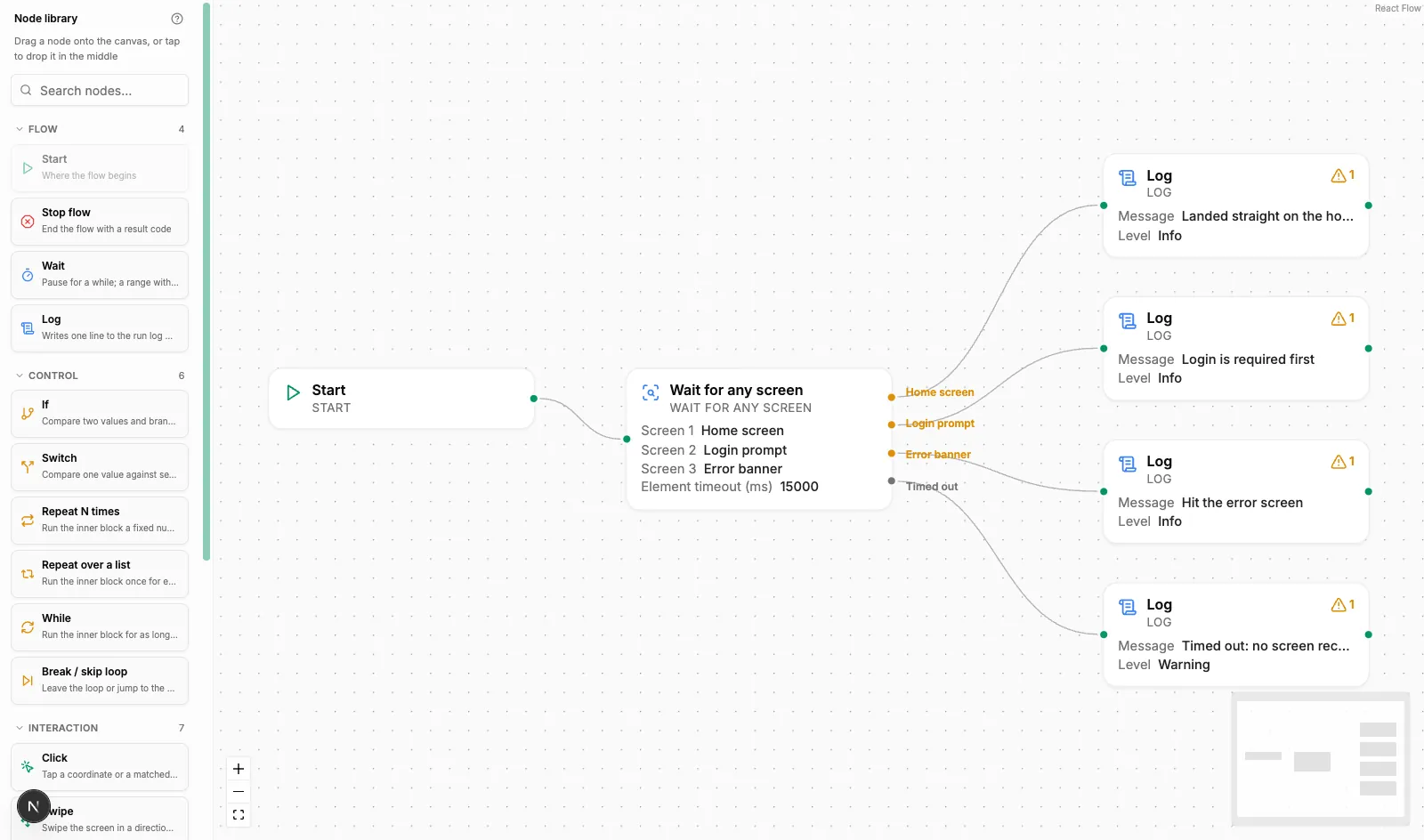
Wait for any screen, which the library files under ELEMENTS, is for the moment where an app can go several ways — straight in, or a captcha, or "verify your email". You list the screens, name each branch, and the flow takes whichever one turns up first. They are "Checked top to bottom; the first screen that matches wins. Put the more specific screens first". Each Branch name is "Shown on the wire in the canvas", so name them after screens rather than case 1. If none appears in time the Timed out branch runs — a different output from error, so "nothing came up" need not be treated as a crash.
Wait for network, over in the DEVICE group, asks whether the phone can actually reach the internet: "“Real internet” actually reaches the outside, not just signal bars". Connected takes true straight away; otherwise it waits up to the timeout and then takes false. Set the timeout to 0 "to check once without waiting" when you only want to know right now.
What happens to an output you leave unconnected
This catches people out often enough to state plainly:
- out, true, false, case and timeout left unconnected: "the flow ends successfully there."
- error unconnected: "the flow stops and reports the failure." To carry on past an error you have to wire the error output somewhere.
- Inside a loop body an unconnected output ends that round — but error still stops the whole flow.
Summary
- Start begins the run; Stop flow ends it with a reason — result code, message, optional screenshot. Leaving an output unwired already ends a flow successfully.
- Give Wait two different ends so a fleet of phones does not move in lockstep, and prefer waiting for an element over waiting for the clock.
- Log with
{{variables}}in the message is the cheapest debugging you will ever do. - On If, wrap the right side in
{{ }}to read a variable, and set Compare as to Number for numbers. - Loops are containers: wire Loop body inwards, never a wire back out. Give While an iteration limit and a Break, or a 30-minute TIMEOUT failure is waiting for you.