Remote Control
What your plan locks in the viewer
Which viewer tools depend on your rental plan, what the Not in plan and Paid plan badges mean, and why share-link guests get none of them.
4 min read
Not every rental plan includes every tool in the viewer. A tool your plan does not include is not hidden: it stays on screen, greyed out and marked with a badge or a notice, so you can see what it would do before you pay for it. This page lists what depends on your plan, how to read the badges, and where to check before you rent.
The two badges
| Badge | What it means | Where you see it |
|---|---|---|
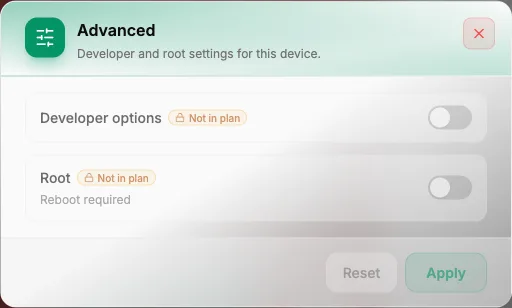
| Not in plan | The tool is not part of your plan at all. The dialog still opens so you can look, but nothing in it reaches the device. | The ADB Console and Spoof location rows in the Actions list, and the Root and Developer options switches in Advanced |
| Paid plan | Your plan has the fixed GPS pin but not movement. | The movement half of Spoof location |
Hover a badge and the tooltip reads "Upgrade your plan to use this".
What depends on your plan
| Tool | What it covers | Plan rule |
|---|---|---|
| GPS pin | The pin itself in Spoof location: search, the map, coordinates, Apply | Free on every plan, free trial included |
| Movement | The Follow a route tab, Wander around, Realism, Random stops, Scatter other devices and Paste a list… | Paid plans only |
| ADB Console | Running vetted shell commands | Depends on the plan |
| Root | The switch in Advanced | Depends on the plan |
| Developer options | The other switch in Advanced | Depends on the plan |
| Export file | Downloading a file from the device | Not tied to the plan |
The Fixed pin tab mixes both: the pin and Apply are free, while Wander around and Realism are paid.
At the time of writing, a free-trial plan includes only the GPS pin from this list, and the full plans include everything. Plans can change, so treat the plan card in the store as the source of truth, not this page.
What you see when a tool is locked
- ADB Console. The row carries a Not in plan badge. You can still open it, search the catalogue and read the Preview line for any command, but Run stays disabled and a notice says "Not included in this plan. You can still preview the commands."
- Advanced. The Root and Developer options rows stay visible and greyed out, each with a Not in plan badge.
- Spoof location. With no location in the plan, the row carries Not in plan and the dialog opens with a banner reading "Your current plan does not include spoofing location. Upgrade to use it. Everything below still shows what it would do." If only movement is missing, the Follow a route tab explains that walking a route is a paid-plan feature and a fixed pin works on any plan.
The grey-out is only the visible half: the device enforces the plan too, so a lock is more than a greyed-out button.
Guests on a share link get none of it
A guest who opens your phone through a public share link is locked out of all of these — ADB Console, Root, Developer options and Spoof location, even the fixed pin — whatever plan the phone is on. If a guest needs one of them, do it for them from your own session.
Check the plan before you rent
Each plan card in the store lists what the plan includes, with one line of explanation per permission and chips for the main ones: Root, Change Info, Promo Hours, Mock location, Mock motion and Can extend rental. The lines that matter for this page:
- Mock location — "Set GPS anywhere in the world — region-locked apps, location games." This is the GPS pin.
- Mock motion — "Walk or drive along a real route, custom speed, wander while idle." This is movement.
- Root — "Root access: install root-only apps, tweak the system deeply."
- ADB — "Run vetted ADB commands on the device, and the ADB node in auto-flows."
- Developer options — "Turn on Developer Options for the deeper settings a real phone has."
Browse and pick a device package explains the plan cards.
Summary
- A locked tool stays on screen, greyed out, with a Not in plan badge (the tool is not in your plan) or a Paid plan badge (movement).
- The fixed GPS pin is free on every plan; routes, wander, realism, random stops, scattering and pasting a list need a paid plan.
- ADB Console, Root and Developer options depend on the plan; Export file does not.
- Share-link guests are locked out of all of them, and the device enforces the lock — check the plan card before you rent.