Automation
Node reference
All 52 nodes in the flow library by group, what the FLOW and CONTROL nodes do, and the two nodes to handle with care.
4 min read
Nodes are the vocabulary of a flow, and the library holds 52 of them in 7 groups. This page lists all 52, goes deeper on the ones you reach for first, and flags two to handle with care.
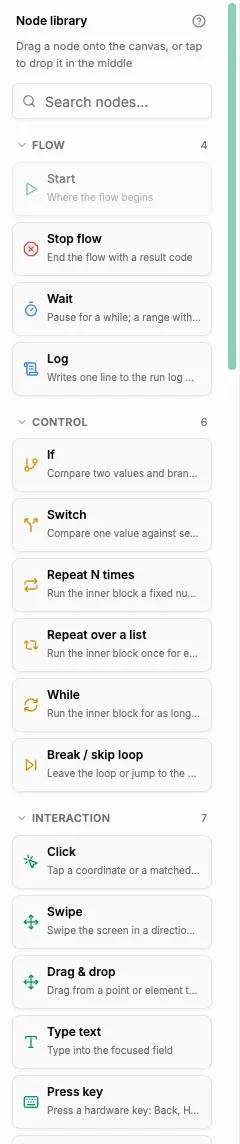
How the library is laid out
The node library runs down the left side of the editor, with a "Search nodes…" box at the top. Drag a node onto the canvas and connect it to the one before it.
The full catalogue
| Group | Nodes |
|---|---|
| FLOW (4) | Start · Stop flow · Wait · Log |
| CONTROL (6) | If · Switch · Repeat N times · Repeat over a list · While · Break / skip loop |
| INTERACTION (7) | Click · Swipe · Drag & drop · Type text · Press key · Hide keyboard · Keyboard open? |
| ELEMENTS (4) | Wait for element · Wait for any screen · Swipe until found · Count elements |
| VARIABLES (12) | Set variable · Calculate · Transform text · Read text on screen · Read clipboard · Write clipboard · Clear variable · Read text file · HTTP request · Ask AI · Read mailbox · Generate 2FA code |
| APPS (9) | Open app · Close app · Close every app · Clear app data · Uninstall app · Back up app data · Restore app data · Open link · Check app |
| DEVICE (10) | Toggle connection · Wait for network · Rotate screen · Change device info · File action · File exists? · Read device info · ADB command · Screenshot · Factory reset |
FLOW: the skeleton
| Node | What it is for |
|---|---|
| Start | Where the run begins. |
| Stop flow | Ends the run deliberately, at a point you choose. |
| Wait | Pauses before the next node runs. |
| Log | Writes a message of your choosing at that point in the flow. |
Log is what you read back when a run surprised you — put one either side of anything you are unsure of.
CONTROL: branching and repetition
| Node | What it is for |
|---|---|
| If | Two ways forward, chosen by a condition. |
| Switch | Several ways forward, chosen by a value. |
| Repeat N times | Runs the enclosed steps a fixed number of times. |
| Repeat over a list | Runs the enclosed steps once per item in a list. |
| While | Repeats for as long as a condition holds. |
| Break / skip loop | Leaves a loop early, or skips the rest of the current round. |
While repeats while its condition is true. If the condition can never become false — a screen that never appears, an app that never finishes loading — the loop does not end on its own, and the run is cut off as Failed with a reason of TIMEOUT after 30 minutes. Prefer Repeat N times with a ceiling, or give the loop a Break / skip loop with a way out.
Waiting properly, instead of guessing
Wait pauses for a fixed time, which means guessing a number that is too short on a bad day and wasteful on a good one. The ELEMENTS group does the same job better: Wait for element and Wait for any screen carry on as soon as the phone is ready.
A flow that assumes the next screen is already there is the most common kind of flow that works once and then fails.
Two nodes to handle with care
ADB command, in the DEVICE group, needs a package that includes ADB — the package card states it outright: "Run vetted ADB commands on the device, and the ADB node in auto-flows." Check the chips before you rent: Browse and pick a device package. ADB is not a free shell here, only a vetted set of commands, and that limit applies to the node as much as to the manual console in Viewer actions menu.
Factory reset, also in DEVICE, carries the same destructive action as the viewer's.
A flow containing Factory reset wipes the phone when the run reaches that node — every app, every account, every file, with no undo. Keep it out of anything you run in batches until you are sure of the branch that leads to it.
Use variables instead of fixed values
Node fields that take text can take a variable in {{ }} instead of a literal value — that is what turns one flow into something you can run on twenty devices with twenty different inputs. Do it from the beginning; see Variables and flow data.
Summary
- 52 nodes in 7 groups: FLOW, CONTROL, INTERACTION, ELEMENTS, VARIABLES, APPS and DEVICE.
- FLOW is the skeleton; CONTROL holds If, Switch, the loops and Break / skip loop.
- Prefer Wait for element over a fixed Wait, and give every loop a way out — 30 minutes of running earns a TIMEOUT failure.
- ADB command needs a package that includes ADB, and Factory reset wipes the device with no undo.