Automation
Generate a flow with AI
Use the AI panel to draft a flow, and understand AI flow credits - the usage history, the three purchase rules, and refunds.
4 min read
The flow editor can write a flow for you from a description. It is the fastest way to get past an empty canvas, and it costs AI flow credits — a balance with its own page and its own purchase rules. This page covers both: how to use the panel, and how the credits work.
The AI panel in the editor
The editor toolbar starts with an AI button. Open it, describe what you want the flow to do, and it produces a flow on the canvas for you to edit.
Describe the job the way you would explain it to a person who has the phone in their hand: which app, what to open, what to type, what to do when a screen does not appear. A vague description produces a vague flow.
A generated flow is a draft, not a finished job. Read every node before you run it, check anything destructive, and try it first on a device that is not holding accounts or data you care about. Open the flow the same way you would one you built yourself — see Create your first flow.
Whatever the AI produces is an ordinary flow afterwards: the same nodes, the same variables, the same Save and Run buttons. Nothing about it is locked.
The AI Flow Credits page
AI Flow Credits is the third page in the Automation Package group in the sidebar.
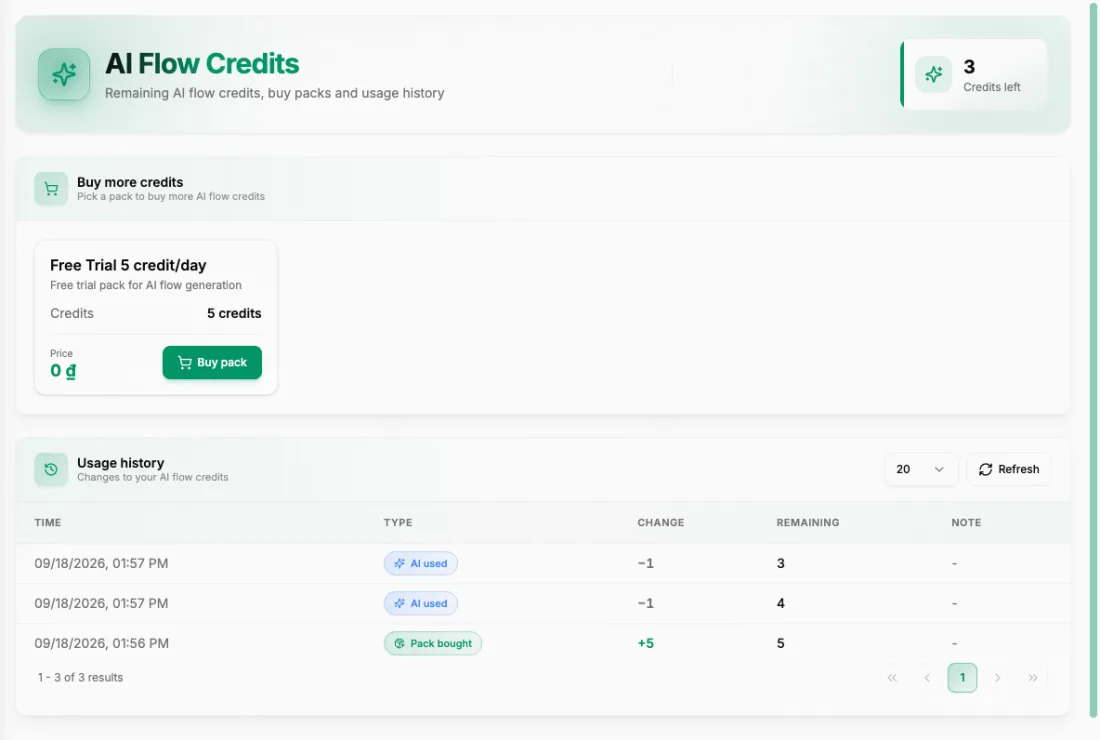
At the top it shows how many Credits left you have. Below that are two sections:
- Buy more credits — "Pick a pack to buy more AI flow credits".
- Usage history — "Changes to your AI flow credits".
Reading the usage history
The history table has the columns TIME, TYPE, CHANGE, REMAINING and NOTE. Every movement in your balance appears there, so it is the place to look when the number is not what you expected.
| Type | What it means |
|---|---|
| Pack bought | You took a credit pack; the balance goes up by the pack's size. |
| AI used | A generation spent a credit; the balance goes down. |
| Adjusted by support | The support team changed the balance by hand. |
The CHANGE column carries the signed amount and REMAINING the balance immediately after, so you can follow the arithmetic row by row rather than guessing where a credit went.
Getting more credits
The Buy more credits section lists whatever packs are on sale at the moment. At the time of writing there is exactly one: a free trial pack of 5 credits per day at 0 ₫, so in practice this is a daily top-up rather than a purchase.
When nothing is on sale, the section says so plainly: "There is no AI credit pack on sale right now. Please check back later." That is not an error and there is nothing to fix on your side.
Three rules decide whether the button works at all:
- Your account must have topped up at least once. A never-funded account cannot take a pack, free or otherwise.
- One pack per day. A second attempt on the same day is refused.
- You cannot stack packs. While you still have unused credits, you cannot take another one — spend what you have first.
If you need to top up the account itself, that is a different balance entirely: see Top up your balance.
When a generation fails
If a generation fails because of a system error, the credit is returned to you. Check the Usage history table — it records every change to the balance, with the time of each.
If a credit is missing and you cannot account for it in that table, take the time and the row to support: Contact Support.
Practical way to use it
Describe one concrete task, not an entire workflow. Short flows come back usable far more often than long ones.
Read the result node by node, and replace any fixed value that should be a variable — see Variables and flow data.
Run it once on a throwaway device and watch the status badge, as in Run a flow and watch it.
Save the version that worked, then use Duplicate on the list page for variants rather than spending another credit.
Generating once and then editing by hand is cheaper than generating repeatedly. With one pack per day and no stacking, credits are the scarce part — your own editing time is not.
Summary
- The AI button in the editor toolbar generates a flow from a description, spending AI flow credits.
- AI Flow Credits shows credits left, the packs on sale, and a Usage history of every change.
- To take a pack you must have topped up once, and you get one pack per day, only when your credits are used up.
- Treat a generated flow as a draft: read it, add variables, and test it on a device you do not care about.