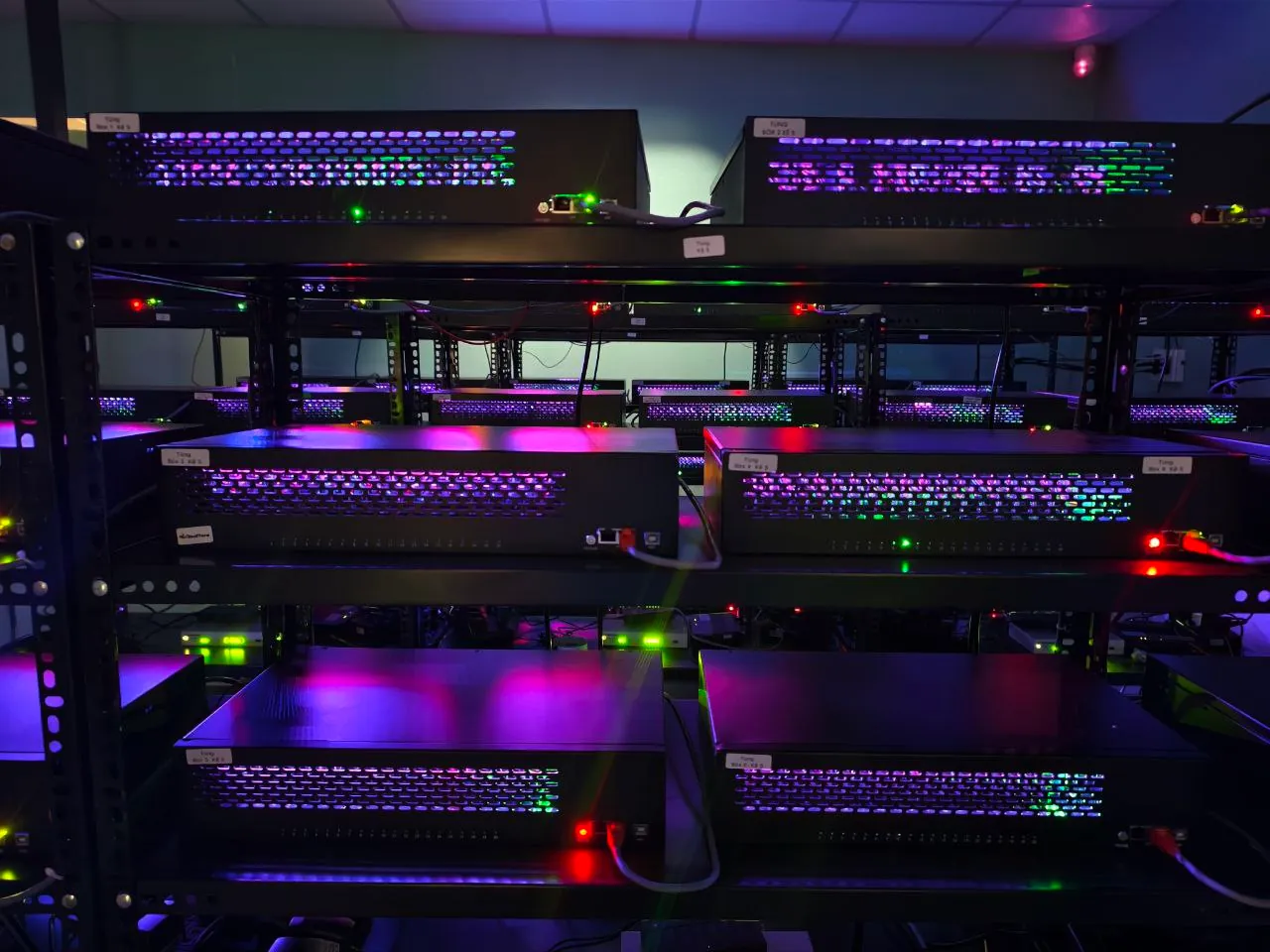
When you open a browser and connect to a cloud phone, what's on the other side of the screen isn't emulation code — it's a real Android phone. It's running, processing your commands, and sitting inside a server rack in a data center held at a constant 72–75°F (22–24°C).
The comprehensive guide to Cloud Phone introduced the concept of "real cloud phone" running on genuine ARM hardware. This article opens the data center doors so you can see exactly what's running behind the scenes — from the mainboard, to the rack, the cooling system, and the streaming pipeline that delivers video to your browser.
XCloudPhone uses real smartphone mainboards (ARM Exynos 8895 or Snapdragon chips) with batteries and screens completely removed, mounted in custom server racks inside data centers with industrial cooling at 72–75°F (22–24°C). The entire round trip from your touch input to on-screen response takes under 100ms.
In this article, you'll see:
- 4-layer architecture of the cloud phone server system
- 4 technical reasons why batteries and screens are removed
- 6 core components on each mainboard
- 5-step streaming pipeline from mainboard to browser (under 100ms)
Architecture Overview — From Smartphone to Server Rack
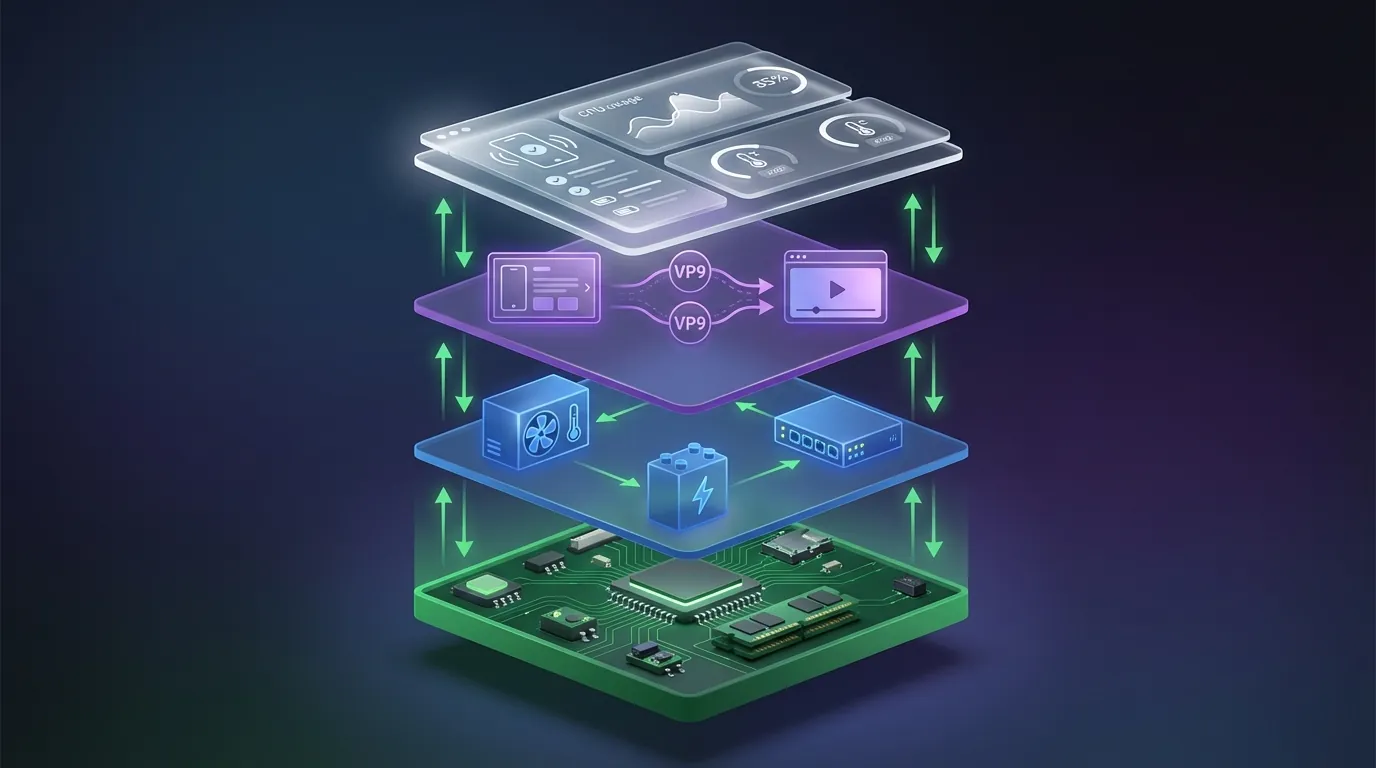
XCloudPhone's server architecture consists of 4 layers working in coordination: Hardware, Infrastructure, Streaming, and Management. Each layer solves a distinct challenge — from processing applications to delivering video to your browser.
Layer 1 — Hardware
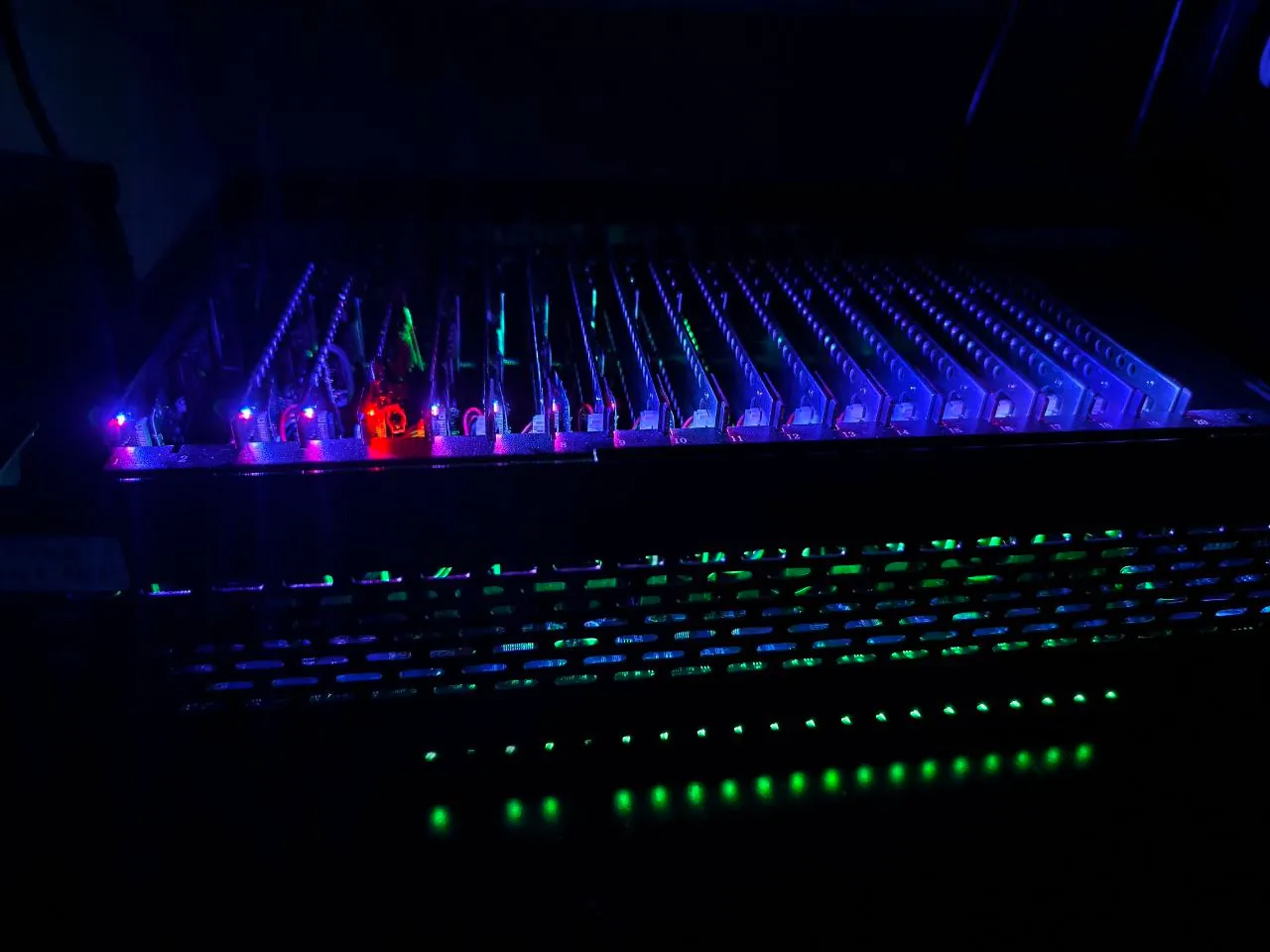
The foundation of the entire system is real Android smartphone mainboards. Each mainboard contains an ARM chip (Exynos 8895 Octa-core, Snapdragon 835, or Snapdragon 845), 6GB RAM, 64GB storage, Mali-G71 GPU, modem baseband, and sensor hub. Mainboards are mounted in custom 2U rack trays — each rack holds 12–20 mainboards depending on configuration.
Batteries and screens have been completely removed. Mainboards receive DC power directly from rack-mounted power supplies and stream video over the network instead of displaying it on a physical screen.
Layer 2 — Infrastructure
The data center provides 3 critical elements: industrial cooling (stable 72–75°F / 22–24°C), redundant power (UPS + diesel generator), and backbone networking (Gigabit Ethernet + multiple ISP redundancy). No home-based phone farm can achieve the same reliability for any of these 3 elements.
Layer 3 — Streaming
The WebRTC pipeline transmits video and audio from the mainboard to your browser in real time. MediaProjection API captures the screen → GPU encodes to VP8/VP9 → WebRTC peer-to-peer streams to the browser → Accessibility Service receives your touch inputs and relays them back. The entire cycle completes in under 100ms.
Layer 4 — Management
The admin dashboard monitors each device's status: CPU load, RAM usage, temperature, and network health. The system auto-restarts devices when it detects a hang, sends alerts when temperatures exceed thresholds, and logs every event for post-analysis.
Each mainboard in the rack equals 1 independent cloud phone. Renting 1 device means you own the full resources of 1 real mainboard — no shared CPU, RAM, or storage with anyone else.
Why Remove Batteries and Screens? 4 Technical Reasons
Removing batteries and screens from mainboards serves 4 specific technical purposes. This isn't an arbitrary decision — each reason directly relates to safety, stability, and operational efficiency for a system running 24/7/365.
Removing the Battery — Safety and Stability
Lithium-ion batteries are the number 1 fire hazard when operating 24/7 in enclosed spaces. Phone batteries are designed for standard charge-discharge cycles (300–500 cycles), not continuous charging.
Under continuous charge, battery temperatures sustain 104–113°F (40–45°C) — significantly higher than the ideal operating range of 68–77°F (20–25°C). The danger threshold begins at 140°F (60°C) — at this temperature, the electrolyte inside the battery starts decomposing and producing gas, leading to battery swelling.
Battery swelling after 6–12 months of continuous operation causes 3 problems: physical pressure on the mainboard (board bending, circuit breaks), thermal runaway fire risk, and frequent replacements (increasing operational cost and downtime).
The solution: replace batteries with direct DC power from a stable power supply. DC power delivers constant voltage (5V or 9V), runs cool (no chemical reactions), and operates indefinitely without replacement. This is data center standard: no Lithium batteries inside server racks.
Removing the Screen — Savings and Optimization
AMOLED or LCD screens consume 30–40% of a mobile device's total power. In a cloud phone environment, no one looks at the physical screen — all visuals stream to the browser. Keeping screens powered on wastes 30–40% of energy per device.
Removing screens delivers 3 benefits:
1. Reduced heat output — Screens are the second-largest heat source (after CPU) on mobile devices. Removal reduces the load on cooling systems and lowers electricity costs for CRAC (Computer Room Air Conditioning) units.
2. Higher device density per rack — No space needed for 6.2–6.9 inch displays. Mainboards fit compactly in rack slots, allowing 12–20 boards in a single 2U unit versus only 4–6 with intact phone casings.
3. Optimized rendering pipeline — Instead of GPU render → display driver → physical screen, the GPU renders directly to a buffer → MediaProjection API captures the buffer → encodes to WebRTC. Bypassing the display pipeline saves an additional 3–5ms of latency.
Inside a Cloud Phone Mainboard — 6 Core Components
Each cloud phone mainboard contains 6 independently functioning components that create an experience identical to a handheld smartphone.
The key point: all 6 components are physical hardware, not software emulation. When apps query hardware information (via Build.getSerial(), TelephonyManager.getDeviceId(), or SensorManager.getSensorList()), the device returns values from real silicon — identical to holding a Samsung Galaxy S8 in your hand.
The ARM Exynos chip executes native instruction sets — fundamentally different from binary translation on x86 that emulators use. A dedicated deep dive into ARM vs x86 Architecture explains why instruction set differences affect both performance and anti-detect capability.
Data Center Infrastructure — Cooling, Power, and Network
The data center provides 3 elements that no smartphone or home phone farm can match: stable temperature, uninterruptible power, and dedicated network bandwidth.
Industrial Cooling System
Server room temperature maintains a stable 72–75°F (22–24°C) year-round, following ASHRAE TC 9.9 (American Society of Heating, Refrigerating and Air-Conditioning Engineers) guidelines for data centers.
CRAC (Computer Room Air Conditioning) units control temperature zone by zone. The hot aisle / cold aisle configuration directs airflow: cold air blows through the front of racks (cold aisle), devices absorb heat and exhaust it out the back (hot aisle), and CRAC units capture hot air for recooling.
Result: zero thermal throttling. The Exynos 8895 CPU on cloud phones always runs at maximum clock speed (2.3GHz) because ambient temperature stays well below the throttle threshold (typically 104–113°F / 40–45°C on handheld phones). By comparison, home phone farms often reach 95–104°F (35–40°C) in enclosed rooms — causing many devices to downclock automatically to prevent overheating.
Redundant Power System
Data center power uses 3 layers of protection against outages:
Layer 1 — Dual Power Feed: 2 independent utility power feeds from 2 separate substations. If one feed fails, the other takes over instantly with zero interruption.
Layer 2 — UPS Battery: Uninterruptible Power Supply (UPS) provides immediate power (under 10 millisecond switchover) if both utility feeds fail simultaneously. Runtime: 15–30 minutes — enough to activate the diesel generator.
Layer 3 — Diesel Generator: Diesel generators start automatically within 30 seconds when UPS signals activation. Runtime: indefinite (depends on fuel reserves).
Result: 99.9%+ uptime — equivalent to a maximum of 8.7 hours of downtime per year. Home phone farms depend on local utility power — a single 2-hour outage means 2 hours of every device going offline.
Backbone Network
Network connectivity uses Gigabit Ethernet backbone (1Gbps) with multiple ISP redundancy — if one ISP experiences issues, traffic automatically routes to a backup ISP. Latency from server to gateway: typically under 1ms (internal data center network).
Details on bandwidth, end-to-end latency, and network stability affecting streaming experience are analyzed in the dedicated deep dive on Cloud Phone Network Infrastructure.
Data Flow — From Mainboard to Your Browser in 5 Steps
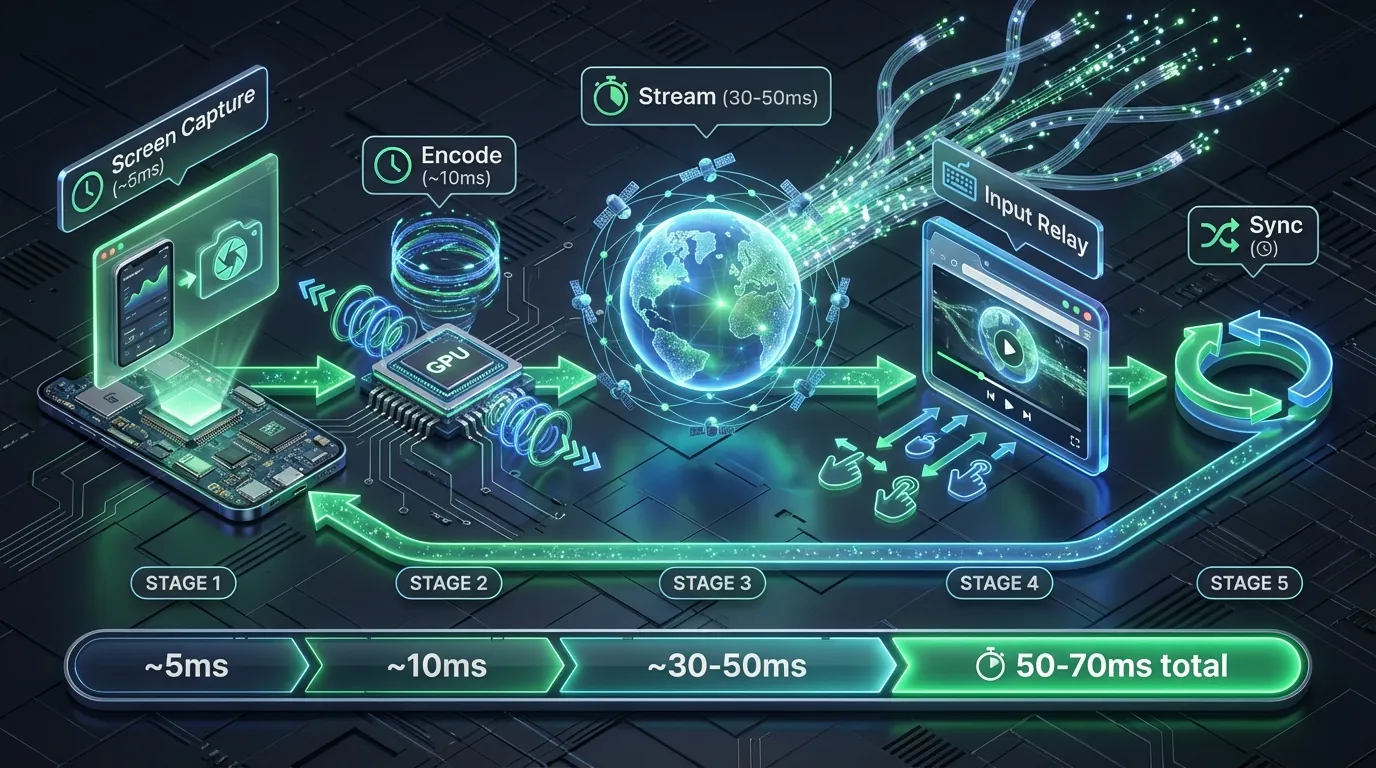
The process from your touch input to the cloud phone's response happens in 5 steps, under 100ms. This is XCloudPhone's streaming pipeline, built on the WebRTC (Web Real-Time Communication) protocol, a W3C Recommendation.
Step 1 — Screen Capture: Android's MediaProjection API captures the device's display content (frame buffer). Capture rate: 30–60 FPS depending on configuration. Time: ~5ms.
Step 2 — Encode: The Mali-G71 GPU encodes video frames into VP8, VP9, or H.264 codec depending on available bandwidth. Hardware encoding (GPU) is 3–5x faster than software encoding (CPU). Time: ~10ms.
Step 3 — Stream: WebRTC peer-to-peer transmits the video and audio stream to your browser. WebRTC automatically adjusts bitrate based on network bandwidth — reducing quality when the network is weak, increasing it when the network recovers (adaptive bitrate). Time: 30–50ms (depends on server-to-client distance).
Step 4 — Input Relay: When you tap, swipe, or type in the browser, your actions are sent back to the server. Accessibility Service on the device receives coordinates and gesture type, dispatching them as real touch events on Android OS — as if you were touching the physical screen.
Step 5 — Sync: The device processes input, renders a new frame, and returns to Step 1. The cycle repeats continuously at 30–60 loops per second.
Latency Breakdown
In practice, 50–70ms latency equals near-instantaneous response — this speed falls below the human perception threshold for delay (approximately 100ms according to Human-Computer Interaction research). Technical benchmarks show WebRTC latency is 3–5x lower than traditional VNC or RDP (typically 150–300ms), thanks to its peer-to-peer architecture and built-in adaptive bitrate.
Cloud Phone Server vs Home Phone Farm — Infrastructure Comparison
Cloud phone servers differ from home phone farms in 5 core areas. The table below compares them directly based on actual operational metrics:
Home phone farms work when you run fewer than 10 devices and are ready to handle issues at any time. Cloud phone servers suit scaling from 10 to 1,000+ devices with reliable uptime.
A cost analysis comparing Box Phone Farms and Cloud Phone Farms examines TCO (Total Cost of Ownership) at each scale. The Phone Farm as a Service model is designed for agencies wanting rapid deployment without infrastructure investment.
FAQ — Common Questions About Cloud Phone Infrastructure
"Is My Data Safe on a Cloud Phone?"
Each device is a standalone sandbox — storage, cookies, cache, and sessions are completely isolated. No data is shared between two different cloud phones, even when they sit on the same rack. When you stop using a device, the system supports factory reset to wipe all personal data from the hardware.
"What Happens If a Device in the Rack Fails?"
The monitoring system detects device failures within 30 seconds (health check interval). Handling process: the system sends an alert → technicians receive notification → the failed mainboard is replaced with a spare. A failed device doesn't affect other devices in the rack because each mainboard operates independently for power, networking, and data.
"Cloud Phones Use "Old" Phones — Is Performance Good Enough?"
The device pool uses Samsung flagships (Galaxy S8, Note 8/9, S10) with Exynos or Snapdragon chips. These chips remain top-tier for farming, AFK gaming, and automation tasks — where the primary requirements are 24/7 stability and anti-detect, not the highest benchmark scores. The Exynos 8895 runs Genshin Impact at 30 FPS on medium settings — sufficient for AFK farming. What matters more than the phone model is the real ARM chip (native execution, genuine fingerprint).
"Do Cloud Phones Use Physical SIM Cards?"
No physical SIM required. Devices connect to the internet via the data center's Gigabit Ethernet backbone — more stable than mobile networks. The modem baseband remains integrated on the mainboard, providing carrier identity for fingerprinting, but actual data connectivity uses Wi-Fi or Ethernet. VoIP and virtual number services are available if you need calling or SMS.
"Can I See Real Photos of the Servers?"
This article provides a detailed architectural description based on XCloudPhone's actual infrastructure. Illustrations reflect the rack structure, mainboard layout, and operational processes. Contact support at app.xcloudphone.com for additional details or infrastructure demos.
"When Are Devices in the Rack Upgraded?"
The upgrade cycle depends on 2 factors: new chip generations delivering significant performance improvements (e.g., new Android version support, stronger GPUs for newer games), and market demand (games requiring higher-spec hardware). The Exynos 8895 and Snapdragon 835 remain capable until major Android versions drop support for this chip generation.