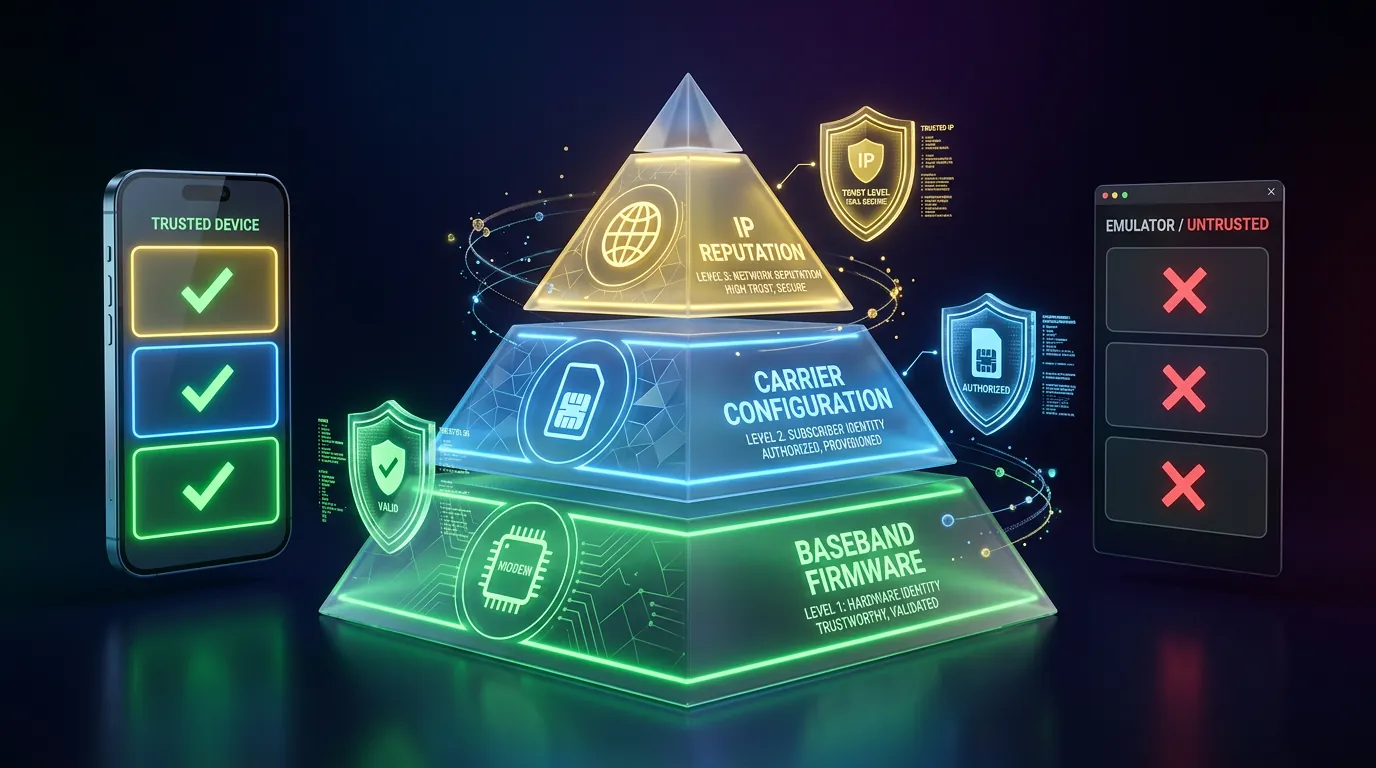
In the article What Is Cloud Phone, a cloud phone is defined as a real Android device running on the cloud — but what does "real" mean at the network layer? You purchased an expensive residential proxy, configured the correct regional IP, but your Facebook account still got checkpointed. The problem is: proxies only address 1 of 3 layers of network identity.
Network fingerprint consists of 3 layers — baseband firmware, carrier config (MCC/MNC), and IP reputation — proxies only fix the last one. This article analyzes what network fingerprint is, the 3 layers of network identity, cross-layer validation, IP reputation classification, and why ARM cloud phones deliver superior network identity.
What Is Network Fingerprint — 3 Layers of Device Network Identity
Network fingerprint is the combination of network signals across 3 layers — baseband firmware, carrier config, and IP reputation — that platforms collect to verify device identity. Each layer carries distinct information, and platforms cross-reference them against each other.
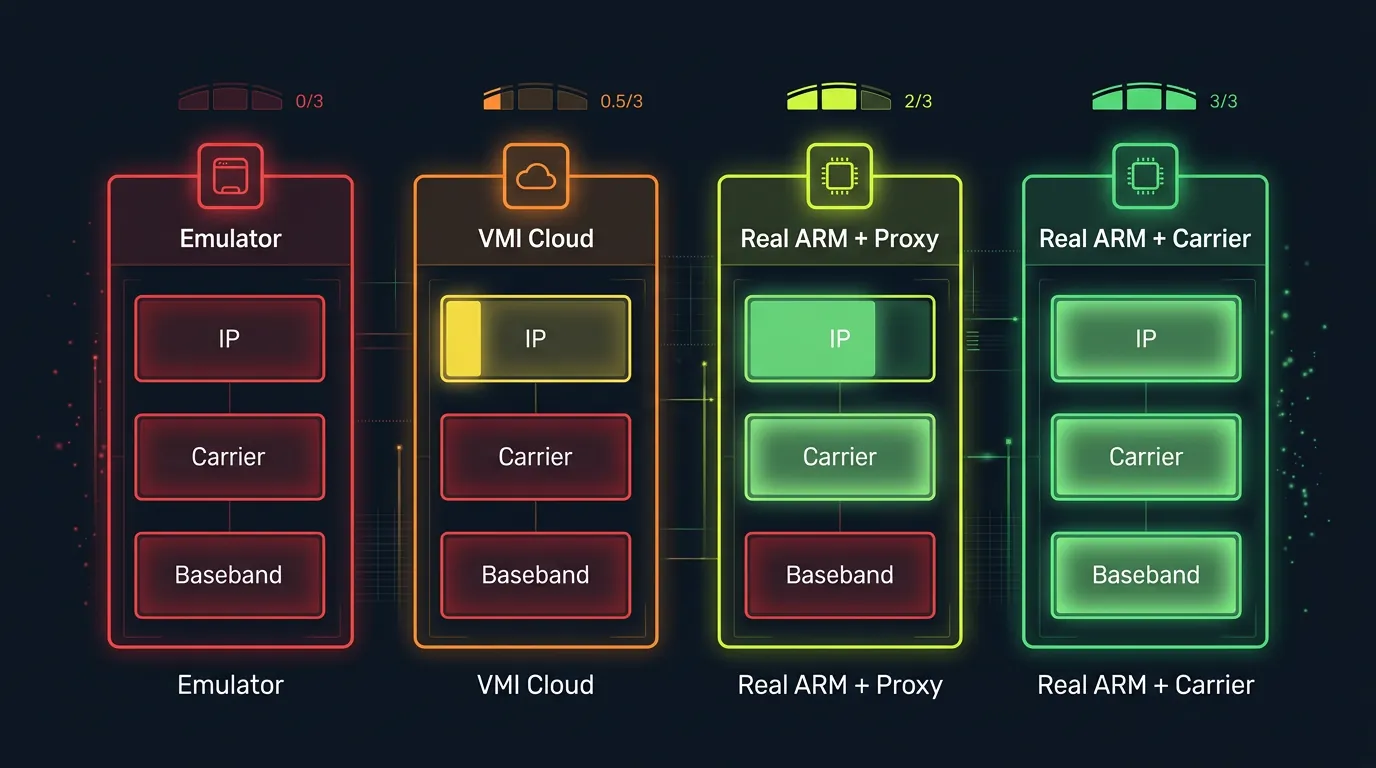
Missing 1 of 3 layers = invalid network identity. Emulators lack all 3 layers (0/3), VMI lacks at least 2 (0-1/3), only a real ARM device has all 3 (2-3/3).
Distinction: the Device Fingerprint article covers 7 fingerprint components at a high level → this article deep dives into the network layer — the component most users overlook when they focus solely on proxies.
3 examples illustrating 3 levels of network identity: a real handset (3/3 layers — real baseband, real SIM, carrier IP), BlueStacks emulator (0/3 — no baseband, no SIM, datacenter IP), and VMI cloud phone (0-1/3 — no baseband, fake carrier possible, datacenter IP).
3 Network Identity Layers That Platforms Inspect
Platforms inspect 3 layers of network identity and cross-reference them to evaluate devices. Each layer carries a distinct signal — spoofing 1 layer is easy, spoofing all 3 simultaneously is nearly impossible.
Layer 1 — Baseband Firmware: The Hidden Modem Inside Every Phone
Baseband firmware runs on a separate radio processor (Shannon on Samsung, Qualcomm MDM on Snapdragon), handling all cellular communication — calls, messages, and mobile data. The baseband processor operates independently from the main CPU, running its own proprietary firmware.
Baseband firmware contains IMSI (International Mobile Subscriber Identity), TMSI (Temporary Mobile Subscriber Identity), and authentication keys for mobile networks. The ro.baseband property on Android returns a specific version string: on Samsung Galaxy S8, the value is "G955FXXU9ETK4"; on Qualcomm devices, it follows a format like "1.0.c7-00060-8998_GEN_PACK-1."
Emulators lack a baseband processor — TelephonyManager.getDeviceId() returns null, ro.baseband returns an empty string, and getNetworkOperator() has no value. Every real Android phone has baseband firmware — complete absence is an immediate detection signal. Anti-fraud systems check baseband presence as their first step.
Layer 2 — Carrier Config: MCC/MNC, APN, VoLTE
Carrier config confirms mobile carrier identity through MCC (Mobile Country Code) and MNC (Mobile Network Code) — 2 internationally standardized codes identifying every carrier worldwide.
3 MCC/MNC examples:
- MCC 310 MNC 260 = T-Mobile United States
- MCC 234 MNC 15 = Vodafone United Kingdom
- MCC 440 MNC 10 = NTT Docomo Japan
Beyond MCC/MNC, carrier config includes APN settings (Access Point Name), VoLTE parameters, IMS (IP Multimedia Subsystem) configuration, and roaming profiles. All originate from the SIM card and baseband firmware — no SIM = no carrier config.
Emulators have no SIM card → MCC/MNC absent, APN empty, VoLTE unavailable. Some VMI platforms can fake MCC/MNC via software, but lack VoLTE/IMS verification — platforms detect this through cross-checking.
Layer 3 — IP Reputation: Datacenter vs Residential vs Carrier
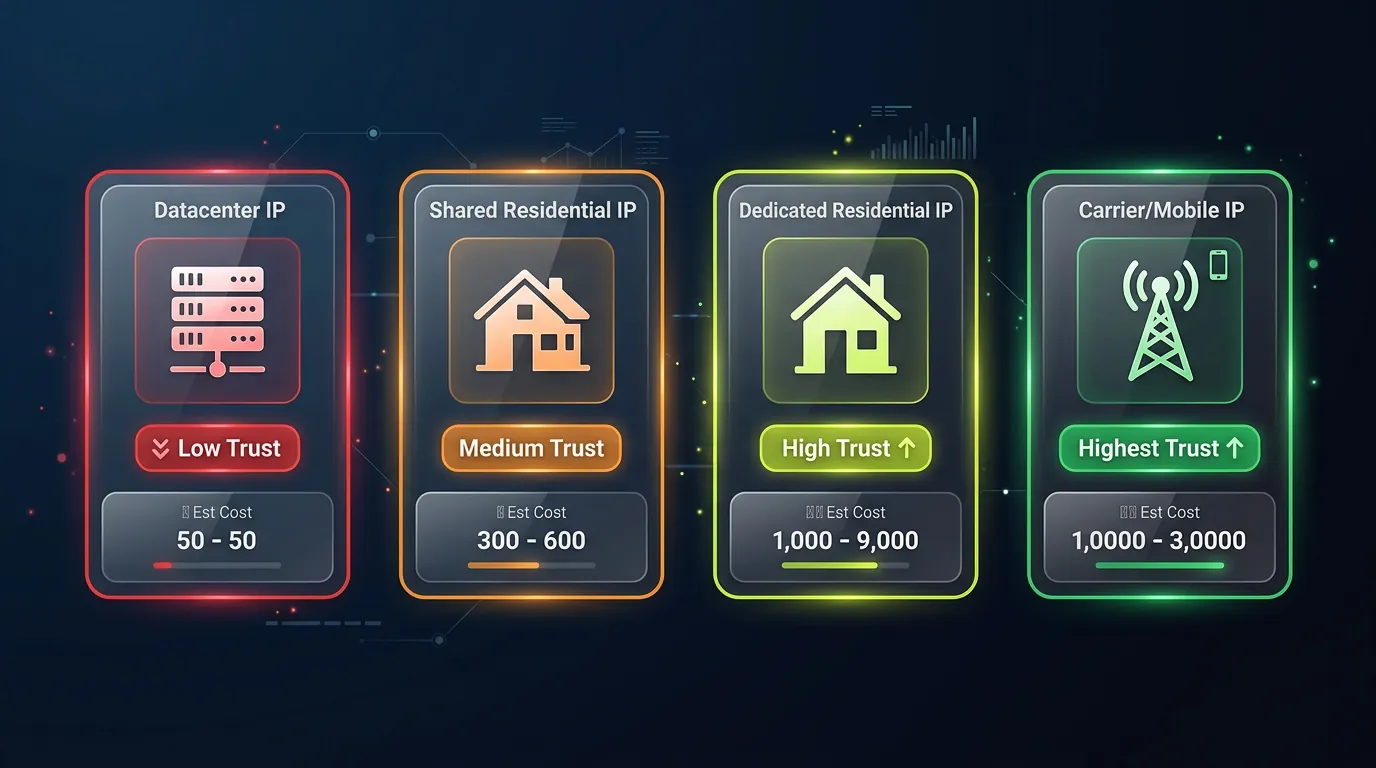
IP reputation databases (MaxMind, IPQualityScore, ipinfo.io) classify IPs into 3 trust categories:
- Datacenter IP — sourced from cloud providers (AWS, GCP, Azure, OVH). Immediately flagged as server/VM → lowest trust for consumer apps. Inexpensive (shared hosting ~$5/month), but platforms identify them instantly
- Residential IP — sourced from home ISPs (Comcast, AT&T, BT, Deutsche Telekom). Medium trust because they originate from real households. Shared residential proxies can get flagged when too many accounts use the same IP
- Carrier/Mobile IP — sourced from mobile carriers via CGNAT (Carrier-Grade NAT). Highest trust because only real mobile devices connect via cellular networks. Thousands of users share the IP pool → individual tracking is difficult → less likely to be flagged
Combining IP type with baseband + carrier data, platforms build a complete network trust profile. A "clean" residential IP without baseband + carrier = only 1/3 layers.
Cross-Layer Network Validation — Why a Clean Proxy Is Not Enough
Cross-layer validation detects mismatches between the 3 network identity layers — explaining why a residential proxy alone cannot protect an account.
MCC/MNC × IP Geolocation Match
Platforms cross-reference carrier identity with IP location. MCC 310 (United States) + US IP = consistent. MCC 310 + Singapore IP = mismatch → suspicious. A US residential proxy but MCC absent (emulator without SIM) = obvious mismatch → checkpoint.
A real ARM cloud phone: MCC/MNC genuine (from real SIM/baseband) + IP depends on proxy setup → consistent if the proxy matches the region.
Baseband × Carrier × IP Triad — Comparing 4 Platforms
The critical takeaway: proxies fix 1 layer (IP) but miss 2 layers (baseband + carrier). This is why expensive residential proxies still cannot save accounts running on emulators — the network identity lacks 2/3 of its foundation.
A common pain point from Reddit and forum communities: "I bought residential proxy from IPRoyal/BrightData at $15/GB but my account still got checkpointed" — the reason: proxies only fix the IP layer, baseband null + carrier absent = immediate detection.
IP Reputation Breakdown — Categories and Costs
IP reputation breaks down into 4 trust levels — each with different costs and effectiveness for account farming operations.
XCloudPhone operates in a data center → the default IP is a datacenter IP. To optimize Trust Score, you need to combine it with an appropriate proxy. XCloudPhone supports proxy integration directly from the web dashboard — users enter proxy credentials, and the device connects automatically with WebRTC IP leak protection.
However, even with a datacenter IP, an ARM cloud phone outperforms emulators because it has real baseband firmware (1/3 layers) — emulators have 0/3 layers regardless of which proxy they use.
Trust chain connection: native ISA (ISA ARM v8-A vs x86 article) → sensor data consistency (Sensor Data article) → network identity (this article) → overall Trust Score. Each layer adds trust points.
ARM Cloud Phone — Real Network Identity From Physical Hardware
An ARM cloud phone delivers real network identity — Shannon baseband firmware from the Exynos 8895 combined with authentic carrier config. This is what emulators and VMI platforms cannot replicate.
XCloudPhone uses Samsung Galaxy S8 mainboards (Exynos 8895) with batteries and screens removed, mounted in server racks. The Shannon baseband processor integrated into the SoC operates normally, and carrier config inherits from the hardware setup. Combined with residential or carrier proxy, network trust reaches 2-3/3 layers.
Cost is ~$10/device on a pay-as-you-go model, significantly reducing the risk of detection through network fingerprinting compared to traditional emulators. For phone farm operations at scale, a real cloud phone with genuine baseband firmware delivers an undetectable network identity that proxy-only setups cannot achieve.
👉 Experience a real cloud phone with authentic network identity: app.xcloudphone.com
FAQ — Network Fingerprinting
"Do emulators have baseband firmware?"
No — emulators run on x86 PCs and lack a baseband processor. TelephonyManager.getDeviceId() returns null, ro.baseband returns empty. Every real Android phone has baseband firmware — complete absence is an immediate detection signal.
"Is a residential proxy safe enough for account farming?"
Not on its own — proxies fix the IP layer but lack baseband and carrier identity = only addressing 1/3 network layers. Platforms cross-validate all 3 layers: baseband null + carrier absent + residential IP = a clear mismatch pattern.
"Does an ARM cloud phone have carrier config?"
Yes — the SoC integrates real baseband firmware, and carrier config inherits from the hardware setup. MCC/MNC, APN settings, and VoLTE parameters function identically to a handheld device.
"What happens when MCC/MNC mismatches IP location?"
Checkpoint or ban — platforms detect location inconsistency between carrier location (MCC) and IP geolocation. Example: MCC 310 (US) + Singapore IP = mismatch → immediate checkpoint. Consistency between carrier and IP location is a critical factor.
From Network Identity to a Safe Account Farming Strategy
Network fingerprint is not just about IP — it encompasses 3 identity layers (baseband + carrier + IP) that must align with each other. A clean proxy addresses 1/3 of the equation, emulators address 0/3 — only an ARM cloud phone with real baseband firmware addresses 2-3/3 layers.
The complete trust chain: native ISA confirms a real chip (ISA ARM v8-A vs x86 article) → sensor data consistency confirms physical behavior (Sensor Data Consistency article) → real network identity confirms the network (this article) → overall Trust Score determines whether an account stays clean.
Learn more about what a cloud phone is in the overview article What Is Cloud Phone, how device fingerprinting works in the Device Fingerprint article, or high-trust account farming strategies in the Social Trust article.
👉 Start farming safely with a real ARM cloud phone: app.xcloudphone.com