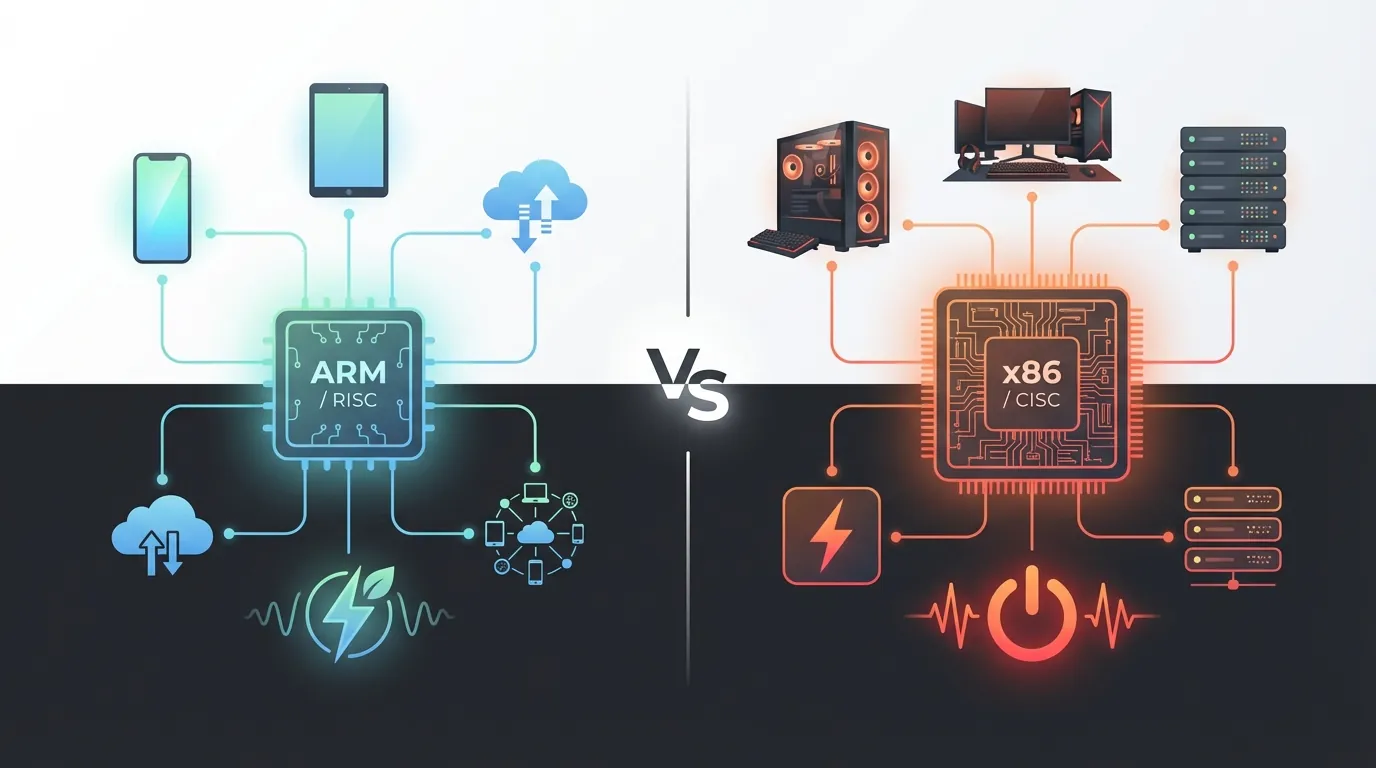
Over 99% of smartphones worldwide run ARM processors — that number is no accident. ARM (Advanced RISC Machine) and x86 represent two fundamentally opposite approaches to chip design: one optimizes for performance per watt, the other for raw computing power.
Our comprehensive guide What Is Cloud Phone introduced the concept of real Android devices running on ARM hardware in data centers. The difference between ARM and x86 is the core reason why ARM-based cloud phones produce fingerprints identical to real handsets, while x86 emulators inevitably expose detection signatures.
This article covers:
- RISC vs CISC — Two instruction set philosophies and their real-world impact
- SoC design — Why smartphones integrate everything onto a single chip
- Performance per watt — Actual benchmarks comparing ARM and x86
- Software ecosystem — Android, iOS, and their dependence on ARM
- Cloud phone implications — Why chip architecture determines everything
RISC vs CISC — Two Chip Design Philosophies
RISC (Reduced Instruction Set Computing) and CISC (Complex Instruction Set Computing) are two methods of designing Instruction Set Architectures (ISAs) that underpin the entire semiconductor industry. ARM uses RISC, x86 uses CISC — this difference directly impacts performance, power consumption, and software compatibility.
RISC — Fewer Instructions, Each Executes Faster
RISC designs its instruction set with one guiding principle: each instruction performs one simple operation and completes in a single clock cycle. The ARM instruction set contains roughly 50-60 basic instructions — significantly fewer than x86.
Think of RISC like a team of specialized chefs. Each chef handles exactly one task — one cuts vegetables, another grills meat, another plates the dish. Each step is simple, fast, and runs in parallel. Result: 10 dishes come out simultaneously because 10 chefs work at the same time.
3 core technical characteristics of RISC:
- Fixed-width instructions — Every ARM instruction is 32 bits (or 16 bits in Thumb mode), allowing the processor to decode faster since it doesn't need to determine instruction length
- Load/Store architecture — Only two instructions (LOAD and STORE) access RAM; all computation happens on registers. ARM has 31 general-purpose registers (ARMv8-A) — more than double x86's count
- Efficient pipelining — Simple instructions enable deeper pipelining, where multiple instructions execute simultaneously at different stages
CISC — Fewer Program Instructions, Each Does More
CISC designs its instruction set so that one instruction performs multiple complex operations — load data from RAM, compute, and write the result back to memory, all in a single instruction. The x86 instruction set contains over 1,500 instructions.
Think of CISC like an all-in-one chef. One chef receives the order "make pho" and handles everything — simmering bones, slicing beef, blanching noodles, plating. Each instruction is complex but only requires one person to execute all steps.
3 core technical characteristics of CISC:
- Variable-width instructions — x86 instructions range from 1 to 15 bytes, forcing the decoder to analyze each instruction before execution — consuming additional transistors and energy
- Direct memory access — Computations can operate directly on data in RAM without loading into registers first, reducing the number of program instructions needed
- Micro-ops — Modern x86 processors (Intel Core, AMD Ryzen) internally convert complex CISC instructions into simple micro-operations before execution — an internal translation layer that consumes power
RISC (ARM) vs CISC (x86) Comparison
📌 Key takeaway: The RISC/CISC difference at the instruction set level determines everything downstream — from transistor count, to power consumption, to hardware fingerprint quality when apps query the device.
ARM Architecture — From Cambridge to 99% of Smartphones
ARM (Advanced RISC Machine) is a RISC processor architecture developed by ARM Holdings Ltd. (Cambridge, UK) — currently owned by SoftBank Group. ARM doesn't manufacture chips — ARM designs architectures and licenses them to manufacturers for customization.
The Licensing Model — Why So Many Different ARM Chips Exist
ARM Holdings offers two main license types to semiconductor companies:
- Architecture License — Permits designing custom CPU cores based on the ARM architecture (Apple uses this to create M4 and A17 Pro). Only about 15 companies worldwide hold architecture licenses
- Core License — Permits using pre-designed ARM cores (Cortex-A78, Cortex-X4) and integrating them into custom SoCs. Over 500 companies use core licenses, including Qualcomm, Samsung, MediaTek, and Huawei
Result: over 280 billion ARM chips have been manufactured as of 2023, according to ARM Holdings. Every smartphone, tablet, and smartwatch you use contains at least one ARM core.
SoC Design — Why Smartphones Integrate Everything on One Chip
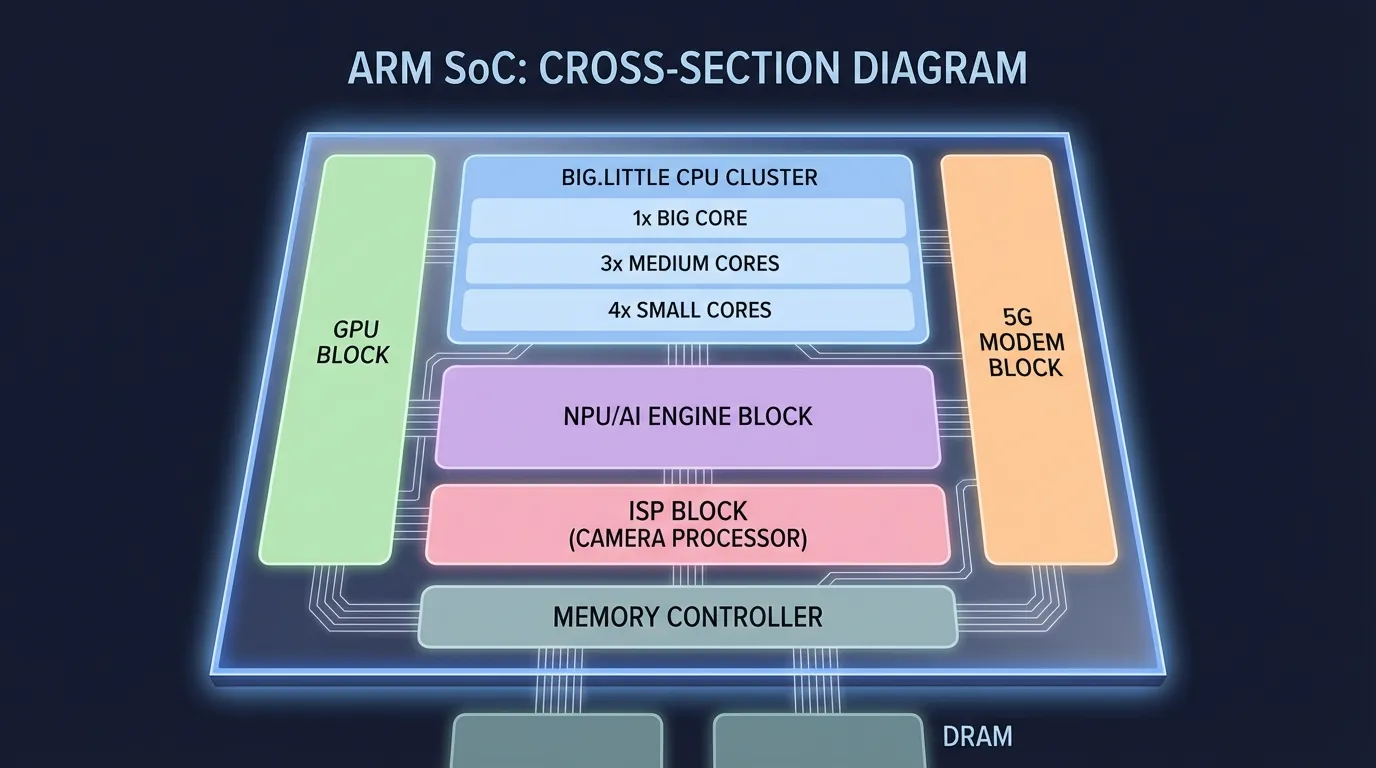
SoC (System on a Chip) is a design approach that integrates all processing components onto a single chip — CPU, GPU, NPU (AI), ISP (camera), 5G modem, and memory controller. ARM's architecture is optimized for SoC design because its CPU cores are compact, power-efficient, and generate minimal heat.
Specific example: Qualcomm Snapdragon 8 Gen 3 integrates on a single chip:
- CPU: 1× Cortex-X4 (3.3 GHz) + 3× Cortex-A720 + 4× Cortex-A520
- GPU: Adreno 750 — native 3D game rendering
- NPU: Hexagon — on-device AI processing
- Modem: Snapdragon X75 — 5G connectivity
- ISP: Spectra — 200MP camera image processing
SoC design allows chips to communicate internally at maximum speed (on-die interconnect) without external buses. Result: ultra-low latency between CPU and GPU — critical for gaming and video streaming.
x86 doesn't use SoC design for mobile. Intel and AMD produce discrete CPUs paired with discrete GPUs and separate modems. This model works well for PCs and servers but is too power-hungry, heat-intensive, and physically large for handheld devices.
x86 Architecture — 45 Years Ruling PCs and Servers
x86 is a CISC processor architecture developed by Intel starting in 1978 with the Intel 8086 chip. After over 45 years, x86 still dominates two major markets: personal computers (PCs) and data center servers.
Raw Computing Muscle — x86's Domain
x86 is optimized for tasks requiring the highest single-threaded performance: 4K video editing, 3D rendering, engineering software (MATLAB, AutoCAD), and large-scale database processing.
3 key technical advantages of x86 in the PC and server segment:
- High clock frequencies — Intel Core i9-14900K reaches 6.0 GHz turbo boost, significantly higher than ARM mobile chips (3.3 GHz on Snapdragon 8 Gen 3). Higher frequency = faster sequential task processing
- Large L3 cache — AMD Ryzen 9 7950X3D has 128MB L3 cache (3D V-Cache), 10-20× more than ARM mobile. Larger cache = fewer slow RAM accesses
- 45-year software ecosystem — Millions of Windows, Linux, and macOS applications are compiled for x86. Moving to ARM requires recompilation or binary translation
The Fatal Weakness for Mobile — Power and Heat
x86 processors consume 15-125W per CPU — 10-100× more than ARM mobile chips (1-5W). This translates into three unsolvable problems for handheld devices:
- Battery drains in 1-2 hours — Smartphones with x86 chips (Intel Atom) had 30-50% shorter battery life compared to equivalent ARM devices
- Temperature exceeds thresholds — x86 requires active cooling (fans), impractical in 8mm-thin devices
- Chip size too large — x86 processors with heatsinks occupy 3-5× the area of ARM SoCs
Intel attempted to enter the mobile market with Atom chips (2008-2016) but failed. The Atom x3, x5, and x7 lineup couldn't compete on performance per watt against Qualcomm Snapdragon and MediaTek Dimensity. Intel officially discontinued mobile x86 development in 2016.
Performance Per Watt — The Metric That Decides Mobile
Performance per watt is the metric measuring energy efficiency of a processor — how much computing power you get for each watt of electricity consumed. ARM leads this metric in the mobile segment by a significant margin.
Real Benchmarks: ARM vs x86 in Mobile
Result: ARM mobile chips achieve 4-5× higher performance per watt compared to x86 in the same benchmark. This gap stems from three factors:
- RISC design — Fewer transistors for decode logic = less wasted energy
- SoC integration — On-die communication is more efficient than external buses
- Optimized manufacturing process — TSMC N4P (4nm) for ARM vs Intel 7 (10nm) for some x86
Why Performance Per Watt Matters for Cloud Phone
Cloud phones run hundreds to thousands of mainboards in a single server rack. Total power consumption = TDP × number of devices. With 1,000 cloud phones:
- ARM (5W/device): 5,000W = 5 kW → ~$300/month electricity
- x86 (28W/device): 28,000W = 28 kW → ~$1,680/month electricity
ARM saves over $1,300/month in electricity per 1,000 devices. This is the core economic reason why cloud phone providers use real ARM mainboards instead of x86 servers running emulators.
Software Ecosystem — Android Was Built for ARM
Android is the world's most popular mobile operating system with 71.8% global market share (StatCounter, 2025). Android has been designed and optimized to run on ARM architecture since its very first version (Android 1.0, 2008).
NDK and ARM-Native Code — Why Emulators Struggle
Android supports two development approaches:
- Java/Kotlin (SDK) — Code runs on Android Runtime (ART), which theoretically supports any CPU architecture since ART compiles to appropriate machine code at install time
- C/C++ (NDK — Native Development Kit) — Code compiles directly into ARM machine code. NDK is commonly used for game engines (Unity, Unreal), image processing, AI models, and high-performance libraries
The problem: when NDK apps run on x86 chips (emulators), the system needs binary translation — translating each ARM instruction to x86 in real time. This process creates 15-30% performance overhead and is the root cause of crashes, lag, and bootloops on emulators.
3 specific examples of NDK apps affected by binary translation:
- Genshin Impact — Game engine uses NDK for 3D rendering and direct GPU API calls. On x86 emulators, frame rates drop 20-40% and crash when loading new maps
- Facebook — Uses NDK for video decoding and camera processing. On x86, video calls lag and images stutter
- TikTok — NDK handles real-time video filters and effects. On emulators, filters delay 200-500ms compared to native ARM
iOS Also Runs ARM — Not a Coincidence
Apple designs custom chips (A-series, M-series) based on ARM architecture licenses. iPhone, iPad, and MacBook M-series all run ARM natively. Google (Tensor), Samsung (Exynos), and Microsoft (SQ) also design custom ARM chips for their devices.
ARM's mobile dominance has reached the point where both of the world's largest mobile operating systems — Android and iOS — are built entirely on ARM. No mobile operating system has ever succeeded on x86.
ARM vs x86 in the Context of Cloud Phone — Why Chip Architecture Determines Everything
The ARM vs x86 difference directly impacts three critical factors when operating cloud phones: application compatibility, device fingerprinting, and gaming performance.
Application Compatibility — Native vs Translation
ARM cloud phones run Android applications natively — no translation layer involved. Every app on Google Play Store is compiled for ARM and runs directly on ARM chips in the data center.
x86 emulators run Android applications through a binary translation layer — every ARM instruction must be translated to its x86 equivalent. This translation layer creates:
- Performance overhead: 15-30% of processing power consumed by translation
- Compatibility errors: NDK apps may crash due to imperfect translation
- Detection signatures: Anti-cheat systems detect the translation layer and flag the device as an emulator
Our deep-dive on Native ARM vs Binary Translation explains the translation mechanism in detail and its impact on each application type.
Device Fingerprint — Real vs Fake
When applications query device hardware, ARM chips return values from real hardware:
ro.hardware=samsungexynos8895(actual chip on the mainboard)ro.product.cpu.abi=arm64-v8a(64-bit ARM architecture)ro.board.platform=exynos5(Samsung platform)
x86 emulators return fake or generic values:
ro.hardware=goldfishorranchu(QEMU emulator chip names)ro.product.cpu.abi=x86_64(x86 architecture — instant red flag)ro.board.platform=android_x86(emulator platform)
Our analysis of Virtual Android vs Real Android details the 5 methods applications use to detect virtual devices — all exploiting this ARM vs x86 architectural difference.
Gaming Performance — Hardware vs Software Rendering
3D games require GPU hardware rendering — the process of the GPU drawing each pixel using shaders, textures, and lighting pipelines. ARM SoCs integrate dedicated mobile GPUs: Mali-G78 (Samsung), Adreno 750 (Qualcomm), Apple GPU (Apple).
ARM cloud phones use real Mali/Adreno GPUs on the mainboard → native hardware rendering → stable 60 FPS for 3D games like Genshin Impact, PUBG Mobile, and Honkai: Star Rail.
x86 emulators use two rendering methods:
- Software rendering — x86 CPU draws pixels itself, extremely slow (5-15 FPS for 3D games)
- GPU passthrough — Uses PC GPU (NVIDIA/AMD) but through an OpenGL ES → Vulkan/DirectX translation layer, creating overhead and visual artifacts
Result: 3D games on x86 emulators experience stuttering, lag, and graphic glitches that ARM cloud phones simply don't encounter.
Why ARM Is the Future — Beyond Mobile
ARM doesn't just dominate mobile — this architecture is expanding into data centers, laptops, and IoT (Internet of Things) at unprecedented speed.
ARM in Data Centers — AWS Graviton and Ampere Altra
Amazon Web Services (AWS) developed Graviton chips based on ARM for cloud servers. Graviton4 delivers 30% higher performance than Graviton3 while consuming significantly less energy than equivalent x86 chips (Intel Xeon, AMD EPYC).
3 reasons ARM has successfully penetrated the server market:
- Performance per watt — AWS Graviton3 delivers equivalent performance to the latest Intel Xeon at 60% lower power consumption
- Cloud-native workload optimization — Microservices, containerized apps, and web serving align well with ARM's multi-core design
- Operating costs — Graviton EC2 instances cost 20-40% less than equivalent x86 instances
Ampere Altra (128 ARM cores) and NVIDIA Grace (72 ARM cores) are also challenging x86 in the high-performance server segment.
ARM in Laptops — Apple M-Series Changed the Game
Apple transitioned from Intel x86 to its custom M1 ARM chip in 2020 — a strategic decision that transformed the entire laptop industry. MacBook Air M1 delivered 18 hours of battery life compared to 10 hours on the previous Intel MacBook, while outperforming it in most benchmarks.
Qualcomm followed with Snapdragon X Elite for Windows ARM laptops, and MediaTek Kompanio for ARM Chromebooks. This trend demonstrates ARM is encroaching on the PC market — x86's traditional stronghold for 45 years.
ARM and IoT — 60 Billion Connected Devices by 2030
IoT (Internet of Things) is the next market ARM dominates absolutely. From smartwatches (Apple Watch, Galaxy Watch), security cameras, smart home devices, to industrial sensors — all run ARM cores (Cortex-M series) due to ultra-low power requirements (under 1mW for some chips).
The IoT market is projected to reach 60 billion connected devices by 2030, according to Statista. ARM Holdings expects to collect license fees from the majority of these.
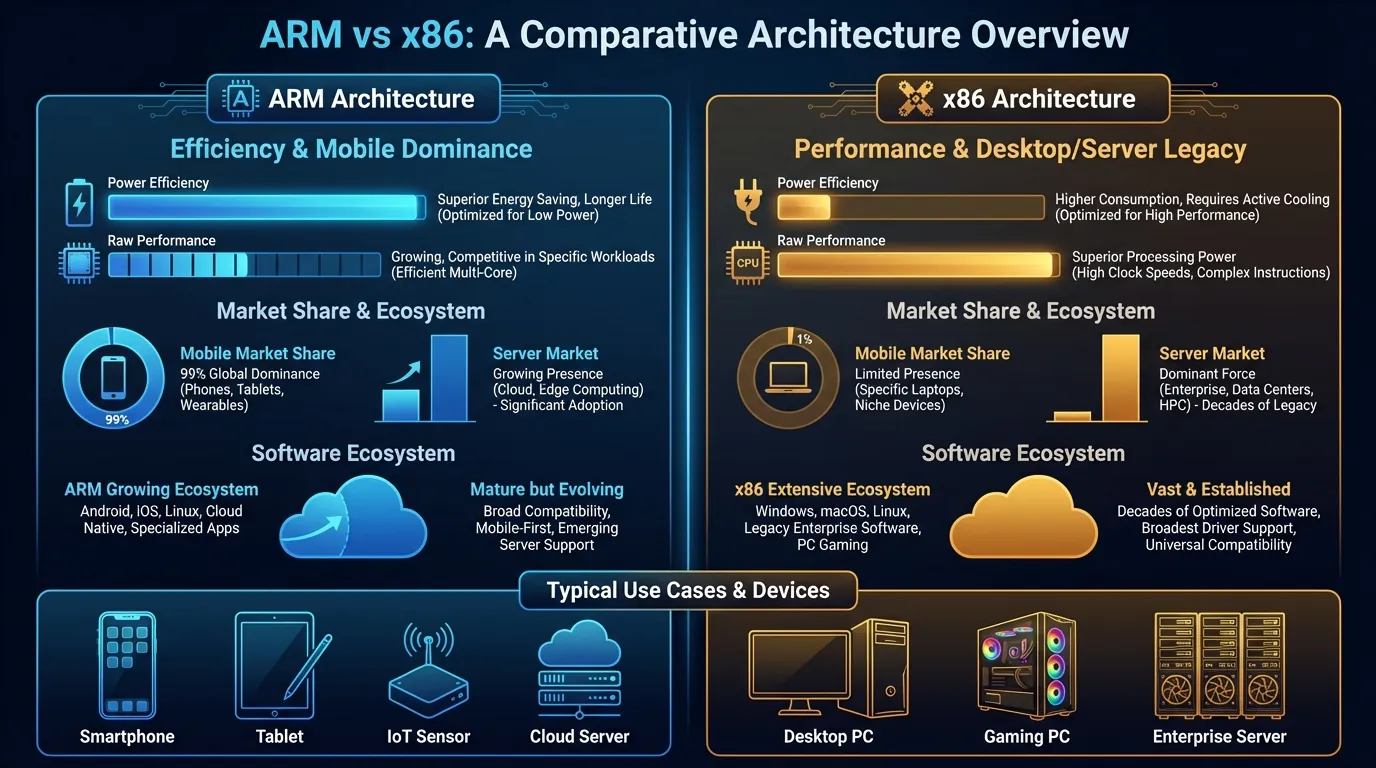
ARM vs x86 — Comprehensive Comparison
Frequently Asked Questions About ARM and x86
"Is ARM as Powerful as x86?"
ARM delivers equal or superior performance to x86 in the mobile and laptop segments (Apple M4 outperforms Intel Core i9 in many benchmarks). In servers, ARM chips (AWS Graviton4, Ampere Altra) compete head-to-head. x86 maintains an edge in tasks requiring extreme single-threaded performance (PC gaming, professional 3D rendering).
"Why Do PC Games Still Run on x86?"
PC games are optimized for x86 because of Windows' 45-year ecosystem — millions of games compiled for x86 across Steam, Epic, and GOG. Transitioning to ARM requires developers to recompile entire codebases. However, mobile games on Android and iOS are already optimized for ARM — this is why ARM cloud phones run mobile games more smoothly than x86 emulators.
"Will ARM Replace x86?"
ARM is expanding rapidly into x86 territory — laptops (Apple), servers (AWS), and even Windows PCs (Qualcomm). However, x86 has an enormous software ecosystem and won't disappear within the next decade. The clear trend: ARM captures mobile + IoT + cloud, while x86 retains PC gaming and enterprise legacy.
"Is RISC-V a Competitor to ARM?"
RISC-V is an open-source RISC architecture — no license fees required unlike ARM. RISC-V is growing rapidly in IoT and embedded systems. However, RISC-V still lacks a mature software ecosystem and its performance doesn't yet compete with ARM in the smartphone and server segments (as of 2026).
"Why Does Cloud Phone Need ARM Instead of x86?"
Cloud phone requires ARM for three non-negotiable technical reasons: (1) Android applications compile for ARM and run natively without translation, (2) ARM chips produce real fingerprints identical to handheld phones, passing every hardware check, and (3) 4-5× higher performance per watt enables cost-effective operation of thousands of devices in data centers.
"Is ARM More Secure Than x86?"
ARM and x86 have comparable security at the architecture level — both support TrustZone (ARM) and SGX (Intel). However, in the cloud phone context, ARM is safer because it produces authentic fingerprints — significantly reducing the risk of platforms detecting the device as virtual.
"Can Emulators Perfectly Simulate ARM on x86?"
No — binary translation from ARM to x86 always creates overhead (15-30% performance loss) and detection signatures. Even if emulators can fake some system properties, the CPU architecture reports as x86 — not ARM — and this hardware-level difference cannot be fully concealed by software.
From Chip Architecture to Cloud Phone Choice — Connecting the Dots
ARM vs x86 — as you've seen throughout this article — isn't just chip design theory. This difference directly shapes everyday experience: from smartphone battery life, to gaming performance, to account protection when managing multiple devices.
Cloud phones use real ARM mainboards — Exynos, Snapdragon, or equivalent chips — running natively with Android applications, producing fingerprints identical to handheld devices, and efficiently operating thousands of units in data centers. x86 emulators must translate code, create overhead, and inevitably expose detection signatures.
Our deep-dive on Native ARM vs Binary Translation analyzes the technical mechanism at a deeper layer — why every ARM instruction must be translated when running on x86, and the real-world impact on each application type.
Try a real ARM Cloud Phone — starting at just $10/device.
→ Start your XCloudPhone trial | Join the community on Telegram, Discord, and YouTube