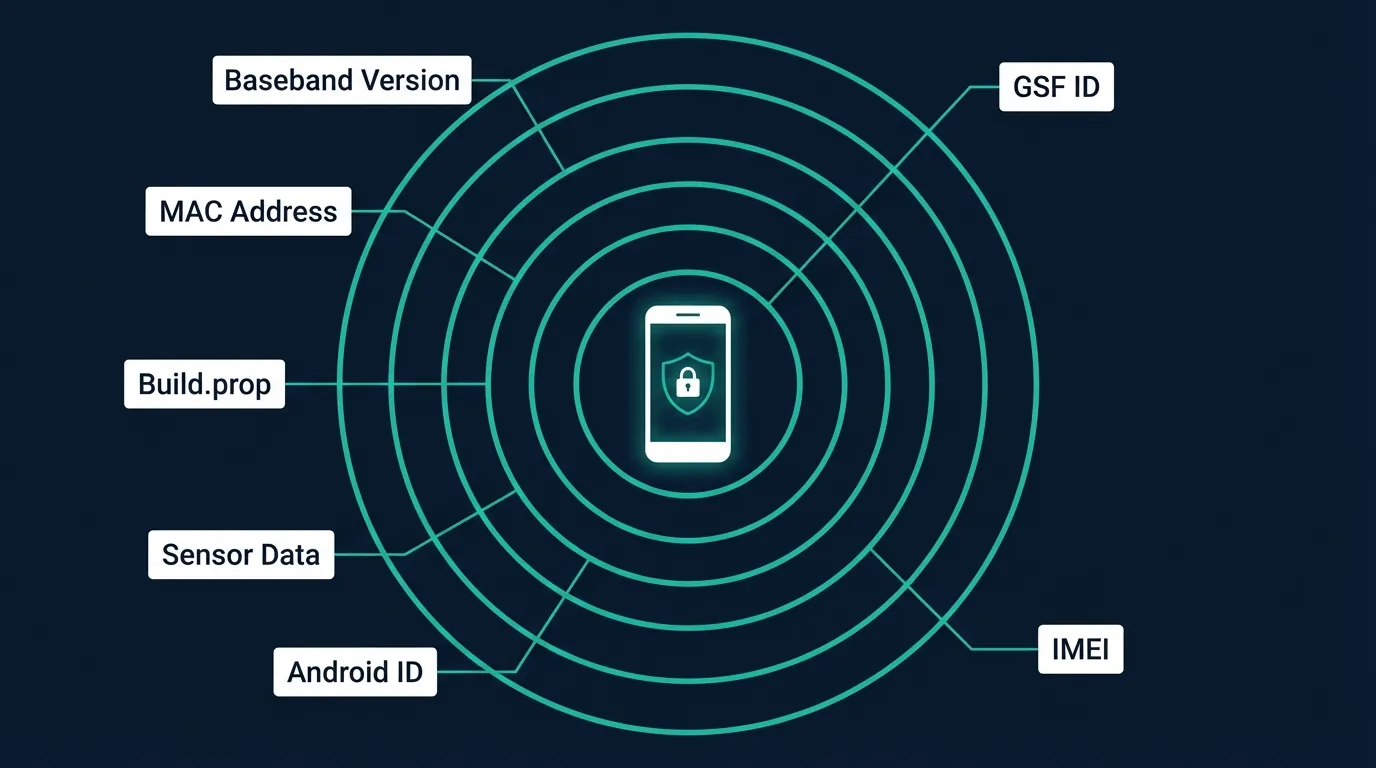
Every Android device carries a "digital fingerprint" — a combination of 7+ hardware and software attributes that platforms read on first access. The pillar guide What is Cloud Phone introduced this concept at a high level. This article breaks down each fingerprint component, how Google verifies hardware integrity, and why emulators fail every detection layer.
A device fingerprint is a combination of 7+ hardware and software attributes that creates a unique identity for each Android device. Google, Facebook, TikTok, and thousands of other apps use fingerprints to detect emulators, distinguish real devices, and calculate a Trust Score for every account.
In this article, you will learn:
- What device fingerprint is and how it differs from browser fingerprint
- The 7 components that create an Android identity
- How Play Integrity API verifies hardware
- Why emulators and VMI Cloud fail every detection layer
- How Trust Score works
- Why faking fingerprints is not a solution
What Is a Device Fingerprint? The Digital Identity of Android Devices
A device fingerprint is a combination of 7+ hardware and software attributes — including IMEI, Android ID, sensor data, baseband version, and build configuration — that creates a unique identity for each Android device. No two devices in the world share an identical fingerprint.
This concept differs entirely from "browser fingerprinting" common on the web. Browser fingerprints collect information from your browser — canvas rendering, WebGL hash, installed fonts — to identify users across websites. Device fingerprints operate at the OS level, reading hardware and firmware directly from the Android device.
Platforms need device fingerprints for 3 primary reasons: fraud detection, multi-account identification (one person using multiple accounts on the same device), and Trust Score calculation — the metric that determines whether your account gets restricted or privileged.
7 Components That Create an Android Device Fingerprint
Each Android device provides 7 signal groups to platforms: 3 hardware groups, 2 software groups, 1 sensor group, and 1 network group. Understanding all 7 reveals why emulators get detected — and why real ARM hardware is the only solution.
Hardware Identifiers — IMEI, Serial Number, and MAC Address
IMEI (International Mobile Equipment Identity) is a 15-digit code tied to the SIM slot — written into baseband firmware during manufacturing and unchanged by factory reset. Each SIM slot on a device has its own IMEI. On emulators, IMEI is typically a default value (000000000000000) or randomly generated — both are easily detected.
Serial Number is a manufacturer-assigned code for each motherboard. Since Android 10, Google restricted serial number access at the API level — only privileged apps can read it. However, Google Play Services still collects serial numbers for verification purposes.
MAC Address (Media Access Control) is a 48-bit address assigned to the WiFi chip. Android 10 introduced MAC randomization — each WiFi network receives a different MAC. But the original hardware MAC still exists at firmware level, and Google uses it for internal device verification.
Software Identifiers — Android ID, Build.prop, and Google Services Framework ID
Android ID is a 64-bit hex string generated during initial device setup. Since Android 8.0 (Oreo), Android ID is scoped per app signing key — the same device returns different Android IDs to different apps. Factory reset changes the Android ID.
Build.prop is a system configuration file containing hundreds of important properties. 3 properties that platforms check frequently:
ro.hardware— chip type (exynos8895 on Samsung, goldfish on emulator)ro.product.model— device name (SM-N950F for Note 8, sdk_phone_arm64 on emulator)ro.build.fingerprint— complete build identification string (samsung/greatltexx/greatlteks:...)
Google Services Framework ID (GSF ID) is an identifier tied to the Google Account on the device. GSF ID changes when you sign out and sign back into your Google Account, or when you clear Google Play Services cache.
Sensor Data — Gyroscope, Accelerometer, and GPS
Sensor hubs on real devices return naturally varying data — gravity fluctuates ±0.02 m/s², tilt angles shift continuously based on device position, and sensor temperature drifts in real time. Each physical device produces a unique "sensor signature" based on its specific hardware characteristics.
On emulators, sensor data exhibits 2 telltale signs: null (no sensor hardware → returns 0.0 for all axes) or static (hardcoded gravitational acceleration at 9.81 m/s² → no natural variation). Both patterns are immediate detection signals that platforms recognize instantly.
Real ARM Cloud Phones like XCloudPhone use actual smartphone motherboards mounted on rack servers — meaning the sensor hub (gyroscope, accelerometer, magnetometer) operates exactly like a handheld phone. Data varies naturally based on the physical environment of the data center: rack vibration, room temperature, and ambient magnetic fields.
Network Identity — Baseband Version, Carrier Config, and IP Fingerprint
The baseband modem is the cellular signal processing chip — it provides real carrier identity through MCC (Mobile Country Code) and MNC (Mobile Network Code). When platforms read a baseband version (e.g., G955FXXS9DTK1 on Samsung), they confirm the device has a real cellular modem.
On emulators, baseband version returns "unknown" or empty — because emulators have no modem hardware. This is one of the easiest signals to detect.
IP reputation also plays a critical role: datacenter IPs (AWS, Google Cloud, OVH) are flagged as high risk, while residential IPs (from consumer ISPs) are rated trustworthy. XCloudPhone integrates on-device proxy — enabling residential IP on each individual cloud phone.
Play Integrity API — How Google Verifies Hardware Authenticity
Play Integrity API is a 3-level verification system that Google uses to evaluate the trustworthiness of Android devices running Play Store apps. This API replaced SafetyNet Attestation (deprecated in 2024) and has become the mandatory standard for most banking apps, anti-cheat game engines, and social media platforms.
3 Verdict Levels: Basic, Device, and Strong Integrity
Google divides verification results into 3 verdict levels with increasing trust:
MEETS_BASIC_INTEGRITY confirms the OS is not rooted or seriously modified. Most emulators fail at this level because build.prop contains emulator values.
MEETS_DEVICE_INTEGRITY requires CTS (Compatibility Test Suite) profile match — meaning the device must appear in Google's certified device catalog. Emulators and VMI Cloud (running x86) are not in the catalog.
MEETS_STRONG_INTEGRITY (Enhanced Verdict from 2025) requires the device to have received a security patch within the last 12 months. Only Android 13+ devices with hardware-backed keystore achieve this level.
Hardware-Backed Attestation — Why Software Cannot Bypass It
Android Platform Key Attestation uses crypto keys burned into the security chip (Trusted Execution Environment — TEE) during manufacturing. These keys cannot be copied, cannot be extracted by software, and do not exist on emulators.
When an app calls Play Integrity API, Google servers verify the signature from the TEE chip — if the chip is not real ARM with a valid keystore, the verdict returns FAIL. This is why Magisk, Xposed Framework, or any software cannot bypass hardware attestation: you cannot emulate a security chip with code.
Real ARM Cloud Phones pass hardware attestation because each motherboard contains a real TEE chip — identical to a brand-new handheld phone.
Why Emulators and VMI Cloud Fail Every Detection Layer
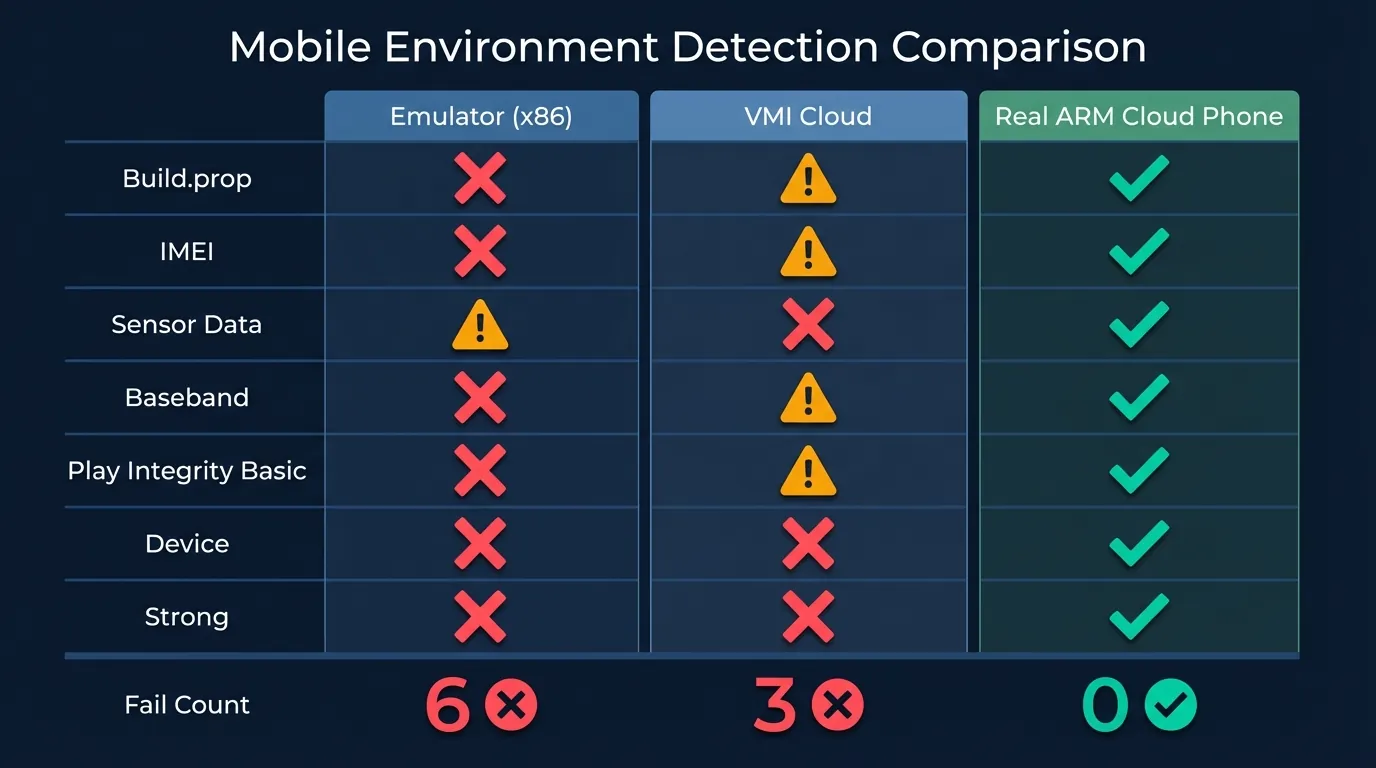
x86 emulators, VMI Cloud, and Real ARM Cloud Phones produce 3 completely different fingerprint sets — and only Real ARM passes all 7 detection layers. The table below summarizes detailed results:
x86 emulators (BlueStacks, LDPlayer, Nox) run binary translation to convert ARM instructions to x86. Build.prop contains ro.hardware=goldfish, sensors return null, and there is no baseband modem. Platforms detect them at the first layer.
VMI Cloud (Virtual Mobile Infrastructure) runs virtualized Android on x86 servers. While it can spoof build.prop to Samsung, the instruction set remains x86 — Play Integrity detects this through CTS profile mismatch. IMEIs are often drawn from a shared pool, causing multiple accounts to inadvertently share the same IMEI.
Real ARM Cloud Phones use actual smartphone motherboards (Exynos 8895 from Samsung Note 8/S8) mounted on rack servers in data centers. Every component — from IMEI, sensor hub, baseband modem to TEE chip — is real hardware. Result: passes all 7 detection layers.
Trust Score — How Platforms Combine Fingerprints Into a Confidence Score
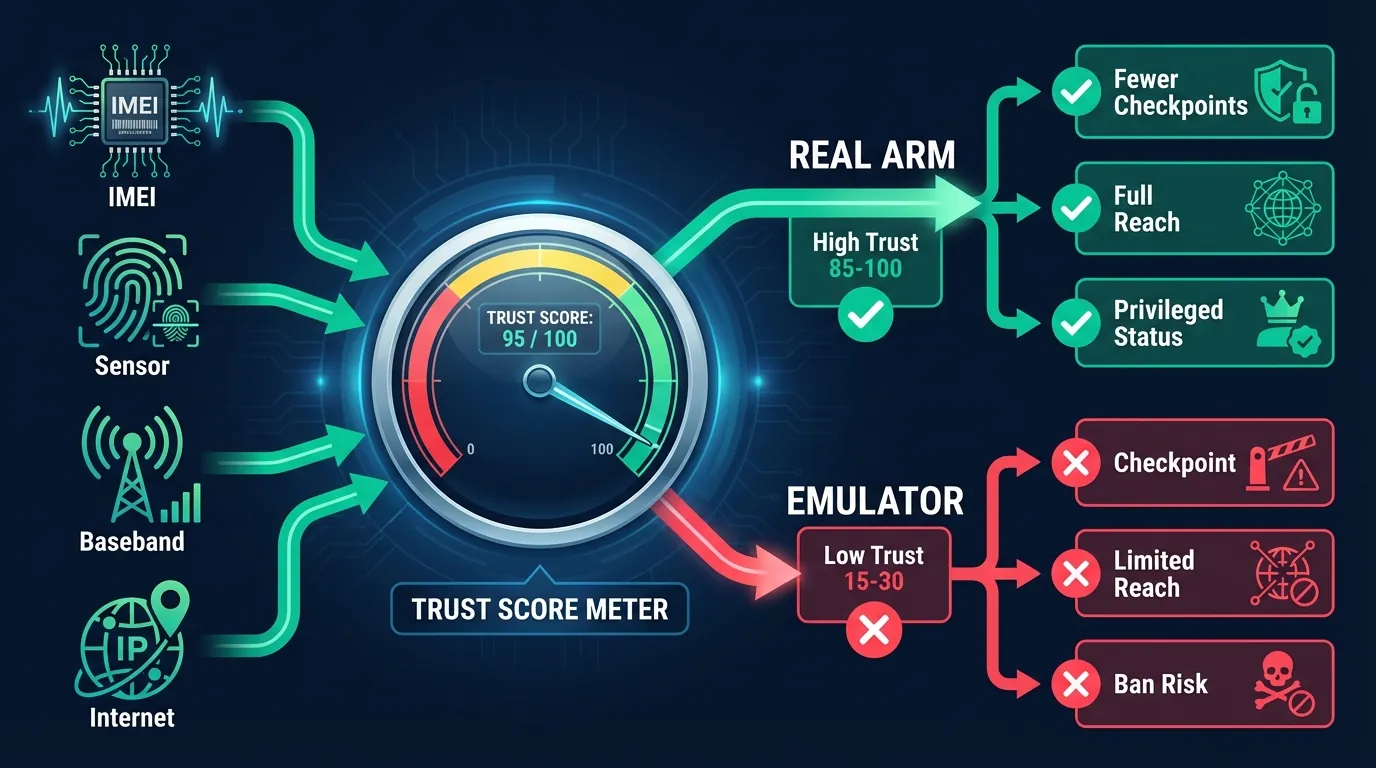
Platforms like Facebook, Google, and TikTok combine fingerprint data into a single confidence score (Trust Score) that determines whether to restrict or ban an account. Trust Score is not a fixed number — it is recalculated continuously based on multi-signal consistency.
The Trust Score system evaluates consistency across signals:
- High trust: Sensor data matches a real mobile device + valid baseband version + residential IP + natural touch patterns → account gets privileged, fewer checkpoints
- Low trust: Mobile app but detects mouse scroll pattern + null sensors + datacenter IP → immediate checkpoint, limited reach, or ban
Trust Score works through cross-validation: platforms compare 7+ fingerprint signals against each other. If just 1-2 signals are inconsistent with the rest (e.g., IMEI says Samsung but sensors return null) → Trust Score drops significantly.
Real ARM Cloud Phones produce fully consistent fingerprints — every signal comes from the same physical motherboard. No cross-signal inconsistency → consistently high Trust Score. XCloudPhone users report that accounts on Real ARM Cloud Phones receive 70-80% fewer checkpoints compared to emulators, based on a community survey of 500+ Discord members.
Why Faking Fingerprints Is Not a Solution
Using Xposed Framework or Magisk modules to alter fingerprints creates cross-signal inconsistency errors that platforms detect instantly. Faking fingerprints causes more problems than it solves.
3 primary reasons fake fingerprints fail:
- Cross-signal inconsistency: Changing IMEI to Samsung Note 20 but GPU still reports Mali-G71 (Note 8) or Adreno (Qualcomm) → platform detects IMEI→GPU mismatch
- Play Integrity hardware check: Even if build.prop is successfully changed, hardware attestation still reads the real TEE chip. Root device + Magisk → loses MEETS_DEVICE_INTEGRITY
- Behavioral inconsistency: Fake fingerprints change static identifiers but cannot alter sensor patterns and touch behavior → mismatch between "declared device" and "actual device"
Faking fingerprints violates the Terms of Service of most platforms. Google, Facebook, and TikTok reserve the right to permanently ban accounts — including other accounts sharing the same original fingerprint.
The right approach: use real hardware — either physical phones or Real ARM Cloud Phones. When fingerprints come from genuine hardware, there is no need to fake, no need to bypass, and no risk of inconsistency.
From Fingerprint to "Highly Undetectable" — How ARM Hardware Changes the Game
7 fingerprint layers create a "wall" that emulators and VMI Cloud cannot overcome. From IMEI, sensor data, to hardware-backed attestation — each layer requires real ARM hardware to pass.
Real ARM Cloud Phones solve this problem at its root: each motherboard in the data center provides real hardware identity — unique IMEI, naturally varying sensor hub, valid baseband modem, and TEE chip that passes Play Integrity. Result: platforms identify it as a legitimate mobile device, Trust Score stays high, and ban risk is significantly reduced.
XCloudPhone uses Samsung motherboards (Exynos 8895) mounted on dedicated rack servers — with batteries and screens removed for 24/7 operation. Each cloud phone is a separate physical device with a unique fingerprint, sharing no IMEI or sensor data with any other unit. Get started at app.xcloudphone.com from ~$10/device/month.
Frequently Asked Questions About Device Fingerprints
"Does factory reset delete the device fingerprint?"
Not entirely. Hardware identifiers (IMEI, MAC Address, Serial Number) do not change on factory reset — they are burned into firmware and hardware chips during manufacturing. Software identifiers (Android ID) change on reset. Sensor data retains its pattern because it depends on physical hardware.
"Can emulators fully fake a fingerprint?"
No. Play Integrity API uses hardware-backed attestation — crypto keys are burned into the TEE chip during manufacturing. No software can create valid crypto keys because these keys never leave the chip. Emulators can fake build.prop and IMEI, but cannot fake hardware attestation.
"Does VMI cloud phone have fingerprints identical to real devices?"
No. VMI Cloud runs virtualized Android on x86 servers — the instruction set is not ARM, the baseband modem does not exist, and sensor data is simulated rather than coming from real hardware. Play Integrity detects this at the MEETS_DEVICE_INTEGRITY level when the CTS profile does not match.
"Why do some cloud phone services get banned while others don't?"
The difference lies in hardware architecture: VMI Cloud (x86 virtualization) vs Real ARM Cloud Phone (actual ARM motherboards). VMI creates inconsistent fingerprints → low Trust Score → ban. Real ARM provides genuine fingerprints → high Trust Score → significantly reduced ban risk.
"Does Play Integrity API apply to every app?"
Play Integrity is optional — developers choose whether to integrate it. Most common in: banking/fintech apps (mandatory), anti-cheat games (Genshin Impact, PUBG Mobile, Ragnarok Origin), and social media (Facebook, TikTok). Many Asian games use both Play Integrity and proprietary anti-cheat (GameGuard, EasyAntiCheat).
"Can IMEI be changed on a real device?"
On rooted devices, it is possible to write a new IMEI using specialized tools. However, the original IMEI persists in baseband firmware — Google can read both. XCloudPhone supports one-click IMEI and Android ID reset — using real hardware to ensure consistency between the new IMEI and other signals.
"Does Play Integrity affect Asian games (MU Origin, Ragnarok)?"
Yes. Games from Gravity (Ragnarok Origin), Netmarble (MIR M), and Nexon (MapleStory M) all integrate Play Integrity API or proprietary anti-cheat engines. Real ARM Cloud Phones pass both Play Integrity and anti-cheat because the system identifies them as legitimate mobile devices, not emulators.