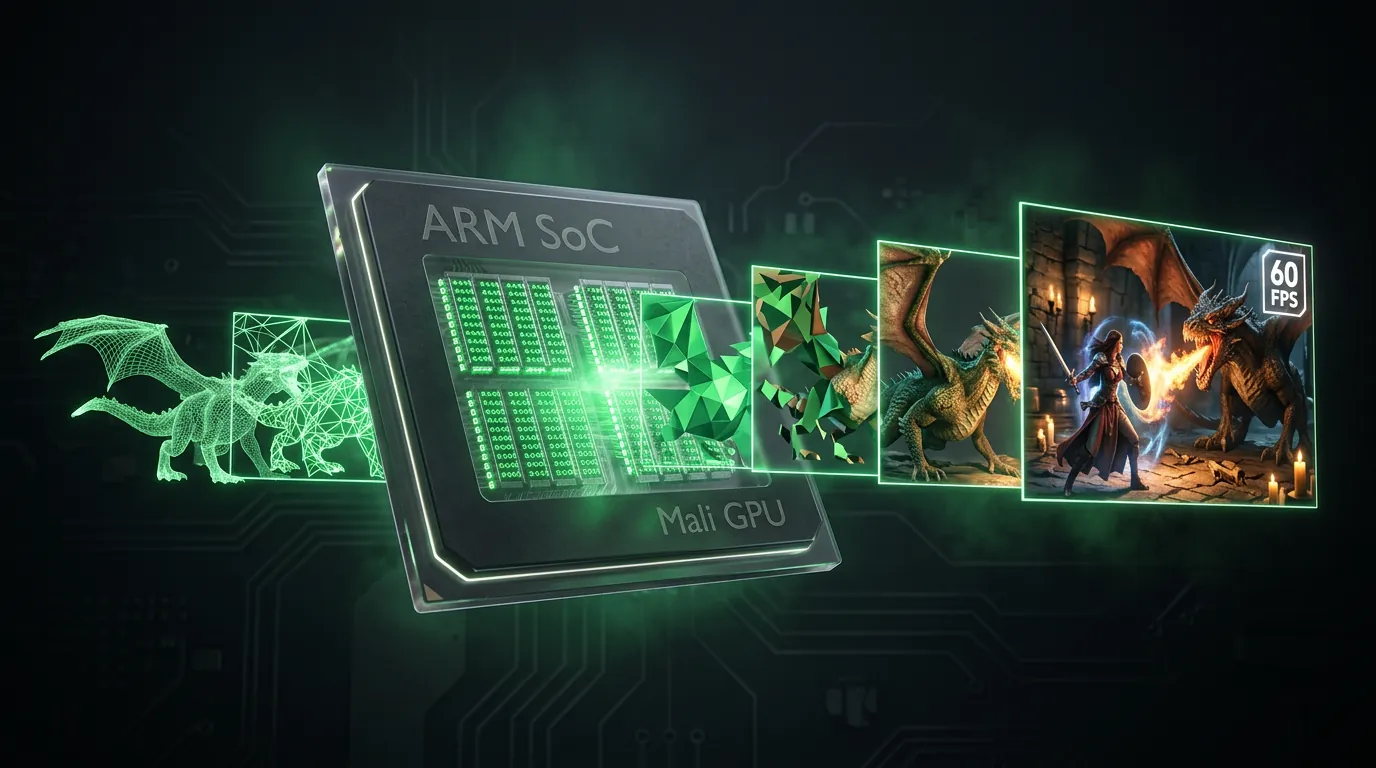
GPU processes every pixel in a 3D game — shadows, reflections, particle effects, and texture mapping. How the GPU handles rendering determines whether you get 60 FPS smooth gameplay or 15 FPS stuttering lag.
The article What is Cloud Phone covered cloud phones using real Mali GPU integrated on ARM chips. This article deep-dives into the hardware rendering pipeline: how GPU hardware rendering works, why Mali ARM delivers native performance, and why x86 emulators always fall behind. You will understand the 5-step GPU pipeline, FPS benchmarks across 5 popular games, 3 technical problems with emulators, and the future of ray tracing on next-gen ARM.
GPU Hardware Rendering vs Software Rendering — 2 Ways to Draw Game Graphics
GPU hardware rendering and software rendering are 2 graphics processing methods with a 50-100x performance gap — determined by the number of cores executing parallel computations.
GPU Hardware Rendering
GPU (Graphics Processing Unit) is a chip specialized for graphics with hundreds to thousands of shader cores running in parallel. On Android devices, the 3 major GPU families are: Mali (ARM), Adreno (Qualcomm), and PowerVR (Imagination Technologies). Mali-G71 in Samsung Exynos 8895 integrates 20 shader cores, each running thousands of simultaneous calculations — total throughput far exceeds traditional CPU.
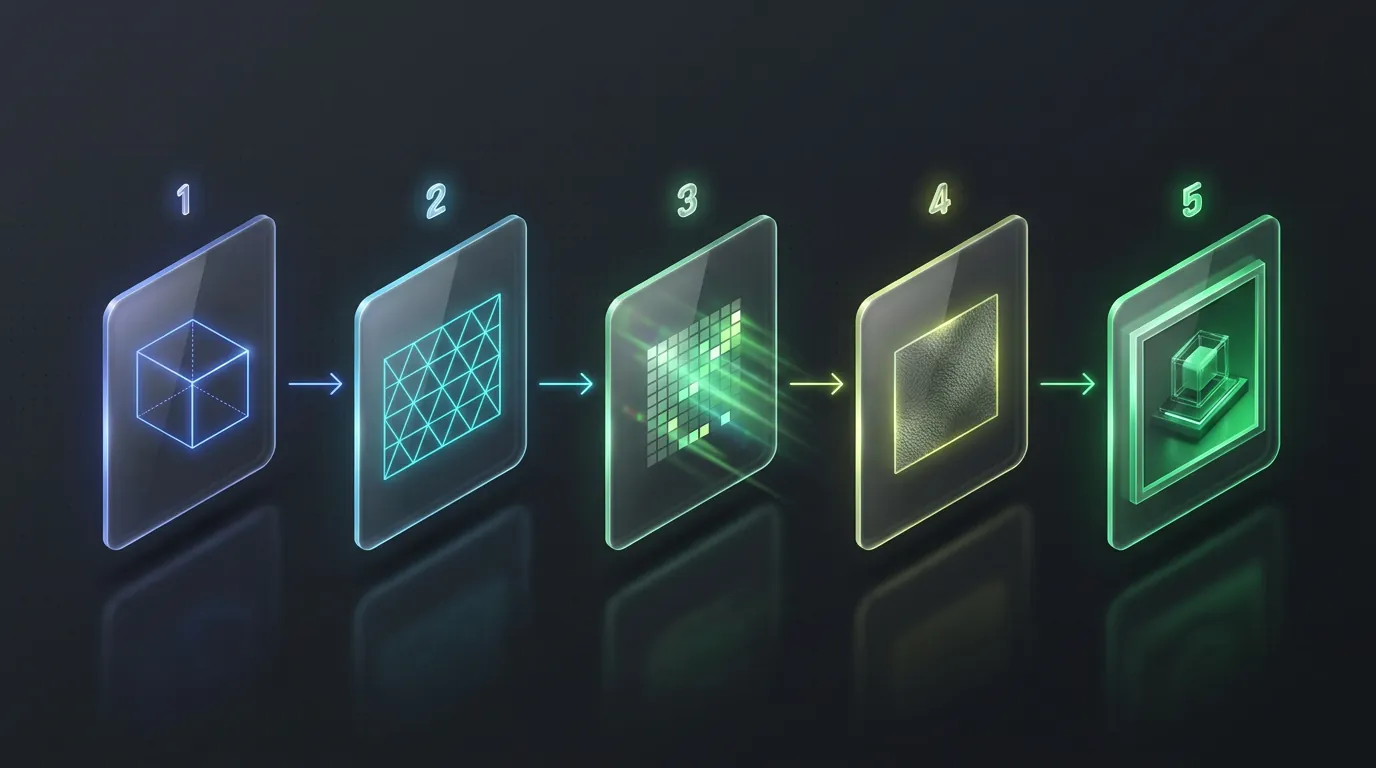
The GPU rendering pipeline has 5 sequential steps:
- Vertex Processing — Calculates 3D coordinates for each vertex in the game model
- Rasterization — Converts 3D geometry into 2D pixels on screen
- Fragment Shading — Computes color, lighting, and shadows for each pixel
- Texture Mapping — Applies surface textures onto 3D models
- Output Merging — Combines everything and outputs the final frame to screen
The entire pipeline runs on dedicated GPU hardware, processing 30-60 frames per second (equivalent to 16-33ms per frame).
Software Rendering
Software rendering uses CPU instead of GPU to draw graphics. CPU has only 4-16 general-purpose cores — compared to hundreds of specialized shader cores on a GPU. Result: CPU rendering achieves 5-15 FPS on average 3D games, 50-100x slower than GPU hardware rendering.
Software rendering occurs when: GPU is unavailable (virtual machine lacks GPU passthrough), drivers are incompatible (API translation fails), or the virtualization platform (VMI) does not support GPU hardware acceleration.
Pro Tip: Check GPU hardware rendering on your device using the "GPU Profiler" app (Android) — if "Renderer" shows "OpenGL ES" or "Vulkan", GPU hardware is active.
ARM Cloud Phone — Real Mali GPU Renders Games Natively
ARM cloud phones use a real Mali GPU integrated on the ARM SoC (System on Chip) — the same GPU found in Samsung Galaxy S8, Note 9, and S10. Android games render directly on the physical GPU with zero translation layers.
Native Rendering Pipeline
When you play Genshin Impact on an ARM cloud phone, the pipeline runs in 4 steps with no overhead:
- Game calls OpenGL ES 3.2 — Standard Android graphics API
- Mali driver receives commands — Real hardware driver, not a wrapper
- Mali GPU renders frame — 20 shader cores processing in parallel
- WebRTC streams the result — Completed frame transmitted to your browser
Zero translation layer: game calls OpenGL ES → Mali GPU receives it directly → renders → outputs. This is native execution — identical to playing on a physical handset.
FPS Benchmarks on ARM Cloud Phone
Real-world performance on ARM cloud phone (Mali-G71, Exynos 8895, 6 GB RAM):
2D and idle games (Roblox, Idle Heroes, Catizen) hit 60 FPS stable on all settings — GPU overhead is near-zero for 2D sprite rendering.
Cloud phones running real GPU — physical ARM hardware analyzed in What is Cloud Phone — have an advantage VMI cannot match: full API compatibility. Games requiring OpenGL ES 3.2, Vulkan 1.2, or OpenCL 2.0 all run native — no crashes from "unsupported GPU" or "driver not found" errors.
x86 Emulators — Why Rendering Always Falls Behind
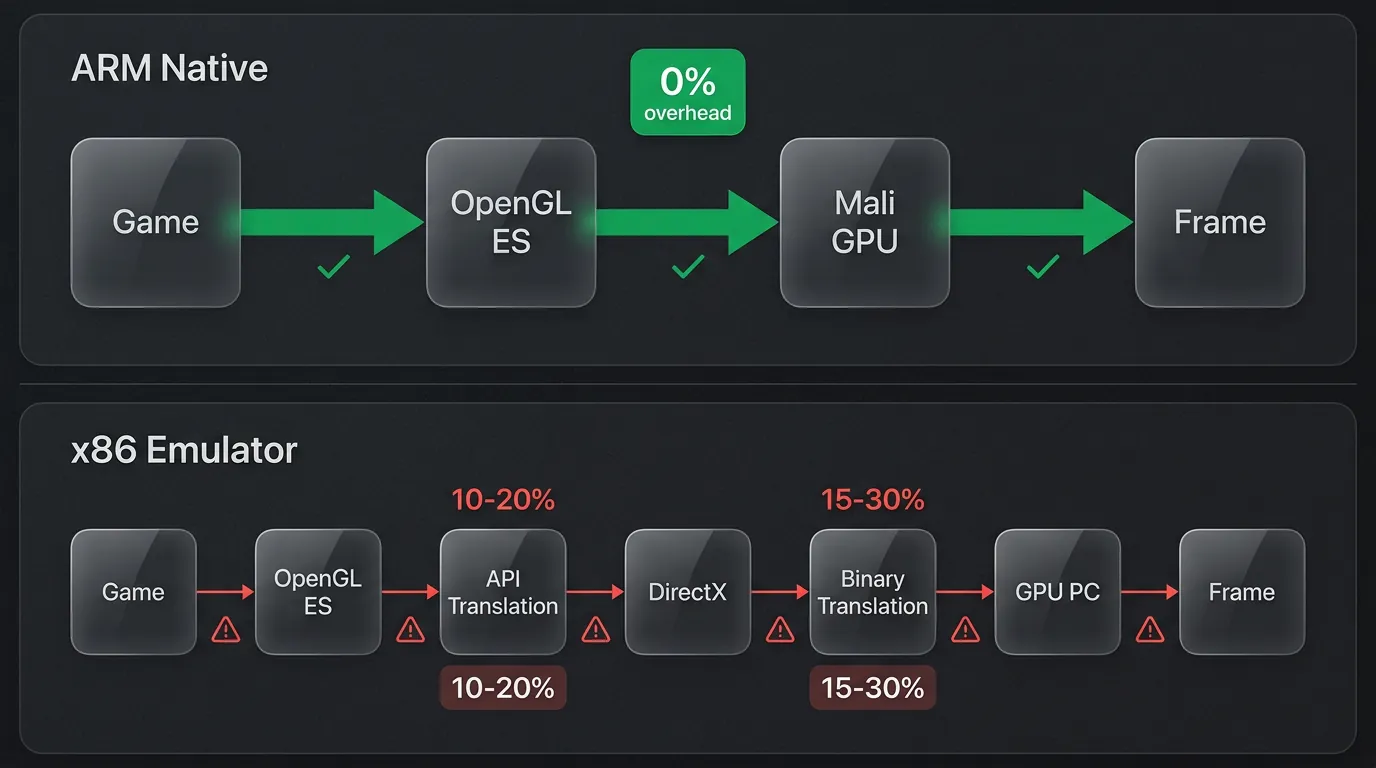
x86 emulators render games worse than ARM cloud phones due to 3 unavoidable technical problems — each adding an overhead layer between the game and GPU.
Problem 1: API Translation (10-20% Overhead)
Android games call OpenGL ES (mobile graphics API). PCs run DirectX or OpenGL (desktop graphics API). Emulators must translate every OpenGL ES command to DirectX/Desktop OpenGL — API translation costs 10-20% performance per frame.
On ARM cloud phone: game calls OpenGL ES → Mali GPU receives it directly. Zero translation.
Problem 2: Binary Translation (15-30% Overhead)
The article ARM vs x86 explained binary translation in detail — the process of translating ARM machine code to x86 instructions. Every GPU driver instruction written for ARM must be translated to the x86 instruction set — adding 15-30% CPU overhead depending on complexity.
BlueStacks and LDPlayer use binary translation engines (libhoudini or NDK Bridge). Result: same game, same graphics settings, x86 emulators run 25-45% slower than ARM native.
Problem 3: Software Rendering Fallback
When API translation cannot translate 100% of GPU commands (occurs with Vulkan or advanced compute shaders), the emulator falls into software rendering fallback — CPU draws graphics instead of GPU. FPS drops from 40-50 down to 5-15 FPS.
VMI platforms (technology used by Geelark, VMOS Cloud) hit this problem even harder: Android virtual machines running on x86 servers have no GPU passthrough → all rendering shifts to CPU. 3D games on VMI reach only 10-20 FPS at lowest settings.
Which Games Are Impacted Most?
Heavy 3D games are affected most severely on emulators, with FPS dropping 40-60% compared to native ARM — particularly games using complex shaders and physics simulation.
Heavy 3D Games — Largest Gap
3 games most impacted on x86 emulators:
- Genshin Impact — FPS drops 50-60% on emulator (30 FPS native → 12-15 FPS x86). Cause: open world rendering + dynamic lighting + particle effects demand dedicated GPU shader cores
- Honkai: Star Rail — FPS drops 50%+ on emulator. Ray tracing software fallback causes lighting effects to break or turn off entirely
- PUBG Mobile — FPS drops 30-40% on emulator (40-50 native → 25-30 x86). Tencent anti-cheat also detects x86 emulators → forced separate lobby
2D and Idle Games — Small Gap
2D, idle, and tap-to-earn games show only 10-15% FPS difference between ARM and x86. GPU rendering for 2D sprites is simpler — CPU backup handles it without major penalty. Games like Ragnarok Origin (2D mode), Roblox (low-poly), Idle Heroes, and Catizen run acceptably on both emulators and ARM cloud phones.
Practical Rule
Choose your platform based on the type of game you play:
- Heavy 3D games (Genshin, Honkai, Wuthering Waves) → ARM cloud phone — stable FPS, no crashes, undetectable
- 2D, idle, tap-to-earn (Idle Heroes, Catizen, Roblox) → Small gap — cloud phone still more stable thanks to real GPU
- Games with strict anti-cheat (PUBG, Free Fire, Call of Duty Mobile) → ARM cloud phone — real hardware means minimal ban risk
The Future of GPU — Ray Tracing and AI Super Sampling on ARM
Next-gen ARM GPUs support hardware ray tracing and AI upscaling — 2 technologies previously exclusive to desktop GPUs (NVIDIA RTX, AMD RDNA 3).
Hardware Ray Tracing
ARM Immortalis-G925 and Mali G1-Ultra integrate dedicated ray tracing hardware — computing reflections, refractions, and shadows with physics-accurate precision. Previously, mobile games relied on "baked lighting" (pre-rendered static light). Hardware ray tracing enables real-time dynamic lighting — mobile games approaching console-quality visuals.
Next-gen cloud phones with Immortalis-G925+ will run ray tracing natively, while x86 emulators must simulate it through software — adding 60-80% overhead.
AI Neural Super Sampling
Neural Super Sampling is an AI upscaling technology developed by ARM: render a game at low resolution (540p), then use an AI neural network on the GPU to upscale to 1080p. Result: 50% less GPU load with image quality close to native 1080p. Upscale time: under 4ms per frame — fast enough for 60 FPS.
This trend carries special significance for cloud phones: the GPU handles both game rendering and WebRTC stream encoding. AI upscaling frees GPU resources for encoding, improving stream quality without dropping game FPS.
Frequently Asked Questions (FAQ)
"Does an ARM Cloud Phone Have a Real GPU?"
Yes, ARM cloud phones (Real Device type) use a Mali or Adreno GPU integrated directly on the ARM SoC — the same GPU found in commercial Samsung, Huawei, and Qualcomm phones. The GPU renders graphics natively without software emulation.
"Do Emulators Use the PC GPU for Rendering?"
Yes, but through API translation — the emulator translates OpenGL ES (Android) commands to DirectX (Windows). Translation costs 10-20% performance per frame. For particularly demanding games (Genshin Impact, Honkai), FPS loss reaches 40-60% due to compounding translation overhead.
"Which GPU Is Best for Cloud Phone?"
Mali-G78 or above and Adreno 660 or above are optimal GPUs for cloud phone gaming in 2026. Mali-G78 supports Vulkan 1.2 natively, has 24 shader cores, and machine learning inference — sufficient for Genshin Impact at Medium-High with stable 30+ FPS.
"Does Cloud Phone Support Vulkan?"
Yes, ARM cloud phones support Vulkan 1.2+ natively — a high-performance graphics API that outperforms OpenGL ES by 15-20%. Vulkan reduces CPU overhead through multi-threaded rendering, particularly effective for open-world games and games with many draw calls.
Real GPU vs Fake GPU — Choose the Right Platform for Mobile Gaming
GPU hardware rendering on real ARM chips processes game graphics natively — no API translation, no binary translation, no software fallback. x86 emulators and VMI always trail 25-60% in FPS because every pixel must pass through multiple translation layers before appearing on screen.
ARM cloud phone is the only platform combining a real physical GPU with 24/7 data center operation. XCloudPhone provides native Mali GPU rendering at around $10/device — heavy 3D games run stable without buying a flagship phone. Get started at app.xcloudphone.com.