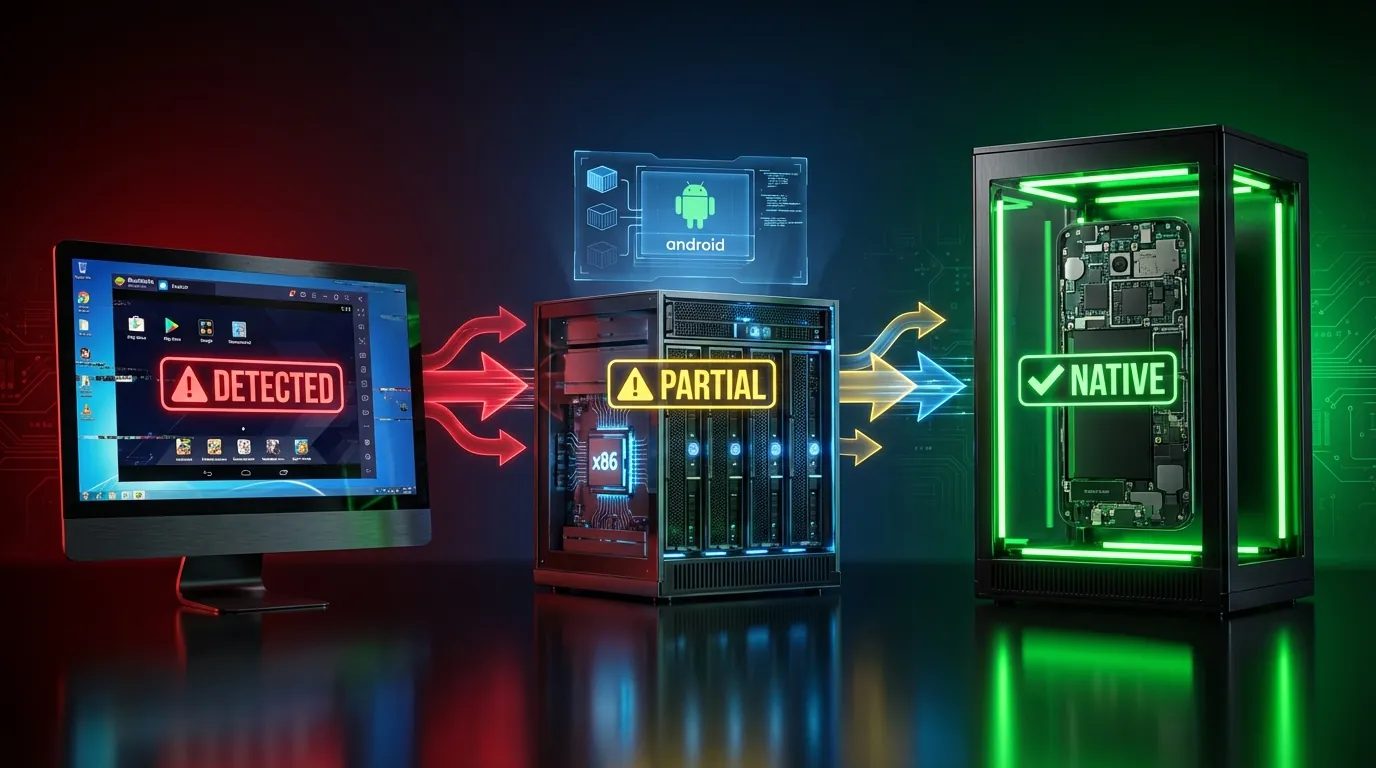
"Virtual Android" gets over 700 searches per month on Google — yet three different people searching the term picture three entirely different things. One thinks of BlueStacks, another imagines a cloud-based phone service, and the third wants a real Android device running 24/7 in the cloud.
The comprehensive guide to Cloud Phone explained how Android Cloud Phones run on real ARM hardware. This article breaks down 3 types of "virtual Android" that are commonly confused — their hardware architecture, detection mechanisms, and direct impact on account ban risk.
Not all "virtual Androids" are created equal — the difference lies in the hardware layer, and that layer determines everything: app performance, game compatibility, and account safety when managing multiple profiles.
In this article, you'll find:
- 3 types of virtual Android and how to tell them apart
- Binary translation — why x86 vs ARM architecture creates the core difference
- 5 detection methods apps use to identify virtual devices
- 4 specific use cases to help you choose the right solution
What Is Virtual Android? 3 Common Types of Virtual Android Devices
Virtual Android is a broad term covering 3 types of Android devices that run without dedicated hardware in your hands: Emulator, VMI Cloud, and Real ARM Cloud. The difference between these 3 types lies in the underlying hardware layer — the factor that determines performance, app compatibility, and detection risk.
Type 1 — Android Emulator (PC-Based Simulation)
An Android Emulator is software running on your personal computer that translates ARM instructions to x86 architecture through binary translation. Popular emulators include BlueStacks, LDPlayer, Nox, and MEmu.
Emulators run directly on your computer's CPU (Intel or AMD), consuming local RAM and CPU resources. Each instance requires 2–4GB RAM and significant CPU power. Running 5 emulators simultaneously means your computer processes all 5 translation layers at once — explaining why fans spin constantly and the system slows to a crawl.
The biggest weakness: emulators create fake hardware fingerprints. When apps query device information, emulators return values like ro.hardware = goldfish or ro.product.model = sdk_gphone64_x86_64 — clear red flags for detection systems.
Type 2 — VMI Cloud Phone (Virtualized on x86 Cloud Servers)
A VMI Cloud Phone (Virtual Mobile Infrastructure) runs Android inside a container or virtual machine on x86 servers in a data center. Unlike emulators running on personal PCs, VMI Cloud Phones run on powerful servers — but still use binary translation because the servers use x86 chips (Intel Xeon, AMD EPYC, Intel Core), not ARM.
VMI Cloud offers the advantage of being persistent — app data and device state remain intact between sessions. Close your browser today, open it tomorrow, and everything is exactly where you left it.
However, VMI Cloud Phone fingerprints still aren't fully authentic. x86 chips on servers don't generate genuine IMEI numbers, baseband signals, or sensor data like real ARM devices. Some budget "cloud phone" services on the market actually use this x86 VMI architecture.
Type 3 — Real ARM Cloud Phone (Actual Hardware in the Cloud)
A Real ARM Cloud Phone is an actual Android device (ARM chip such as Exynos 8895 or Snapdragon) placed in a data center, streaming video and audio to your browser via WebRTC. There is no binary translation — apps run natively on ARM silicon, identical to a handheld smartphone.
Each device has its own unique IMEI, real sensors (gyroscope, accelerometer, GPS), and genuine carrier identity. When apps query hardware, Real ARM Cloud Phones return results identical to retail devices — because they fundamentally are physical devices.
XCloudPhone and select providers use the Real ARM Cloud Phone architecture. Real smartphone mainboards with batteries and screens removed are mounted in custom server racks inside data centers with industrial cooling.
Comparison Table: 3 Types of Virtual Android
Binary Translation — Why x86 vs ARM Architecture Makes All the Difference
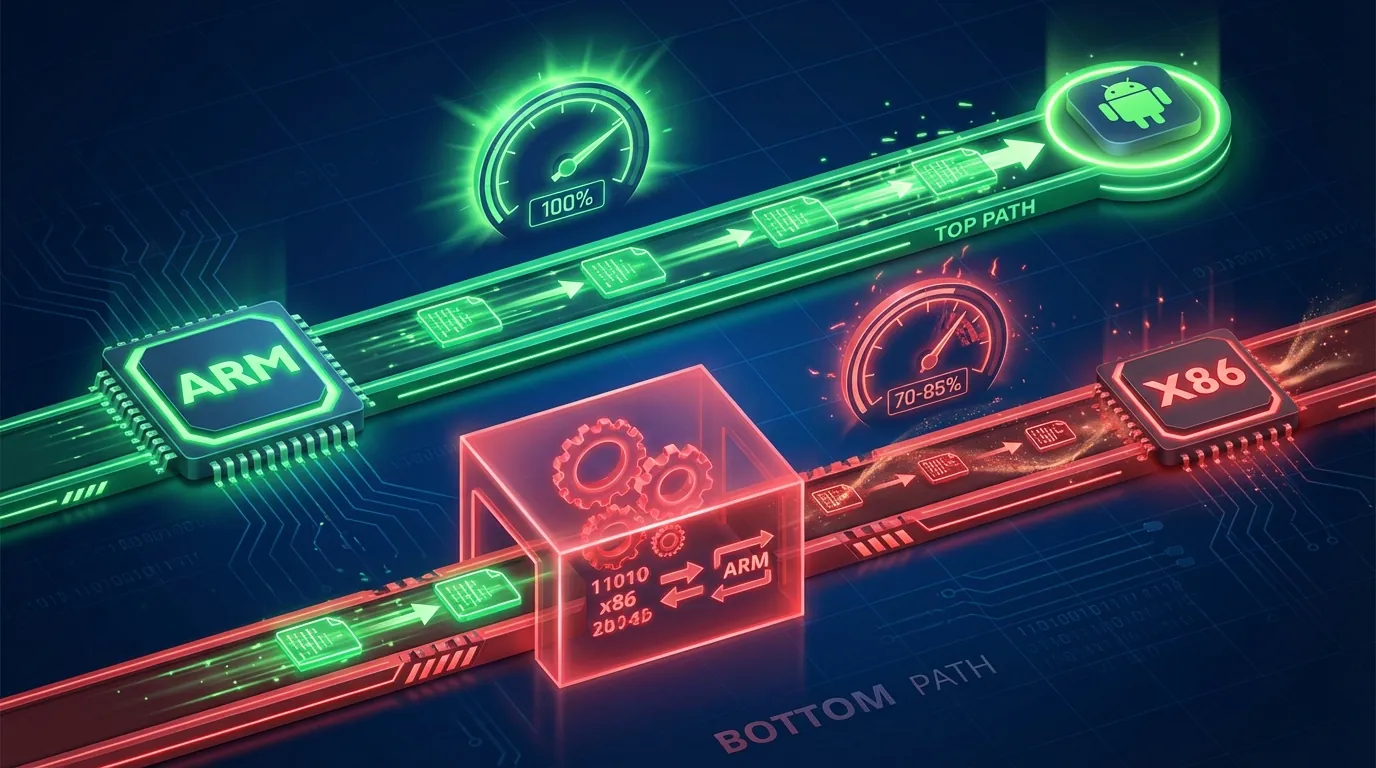
Binary translation is the process of converting each machine instruction from ARM architecture (RISC) to x86 architecture (CISC) in real time, every time an Android app runs on non-ARM hardware.
ARM architecture (Reduced Instruction Set Computing) uses a simplified instruction set optimized for performance per watt — the reason every smartphone uses ARM. x86 architecture (Complex Instruction Set Computing) uses a complex instruction set optimized for heavy computing on PCs and servers.
When an emulator runs an Android app on an x86 chip, every ARM instruction passes through a translation layer. This process creates a 15–30% performance overhead — you lose one-fifth to one-third of processing power just on "translation."
Real-world consequences:
- Game lag: Frame rates drop 15–30% compared to native execution
- App crashes: Some apps using NDK (Native Development Kit) call ARM instruction sets directly → crash on x86
- Bootloops: When games update anti-cheat measures, emulators often fail to stay compatible
- Hardware query failures: Android OS queries processor info, emulators return generic values (not Exynos or Snapdragon)
Real ARM Cloud Phones eliminate the binary translation layer entirely. Apps communicate directly with real ARM silicon — speed, compatibility, and hardware query results match a handheld device exactly.
A dedicated deep dive into Native ARM vs Binary Translation explains in detail how instruction set architecture affects performance across different app types.
5 Ways Apps Detect Virtual Devices
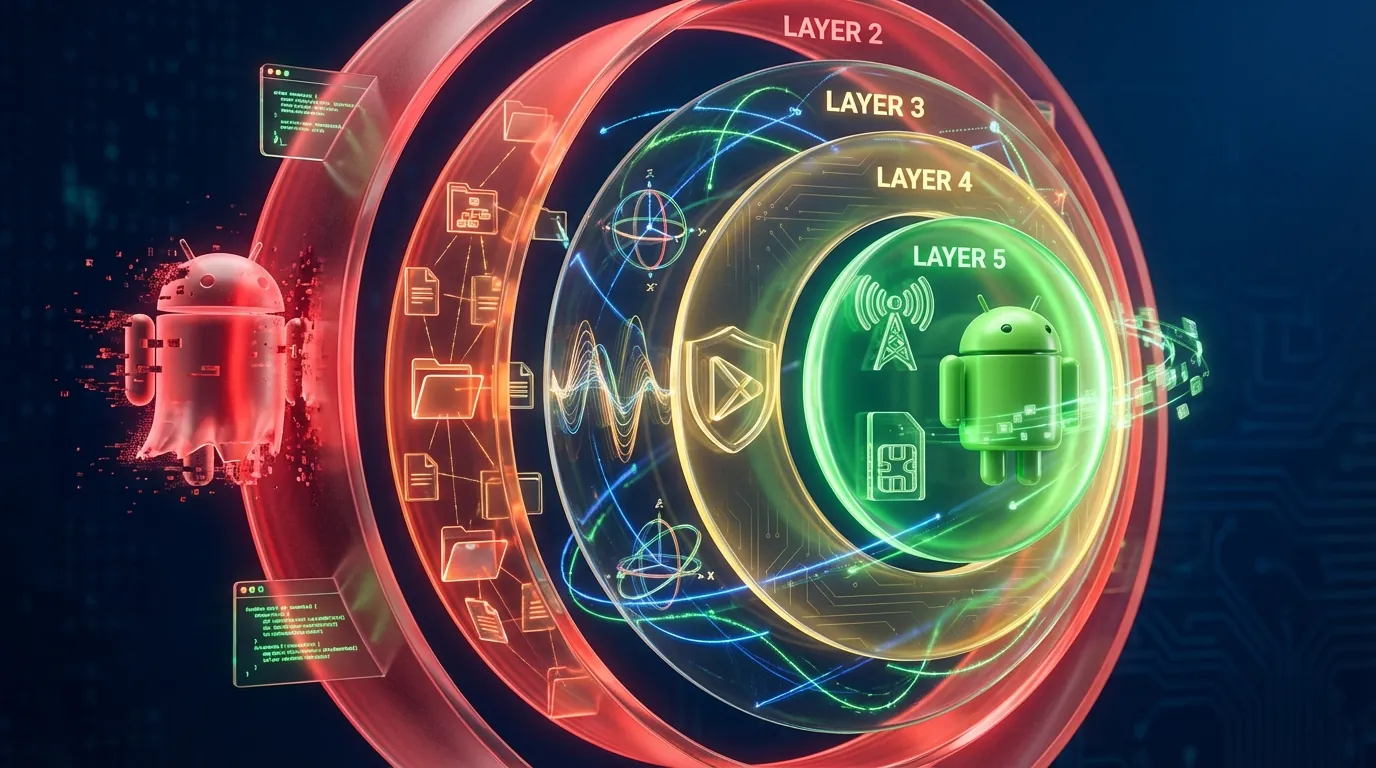
Apps and platforms use 5 technical methods to distinguish virtual devices from real hardware. All 5 methods exploit differences at the hardware layer — where emulators and VMI Cloud Phones cannot achieve perfect emulation.
1. System Property Check
Android stores device information in system properties. Emulators typically return telltale values:
ro.hardware=goldfishorranchu(QEMU virtual chip names)ro.product.model=sdk_gphone64_x86_64ro.build.fingerprintcontains the stringgeneric
Real ARM Cloud Phones return values from actual hardware: ro.hardware = samsungexynos8895, ro.product.model = SM-G950F — indistinguishable from retail devices.
2. File System Scan
Emulators create characteristic system files that real devices don't have:
/dev/qemu_pipe— communication channel with the QEMU hypervisor/system/lib/libc_malloc_debug_qemu.so— QEMU debug library/sys/qemu_trace— emulator trace file
Apps scan the file system and flag the device immediately when any of these files exist. Real ARM Cloud Phones contain zero QEMU files because they don't use emulation.
3. Sensor Check
Real Android devices have physical sensors: gyroscope, accelerometer, and GPS. These sensors return values that change continuously based on gravity, movement, and position.
Emulators lack physical sensors → return fixed values (usually 0) or null. Some emulators simulate sensor data, but the values don't fluctuate naturally — detection algorithms immediately recognize the rigid pattern.
Real ARM Cloud Phones use a sensor hub mounted on the physical mainboard → returning naturally fluctuating sensor data based on gravity and server room temperature.
4. Hardware Attestation (Play Integrity and SafetyNet)
Google's Play Integrity API (formerly SafetyNet Attestation) verifies hardware integrity at the deepest level. The API checks:
- CTS Profile Match: Does the device pass the Compatibility Test Suite?
- Basic Integrity: Has the system been modified (rooted, custom ROM)?
- Device Recognition: Can Google identify the hardware ID?
Emulators fail CTS Profile Match due to fake hardware → apps know it's not a real device → deny access or restrict features. Real ARM Cloud Phones pass CTS because the ARM chip, Android OS, and firmware are all OEM-original.
5. Network and Carrier Fingerprinting
The final layer apps check is network and carrier fingerprinting:
- IP Address: Emulators use home or datacenter IPs — datacenter IP ranges are easily identifiable
- Baseband Info: Emulators have no modem baseband → return empty values when
gsm.version.basebandis queried - Carrier Identity: Emulators have no SIM → no carrier information (MCC/MNC)
Real ARM Cloud Phones have modem baseband integrated on the mainboard, providing genuine carrier identity. Combined with proxy support to mask datacenter IPs, the device becomes indistinguishable from a regular smartphone on the network.
Device Fingerprint and Network Fingerprinting are two critical factors every platform checks. A dedicated article on Device Fingerprinting analyzes how Google identifies and classifies devices.
Detection Methods Summary
Why Real Cloud Phones Reduce Ban Risk to a Minimum
Real ARM Cloud Phones reduce ban risk by eliminating all 5 vulnerabilities that emulators and VMI Cloud Phones expose during detection checks. Here are 5 core reasons, ranked by impact:
1. Native ARM Execution — No binary translation → passes every hardware check. The Exynos 8895 or Snapdragon chip on a cloud phone executes ARM instructions natively, identical to a retail smartphone. Apps querying processor info receive genuine results.
2. Unique Device Fingerprint — Each device has its own unique IMEI, Android ID, and MAC address. No two cloud phones share a fingerprint, eliminating the risk of "one device running 50 accounts."
3. Real Sensor Data — Gyroscope, accelerometer, and GPS return naturally fluctuating values. Behavioral analysis algorithms on platforms detect no anomalies in sensor patterns.
4. Clean Android OS — Stock Android OS from Samsung firmware, no custom ROM, no Xposed framework, no Magisk traces. Play Integrity API verifies system integrity → pass.
5. Isolated Environment — Each cloud phone is a standalone sandbox: cookies, cache, storage, and network sessions are completely isolated. Platforms cannot link two accounts through shared data.
Ban rates when using emulators for social media multi-accounting range from 15–40% within 30 days, depending on platform and user behavior, according to Reddit community discussions. Real ARM Cloud Phones reduce this rate to a minimum by eliminating structural risk — where the very nature of a virtual device is itself the reason for detection.
⚠️ Important note: No solution guarantees 0% bans. Ban risk depends on both hardware risk and behavioral risk. Real ARM Cloud Phones eliminate hardware risk, but you still need to follow platform ToS and maintain natural usage patterns.
Virtual or Real Android? A Guide for 4 Specific Use Cases
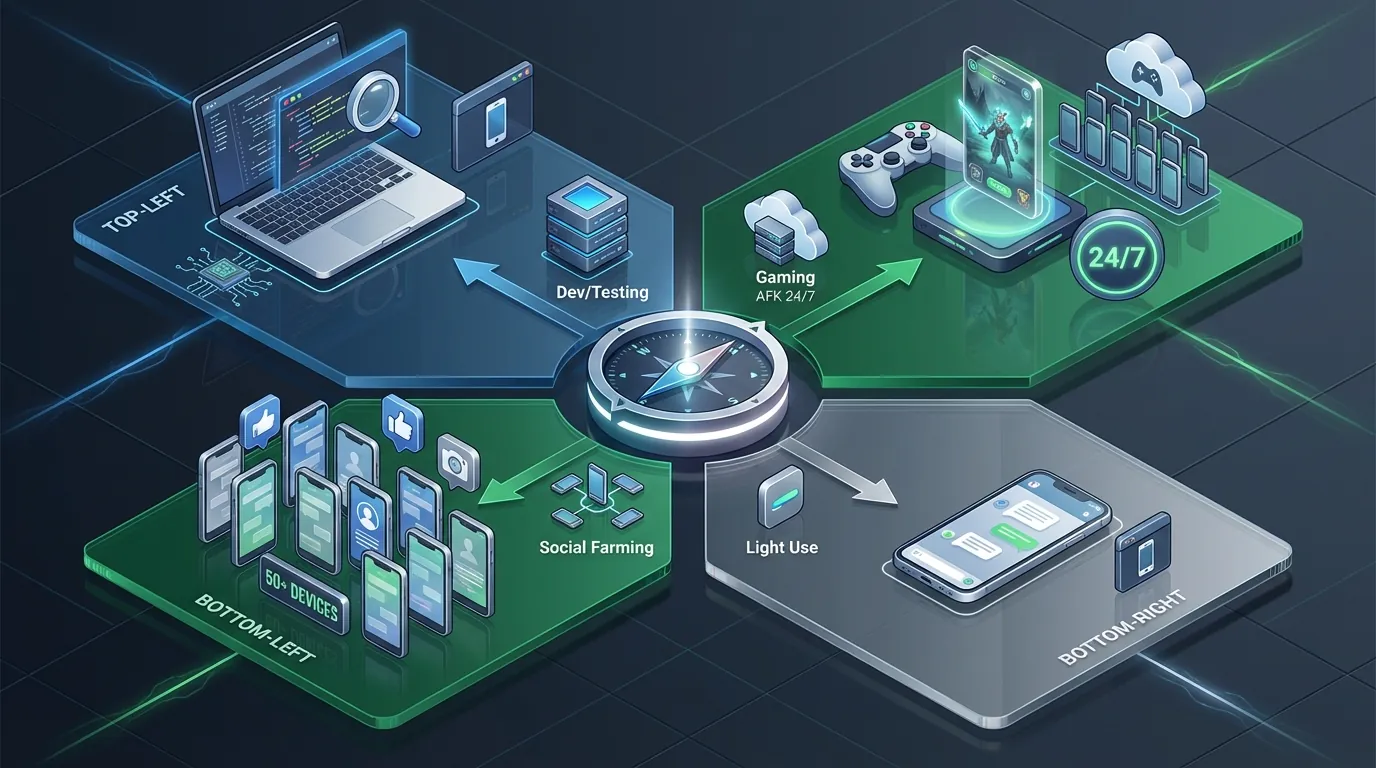
Choosing between Virtual Android and Real Android depends on 4 specific use cases: development/testing, AFK gaming, social farming, and light personal use. The table below summarizes recommendations for each scenario:
AFK Gaming 24/7
AFK gamers need 3 things: stable 24/7 connectivity, hardware rendering for 3D games (Genshin Impact, Honkai: Star Rail, AFK Arena), and undetectable hardware. Emulators fail all 3: shutting down your PC kills the game, software rendering causes lag, and anti-cheat systems increasingly detect x86 architecture. Real ARM Cloud Phones run games natively on Mali-G71 GPU, stay online 24/7 in a data center, and pass every hardware check.
Social Media Farming (50+ Accounts)
Managing multiple social media accounts (Facebook, TikTok, Instagram) requires each account to have a completely unique fingerprint. Running 50 emulator instances on 1 PC means 50 accounts sharing the same IP and hardware model → platforms detect and ban in bulk. Real ARM Cloud Phones provide 50 separate devices with 50 unique IMEIs, 50 Android IDs, and 50 isolated environments.
Development and Testing
App developers need to test UI, API responses, and basic functionality → the free Android Studio Emulator is sufficient. Android Studio provides built-in debugging tools, logcat, and layout inspector — tools cloud phones don't support. Emulators only fall short when you need to test on real hardware (sensors, NFC, fingerprint scanner).
Light Personal Use
If you only need 1–2 lightweight apps (Telegram, WhatsApp, news reading) and don't care about ban risk → a free emulator or budget VMI Cloud ($3–5/month) is sufficient. Real ARM Cloud isn't worth the investment when your tasks don't require anti-detect capabilities.
From "Virtual" to "Real in the Cloud" — How Cloud Phones Changed the Game
The history of virtual Android spans 3 evolutionary stages: Emulator (2010s), VMI Cloud (2018+), and Real ARM Cloud (2022+). Each stage solved the limitations of its predecessor.
Emulators emerged in the early 2010s for app development, then gamers and marketers adopted them. VMI Cloud appeared around 2018–2019 to eliminate local resource consumption — but still carried binary translation and inauthentic fingerprints.
Real ARM Cloud Phone represents the next leap: instead of emulating hardware, place actual hardware in the cloud. XCloudPhone removes batteries and screens from smartphone mainboards, mounts them in custom server racks, provides stable DC power, and streams video via WebRTC.
The cloud phone market is projected to reach $3.3 billion by 2031 at a CAGR of 28.9%, according to industry reports. A detailed Cloud Phone vs Emulator comparison analyzes the strengths and weaknesses of each approach in greater depth. The Phone Farm as a Service model is designed for agencies looking to scale without investing in physical infrastructure.
FAQ — Can Virtual Android Actually Replace a Real Phone?
"Is Virtual Android Free?"
Emulators (BlueStacks, LDPlayer, Nox) are completely free — download and run them on your PC instantly. Cloud phones (both VMI and Real ARM) charge a monthly subscription, ranging from $3–15/device depending on provider and configuration. XCloudPhone costs approximately $10/device/month.
"Can Google Detect Cloud Phones?"
Real ARM Cloud Phones pass Google's Play Integrity API because they run on genuine ARM chips with OEM firmware. Emulators typically fail CTS Profile Match → Google identifies them as incompatible devices. VMI Cloud Phones produce inconsistent results depending on the level of firmware emulation.
"How Much RAM Do I Need to Run an Emulator?"
Each emulator instance requires 2–4GB RAM and 1–2 CPU cores. Running 5 emulators simultaneously needs a PC with at least 16GB RAM and an 8-core CPU. Cloud phones require no local RAM — a web browser consumes approximately 200–400MB regardless of how many devices you control.
"Which Virtual Android Can Run Heavy Games?"
3D games like Genshin Impact and Honkai: Star Rail require GPU hardware rendering. Emulators use software rendering or local GPU passthrough → lag and unstable frame rates. Real ARM Cloud Phones run games natively on Mali-G71/Adreno GPU with hardware rendering at 60 FPS, identical to a handheld smartphone.
"Can I Use a VPN or Proxy on a Cloud Phone?"
Yes. Real ARM Cloud Phones support integrated proxy — enter your proxy details in the web dashboard and the device connects automatically. The system prevents WebRTC IP leaks, ensuring your proxy IP isn't exposed through WebRTC connections. Emulators also support VPN/proxy but lack built-in WebRTC leak protection.
"Is Virtual Android Legal?"
Virtual Android (both emulators and cloud phones) is entirely legal to use. No law prohibits running the Android operating system on different hardware or in the cloud. However, how you use the device must comply with each platform's Terms of Service — for example, Facebook and TikTok prohibit creating fake multiple accounts. Ban risk comes from violating ToS, not from the technology itself.