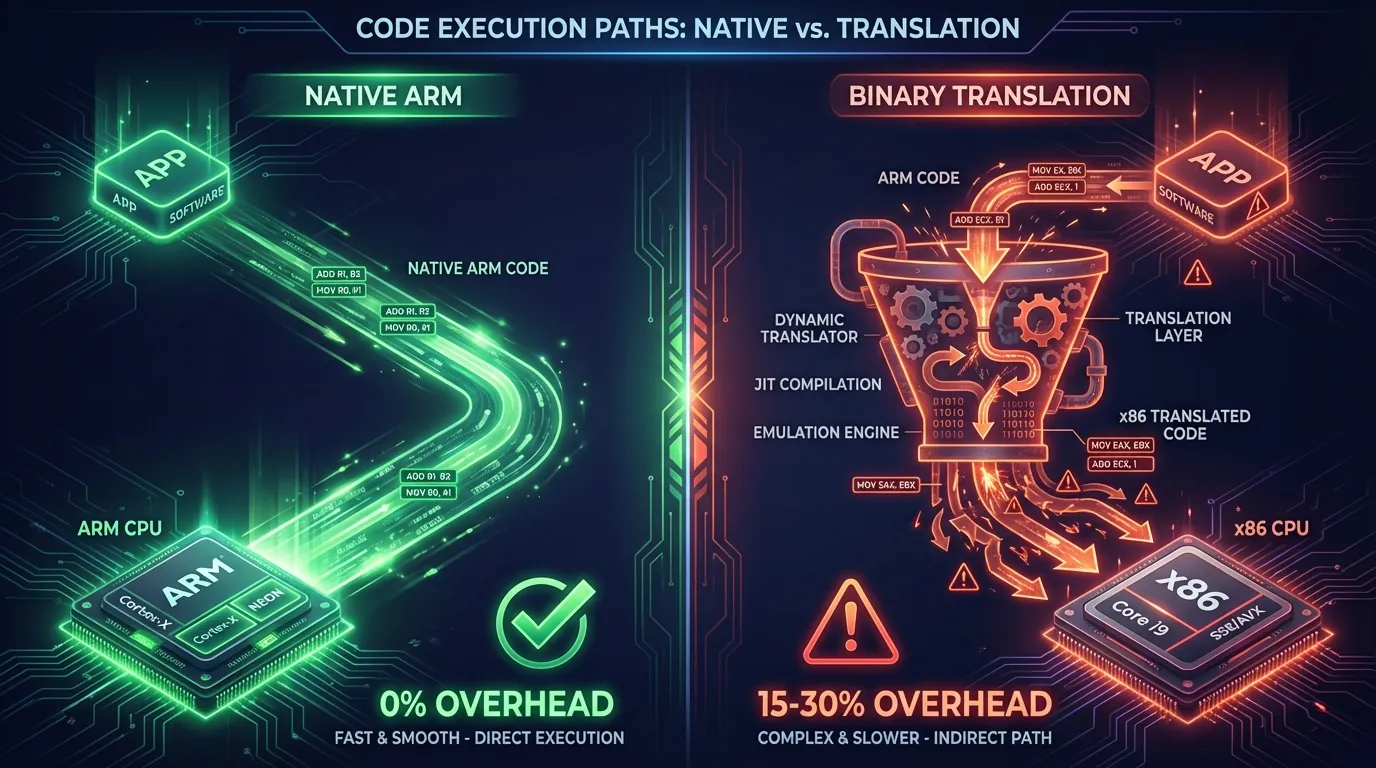
Every time you launch a game on an emulator, millions of ARM instructions must be translated into a language the x86 chip understands — in real time, instruction by instruction. This process is called Binary Translation, and it consumes 15-30% of the device's performance before the application begins doing anything useful.
Our comprehensive guide What Is Cloud Phone introduced the difference between ARM hardware and x86 emulation. Our analysis of ARM vs x86 Architecture explained why RISC and CISC create two fundamentally incompatible chip platforms. This article goes deeper into the technical mechanism — exactly what happens inside when ARM instructions are translated to x86, why the overhead cannot be eliminated, and the real-world impact on games, apps, and detection.
This article covers:
- What Binary Translation is — How ARM instructions are translated to x86 at the instruction level
- 3 types of Binary Translation — Interpretation, JIT, AOT, and their trade-offs
- Technical overhead — Why 15-30% performance is permanently lost
- NDK and native code — Why game engines crash on emulators
- 3 scenarios compared — Emulator, VMI Cloud, Real ARM Cloud Phone
- Detection mechanisms — How anti-cheat systems detect binary translation
What Is Binary Translation — When the CPU Must "Interpret" Every Instruction
Binary Translation is the process of converting machine instructions from a source ISA (Instruction Set Architecture) to a target ISA in real time. In the Android context, the source ISA is ARM and the target ISA is x86.
Why Translation Is Necessary — Machine Languages Are Incompatible
A processor only understands exactly one instruction set — the set it was designed to execute. ARM chips (Exynos, Snapdragon) understand ARM instructions. x86 chips (Intel Core, AMD Ryzen) understand x86 instructions. These two instruction sets are completely different — like English and Japanese.
Android applications are compiled into ARM machine code. When you install a game from Google Play, the APK file contains ARM binary code (typically arm64-v8a). This code contains millions of instructions specific to ARM chips — ARM register types, ARM memory access patterns, ARM instruction formats.
When an x86 emulator attempts to run this ARM code, the x86 chip doesn't understand ARM instructions. The system needs an intermediary translation layer — a binary translator — to convert each ARM instruction into an equivalent x86 instruction. This process runs continuously, non-stop, for the entire duration the application is running.
A Visual Analogy — The International Meeting
Think of binary translation like an international business meeting requiring an interpreter. The speaker talks in English (ARM), the listener only understands Japanese (x86). The interpreter (binary translator) sits between them, listening to each English sentence, translating to Japanese, then relaying it.
3 inevitable problems:
- Slower — Each sentence takes extra time going through the interpreter. The meeting runs 1.5× longer than direct communication
- Lost nuance — Some terms have no equivalent → the interpreter must use multiple words to explain → additional overhead
- Translation errors — The interpreter may misunderstand context → convey the wrong meaning → errors
Native ARM execution is direct communication — no interpreter, no overhead, no translation errors. The application speaks the exact language the chip understands.
3 Types of Binary Translation — Interpretation, JIT, and AOT
Binary Translation isn't a single technique — there are 3 main methods with varying levels of complexity and performance. Android emulators typically combine all three.
1. Interpretation — Translating One Instruction at a Time
Interpretation is the simplest method: read 1 ARM instruction → translate to x86 → execute → read the next instruction. Each instruction is translated individually, with no caching of translation results.
Advantage: simple, easy to implement, highly accurate. Disadvantage: the slowest — overhead reaches 100-1,000× compared to native. Reason: each ARM instruction requires 50-100 x86 instructions to "translate + execute." If an application calls the same function 1 million times, the system translates that same instruction 1 million times.
Interpreters are only used during emulator boot or for rarely-executed code paths.
2. JIT (Just-In-Time) — Translate Once, Cache the Result
JIT compilation translates blocks of ARM instructions to x86 when first encountered, then caches the result. The next time the same block is called, the system uses the cached translation — no re-translation needed.
The JIT process follows 4 steps:
- Detect — System identifies an untranslated ARM code block
- Translate — Convert the ARM block into an x86 block
- Optimize — Optimize the generated x86 code (remove redundant instructions, arrange registers)
- Cache — Store the x86 block in the Translation Cache for reuse
Advantage: 10-50× faster than interpretation after the cache fills up. Disadvantage: first-time calls are still slow (compilation overhead). Loading a new game level → stutter because JIT is translating new code. The cache also consumes RAM — each emulator instance needs an additional 200-500MB for the Translation Cache.
Intel Houdini — the most widely used ARM-to-x86 binary translation library on Android x86 — uses JIT.
3. AOT (Ahead-of-Time) — Pre-Translate, Then Run
AOT translation converts the entire ARM binary to x86 before the application runs — typically during installation. The translation result is stored on disk, and the application always runs the pre-translated version.
Apple Rosetta 2 uses AOT to translate x86 applications to ARM on MacBook M-series. Rosetta 2 achieves 78-79% of native performance — the most impressive figure in the history of binary translation, based on benchmarks from Apple and independent evaluators.
Advantage: no compilation stutter during execution, stable performance. Disadvantage: installation takes much longer (pre-translating the entire binary), consumes double the disk space (keeping both original and translated versions), and cannot handle self-modifying code or JIT-compiled code (like Chrome's V8 JavaScript engine).
3 Binary Translation Methods Compared
📌 Key takeaway: Whether JIT or AOT, binary translation always creates overhead — because x86 instructions generated from ARM translation are always more numerous and less optimized than code written natively for x86. Native ARM execution on cloud phones eliminates all three types of overhead entirely.
Technical Overhead — Why 15-30% Performance Is Permanently Lost
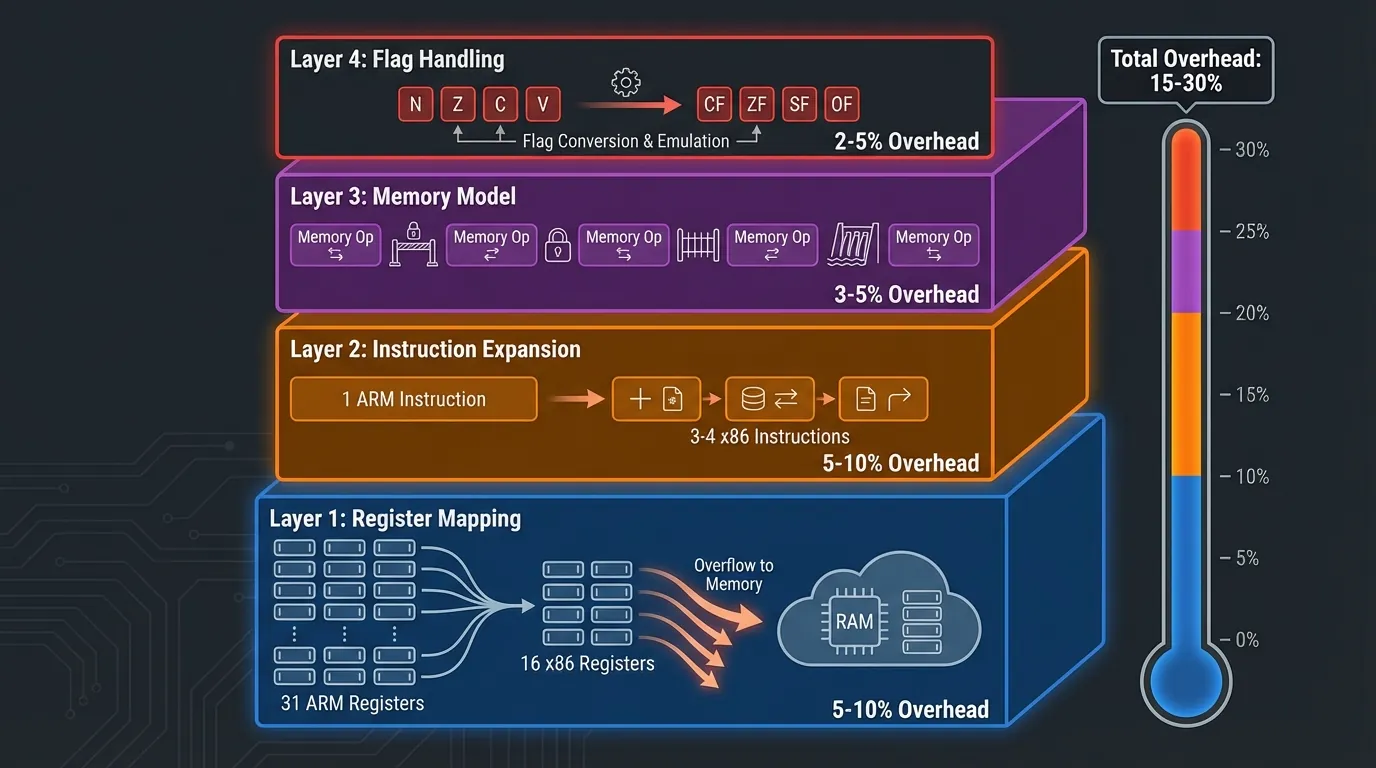
Binary translation creates overhead at 4 technical layers — each contributing to the total 15-30% performance penalty.
Layer 1: Register Mapping — Not Enough Registers
ARM (ARMv8-A) has 31 general-purpose 64-bit registers. x86-64 has only 16 general-purpose registers. When translating ARM code to x86, the binary translator must map 31 ARM registers onto 16 x86 registers — 15 registers short.
Solution: "excess" ARM registers are temporarily stored (spilled) into RAM. Each access to a spilled register = one RAM read/write operation. RAM is 100-200× slower than registers (1ns register latency vs 100-200ns RAM latency). Result: register spilling contributes 5-10% overhead.
Layer 2: Instruction Expansion — 1 ARM Instruction = Multiple x86 Instructions
Some ARM instructions have no direct equivalent in x86. The binary translator must use multiple x86 instructions to simulate a single ARM instruction.
3 specific examples:
- ARM Conditional Execution: ARM allows adding conditions to nearly every instruction (e.g.,
ADDEQ— add only when the equal flag is true). x86 lacks this feature → requires an additional branch instruction + comparison → 1 ARM instruction = 3-4 x86 instructions - ARM Load Multiple:
LDMloads multiple registers from RAM in a single instruction (e.g.,LDM R0, {R1-R8}loads 8 registers). x86 needs 8 separate MOV instructions - ARM Barrel Shifter: ARM integrates shift operations into every data processing instruction (e.g.,
ADD R0, R1, R2, LSL #3= add R1 to R2 shifted left by 3). x86 needs a separate shift instruction before adding → 2 instructions instead of 1
Result: x86 code generated from binary translation is 30-50% longer than native x86 code. More instructions = more instruction fetches, decodes, and executions = slower.
Layer 3: Memory Model Mismatch — ARM Is Relaxed, x86 Is Strict
ARM uses a Weakly Ordered Memory Model — allowing the CPU to reorder memory reads/writes for performance optimization. x86 uses Total Store Order (TSO) — guaranteeing write operations maintain consistent ordering.
The binary translator must insert additional memory barrier instructions when translating ARM code that assumes specific memory ordering — ensuring the translated program behaves correctly under x86's stricter memory model. Memory barriers cost 5-20 clock cycles each and occur thousands of times per second.
Layer 4: Flag Handling — Two Different Flag Systems
ARM and x86 use different status flag systems for comparisons and branching. ARM has 4 flags (N, Z, C, V) with update behaviors different from x86's flags (CF, ZF, SF, OF).
The binary translator must compute and update flags separately after each computation — adding 1-3 x86 instructions per ARM computation that affects flags. This overhead accumulates across millions of computations per second.
Overhead Summary by Layer
NDK and Native Code — Why Game Engines Crash on Emulators
NDK (Native Development Kit) allows Android developers to write C/C++ code that compiles directly to ARM machine code — bypassing Android Runtime (ART). NDK produces .so (shared library) files containing raw ARM binary code that calls CPU instructions directly.
When Apps Use NDK
3 types of applications use NDK most commonly:
- Game engines — Unity (powering 70%+ of mobile games), Unreal Engine, and Cocos2d-x compile their render pipelines, physics engines, and AI to native ARM code for maximum performance
- Media processing — FFmpeg (video processing), OpenCV (image processing), and TensorFlow Lite (AI inference) use ARM NEON SIMD instructions available only on ARM
- Cryptography and security — Encryption libraries, DRM, and anti-tamper systems use hardware-specific instructions for acceleration and emulator detection
4 Reasons NDK Apps Crash on x86 Emulators
1. NEON SIMD incompatibility — ARM NEON is a SIMD (Single Instruction, Multiple Data) instruction set that processes multiple data elements in parallel. x86 uses SSE/AVX for the same purpose but with entirely different encoding. The binary translator must map each NEON instruction to an SSE/AVX equivalent — this process isn't perfect. Some NEON instructions have no SSE equivalent → crash or incorrect results.
2. Hardware-specific instructions — Some NDK libraries call instructions exclusive to specific ARM chips (e.g., Samsung Exynos custom instructions). The binary translator doesn't know how to translate these → crash with SIGILL (Illegal Instruction) signal.
3. Inline assembly — Developers write ARM assembly directly in C/C++ for maximum performance (e.g., game physics, cryptography). ARM assembly is naked machine code — the binary translator must interpret each assembly instruction individually → higher mistranslation rate.
4. Memory alignment differences — ARM requires data aligned to 4-byte or 8-byte boundaries. x86 is more flexible with unaligned access. When the binary translator converts ARM code with strict alignment assumptions, crashes can occur because x86 handles alignment differently.
Real-World Impact on Games
ARM cloud phones run NDK code natively — no binary translation involved. ARM .so files execute directly on the ARM CPU, identical to a handheld phone. No crashes, no lag, no overhead.
3 Scenarios Compared — Emulator, VMI Cloud, and Real ARM Cloud Phone
3 types of "virtual Android" process ARM applications through 3 entirely different mechanisms. Our analysis of Virtual Android vs Real Android introduced these three types — this article analyzes the binary translation layer in depth.
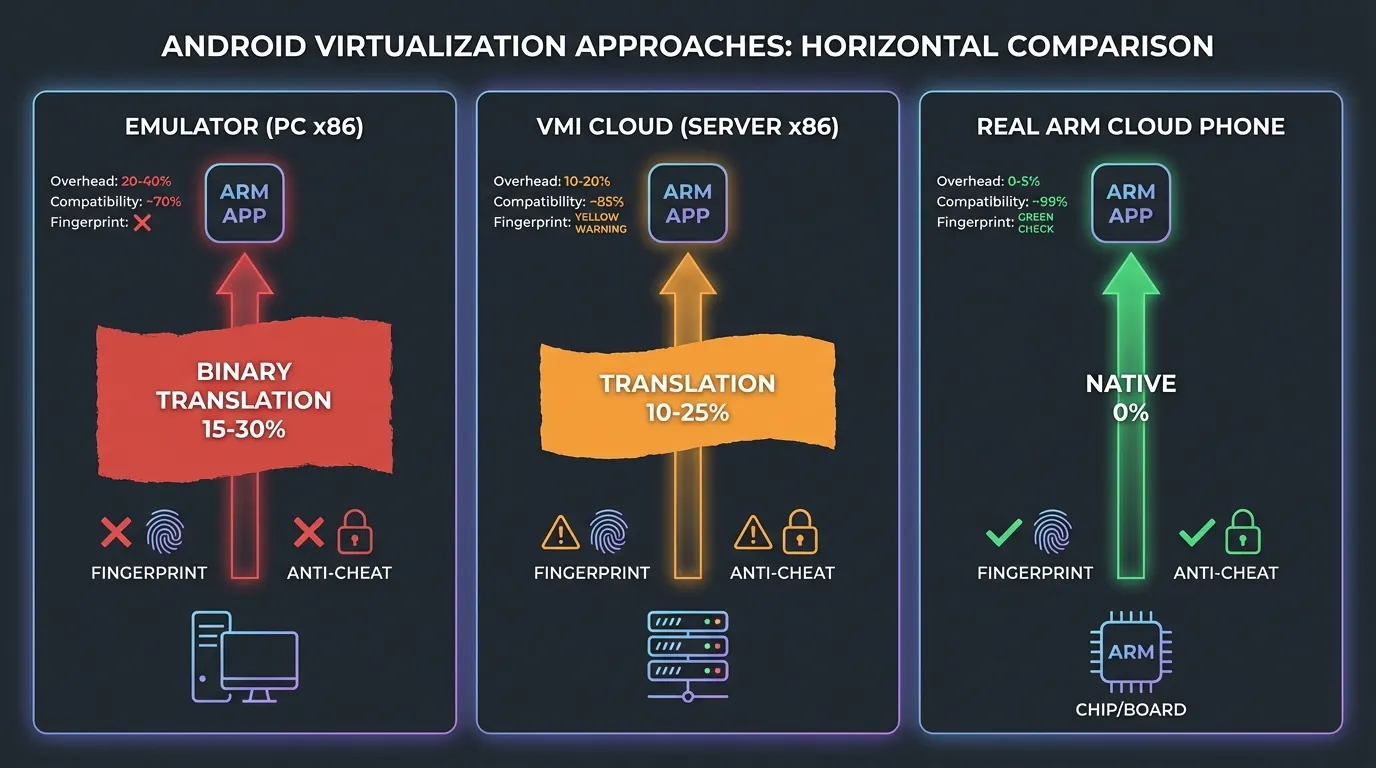
Scenario 1: Emulator (PC x86) — Full Binary Translation
Android emulators on PCs (BlueStacks, LDPlayer, Nox) run on the computer's x86 CPU. Every ARM instruction in applications must be translated to x86 through the binary translation layer.
Pipeline: ARM App → Intel Houdini / libhoudini → JIT Translation → x86 instructions → x86 CPU
Result:
- Overhead: 15-30% performance loss
- Resource cost: 2-4GB RAM + 30-60% CPU per instance
- Fingerprint:
cpu.abi = x86_64,hardware = goldfish→ instantly detected
Scenario 2: VMI Cloud (x86 Server) — Server-Side Binary Translation
VMI Cloud Phone (Virtual Mobile Infrastructure) runs Android in containers on x86 servers (Intel Xeon, AMD EPYC). Binary translation still occurs — but on more powerful server CPUs.
Pipeline: ARM App → Intel Houdini → JIT Translation → x86 instructions → Xeon/EPYC
Result:
- Overhead: 10-25% performance loss (lower than emulators due to powerful server CPUs)
- Resource cost: server resources (doesn't affect your PC)
- Fingerprint:
cpu.abi = x86_64, no real IMEI/sensors → still detectable
VMI Cloud is "better" than PC emulators because it doesn't consume local resources and powerful servers reduce perceived lag. However, the fundamental nature of binary translation doesn't change — overhead and fake fingerprints persist.
Scenario 3: Real ARM Cloud Phone — Zero Translation
Real ARM Cloud Phone uses actual ARM mainboards (Samsung Exynos 8895, Qualcomm Snapdragon) in server racks. The ARM chip directly executes ARM instructions — no binary translation layer exists.
Pipeline: ARM App → ARM CPU (native execution) → real hardware
Result:
- Overhead: 0% — native execution
- Resource cost: zero on your PC (browser only, ~200-400MB RAM)
- Fingerprint:
cpu.abi = arm64-v8a,hardware = samsungexynos8895→ identical to a real phone
Detailed 3-Scenario Comparison
Detection Mechanisms — How Anti-Cheat Systems Detect Binary Translation
Anti-cheat systems and social media platforms detect binary translation through 4 technical methods — all exploiting traces left by the translation layer.
1. CPU Architecture Query
Applications call System.getProperty("os.arch") or read /proc/cpuinfo to check CPU architecture. On an x86 emulator:
On a real ARM cloud phone:
Anti-cheat check: if architecture = x86 → device is an emulator → action (ban, separate lobby, feature restriction).
2. Translation Timing Anomaly
Binary translation creates abnormal timing patterns at the instruction level. Native ARM instructions execute in 1-3 stable clock cycles. ARM instructions translated to x86 via JIT execute with variable timing — because:
- First call: JIT compilation → 1,000+ cycles (compilation overhead)
- Subsequent calls: cache hit → 5-10 cycles (faster but still slower than native)
Anti-cheat measures timing variance across a series of instructions → high variance = binary translation → device is an emulator.
3. Houdini Library Detection
Intel Houdini is the most common binary translation library on Android x86. Applications check for the existence of:
/system/lib/libhoudini.so— main Houdini library/system/lib/arm/— directory containing ARM library stubsdalvik.vm.isa.arm.variant— system property reporting emulated ARM
If Houdini files exist → device uses binary translation → emulator. Real ARM Cloud Phones contain none of these translation files because no translation is needed.
4. Instruction Set Feature Detection
Each architecture has unique instruction set extensions. ARM has NEON, SVE, and Crypto Extensions. x86 has SSE, AVX, and AVX-512.
Applications execute a specific NEON instruction and check the result. On native ARM: correct result in 1 cycle. On x86 via translation: the result may be incorrect (edge case) or return an exception (unimplemented instruction).
Modern anti-cheat systems combine all 4 methods into multi-layer detection — an application only needs one method to return positive to conclude the device is an emulator.
Rosetta 2 and Prism — Lessons From the Best Binary Translation
Apple Rosetta 2 and Microsoft Prism are the two best binary translation solutions available today — but even they cannot completely eliminate overhead.
Apple Rosetta 2 — The Binary Translation Benchmark
Rosetta 2 translates x86 applications to ARM on MacBook M-series, achieving 78-79% of native ARM performance. Rosetta 2 uses AOT translation combined with JIT fallback for self-modifying code.
3 techniques Rosetta 2 employs to reduce overhead:
- Instruction fusion — Merges multiple consecutive x86 instructions into a single optimized ARM sequence
- Paired load/store — Combines two consecutive memory access instructions into a single ARM LDP/STP instruction
- Stack frame optimization — Merges setup/teardown of stack frames to reduce register pressure
Despite this, Rosetta 2 still loses 20-22% of performance compared to native. Compute-heavy applications (video editing, 3D rendering) feel the difference clearly.
The Lesson for Cloud Phone
Rosetta 2 demonstrates that even with billions of dollars in engineering investment (Apple), binary translation can never achieve 100% native performance. The reason: fundamental RISC vs CISC architectural differences (register count, instruction format, memory model) create overhead that cannot be eliminated.
ARM cloud phones solve this problem entirely by using the exact architecture applications were compiled for — ARM running ARM, natively, zero translation.
Frequently Asked Questions About Binary Translation and Native ARM
"Does Binary Translation Affect AFK Games?"
Binary translation affects every Android application running on x86 — including AFK games. While AFK games are simpler than 3D titles, overhead persists: input lag increases by 50-100ms, battery drain (on PCs) increases by 20-30%, and crash rates rise when games update their NDK libraries.
"Why Does BlueStacks Still Run Most Apps?"
BlueStacks uses Intel Houdini (JIT binary translation) combined with an x86-native Android build for system components. Houdini works adequately for simple applications (chat, browser, 2D games). Houdini struggles with heavy NDK apps (3D games, video editing) and fails completely against anti-cheat systems that check CPU architecture.
"Does ARM Cloud Phone Need Binary Translation?"
No — this is the core differentiator. ARM cloud phones use real ARM chips (Exynos, Snapdragon) in data centers. Android applications compiled for ARM run natively on ARM chips — zero translation, zero overhead.
"Is 15-30% Overhead Significant?"
15-30% overhead directly impacts three factors: frame rates drop 15-30% (a 60 FPS game falls to 42-51 FPS), input latency increases (real-time games experience delayed responses), and crash rates rise (NDK apps become incompatible). For high-value accounts (6-month nurture accounts, $500+ game accounts), overhead is even more dangerous — because it comes paired with fake fingerprints that lead to bans.
"Is Intel Houdini a Good Binary Translation Solution?"
Intel Houdini is the best binary translation solution for Android x86 — but still doesn't achieve native performance. Houdini reduces overhead to 15-25% (depending on the application), sufficient for routine tasks. Houdini fails on two fronts: (1) fingerprints still report x86, and (2) complex NDK apps still crash.
"Can Binary Translation Be Detected?"
Yes — anti-cheat systems detect binary translation through 4 methods: CPU architecture query, timing anomaly, Houdini library detection, and instruction set feature testing. While emulators can fake some system properties, the underlying CPU architecture (x86) and timing patterns cannot be fully concealed.
From Binary Translation to Choosing a Solution — Connecting to Reality
Binary translation exists because Android applications and x86 chips speak two different languages. Every emulation solution — from BlueStacks on PCs to VMI Cloud on servers — must bear the overhead and detection risk from this translation layer.
ARM cloud phones eliminate binary translation entirely by using real ARM mainboards — Exynos 8895 or equivalent chips — in data centers. Applications run natively, fingerprints are authentic, overhead is zero.
Try a real ARM Cloud Phone — starting at just $10/device.
→ Start your XCloudPhone trial | Join the community on Telegram, Discord, and YouTube