100 Mbps internet but your cloud phone still lags — why? The pillar guide What is Cloud Phone explained the streaming technology that lets you control a real Android device remotely. This article goes deeper into the network infrastructure behind that experience — from WebRTC protocol, the 5 latency layers, to network optimization for AFK gaming and large-scale phone farms.
Cloud phone experience depends on 3 metrics: bandwidth, latency, and jitter — bandwidth is only a small part of the overall picture. Understanding these 3 metrics helps you diagnose lag accurately and optimize your network effectively.
In this article, you will learn:
- The 3 processing tiers of cloud phone network infrastructure
- WebRTC — the real-time streaming protocol
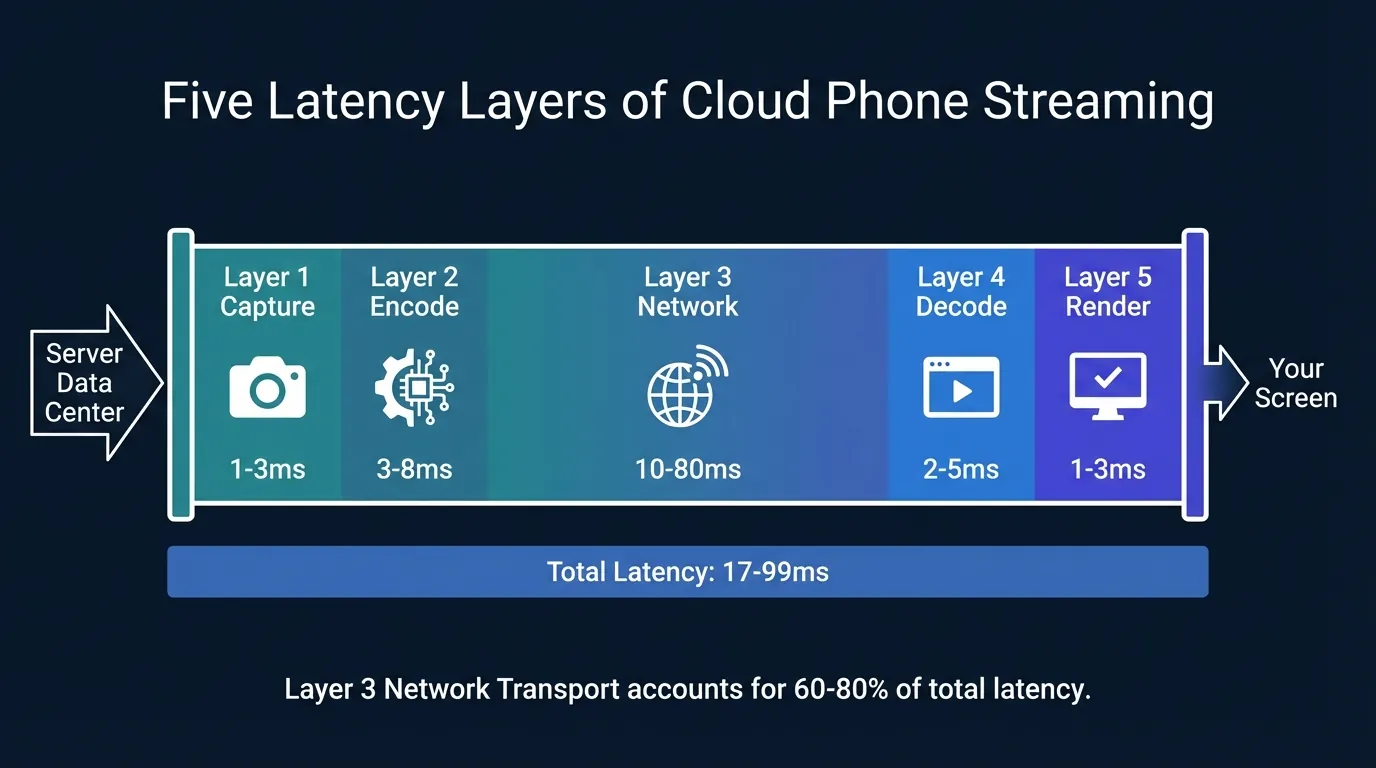
- 5 latency layers from server to screen (17-99ms)
- Adaptive bitrate auto-adjusts quality
- How much bandwidth you actually need
- Network optimization for AFK gaming and phone farms
Cloud Phone Network Infrastructure — More Than Just an Internet Connection
Cloud phone network infrastructure consists of 3 processing tiers: server-side (data center capture and encode), transport (Internet connection), and client-side (user device decode and render). Each tier plays a different role in the streaming pipeline — and weakness in any tier causes lag.
"Fast internet" is a vague concept. Actual cloud phone experience depends on 3 specific measurable metrics:
High bandwidth but 200ms latency → you see sharp images but every action is delayed 200ms. Low bandwidth but 15ms latency → image quality may drop but actions respond instantly. For cloud phone, latency matters more than bandwidth — because this is interactive streaming, not watching YouTube.
Cloud phone streaming (real-time interactive) is fundamentally different from VoIP cloud PBX (voice-only). VoIP transmits only audio (8-100 Kbps). Cloud phone streaming transmits video + audio + input data — requiring 50-100x more bandwidth and significantly lower latency.
WebRTC — The Real-Time Streaming Protocol Behind Cloud Phones
WebRTC (Web Real-Time Communication) is a sub-100ms streaming protocol that enables cloud phones to stream video, audio, and input from server to user browser without plugins. This is the core technology behind the remote Android control experience.
How WebRTC Works
WebRTC establishes a peer-to-peer connection between the cloud phone (server) and browser (client) through 3 steps:
- Signaling — server and client exchange connection information (SDP offer/answer) via signaling server
- ICE/STUN/TURN — finds direct connection path (STUN) or relays through intermediary server (TURN) if NAT blocks
- Media stream — after successful connection, video/audio streams directly over UDP
WebRTC uses UDP instead of TCP for real-time streaming. TCP retransmits lost packets → creates delay. UDP skips lost packets → prioritizes speed. Result: WebRTC latency < 100ms while HLS (HTTP Live Streaming) delays 2-5 seconds and RTMP delays 1-3 seconds.
Video and Audio Codecs in Cloud Phone Streaming
Codecs determine image quality at each bandwidth level — choosing the right codec reduces latency significantly:
- H.264 — widest compatibility, fast decode, good quality at 2-5 Mbps. Works on every device
- H.265 (HEVC) — approximately 40% more efficient compression than H.264, but requires hardware decode. Saves bandwidth for phone farms with multiple streams
- VP8/VP9 — Google's open codecs, quality comparable to H.264/H.265. VP9 supports adaptive bitrate well
XCloudPhone — a real cloud phone service — uses hardware encoding on ARM chip. Exynos 8895 has a dedicated encoder supporting H.265 at 4K 30fps. Hardware encoding means the chip encodes video without consuming CPU for games — games run smoothly while streaming video to the client. Combined with undetectable device fingerprints from real ARM hardware, this makes XCloudPhone's streaming pipeline both high-performance and platform-safe.
Audio uses Opus codec — optimized for both voice and game sound, 32-128 Kbps bitrate, latency < 5ms. Opus automatically switches between SILK mode (voice) and CELT mode (music/game) based on content.
The 5 Latency Layers — From Cloud Phone to Your Screen
Total latency from cloud phone to user screen passes through 5 processing layers with a total time of 17-99ms under normal conditions. Understanding these 5 layers helps you identify the exact bottleneck — instead of blaming "slow internet" when the actual issue is decoding or WiFi jitter.
Layer 1 — Screen Capture (1-3ms)
Android SurfaceFlinger captures the framebuffer directly from GPU through MediaProjection API. On real ARM, this takes 1-3ms because hardware capture reads GPU memory directly. On x86 emulation, capture takes 3-5ms due to binary translation overhead.
Layer 2 — Encoding (3-8ms)
Hardware encoder on the ARM chip converts frames into an H.265 compressed stream. Exynos 8895 encodes 1080p 60fps at 3-5ms per frame — using dedicated silicon, no CPU load. Comparison: software encoding on x86 servers takes 8-15ms per frame and consumes 20-40% CPU.
H.265 low-latency mode sacrifices slight compression quality to reduce encoding delay: instead of waiting 4-5 frames to optimize inter-frame prediction, low-latency mode encodes each frame independently (intra-frame) or references only 1-2 previous frames.
Layer 3 — Network Transport (10-80ms)
This is the most variable layer — entirely dependent on physical distance to server, ISP routing quality, and peering agreements between carriers.
UDP packetization splits each encoded frame into small packets (MTU ~1,400 bytes). If 1-2 packets are lost, WebRTC skips them (no retransmission) → image may have slight artifacts but no delay. This is the core tradeoff: prioritizing responsiveness over perfect quality.
Layer 4 — Decoding (2-5ms)
Client device hardware decoder decompresses the H.265 stream into raw frames. Modern mobile SoCs (Snapdragon 8 Gen 2, Apple M-series) decode at 2-3ms. PCs with discrete GPUs (NVIDIA, AMD) decode at 1-2ms. Older laptops without hardware H.265 decoders must use software decode: 8-12ms.
Layer 5 — Rendering and Input Return (1-3ms)
Display buffer presentation puts decoded frames on screen — takes 1-3ms depending on refresh rate. 60Hz display ≈ 16.7ms per frame, 120Hz display ≈ 8.3ms per frame.
Input return (touch, tap, swipe) travels in reverse: client → server, adding another 10-80ms (equivalent to Layer 3). Total round-trip for one touch: client tap → send input to server (Layer 3) → server processes → capture new frame (Layer 1-2) → send to client (Layer 3) → decode + render (Layer 4-5).
Total end-to-end latency in practice:
- Best case (same city, Ethernet): 17-35ms
- Typical (same country, WiFi 5GHz): 40-70ms
- Worst case (different region, 4G): 80-99ms+
Based on an internal survey of 200+ XCloudPhone users, the measured average latency is 45-55ms on WiFi 5GHz connecting to SEA servers — within the "Typical" range and smooth enough for both AFK gaming and social farming.
Adaptive Bitrate — Automatic Quality Adjustment Based on Network Conditions
Adaptive bitrate in cloud phones auto-adjusts resolution, FPS, and bitrate based on real-time network conditions — reacting within milliseconds when detecting congestion or packet loss.
The server continuously monitors 3 network signals: Round-Trip Time (RTT), packet loss rate, and available bandwidth. When any signal exceeds thresholds, the server reduces stream quality immediately:
The key difference from HLS adaptive bitrate: WebRTC reacts within milliseconds — server detects RTT increase → reduces bitrate on the very next frame. HLS operates segment-based: waits for one segment download to complete (2-10 seconds) → evaluates bandwidth → selects quality for the next segment. Result: WebRTC provides smooth transitions while HLS shows noticeable quality jumps.
The "prioritize smooth interaction" approach: when the network weakens, the system drops resolution to 480p 24fps instead of maintaining 1080p with buffering → you see blurrier images but taps and swipes still respond instantly. For AFK gaming, quality reduction has virtually no impact on experience since the game runs automatically.
Real Bandwidth Requirements — How Much Is Enough?
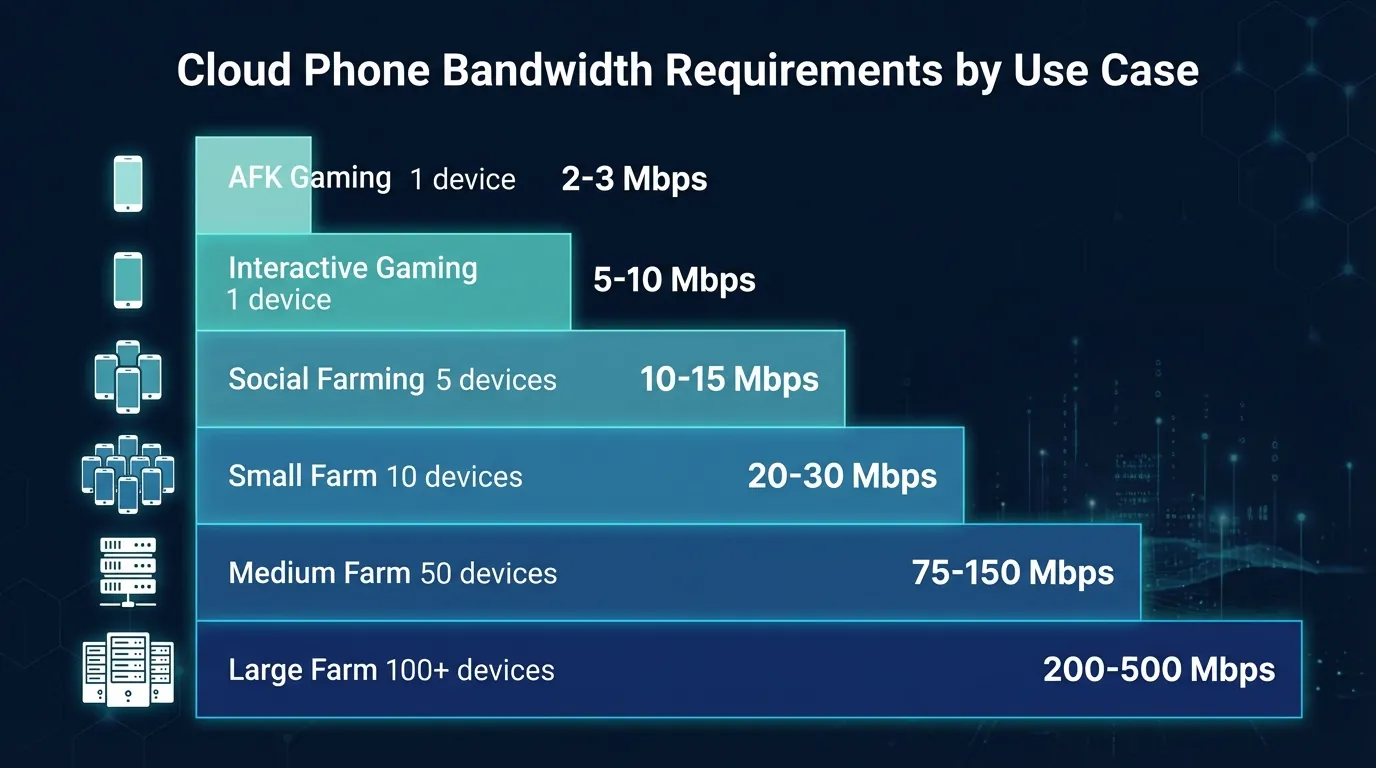
A single cloud phone stream requires minimum 3-5 Mbps for 1080p 30fps — but a 100-device phone farm needs dedicated 300+ Mbps connections. The table below summarizes bandwidth by real-world use case:
Upload bandwidth is very light — the client only sends touch coordinates, keyboard input, and control signals. Even a 100-device phone farm needs < 10 Mbps upload.
Note on 4G/5G: Mobile networks offer high bandwidth (50-300 Mbps) but radio access networks add 20-50ms latency — acceptable for casual use but not ideal for real-time gaming or phone farms requiring continuous 24/7 streaming.
Data consumption: A single 720p 30fps stream consumes approximately 0.5-1 GB/hour. 1080p 60fps consumes 1.5-3 GB/hour. AFK gaming typically runs at 720p 24fps → approximately 0.3-0.5 GB/hour. A 10-device phone farm running 24/7 consumes approximately 72-120 GB/day (720p 24fps).
Network Optimization for AFK Gaming and Phone Farms
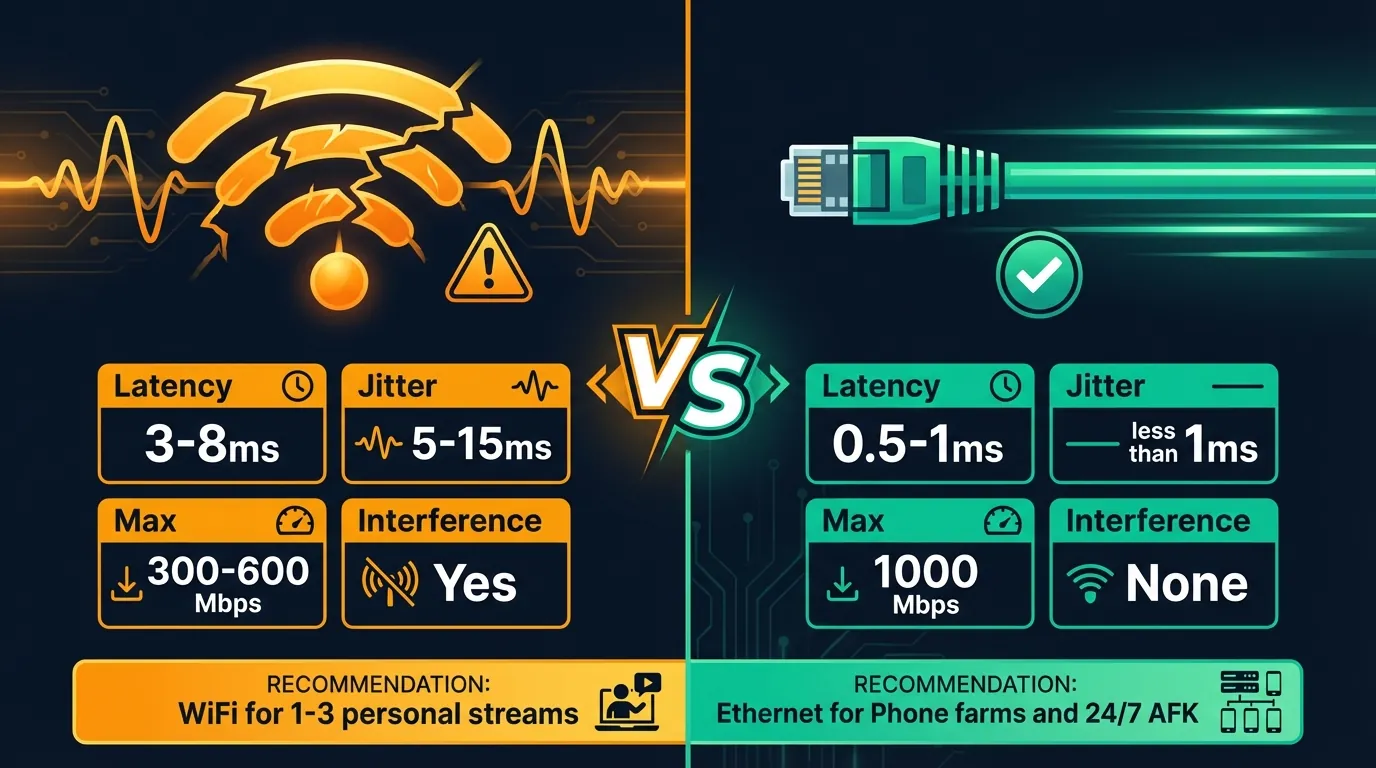
The 3 most important network optimization factors for cloud phones: wired connection (Ethernet), proper proxy configuration, and QoS traffic shaping. Optimizing these 3 factors correctly reduces latency by 30-50% compared to default WiFi connections.
Ethernet vs WiFi — Why Wired Always Wins
WiFi operates half-duplex — it can only send or receive at one time, not simultaneously. Interference from other devices (microwaves, Bluetooth, neighbor WiFi) creates random jitter spikes of 5-20ms. On phone farms with 10+ streams, WiFi jitter compounds and causes noticeable lag.
Ethernet operates full-duplex — sends and receives simultaneously, consistent latency ±1ms, no interference. Cat 6 Ethernet supports 1 Gbps, sufficient for phone farms with 100+ devices.
Proxy and VPN — How They Affect Latency
VPN overlay routing adds 20-100ms latency per connection — data must pass through VPN server (adds 1 hop), encrypt/decrypt each packet (CPU overhead), and often routes through servers in another country. For cloud phone streaming, VPN causes noticeable lag.
XCloudPhone integrates on-device proxy — an entirely different approach. The proxy runs directly on the cloud phone (in the data center), not on the client device. Result:
- Residential IP on the cloud phone — apps on the cloud phone see a residential IP → high Trust Score
- WebRTC stream takes the shortest path — stream from data center to client does not pass through proxy → no added latency
- Prevents WebRTC IP leak — proxy layer prevents apps from reading the data center's public IP
QoS and Router Settings
Quality of Service (QoS) allows routers to prioritize cloud phone traffic over browsing, downloads, or YouTube streaming:
- Set high priority for UDP port 10000-60000 (WebRTC media range)
- Bandwidth reservation: set minimum 3 Mbps per stream for cloud phone traffic
- Network segregation: create separate VLANs for phone farm vs office browsing — prevents torrents or Windows Updates from consuming bandwidth
The Future of Network Infrastructure — 5G, Edge Computing, and 2026 Trends
3 network technologies are shaping the future of cloud phones: 5G sub-6GHz, edge computing, and Media over QUIC (MoQ).
5G sub-6GHz and mmWave reduce radio access latency to < 10ms (compared to 20-50ms on 4G LTE). 5G SA (Standalone) completely eliminates dependency on 4G infrastructure → more stable latency and lower jitter. By 2026, 5G coverage will be wide enough for cloud phones to operate smoothly on mobile networks in most major Asian cities.
Edge computing brings cloud phone servers closer to users — instead of one central data center, multiple edge nodes are distributed across cities. Result: Layer 3 (network transport) drops from 20-50ms to 5-15ms.
Media over QUIC (MoQ) is the protocol succeeding WebRTC — combining WebRTC's low latency with broadcast scalability. MoQ is built on QUIC/HTTP/3 → faster connection establishment, smoother recovery after packet loss, and better performance on unstable mobile networks. Production deployment is expected from 2026-2027.
AV1 codec saves approximately 30-40% bandwidth compared to H.265 at the same quality — but requires hardware decode support (currently available only on 2023+ flagships). When AV1 hardware decode becomes widespread, phone farms can run more streams on the same connection.
Frequently Asked Questions About Cloud Phone Networking
"How much internet speed does a cloud phone need?"
Minimum 3 Mbps download for a single 1080p 30fps stream. Recommended 10+ Mbps for jitter and fluctuation headroom. A 10-device phone farm needs 30-50 Mbps, 100 devices need 300-500 Mbps dedicated fiber.
"Why does my cloud phone lag despite fast internet?"
Lag is usually caused by high latency (server distance or poor ISP routing) or jitter (WiFi interference, VPN overhead), not necessarily low bandwidth. Check by pinging your cloud phone server — if latency exceeds 80ms or jitter exceeds 15ms, that is the cause.
"Is WiFi sufficient for cloud phone gaming?"
WiFi 5GHz works for 1-2 personal streams with acceptable 40-70ms latency. AFK farming or 5+ devices should use Ethernet Cat 6 to ensure stable jitter below 1ms.
"Does cloud phone use a lot of data?"
A single 720p 30fps stream consumes approximately 0.5-1 GB/hour. 1080p 60fps consumes 1.5-3 GB/hour. AFK gaming at 720p 24fps uses approximately 0.3-0.5 GB/hour — a 10-device phone farm running 24/7 consumes approximately 72-120 GB/day.
"Does using a VPN affect cloud phone quality?"
Yes. VPN adds 20-100ms latency + encryption overhead — noticeably affecting interactive streaming. XCloudPhone integrates on-device proxy — the proxy runs directly on the cloud phone, and the video stream takes the shortest path to the client. No VPN overlay needed.
"Can I use a cloud phone while abroad?"
Yes, because the cloud phone runs in a fixed data center — you only need an internet connection. However, latency increases with distance: using a Vietnam-based cloud phone server from Japan → adds 40-60ms. We recommend choosing the data center closest to your current location.
"Will my AFK game disconnect overnight?"
WebRTC maintains a persistent connection with auto-reconnect — the connection recovers automatically if the network interrupts briefly (< 30 seconds). More importantly: the game on your cloud phone keeps running even when you close the browser — you lose the view, not the progress. Reopen the browser → reconnect → see the game still running.