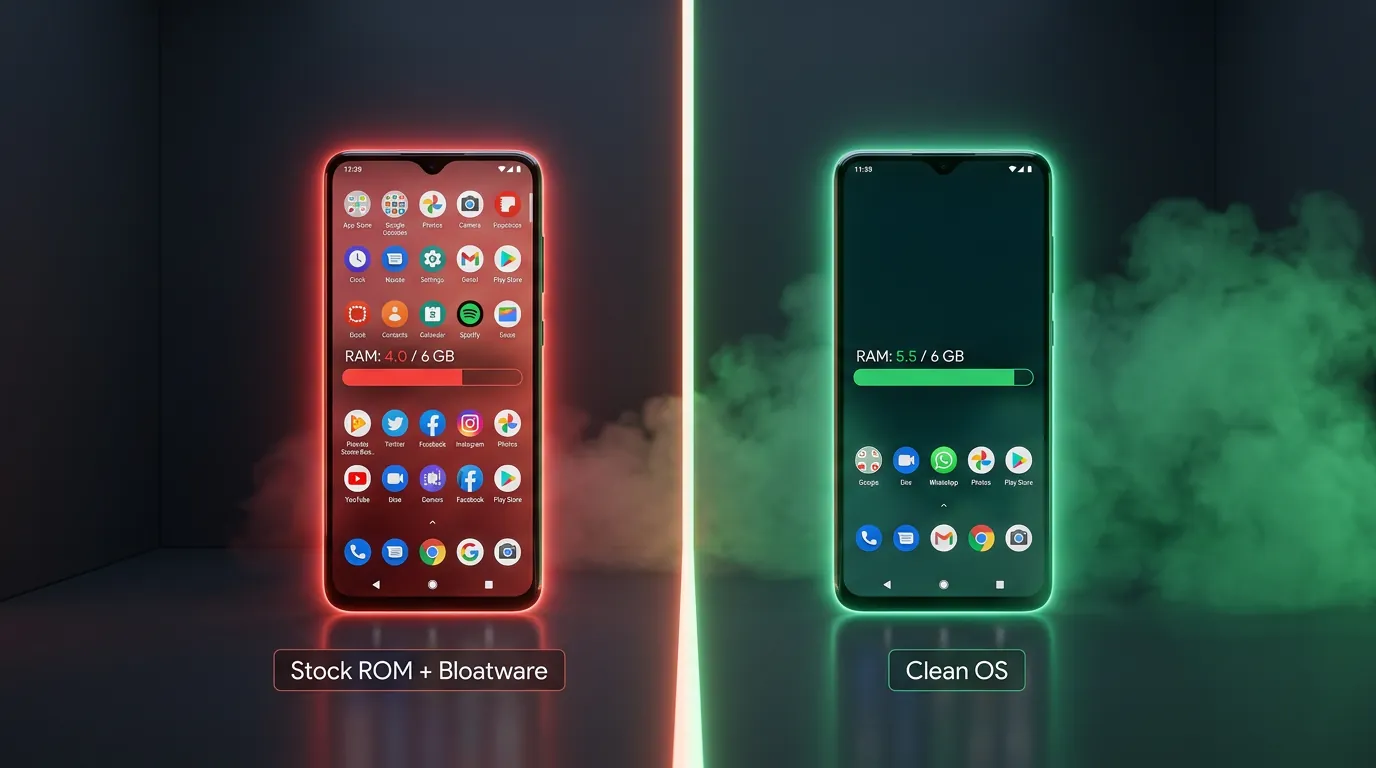
A brand-new smartphone ships with 30-50 pre-installed apps — from OEM weather apps to carrier trial games. These apps (bloatware) consume background RAM, burn CPU cycles, and slow down the device from its very first boot. On a 6 GB RAM phone running Samsung One UI, bloatware eats up to 2.0 GB RAM — leaving you only 4.0 GB for actual games and apps.
The article What is Cloud Phone introduced cloud phones running a streamlined operating system. This article deep-dives into Android Clean OS: what AOSP is, how bloatware impacts performance, 5 OS optimization techniques used on cloud phones, head-to-head benchmarks on identical hardware, and 3 optimized profiles for gaming, farming, and testing.
What Is Android Clean OS? AOSP and the Stripping Principle
Android Clean OS is an Android operating system built on AOSP (Android Open Source Project) with all bloatware and unnecessary services removed — keeping only the core components needed for gaming, farming, and automation.
AOSP — The Open Source Foundation
AOSP is the original Android source code released by Google — including Linux Kernel, Android Runtime (ART), and Application Framework. AOSP does not include Google Mobile Services (GMS), Samsung apps (One UI), Xiaomi services (MIUI), or any OEM software. This is "bare" Android — lightweight, fast, and fully controllable.
3 Types of Android OS
The market has 3 types of Android operating system:
- Stock ROM OEM — Android + manufacturer's custom skin and apps. Examples: Samsung One UI (40-50 pre-installed apps, 2.0 GB background RAM), Xiaomi MIUI (50-70 apps, 2.5 GB background RAM), and OnePlus OxygenOS (20-30 apps, 1.2 GB background RAM)
- Custom ROM — Community-built ROMs from AOSP. Examples: LineageOS, Pixel Experience, and Paranoid Android. Lighter than Stock ROM but not 100% production-stable
- Clean OS (Cloud Phone) — Streamlined AOSP purpose-built for cloud deployment. Only 5-7 core apps, 0.5 GB background RAM — optimized for 24/7 operation on ARM servers
5 Stripping Principles
Cloud phones apply 5 principles when building Clean OS:
- Remove bloatware — Delete all OEM and carrier apps
- Minimal GMS — Keep only core Google Play Services, remove dozens of secondary background services
- Root access built-in — Magisk pre-installed, toggle on/off as needed
- Purpose-built kernel tuning — CPU governor, I/O scheduler, thermal limits configured for 24/7 server operation
- Anti-detect patches — build.prop and system properties sourced from real hardware — Carrier Config, Baseband version, hardware serial matching genuine phone specifications
VMI platforms (technology used by Geelark, VMOS Cloud) run virtualized Android on x86 — the OS is modified to fit into containers, with unclear AOSP stripping levels. Clean OS on Real Cloud Phone (XCloudPhone) differs fundamentally: it runs on real ARM hardware (analyzed in What is Cloud Phone), preserving original kernel parameters and hardware identifiers.
How Bloatware Reduces Device Performance
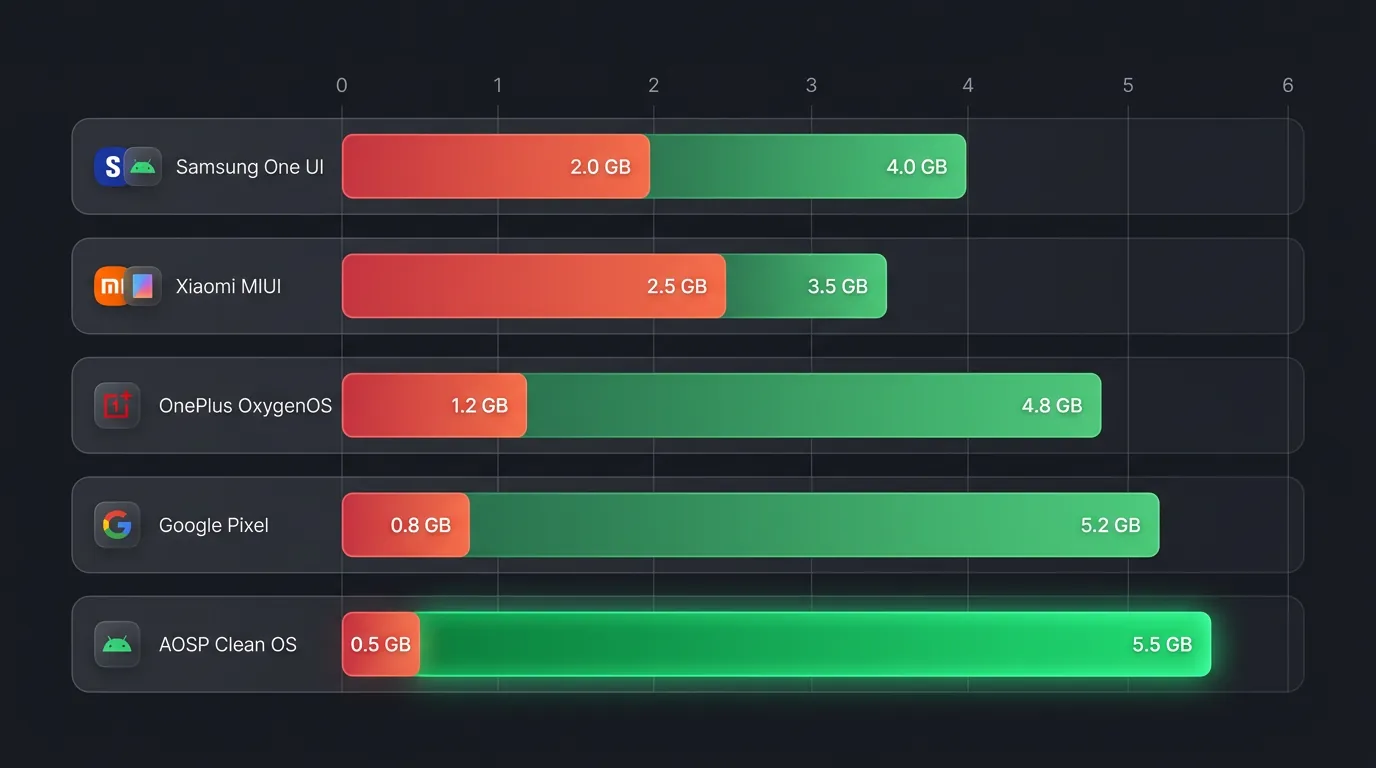
Bloatware consumes 1.5-2.0 GB background RAM on commercial Android phones, significantly reducing gaming performance — especially on 6 GB RAM devices where every MB counts.
What Is Bloatware?
Bloatware (pre-installed junk software) falls into 3 categories: OEM apps (Samsung Health, Samsung Pay, Bixby, Galaxy Store), carrier apps (T-Mobile apps, Verizon services), and redundant Google services (Google Duo, Files, Google TV). These apps run background services, auto-start with the system, and continuously consume RAM + CPU cycles — even when you never open them.
Comparing 5 Android ROMs
Background RAM usage across 5 popular ROM types, measured on identical hardware (Exynos 8895, 6 GB RAM):
Impact on Gaming
The available RAM gap between One UI and Clean OS is 1.5 GB — enough to make the difference between smooth gameplay and game crashes.
Genshin Impact requires 3.5-4.0 GB RAM to run stable at Medium settings. On Samsung One UI (4.0 GB available), the game runs tight and frequently gets killed when switching tabs. On Clean OS (5.5 GB available), the game has 1.5 GB headroom — enough to keep the game in memory + run proxy + run automation tools simultaneously.
Phone farms using physical Samsung phones (Genfarmer-style setups) run stock One UI — bloatware eats 2.0 GB on every device. Cloud phone Clean OS removes this entire bloatware layer, freeing 25% of total RAM for actual workloads.
Pro Tip: Check background RAM on your current device: Settings → Developer Options → Running Services. Count the running processes — over 100 means bloatware is consuming significant resources.
How Do Cloud Phones Optimize the OS? 5 Tuning Techniques
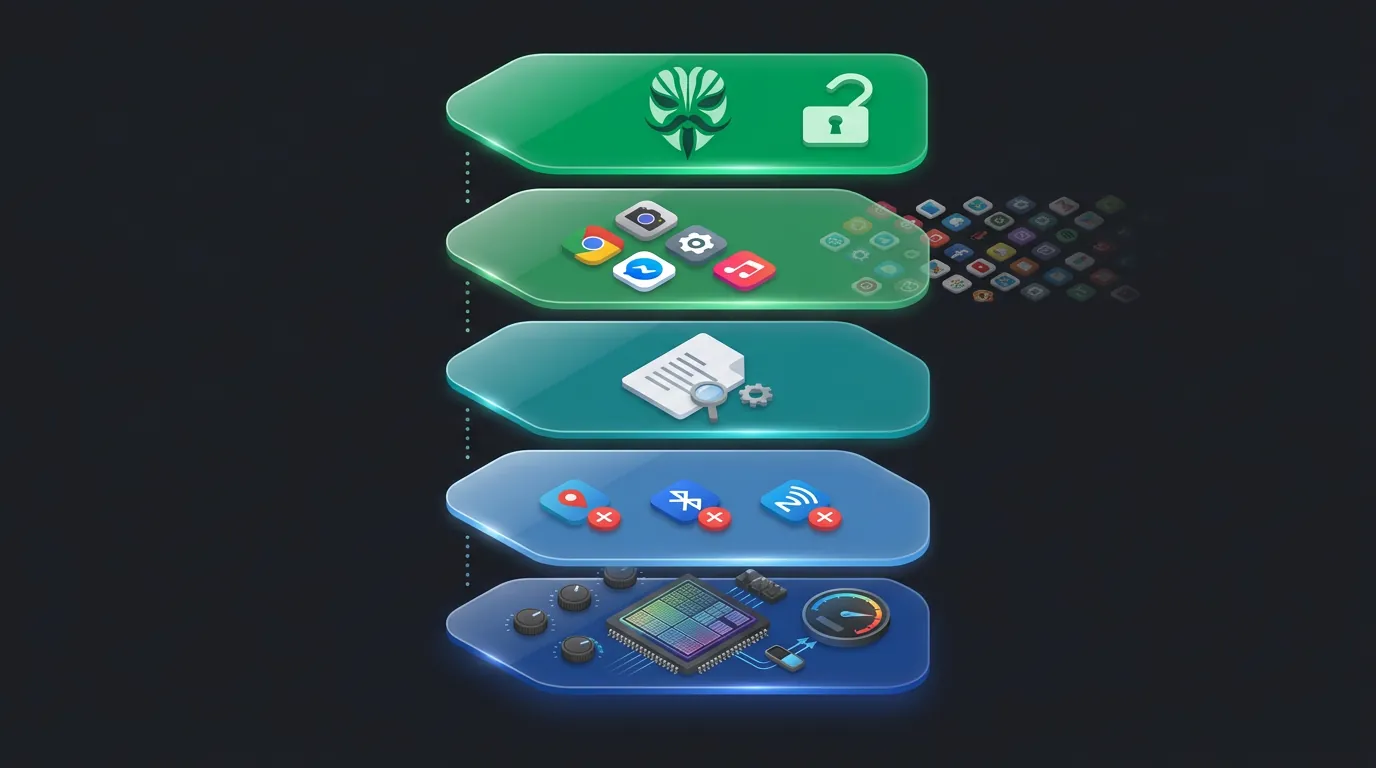
Cloud phones customize AOSP deeply using 5 root-level techniques: kernel optimization, service management, build.prop customization, pre-installed app selection, and root access — each technique targeting a different layer of the operating system.
1. Kernel Optimization
CPU governor is set to "performance" instead of "powersave" or "balanced" — CPU always runs at maximum frequency (2.3 GHz on Exynos 8895). I/O scheduler uses "deadline" instead of "cfq" — optimized for sequential read/write.
Thermal limits are relaxed: commercial phones throttle clock speed (thermal throttling) when temperature exceeds 40°C (104°F) to protect the battery. Cloud phones have no battery — industrial cooling systems in the data center maintain stable temperatures at 22-24°C (72-75°F), allowing CPU/GPU to run full performance 24/7 without throttling. This is a core advantage of real ARM hardware (analyzed in What is Cloud Phone).
2. Service Management
All services unnecessary for cloud deployment are disabled: GPS daemon (cloud phone in data center needs no location), Bluetooth service (no headphones to connect), NFC service (no cards to scan), Telephony daemon (no SIM calling), and Camera service (no camera on rack-mounted mainboard).
Result: 30-40 fewer background processes compared to Stock ROM — equivalent to saving 0.3-0.5 GB RAM and 5-10% CPU idle.
3. Build.prop Customization
Build.prop contains system properties that define device identity: ro.product.model, ro.product.manufacturer, ro.build.display.id, ro.build.fingerprint. Clean OS preserves original build.prop from the actual hardware — a Samsung Galaxy S8 on cloud phone still reports "SM-G950F" in build.prop.
Carrier Config and Baseband version are also preserved — apps and games read this information to verify a real device. Build.prop is a critical bridge to anti-detect capability: the Device Fingerprint article analyzed build.prop from a security perspective. Here, the lens is performance — accurate build.prop ensures the game engine identifies the correct Mali GPU, allocates proper asset quality, and selects the right rendering path.
4. Pre-installed App Selection
Clean OS installs only 5-7 core applications: Settings, File Manager, WebView, Google Play Store (optional), Package Installer, System UI, and Keyboard. Comparison: Samsung One UI ships with 40-50 apps, Xiaomi MIUI with 50-70 apps.
Fewer apps = fewer auto-start services = fewer memory leaks = more stable performance after days of continuous operation. A cloud phone running for 30 days without restart maintains its available RAM — something One UI/MIUI devices cannot achieve due to memory fragmentation from bloatware.
5. Root Access
Magisk pre-installed enables systemless root — full administrator privileges without modifying the system partition. Xposed Framework and LSPosed modules allow hooking into the Android framework at runtime — modifying app behavior, hiding root indicators, and injecting custom code.
Key root features for cloud phones: TaskerEx automation (system-level scripts), AdAway (system-level ad removal), and Greenify (hibernate background apps — though Clean OS already has few apps, Greenify handles GMS background wake-ups).
LDCloud also offers custom ROM, but kernel optimization levels vary — each provider has its own kernel tuning recipe depending on the SoC hardware.
Performance Comparison: Clean OS vs OEM ROM on Identical Hardware
Clean OS outperforms OEM ROM with +1.5 GB available RAM, 10% lower CPU idle, and 30-second faster boot time on identical Exynos 8895 hardware — the difference comes from removing bloatware, not upgrading hardware.
Benchmarks on identical hardware (Exynos 8895, 6 GB RAM, 64 GB storage):
The 15% FPS improvement in Genshin Impact comes from 2 factors: RAM headroom for GPU buffer allocation (+1.5 GB) and CPU headroom for game logic (10% lower idle). On lighter games, the gap is smaller — but stability after 7-14 days of continuous operation is Clean OS's most pronounced advantage.
Clean OS for Every Use Case — Gaming, Farming, Testing
Cloud phones offer 3 Clean OS profiles each optimized for gaming, farming, and testing — each profile adjusts kernel parameters, services, and installed apps differently.
Profile 1: Gaming
- CPU governor: Performance (max frequency 24/7)
- GPU: Mali max frequency + V-sync on
- RAM priority: Game process is prioritized — system never kills game to free RAM
- Installed extras: GameGuard compatibility, no visible root indicators
- Best for: Genshin Impact, PUBG Mobile, Ragnarok Origin, MIR4, Night Crows
Profile 2: Farming (Social Media / Crypto)
- CPU governor: Interactive (saves power on idle, boosts on action)
- Services: Proxy auto-connect, accessibility service enabled
- RAM priority: Multi-app — 3-4 apps running simultaneously (browser + social app + automation tool)
- Installed extras: Proxy client, keyboard input faker, visual automation builder
- Best for: Running 50-100+ TikTok, Facebook, Instagram accounts, and crypto airdrop farming
Profile 3: Testing (Developer / QA)
- CPU governor: On-demand (flexible)
- Services: ADB over network enabled, developer options unlocked, logcat streaming
- RAM priority: Debug tools — Android Studio remote debug, GPU profiler, memory analyzer
- Installed extras: ADB, Logcat, Layout Inspector support
- Best for: Regression testing, compatibility testing, performance profiling on real devices
Pro Tip: You can switch between all 3 profiles without reflashing the OS — only runtime parameters change via script. Profile switch time: under 30 seconds.
Frequently Asked Questions (FAQ)
"Is Android Clean OS Safe?"
Yes, Clean OS is built on AOSP — open source, audited by the community and Google Security Team. There are no OEM backdoors, no carrier telemetry, and no third-party pre-installed apps. Security patches are updated monthly by the cloud phone provider.
"Does Cloud Phone Receive Android Updates?"
Yes, cloud phones receive monthly Android security patches — faster than OEM by 2-4 weeks since updates bypass Samsung's and Xiaomi's QA process. Major version upgrades (Android 13 → 14) depend on the provider and hardware compatibility.
"Can Clean OS Install Google Play?"
Yes, Google Mobile Services (GMS) is installed as an optional package on Clean OS. You can choose to install Google Play Store for downloading games, or skip GMS to save an extra 0.2-0.3 GB background RAM — ideal for farming accounts that do not need Google Play.
"Is One UI / MIUI Better Than Clean OS for Gaming?"
No, bloatware consumes 1.5-2.0 GB RAM on One UI/MIUI — Clean OS frees all of this RAM for games. One UI and MIUI offer attractive interfaces and consumer features (camera, gallery, Samsung Pay), but those features have zero value on a cloud phone used for gaming/farming — they only waste resources.
Clean OS — Less Is More
Android Clean OS proves a simple principle: remove what you do not need = unlock performance for what matters. AOSP - bloatware + kernel tuning = +1.5 GB RAM, -10% CPU idle, and stable gaming performance across 30+ consecutive days.
Cloud phone with Clean OS combines real ARM hardware with purpose-built optimized software — 2 factors that neither bloatware-loaded OEM phones nor virtualized VMI can deliver simultaneously. XCloudPhone provides Clean OS on ARM at around $10/device — 24/7 gaming with no lag, farming with no crashes. Get started at app.xcloudphone.com.