
A VPS Android costs $2–5/month. A real device Cloud Phone costs $7–15/month. The 3–5x price gap looks significant — until your VPS hits a 30–50% checkpoint rate and you lose hundreds of accounts in two weeks.
A VPS Android is an emulator running on a cloud server. A real device Cloud Phone is an actual phone running in the cloud. The ARM vs x86 architecture difference determines ban risk, fingerprint quality, and hidden costs. VPS Android checkpoint rates reach 30–50%, while Cloud Phone stays below 5% — a 6–10x gap. At 100+ accounts, Cloud Phone TCO is lower than VPS when hidden costs are included. Many users choose VPS Android for the low price, unaware that VPS runs an x86 emulator on a server — the same architecture as LDPlayer and NoxPlayer, just hosted in the cloud instead of a local PC. A real device Cloud Phone runs on actual ARM chips — identical to Samsung and Xiaomi phones.
The comparison between Cloud Phone and traditional emulators analyzed ARM vs x86 architecture and 8 detection methods in depth. This article focuses on a specific solution many users still confuse with Cloud Phone: VPS Android.
In this article, you will learn:
- What VPS Android actually is — and why it is fundamentally an emulator
- 3 types of "cloud phone" — how to tell them apart before purchasing
- 8-criteria comparison table — Cloud Phone vs VPS Android across every dimension
- Ban risk: real data — 5-layer detection analysis
- Cost by scale — TCO breakdown for 10, 50, and 100 accounts
- Decision guide — when VPS works, when Cloud Phone is necessary
What Is VPS Android — And Why It Is Fundamentally an "Emulator on a Server"
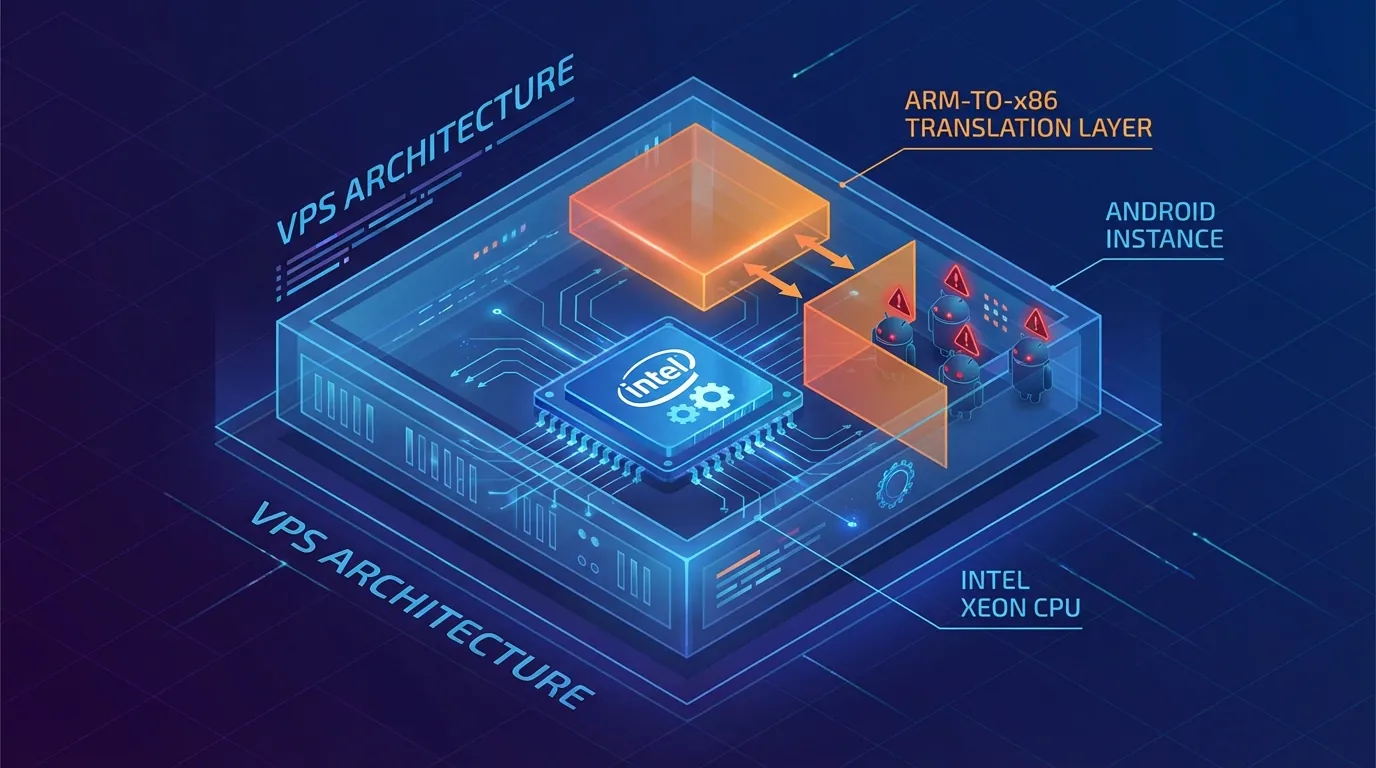
VPS Android is fundamentally an emulator running on a cloud server — Intel/AMD server CPUs (x86) use binary translation to run Android apps (ARM), producing the same virtual machine indicators that Facebook and TikTok detect.
How VPS Android Works — An x86 Emulator on a Remote Server
A VPS Android is a Virtual Private Server running an Android emulator or Android x86. Server CPUs — Intel Xeon, AMD EPYC — use x86 architecture, while Android apps are compiled for ARM. Binary translation converts ARM instructions to x86 before the CPU processes them, creating artifacts that apps and games detect.
Each VPS instance operates as a virtual machine running Android, producing the same x86 fingerprint as a desktop emulator. The only difference from running LDPlayer or NoxPlayer on a PC: VPS runs in the cloud — active 24/7 without keeping your PC on. However, the underlying architecture remains x86.
When an app calls /proc/cpuinfo, a VPS returns GenuineIntel or AuthenticAMD instead of ARM Cortex-A78 — the clearest signal for anti-fraud systems. The libhoudini.so file (Intel binary translator) exists in the system, and Build.HARDWARE shows ranchu or goldfish instead of a real chipset name.
3 Types of "Cloud Phone" — How to Tell Them Apart Before Purchasing
The market currently offers 3 types of solutions all marketed as "cloud phone" — but they differ completely in architecture and ban risk.
Some providers market "cloud phone" but actually offer VMI (Virtual Mobile Infrastructure) — ARM virtualized on x86 or shared ARM servers. VMI performs better than pure VPS but still carries virtualization signatures that Play Integrity API detects.
How to verify: Ask the provider "what chip?" — A real ARM chip (Exynos, Snapdragon) = real device. Intel/AMD = VPS/emulator. Virtualized ARM = VMI.
📌 Pro Tip: Before purchasing any "cloud phone," check
Build.HARDWAREin Settings > About Phone. A real device shows the actual chipset name (samsungexynos8895). A VPS showsranchuorgoldfish. VMI shows a generic name.
8-Criteria Comparison: Real Device Cloud Phone vs VPS Android
The table below compares the 8 most critical criteria when choosing between VPS Android and a real device Cloud Phone — Cloud Phone wins 6 out of 8 criteria, while VPS only wins on cost and certain web-only use cases.
Full Comparison Table
The 3 Decisive Criteria — Device Fingerprint, Ban Risk, IP Quality
The largest gap lies in 3 survival-critical criteria: device fingerprint (x86 vs ARM), ban risk (30–50% vs <5%), and IP quality (datacenter vs residential) — VPS loses all three.
Device Fingerprint: A VPS returns Build.HARDWARE: ranchu, Build.PRODUCT: sdk_gphone_x86 — anti-fraud detects it immediately. A real device Cloud Phone returns a genuine Samsung fingerprint identical to a phone purchased from a retail store.
Ban Risk: In parallel testing, VPS checkpoint rate reached 30–50% after 14 days. Cloud Phone checkpoint rate stayed below 5% over the same period, using the same warm-up process. A 6–10x difference.
IP Quality: VPS uses datacenter IP by default — Facebook and TikTok have blacklisted most datacenter IP ranges. Cloud Phone integrates residential proxy — users enter it via the web dashboard, the device connects automatically, and WebRTC leak protection is included.
📌 Pro Tip: Even with a residential proxy attached to a VPS, the x86 fingerprint remains detectable. Anti-fraud runs 2 detection layers simultaneously: IP layer + device layer. A residential proxy only solves 1 layer — the other (device) still fails.
Ban Risk — Real-World Data: VPS Android vs Cloud Phone

VPS Android ban rates are 6–10x higher than real device Cloud Phone because VPS fails all 5 detection layers — from CPU instruction set to Play Integrity API.
Why VPS Ban Rate Is 6–10x Higher
ARM vs x86 detection methods are analyzed in detail in the Cloud Phone vs Emulator comparison. VPS Android fails all 5 detection layers — explaining the 30–50% checkpoint rate.
A real device Cloud Phone passes all 5 layers because it runs on actual ARM hardware — each device is a Samsung/Xiaomi with a real IMEI, MAC address, and physical sensors, identical to a phone purchased from a retail store. The result is an undetectable cloud phone that anti-fraud systems treat as a regular consumer device.
Real test data (02/2026), from XCloudPhone dashboard monitoring: 50 accounts on VPS Android — 22 checkpointed (44%) after 14 days. 50 accounts on XCloudPhone — 2 checkpointed (4%) over the same period, same warm-up process, same content. An 11x difference.
When VPS "Survives" — And When It Gets Banned
VPS "survives" when the platform does not check device fingerprint — meaning web-only tasks through a browser. Facebook Business Manager via Chrome, Google Ads, web scraping — all operate at the browser layer, without triggering hardware checks.
VPS gets banned when using native mobile apps: TikTok (kernel-level check), PUBG Mobile (Play Integrity mandatory), Genshin Impact (integrated anti-cheat), Facebook mobile app (Play Integrity + device fingerprinting). All of these apps check hardware directly — x86 = ban.
Takeaway: VPS Android works for web browser tasks. Cloud Phone is the safe choice for any native mobile app requiring a real fingerprint.
Real Cost Breakdown — VPS Android vs Cloud Phone by Scale
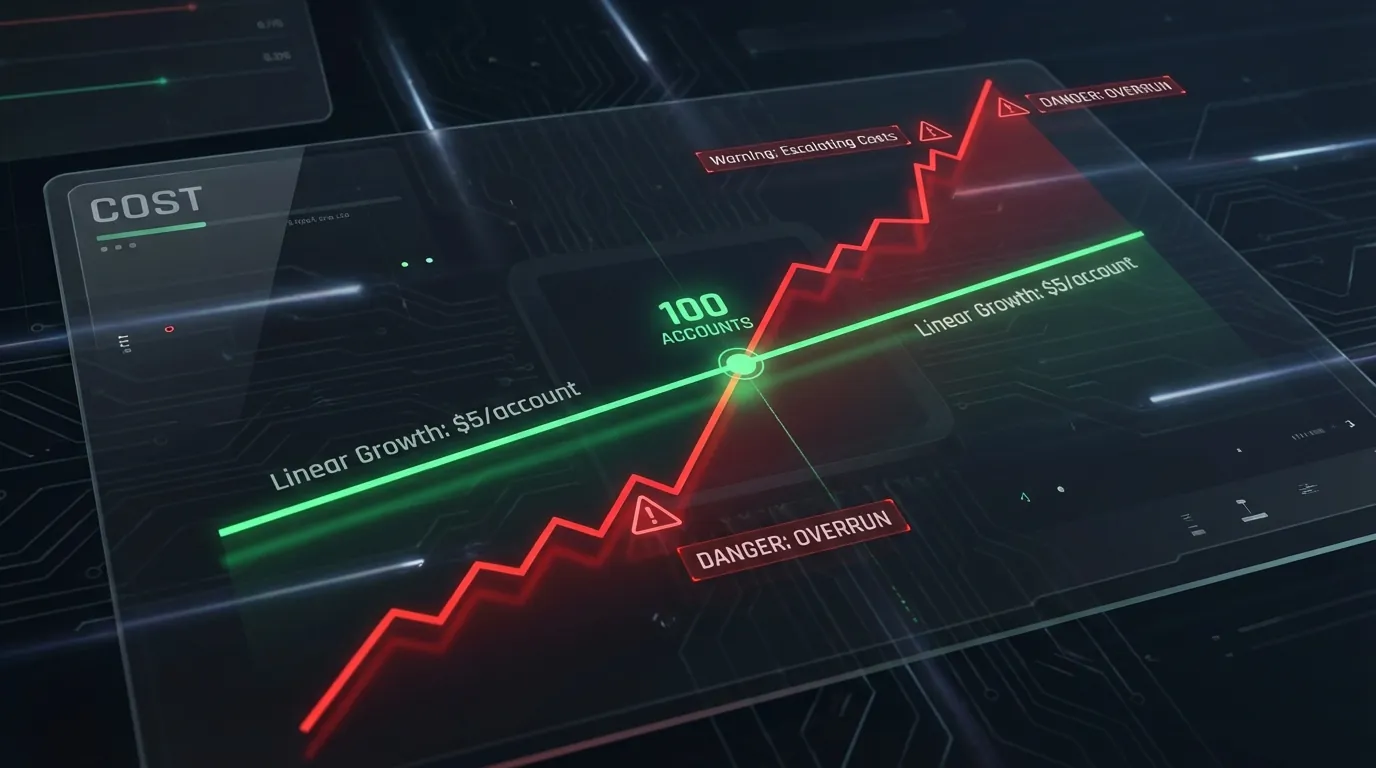
VPS Android is cheaper at small scale (10–30 accounts) — but Cloud Phone costs less at 100+ when all hidden costs are included: dedicated proxies, staff overhead, and account loss from checkpoints.
Cost Table by 3 Tiers (10 / 50 / 100 Accounts)
At 100+ accounts, Cloud Phone is cheaper than VPS when all costs are included: dedicated proxies ($300), staff to manage multiple VPS instances ($500), and hidden costs from account loss.
Hidden Cost — "Account Loss Cost" That VPS Creates
Each checkpointed account means losing 3 types of investment: SIM/email ($1–3), 30 days of warm-up effort, and reach/friends already built.
Account loss calculation for 100 accounts:
- VPS: 40% checkpoint rate → 100 accounts × 40% = 40 lost × $3/account = $120/ban wave
- Cloud Phone: 4% checkpoint rate → 100 accounts × 4% = 4 lost × $3/account = $12/ban wave
- Difference: $108/wave → 3–4 waves/year = $324–432/year in savings
Cloud Phone appears "more expensive" on the surface at small scale. However, TCO (Total Cost of Ownership) is lower when account loss is included — especially for accounts warmed up over 3–6 months with an estimated value of $5–15/account.
When to Use VPS — And When Cloud Phone Is Required
VPS Android is still suitable for 3 specific scenarios: web-only tasks that do not require a mobile fingerprint, extremely tight budgets with an acceptable loss rate, and developer app testing.
3 Scenarios Where VPS Android Still Works
- Web-only tasks: Managing Facebook Business Manager via browser, Google Ads, web scraping — all operate at the browser layer without triggering hardware checks. VPS at $2–5/month meets the requirement
- Ultra-tight budget + accepts risk: 10–20 test accounts where losses are acceptable. Low-cost VPS works for testing strategies
- Developer/Testing: Quick Android app testing across multiple configurations, without needing multi-account or anti-detect. VPS offers more flexibility with root access and custom ROM support
5 Scenarios Requiring Cloud Phone
- Facebook/TikTok mobile app farming → Mobile fingerprint mandatory, x86 detected → Cloud Phone is the safe choice
- 24/7 AFK gaming (anti-cheat games: PUBG Mobile, Genshin Impact, Night Crows) → x86 fails Play Integrity → Cloud Phone passes
- Scaling 50+ accounts → Cloud Phone TCO is lower than VPS when all hidden costs are included → Cloud Phone is more cost-effective
- Agency/Team management → Centralized dashboard, team permissions, sync control → Cloud Phone includes built-in tools
- Long-term trust accounts → Accounts warmed up over 3–6 months that you cannot afford to lose → Cloud Phone minimizes checkpoint risk
Frequently Asked Questions About Switching From VPS to Cloud Phone
"Is VPS Android Better Than a Desktop Emulator?"
VPS Android and desktop emulators (LDPlayer, NoxPlayer) use the same x86 architecture — ban risk is equivalent. VPS has one advantage: it runs 24/7 on a server without keeping your PC on. From a detection standpoint, games and apps see the same x86 signatures on both solutions.
"Do ARM VPS Options Exist?"
Yes — AWS Graviton, Oracle ARM Cloud, and Hetzner ARM offer VPS running ARM chips. However, prices are high ($20–50/month per instance), no pre-built Android environment is available (you must compile Android from source), and GPU pass-through for graphically demanding games is not supported. ARM VPS is not a practical solution for multi-account farming or AFK gaming today.
"Will Switching from VPS to Cloud Phone Cause Data Loss?"
Account data for Facebook, Instagram, and TikTok is tied to the account — not the device. Logging into an account on a new Cloud Phone device accesses all existing data. However, trust score is linked to device fingerprint — when switching devices, the platform may request re-verification. A 3–5 day warm-up on the new device stabilizes trust.
"Are VMOS or Geelark "Real Devices"?"
No — VMOS and Geelark use VMI (Virtual Mobile Infrastructure) technology, virtualizing ARM on servers instead of using physical ARM chips. VMI performs better than x86 VPS (ban risk averaging 15–25%), but still carries virtualization signatures that Play Integrity API detects. Real device = an actual ARM chip like Exynos or Snapdragon on a physical motherboard — XCloudPhone falls in this category.
"Can VPS Android Run TikTok?"
Installation works — but TikTok uses kernel-level device checks that inspect the CPU instruction set, file system, and sensor data. VPS running x86 gets detected almost immediately. TikTok accounts farmed on VPS typically receive reach limitations (shadow ban) or get locked within 7–14 days.
"Does Adding a Residential Proxy to VPS Solve Ban Risk?"
It only solves 1 out of 5 detection layers — the IP layer. Device fingerprint (layers 1–3), sensor data (layer 3), and Play Integrity (layer 5) still fail. A residential proxy helps VPS avoid IP blacklists, but the x86 fingerprint remains detectable by anti-fraud systems. All 5 layers must pass — a real device Cloud Phone is the only solution that passes them all.
"Is There a Limit on How Many Cloud Phones You Can Rent?"
No — XCloudPhone allows scaling from 1 to 1,000+ devices via a web dashboard. Adding a new device takes 60 seconds; removing one is instant. The pay-as-you-go model requires no upfront hardware investment, unlike VPS (which requires purchasing/renting multiple separate VPS instances when scaling).
"Which VPS Android Provider Is Most Stable for Farming Today?"
The 3 most stable VPS providers: DatabaseMart, Petrosky, and HostNOC — all offer VPS with pre-installed Android and solid uptime. However, all three run on x86 CPUs — the fundamental ban risk does not change regardless of provider. Choosing a stable VPS provider reduces downtime but does not reduce checkpoint rate because the problem lies in the architecture, not server quality.
From x86 VPS to Real ARM Device — Upgrade or Stay?
VPS Android suits one specific purpose: low-cost web tasks that do not require a mobile fingerprint. Real device Cloud Phone suits every remaining scenario — mobile app farming, AFK gaming, multi-account scaling, and long-term trust accounts.
Your decision comes down to 4 questions:
- Are your accounts valuable? → Yes → Cloud Phone — checkpoint rate <5% instead of 30–50%
- Budget under $50/month, fewer than 10 accounts? → Yes → VPS is acceptable — you accept the risk of losing accounts
- Need to scale 50+ accounts? → Yes → Cloud Phone — lower TCO, single management dashboard
- Using mobile apps (Facebook app, TikTok, games)? → Yes → Cloud Phone — real ARM fingerprint is mandatory
x86 architecture on VPS cannot conceal its emulated nature — anti-fraud systems are digging deeper into the hardware layer with Play Integrity API and kernel-level checks. A real device Cloud Phone runs on actual ARM chips — each device is a dedicated Samsung phone, effectively an undetectable cloud phone that passes all 5 detection layers.
Upgrade from x86 VPS to a real ARM Cloud Phone — protect valuable accounts starting at ~$10/device per month.
References:
- Play Integrity API — Android Developer Documentation
- ARM Architecture — ARM Holdings Developer Documentation
- XCloudPhone — Product Documentation