![3DS Emulator iOS: 5 Best Apps & Cloud Alternative [2026]](https://cdn-h.xcloudphone.com/posts/hero-3ds-emulator-ios-1772098347341.webp)
Playing #PokemonUltraSun or #TheLegendOfZelda on your iPhone sounds amazing — but 3DS emulation on iOS is still riddled with limitations that most reviews gloss over.
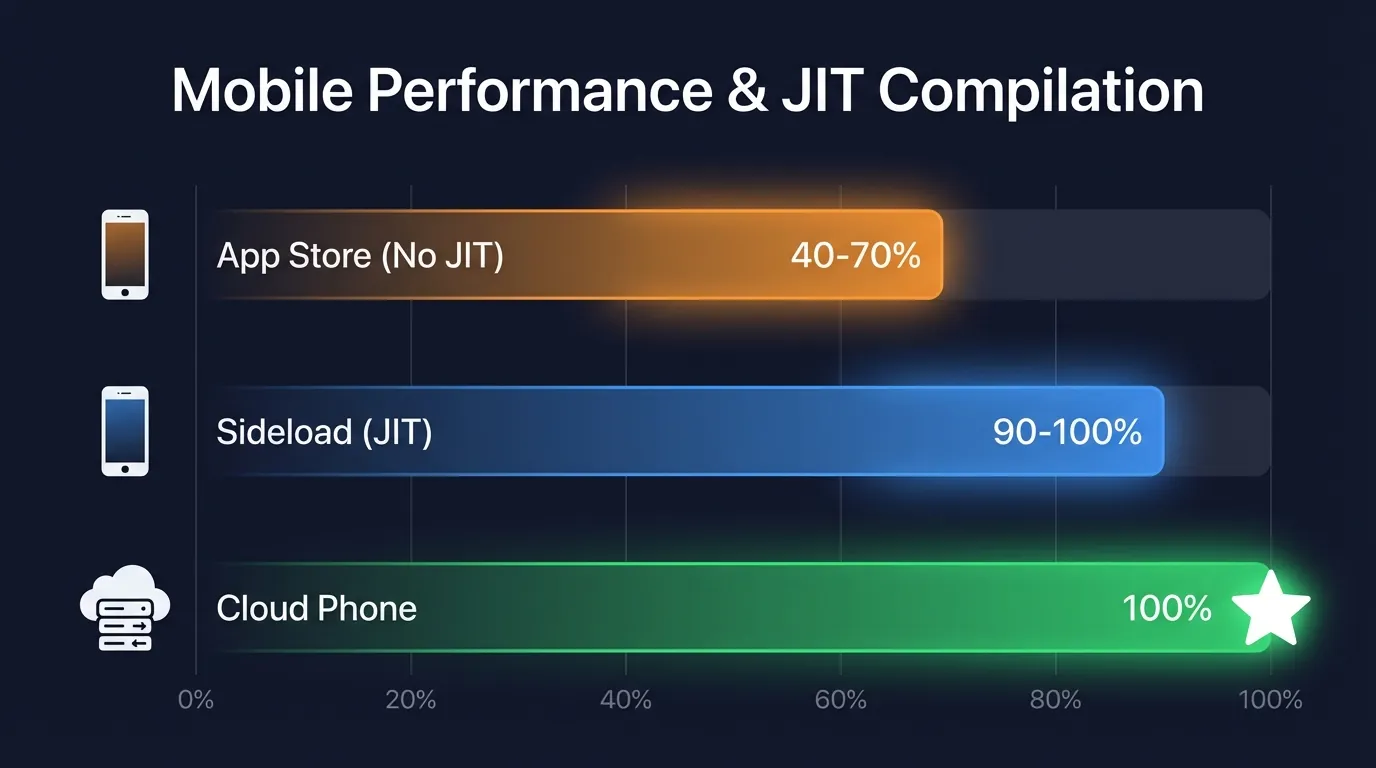
The 5 best 3DS emulators for iOS in 2026 are Manic EMU, Folium, RetroArch, XONE, and Citra forks — but all of them are throttled by Apple's JIT restriction. Apple opened the App Store to emulators in 2024, yet its ban on JIT compilation cuts performance by 30-60% compared to Android or PC. Cloud Phone bypasses every iOS restriction by running full Android emulators on real ARM hardware.
In this article, you will learn:
- How 3DS emulation works on iOS — and why JIT is the bottleneck
- 5 best emulators ranked — real-world testing of Manic EMU, Folium, RetroArch, XONE, and Citra forks
- 3 reasons iOS emulation will always lag behind — JIT policy, GPU PICA200, and Nintendo lawsuits
- Cloud Phone as an alternative — full Android emulators on any iPhone
- 7-criteria comparison — iOS emulator vs Cloud Phone side by side
- Decision guide — which solution fits your games, device, and budget
How 3DS Emulation Works on iOS — And Why It Underperforms
3DS emulators on iOS emulate the Nintendo 3DS ARM11 hardware on Apple Silicon chips — both use ARM architecture, but Apple's JIT compilation ban creates a performance gap that no amount of hardware power can fully close.
How It Works Under the Hood
The Nintendo 3DS runs an ARM11 MPCore CPU paired with a PICA200 GPU — a specialized hardware architecture built for handheld gaming. iOS emulators must replicate the entire CPU pipeline and GPU rendering pipeline on Apple Silicon (A-series and M-series chips).
The advantage: both the 3DS and iPhone use ARM architecture, so emulators skip binary translation (instruction set conversion) that PC-based x86 emulation requires. In theory, iOS should be the ideal platform for 3DS emulation.
In practice, the opposite is true.
The JIT Bottleneck — Why iOS Emulators Run Slower
JIT (Just-In-Time compilation) compiles code into native machine code at runtime, boosting emulator speeds by 3-5x. This is why the same emulator runs significantly faster on Android and PC than on iOS.
Since iOS 16 (2024), Apple has allowed emulators on the App Store — but JIT compilation remains banned for security reasons. The result:
- FPS drops 30-60% compared to the same emulator on Android
- Demanding titles like #PokemonUltraSun stutter noticeably on iPhone 13 and older
- Audio hiccups and frame drops are common across all 3DS emulators
The only workaround: sideloading via AltStore or a Mac to enable JIT — but this requires a Mac, technical knowledge, and carries security risks.
Minimum recommended device: iPhone 14 Pro (A16 Bionic) or newer for acceptable gameplay without JIT.
Top 5 3DS Emulators for iOS [2026]
Five 3DS emulators dominate iOS in 2026, ranging from free to paid, each with distinct strengths. Below is a real-world evaluation based on performance, features, and compatibility.
1. Manic EMU — Best Free All-in-One Emulator ⭐ 4/5
#ManicEMU is the best free option for 3DS emulation on iOS in 2026.
Available directly on the App Store, Manic EMU supports not just 3DS but also N64, NDS, GBA, PS1, and PSP — all in a single app. Key features include unlimited save slots, 5x speed, cheat code support, custom skins, and controller support.
Real-world performance: Runs #PokemonUltraSun smoothly on iPhone 16 Pro and iPad Pro M4. On iPhone 13-14, FPS fluctuates between 25-40fps with occasional audio hiccups. Reddit users report minor bugs after certain in-game events.
- ✅ Free and easy to install
- ✅ Supports 6+ console systems
- ⚠️ In-app ads
- ⚠️ FPS drops on older iPhones (13 and below)
2. Folium — Premium UI, Paid ⭐ 3.5/5
#Folium ($4.99) is the best-looking 3DS emulator on iOS.
Supports 3DS, Nintendo DS, SNES, and PS1. Requires iOS 16.0 or later, iPhone 14 or newer for smooth performance. Controller integration is excellent, particularly with PS5 DualSense and Xbox Series controllers.
Real-world performance: Good, but best when sideloaded with JIT enabled. The App Store version (no JIT) handles #AnimalCrossing well, but heavier titles like #MonsterHunter show noticeable lag.
- ✅ Beautiful UI, strong controller support
- ✅ Stable with few crashes
- ⚠️ Costs $4.99
- ⚠️ Requires iPhone 14+ for 3DS
3. RetroArch — Most Powerful, Steepest Learning Curve ⭐ 3.5/5
#RetroArch is the most powerful emulator across all platforms — iOS included. Free, open-source, and available on the App Store.
RetroArch is not a single emulator but a frontend for 50+ emulation cores. 3DS emulation runs through the Citra core. Deep customization includes shaders, resolution scaling, input mapping, rewind, and fast-forward.
Real-world performance: Entirely dependent on core quality and configuration. The Citra core on iOS handles lighter games (#KirbyTripleDeluxe) well, but demanding titles need JIT.
- ✅ Free, open-source
- ✅ 50+ systems, deep customization
- ⚠️ Complex UI, steep learning curve
- ⚠️ Requires experience to configure properly
4. XONE (Zone) — Dedicated 3DS Emulator ⭐ 3.5/5
XONE (also known as Zone 3DS) is a dedicated Nintendo handheld emulator, available on the App Store and via sideloading.
Requires iOS 15 or later, iPhone 12 or newer for stable performance. XONE focuses exclusively on the 3DS experience rather than multi-system emulation like RetroArch — simpler interface, easier to use.
Real-world performance: Stable across most popular 3DS titles. Performance improves significantly when sideloaded with JIT enabled.
- ✅ Clean, simple interface
- ✅ Dedicated 3DS focus — stable
- ⚠️ Narrower game library than RetroArch
- ⚠️ Still needs JIT for demanding games
5. Citra Forks (pabloMK7, Lime3DS) — The Legacy Continues ⭐ 3/5
#Citra — the world's most popular 3DS emulator — officially shut down after Nintendo's lawsuit in March 2024. However, community-maintained open-source forks like pabloMK7's Citra and #Lime3DS continue active development.
Citra forks are not available on the App Store — sideloading via AltStore or TrollStore is required. The upside: they run with JIT enabled, delivering the best performance of any iOS 3DS emulator.
Real-world performance: Best-in-class with JIT. Runs #PokemonXY, #FireEmblemAwakening, and #TheLegendOfZeldaOcarinaOfTime3D smoothly on iPhone 12 Pro and newer.
- ✅ Best performance (with JIT)
- ✅ Highest game compatibility
- ⚠️ Sideloading required — needs a Mac
- ⚠️ Legal risk (Nintendo is actively pursuing emulator projects)
Quick Comparison Table
Why 3DS Emulation on iOS Will Always Be Limited: 3 Core Reasons
Apple opened the App Store to emulators in 2024, but 3 fundamental limitations ensure 3DS emulation on iOS will never match Android or PC.
1. Apple's JIT Ban — Emulators Pay the Price
Apple's ban on JIT compilation in App Store apps is the #1 reason 3DS emulators run slower on iOS than on Android or PC. Apple considers JIT a security risk (dynamic code execution) and blocks it entirely.
On Android, #RetroArch and Citra run with JIT by default — delivering 3-5x the performance of the same hardware. On the iOS App Store, the same apps run 30-60% slower because they fall back to interpreter mode.
2. GPU Architecture Mismatch — PICA200 Is Hard to Emulate
The Nintendo 3DS uses a PICA200 GPU — a specialized chip with a rendering pipeline entirely different from Apple's GPU (Metal API). Emulators must translate every render call from PICA200 to Metal, creating significant overhead — especially without JIT to optimize the translation layer.
3. Legal Risk — Nintendo Is Actively Suing
Nintendo sued and forced Citra (the most popular 3DS emulator) to shut down in March 2024. Before that, Yuzu (a Switch emulator) met the same fate. Any emulator on the App Store can be removed at any time if Nintendo pressures Apple — putting users at risk of losing access to their preferred emulation app.
So is there a way to bypass all 3 of these limitations?
Cloud Phone — Play 3DS (and Every Retro Console) on Any iPhone Without Limits
Cloud Phone lets you run full Android emulators (with JIT, full performance) on real ARM hardware, then stream the video to your iPhone via browser — completely bypassing every Apple restriction.
How Cloud Phone Works for Emulation
A Cloud Phone is a real Android device running in a data center. You don't install anything on your iPhone — just open a browser:
- Create an account on XCloudPhone → receive a real Android device (ARM chip: Exynos, Snapdragon)
- Install Android emulators on the cloud phone: RetroArch, Citra, DraStic, PPSSPP — full Android versions with JIT
- Launch your game and play directly on the cloud phone
- Stream to your iPhone via WebRTC — low-latency, smooth
The result: 3DS games run at a stable 60fps on any iPhone — including an iPhone 8 or an older iPhone SE. All processing happens on the cloud phone (real ARM, JIT enabled); your iPhone only receives the video stream.
No jailbreak. No sideloading. No risk of App Store removal.
Not Just 3DS — Unlock Every Console
Cloud Phone runs Android, so you can install any emulator from the Google Play Store or via APK:
For example: you can run #PPSSPP (PSP), #Citra (3DS), and #AetherSX2 (PS2) simultaneously on a single cloud phone — something impossible on any iPhone.
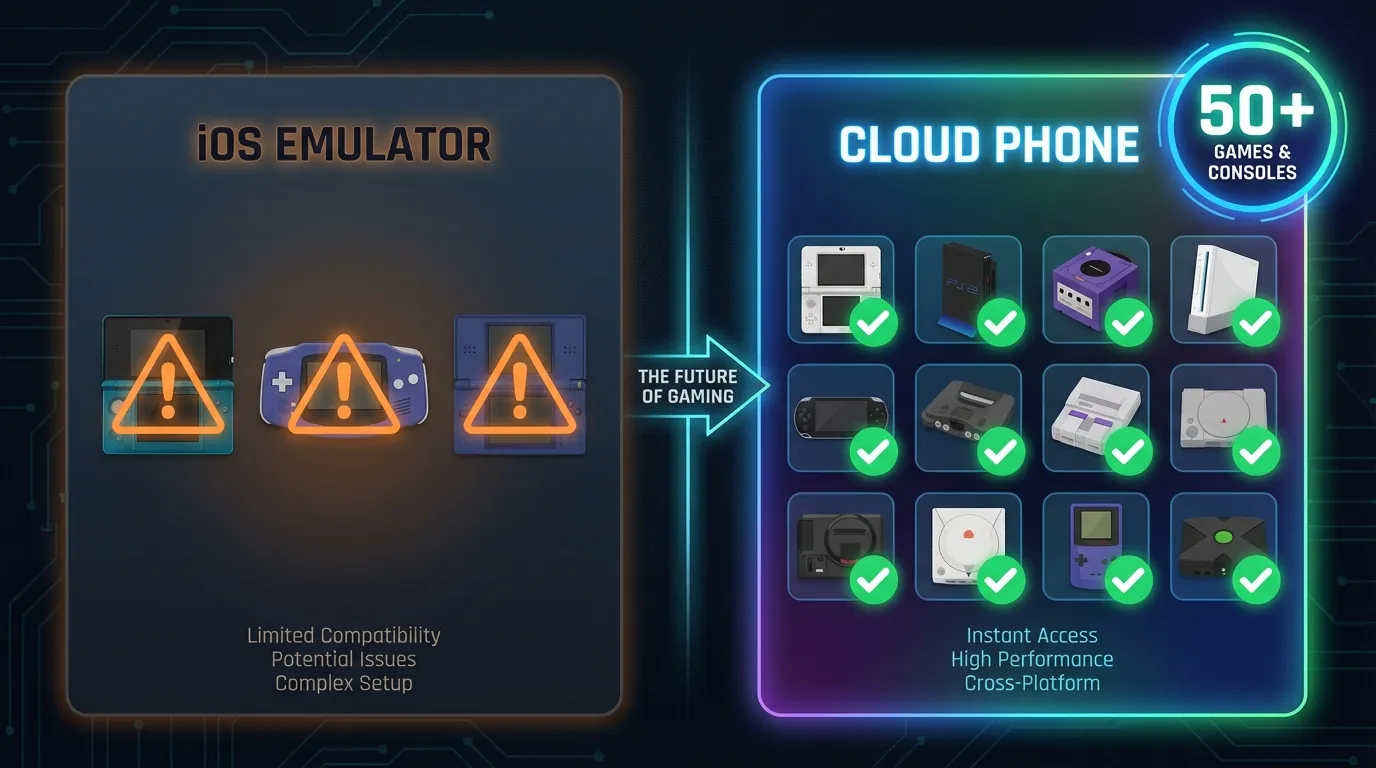
Real-World Comparison: iOS 3DS Emulator vs Cloud Phone
The table below compares the 7 most important criteria between running a 3DS emulator directly on iOS versus through a Cloud Phone.
When Does an iOS Emulator Make More Sense?
An iOS emulator is still a reasonable choice if you only need to:
- Play lightweight GBA or NDS titles (no JIT needed)
- Game casually for 15-30 minutes at a time
- Avoid monthly subscription costs
- Already own an iPhone 14 Pro or newer
When Does Cloud Phone Win?
Cloud Phone is the better solution when you:
- Want smooth 60fps 3DS gameplay with zero lag
- Use an older iPhone (12 or below)
- Want to play PS2, GameCube, or Wii games — not supported on iOS
- Prefer no sideloading risk and no App Store removal threats
- Game frequently — worth the ~$10/month investment
How to Choose the Right Solution
Choosing between an iOS emulator and Cloud Phone depends on 3 factors: the games you want to play, the device you own, and your budget.
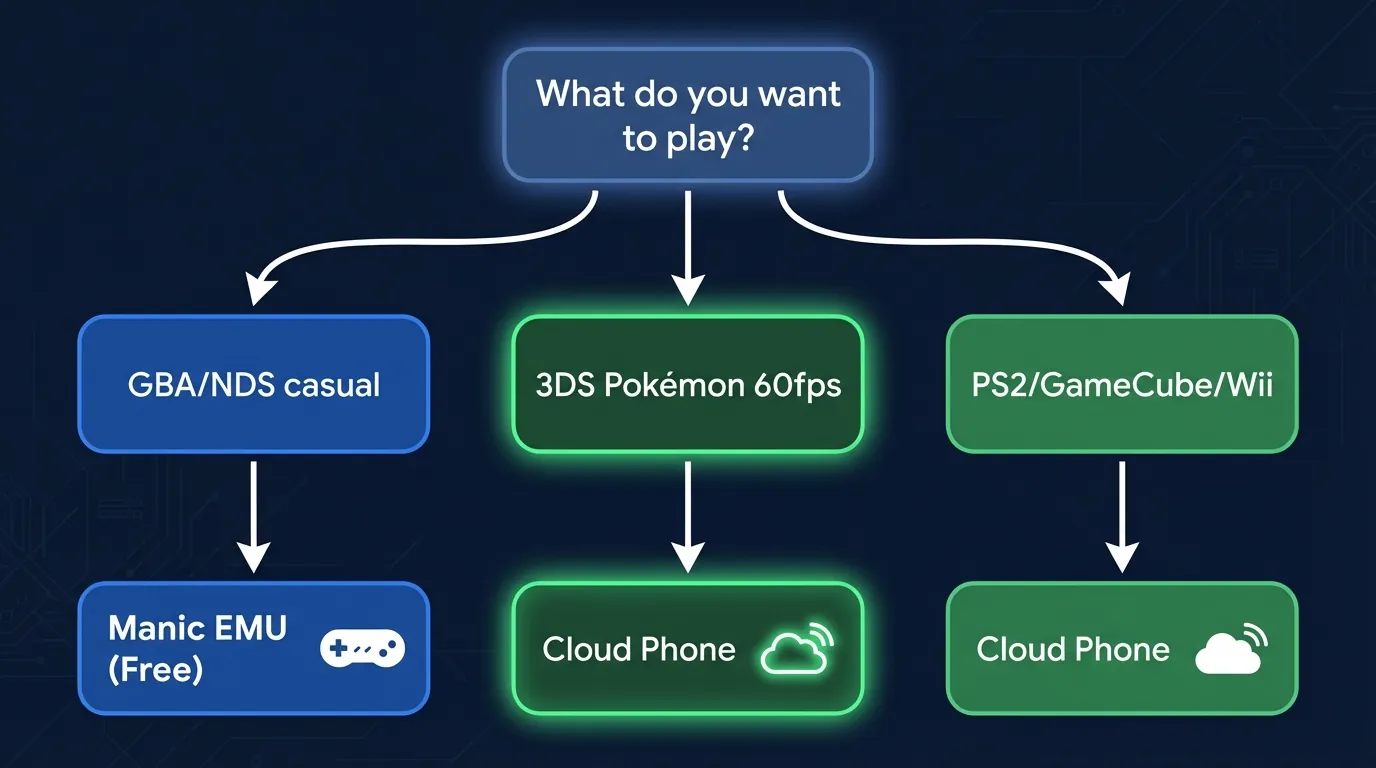
For a broader comparison between Cloud Phone and all types of emulators — including ARM vs x86 architecture analysis and 8 ways games detect emulated environments — see our guide on Cloud Phone vs Emulators.
FAQ — Common Questions About 3DS Emulators on iOS
"Do 3DS emulators on iOS require jailbreaking?"
No — Manic EMU, Folium, RetroArch, and XONE are all available on the App Store without jailbreak. Only Citra forks require sideloading via AltStore (not jailbreaking, but a Mac is needed).
"What is the best free 3DS emulator for iOS?"
Manic EMU is the best free option in 2026, supporting 6+ console systems (3DS, N64, NDS, GBA, PS1, and PSP) in a single app with an intuitive interface.
"Why do 3DS games run slowly on iPhone?"
Apple bans JIT compilation for App Store apps — a technique that boosts emulator performance by 3-5x. The result: performance drops 30-60% compared to the same emulator on Android.
"Does Citra still work on iOS?"
Citra officially shut down after Nintendo's lawsuit (March 2024). However, community forks like pabloMK7's Citra and Lime3DS are still actively maintained. Sideloading is required — they are not on the App Store.
"Can Delta Emulator play 3DS games?"
Currently, #DeltaEmulator does not support 3DS. Delta only emulates NES, SNES, N64, GBA, and NDS. For 3DS on iOS, use Manic EMU, Folium, RetroArch, or XONE.
"What is a Cloud Phone? Why does it run games better?"
A Cloud Phone is a real Android device running on a server in a data center. You install full Android emulators (with JIT, full performance) on the cloud phone, then stream the video to your iPhone via browser. Performance is better because Apple's JIT restriction does not apply.
"Is Cloud Phone expensive?"
Cloud Phone typically costs ~$10/month — significantly cheaper than upgrading to an iPhone 14 Pro ($800+) just for smoother emulation.
"Are 3DS emulators legal?"
Emulators are completely legal — they are software that replicates hardware, which does not violate any law. However, downloading ROMs for games you do not physically own (cartridge) is a copyright violation.
From iOS Limitations to Unlimited Emulation: Cloud Phone Opens a New Era
Apple opened the door to emulators in 2024, but the JIT ban remains the biggest barrier — with no signs of changing in 2026.
Three trends are shaping the future of emulation on iOS:
- Nintendo continues to litigate: After Citra and Yuzu, Nintendo may target other App Store emulators — creating risk for users who depend on a single app
- Apple will not relax JIT restrictions: Apple's security policy prioritizes safety over performance — JIT will remain blocked on the App Store
- Cloud Phone is the future-proof solution: Run emulators on real ARM Android hardware, bypass every iOS limitation, with zero dependency on Apple policy or Nintendo lawsuits
If you want the authentic 3DS experience — 60fps, zero lag, no restrictions — Cloud Phone is the answer. Protect your retro game library for just ~$10/month, playable on any iPhone.
References:
- App Store Review Guidelines — Emulator Policy — Apple Developer Documentation
- Nintendo vs Citra/Yuzu Lawsuit — The Verge, 2024
- ARM Architecture — ARM Holdings Developer Documentation
- XCloudPhone — Product Documentation