![Play Android Games on Low-End PC: 4 Lag-Free Methods [2026]](https://cdn-h.xcloudphone.com/posts/hero-game-pc-yeu-1772700821116.webp)
Your PC has 4GB RAM, an old Intel Core i3, and no dedicated GPU — but you still want to play Genshin Impact, MIR4, or AFK Arena 24/7? Android emulators alone consume 4-6GB RAM, turning a low-end PC into a 5 FPS slideshow.
There are 4 ways to play Android games on a low-end PC: lightweight emulator, cloud phone, native Android OS, and cloud gaming — of which cloud phone is the only solution that requires zero hardware resources from your PC.
This article analyzes all 4 solutions with side-by-side pros/cons, real-world tests of 3 games on a 4GB RAM PC, and costs ranging from $0 to $10/month.
4 Ways to Play Android Games on PC — Quick Overview
4 ways to play Android games on a low-end PC include lightweight emulator, cloud phone, native Android OS, and cloud gaming — each suited to different hardware levels and needs.
Each solution has its own trade-offs. Emulators are free but consume RAM. Cloud phone costs money but demands nothing from your PC. Native Android OS is free but complex to install. Cloud gaming is convenient but does not support Android games.
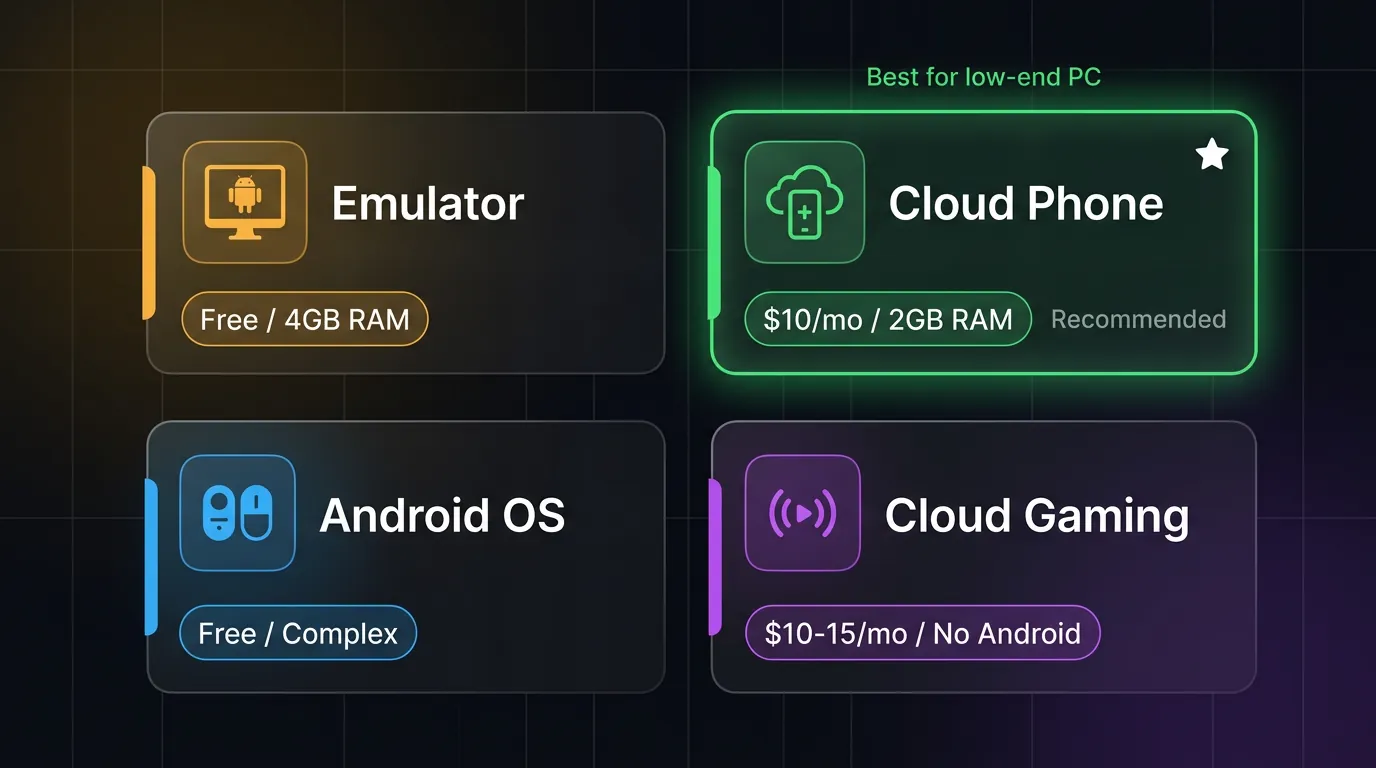
Lightweight Emulator — The "Good Enough" Solution for 4-8GB RAM PCs
3 lightest emulators for low-end PCs are LDPlayer, MEmu Play, and MuMu Nebula — all run on 4GB RAM but still consume 40-60% of CPU resources.
Top 3 Lightweight Emulators (2026)
LDPlayer is the lightest emulator — uses ~1.5GB RAM per instance, supports keymapping for games, optimized for Android 9 and 12. Minimum RAM: 4GB (recommended 8GB).
MEmu Play is more stable for long sessions — fewer crashes than LDPlayer on low-end PCs, consuming ~1.8GB RAM. Supports multi-instance but a 4GB RAM PC can only run 1 instance.
MuMu Nebula (NetEase) — highest FPS among the 3 emulators, optimizes graphics through DirectX rendering. Uses ~2GB RAM. Downside: heavier than LDPlayer, requires a stronger CPU.
Emulator Limitations on Low-End PCs
A 4GB RAM PC faces 5 problems when running emulators:
- RAM bottleneck — Emulator uses 1.5-2GB, Windows uses 2GB → 0-0.5GB left for the game. You must close your browser and every other application.
- CPU throttling — Old CPUs (Core i3, Pentium) run the emulator at 40-60% constantly → thermal throttling reduces FPS to 10-15.
- No AFK 24/7 — PC must stay on continuously. Fan noise, $15-30/month in electricity, and hardware wear (SSD, fan) degrade components.
- Overheating — Old CPUs lack thermal headroom for sustained emulation workloads. Results: crashes, freezes, data corruption.
- Game detection — Anti-cheat detects x86 emulation. Genshin Impact, MIR4, and many other games flag or ban accounts running on emulators. A detailed comparison of how games detect emulators — including Play Integrity checks, sensor validation, and binary analysis — is covered in the best emulators for low-end PCs guide.
Cloud Phone — Game Runs on Server, PC Just Opens a Browser
Cloud phone runs Android games entirely on a real ARM server — a low-end PC only needs to open a browser to stream the screen, requiring just 2GB RAM and 10 Mbps internet.
How Does a Cloud Phone Work?
A cloud phone is a real Android device (Samsung Exynos/Snapdragon ARM chip) housed in a data center, with battery and screen removed for rack-mounting. The game runs entirely on this ARM chip — GPU rendering, physics calculations, AI logic — all processed on the server.
Your PC receives a video stream via WebRTC protocol (like watching a YouTube live stream, but interactive). Input from your mouse/keyboard is sent to the server, the server processes it, and sends video frames back. Average latency: 20-60ms depending on server location (Seoul, Singapore, Tokyo).
PC requirements: any browser (Chrome, Firefox, Edge) + internet ≥10 Mbps. Your PC only decodes video — it does not render the game, does not run an emulator, and uses no CPU/GPU.
Why real ARM architecture passes game detection while emulators get banned is analyzed in the comprehensive cloud phone vs Android emulator comparison.
Why Cloud Phone Is Better Than Emulator for Low-End PCs
Cloud phone turns a low-end PC into a "remote control" — no powerful hardware needed because the PC only does one thing: display a video stream. A Pentium PC with 4GB RAM can play Genshin Impact at max settings via cloud phone, because Genshin runs on an Exynos 8895 in the data center.
XCloudPhone — Real ARM Cloud Phone
XCloudPhone uses real Samsung motherboards (Exynos 8895 Octa-core, 6GB RAM, 64GB storage) — games recognize the device as a genuine Samsung Galaxy Note 8, passing Play Integrity API and all anti-cheat detection.
3 advantages for gaming on a low-end PC:
- AFK 24/7 — Genshin artifact farming, MIR4 crypto mining, AFK Arena idle — games run continuously even with your PC turned off, while you sleep, or while you work.
- Zero resource usage — A 2GB RAM PC runs smoothly because it only opens a browser tab. Even a 10-year-old laptop can play games at max settings.
- Undetectable — Real ARM → no game bans. Anti-cheat sees a Samsung device, not an emulator.
Cost: ~$10/device/month flat rate. No hourly charges, no hidden costs.
Web dashboard: open browser → log in → control cloud phone from any PC. No software installation needed.
3 Real-World Game Tests — 4GB RAM PC, Old Core i3
Genshin Impact lags at 10-15 FPS on emulator but runs smoothly at 30 FPS via cloud phone — on the same 4GB RAM PC, because the game processes on the server rather than the PC.
Test device: Dell Inspiron 3567 (Core i3-7100U 2.4GHz, 4GB DDR4, Intel HD 620). Conditions: 100 Mbps connection, XCloudPhone Singapore server. According to Steam Hardware Survey Q1 2025, 12% of PC gamers still use ≤4GB RAM — this is the segment that cloud phone serves most effectively.
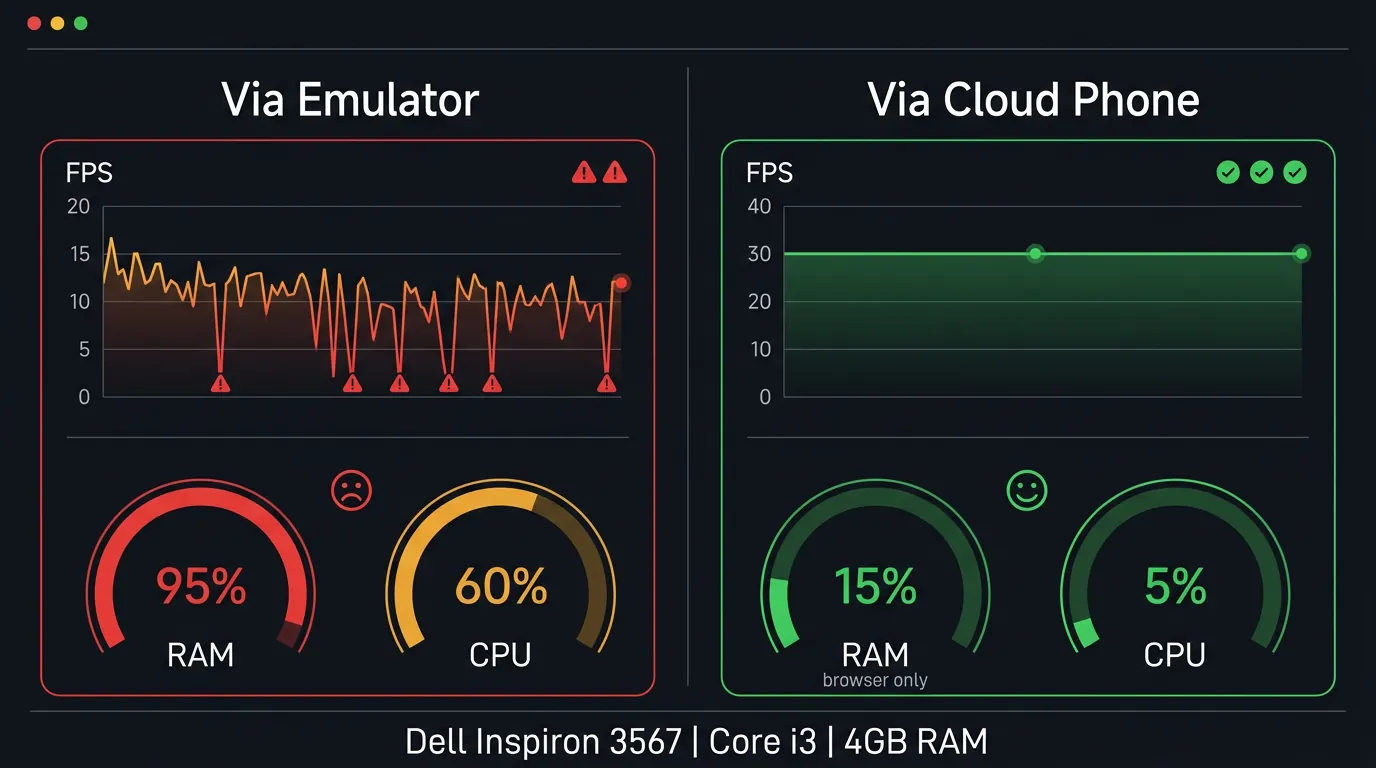
Genshin Impact — The Heaviest Game
Via emulator (LDPlayer):
- FPS: 10-15 (frequently drops to 5)
- RAM usage: 5GB+ (emulator + game) → exceeds 4GB → swaps to disk → micro-stutter
- Crashes: Crashes after 30-60 minutes due to RAM overflow
- Verdict: Unplayable on a 4GB RAM PC
Via cloud phone (XCloudPhone):
- FPS: Stable 30 (server Exynos renders)
- PC resource: <500MB RAM (browser tab), CPU <5%
- AFK resin auto: Runs 24/7, farms artifacts overnight
- Verdict: Smooth gameplay, PC only streams video
MIR4 — The AFK Mining Game
Via emulator:
- Runs at lowest settings but PC must stay on 24/7 → costs $15-30/month in electricity
- Fan runs constantly → noise and SSD wear → hardware degradation
- Multi-instance: Impossible — 4GB RAM supports only 1 instance
Via cloud phone:
- Mines 24/7 with PC off. Check loot in the morning.
- Multi-instance: Run 5-10 accounts mining simultaneously on 5-10 cloud phone devices
- Electricity cost: $0 (server runs, PC stays off)
- Cost for 5 mining accounts: 5 × $10 = $50/month vs $15-30/month in electricity for 1 PC running 24/7
Mobile Legends — The Lightest Game
Via emulator:
- Runs OK on 4GB RAM PC at low-medium settings
- Mild lag during 5v5 teamfights (FPS drops to 20)
- Issue: Alt-tabbing causes game freeze, requires reconnection
Via cloud phone:
- Runs smoothly at max settings (Exynos renders)
- No lag on alt-tab — game runs on server, alt-tabbing on PC has no effect
- AFK ranked: Bot-rank when needed, still farms gold/XP
Other Solutions — Native Android OS and Cloud Gaming
PrimeOS requires dual-boot and GeForce NOW does not support Android games — 2 alternative solutions with significant limitations compared to cloud phone for low-end PCs.
PrimeOS and Bliss OS — Android Directly on PC
Install Android OS as a dual-boot on your PC — native performance, free. However:
- Complex installation: Requires creating a bootable USB, partitioning the hard drive, and configuring BIOS — not suitable for average users.
- Driver issues: Touchpad, Wi-Fi, and GPU drivers often incompatible. AMD GPUs work better than NVIDIA.
- No AFK 24/7: PC must stay on, same as emulators.
- No multi-instance: 1 PC = 1 Android OS = 1 game account.
Best for: Technical users who want free native gaming performance and do not mind dual-booting.
Cloud Gaming (GeForce NOW, Xbox Cloud Gaming)
Cloud gaming streams PC games from servers — focusing on PC games, not Android games. The catalog primarily includes Steam, Epic, and Ubisoft titles.
- Does not support Android games (Genshin on GeForce NOW runs the PC version, not Mobile)
- No AFK 24/7 — sessions are time-limited (1 hour free tier, 6 hours paid)
- $10-15/month — suitable for casual gaming only, not farming
Cost Comparison — Free vs $10 Per Month
Emulators are free — but hidden costs include $15-30/month in electricity when running 24/7 and PC hardware wear — cloud phone costs just $10/month flat with no hidden costs.
The paradox: the "free" solution costs more than the $10/month solution when you factor in total cost of ownership (TCO). This does not count the risk of wearing out your CPU/SSD — replacing an SSD costs $30-50, a fan replacement costs $10-20.
For users who do not need AFK 24/7 (playing only 2-3 hours/day), emulators remain the most economical choice since there is no ongoing electricity cost.
FAQ
"Can a 2GB RAM PC Play Android Games?"
Yes, via cloud phone. Cloud phone only requires a browser — Chrome uses ~300-400MB RAM. A 2GB RAM PC running Windows + Chrome has enough to stream games from a cloud phone. Android emulators require at least 4GB RAM, so they cannot run on a 2GB PC. Cloud phone is the only solution for this hardware tier.
"Do Cloud Phone Games Get Banned?"
Risk is very low. XCloudPhone uses real ARM chips — games recognize the device as a genuine Samsung Galaxy Note 8. Anti-cheat detects x86 emulation, but cloud phone runs ARM natively → passes all detection including Play Integrity API. However, no solution guarantees 0% ban risk — violating game ToS still leads to bans.
"What Internet Speed Is Needed for Cloud Phone?"
Minimum 10 Mbps, recommended 20 Mbps for smooth 720p-1080p streaming at 30-60 FPS. Latency depends on distance to the server — Seoul and Singapore servers deliver 20-60ms latency in Southeast Asia. Stable Wi-Fi is better than 4G for long gaming sessions due to less jitter.
"Can You Run Multiple Games Simultaneously on Cloud Phone?"
Each cloud phone runs 1 game. For multiple games, you need separate cloud phone devices. Example: 1 device running Genshin Impact AFK artifact farming + 1 device running MIR4 crypto mining = 2 × $10 = $20/month. Each device operates independently with no performance impact on each other.
A Low-End PC Is Not the Limit — Choose the Right Solution
4 solutions, each suited to different needs. Emulators work for light 2-3 hour daily sessions on PCs with 4-8GB RAM — free but resource-intensive. Cloud phone is the best fit for very low-end PCs (2-4GB RAM) or 24/7 AFK needs — games run on a real ARM server while your PC just opens a browser. Native Android OS suits technical users who want free native performance. Cloud gaming handles casual PC gaming but does not support Android games.
→ Try XCloudPhone — play Android games on any PC, just $10/device/month