Every month, thousands of farmed accounts get banned — even from users paying $99-$150/month for Multilogin, AdsPower, or GoLogin. The reason is straightforward: antidetect browsers only cover 1 of the 5 detection layers platforms deploy. In the full cloud phone vs emulator comparison, real ARM architecture was analyzed from a hardware perspective — this article goes deeper into why browser-level fingerprint masking is never enough.
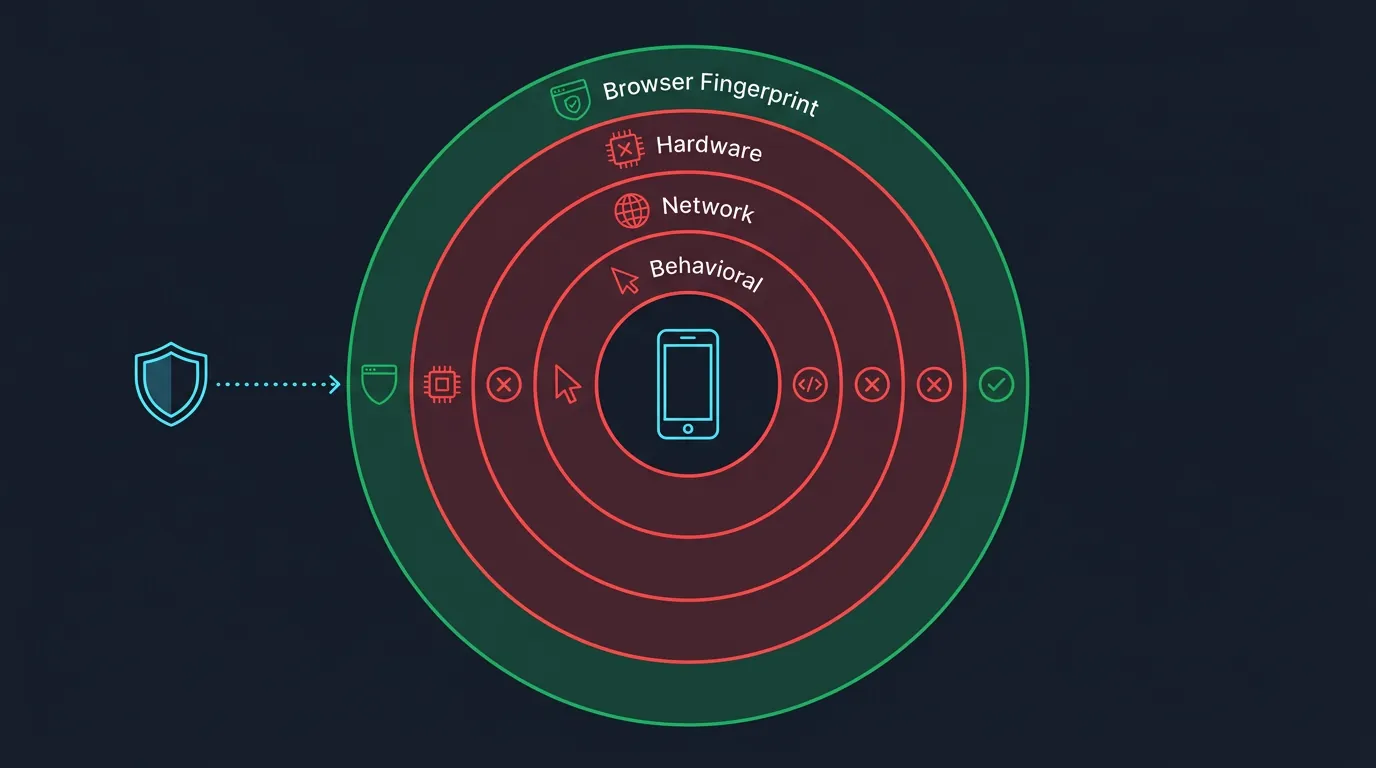
Antidetect browsers mask browser fingerprints but leave 4 layers fully exposed: hardware, network, behavioral, and app SDK — this is why ban rates remain at 30-70% within the first week.
This article breaks down how antidetect systems work, the 5 specific detection layers, why Canvas/WebGL spoofing fails, a ban rate comparison between antidetect and ARM cloud phones, and a decision framework for choosing the right tool by platform type.
How Do Antidetect Systems on PC Work?
Antidetect creates isolated browser environments with spoofed fingerprints including User-Agent, Canvas hash, WebGL renderer, and timezone values. The system generates multiple separate profiles, each with a unique fingerprint set so platforms see "different devices" instead of a single PC.
The antidetect market has 2 main categories:
- Antidetect browsers (Multilogin, AdsPower, GoLogin): Modified Chromium/Firefox → each tab/profile gets a unique fingerprint. Pricing from $0 (free tier, 5 profiles) to $99-$399/month
- Antidetect emulators (modded BlueStacks, LDPlayer plugins): Android emulators with added spoofing layers → modify IMEI, Android ID. Free but stack 2 risk layers (emulator + spoof)
Both categories share the same strategy: replace real values with fake ones — but only at the browser level, never touching the hardware beneath.
5 Detection Layers Platforms Deploy — Antidetect Only Covers 1
Platforms deploy 5 detection layers — antidetect browsers cover layer 1 but leave 4 layers fully exposed. The 5 detection layers: browser fingerprint, hardware fingerprint, network fingerprint, behavioral analysis, and app SDK checks.
Layer 1 — Browser Fingerprint (Antidetect CAN Cover)
Browser fingerprint is the only layer antidetect successfully masks — including Canvas hash, WebGL renderer string, installed fonts, and User-Agent. Antidetect modifies these values at the JavaScript API level.
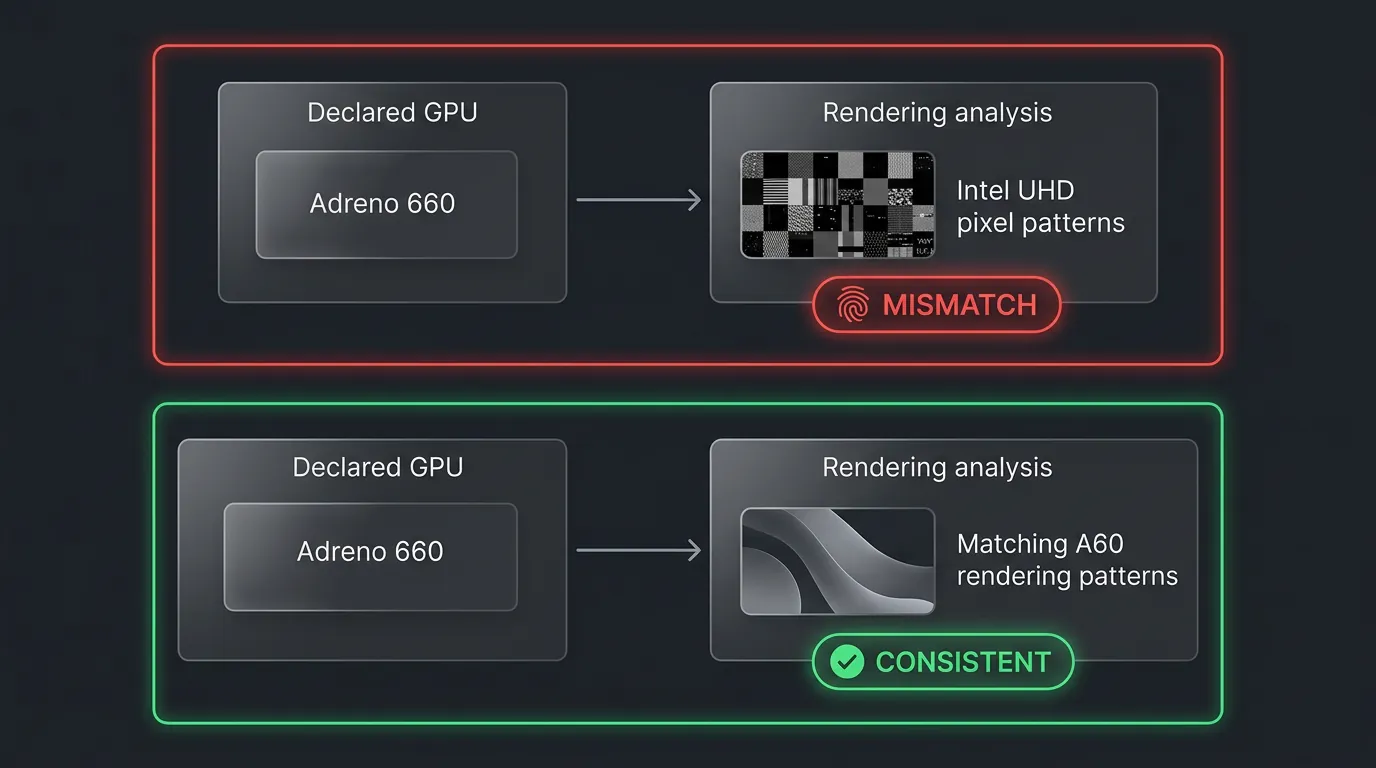
However, even at this layer, inconsistencies occur: antidetect declares "iPhone 15" but the Canvas API returns render patterns from Intel UHD Graphics — platforms catch this contradiction instantly. Detection rate at this layer is approximately 20-30% when platforms only check browser fingerprints.
Layer 2 — Hardware Fingerprint (CANNOT Be Masked)
Hardware fingerprint is a layer antidetect CANNOT spoof because it depends on the physical hardware of the PC. Platforms check 4 hardware factors:
- CPU instruction set:
Build.CPU_ABIreturnsx86_64on PC, while real phones returnarm64-v8a - GPU compute capabilities: Desktop GPUs (NVIDIA RTX, Intel UHD) have entirely different compute features from mobile GPUs (Mali, Adreno)
- Sensor data: Gyroscope, accelerometer, magnetometer — PCs lack these sensors. When apps query sensors → returns
nullor static values → flagged - Build properties:
Build.HARDWARE,Build.BOARD,Build.MANUFACTURERreturn x86/emulator values
Layer 3 — Network Fingerprint: TLS/JA3
Network fingerprint includes TLS/JA3 — a layer proxies DO NOT solve. When a device connects to a server, the TLS handshake generates a "fingerprint" based on cipher suites, extensions, and elliptic curves the client sends.
- JA3/JA4 fingerprint: Each TLS client (Chrome, Firefox, Android WebView) has a unique JA3 hash. Chrome on Android has a different JA3 than Chrome on Windows — platforms compare JA3 against declared User-Agent
- TCP OS fingerprint: TTL (Time-To-Live), TCP window size, and MSS (Maximum Segment Size) reflect the real operating system — proxies hide IP but DO NOT hide TCP/TLS signatures
- WebRTC leak: Even with proxies, WebRTC can leak local IPs, revealing that multiple profiles run on a single machine
Layer 4 — Behavioral Analysis (AI)
Behavioral analysis uses machine learning to detect abnormal patterns from mouse, keyboard, and session data. Major platforms like TikTok, Facebook, and Instagram deploy AI models analyzing 3 behavior types:
- Mouse movements: Humans move cursors in natural bezier curves — bots move linearly or teleport between elements
- Typing rhythm: Human inter-key delay has high variance (50-300ms) — automation tools produce fixed or overly even delays
- Session patterns: Logging into 50 accounts from the same IP range, at the same time, with the same behavior → multi-account correlation
Layer 5 — App SDK Detection
App SDK detection is the final layer — ONLY real hardware passes. TikTok, Instagram, and mobile games integrate 3 detection SDKs:
- Google Play Integrity API (replaces SafetyNet): Hardware attestation via TEE (Trusted Execution Environment) or StrongBox. The API checks device integrity at hardware level → emulators, rooted, or modified devices all FAIL
- SafetyNet Attestation (legacy): Still used by many older apps
- Root/emulator detection: Checks for
subinary, Magisk, Xposed, or emulator files (libhoudini.so,goldfish)
This layer operates on a binary mechanism: pass or fail — no gray zone. Antidetect browsers CANNOT interfere with this attestation process.
Why Canvas and WebGL Spoofing Fail in Practice
Canvas and WebGL spoofing fail because detection systems identify abnormal noise patterns and hardware inconsistency between declared values and actual render output.
Canvas spoofing works by injecting random noise into Canvas output — each render produces slightly different results. Platforms counter this by rendering the same element 3 consecutive times: if output varies → noise injection detected, not a real device (real devices render identical results every time).
WebGL spoofing overrides the WebGL renderer string — declaring "Adreno 660" (Qualcomm mobile GPU) for example. But when platforms run WebGL shader compilation and compute tests, results reflect the actual GPU (Intel UHD or NVIDIA RTX) — compute capabilities, shader precision, and extension support don't match Adreno 660. Platforms compare declared GPU vs actual render output → inconsistency detected.
Real ARM cloud phones have no such issue: the GPU is a real Mali or Adreno → Canvas render output is stable (identical results every time), WebGL renderer string matches actual GPU compute → consistent → passes all detection checks. The antidetect browser vs cloud phone analysis compares detection mechanisms and real-world results between both approaches in detail.
Risk Comparison: Antidetect on PC vs Real ARM Cloud Phone
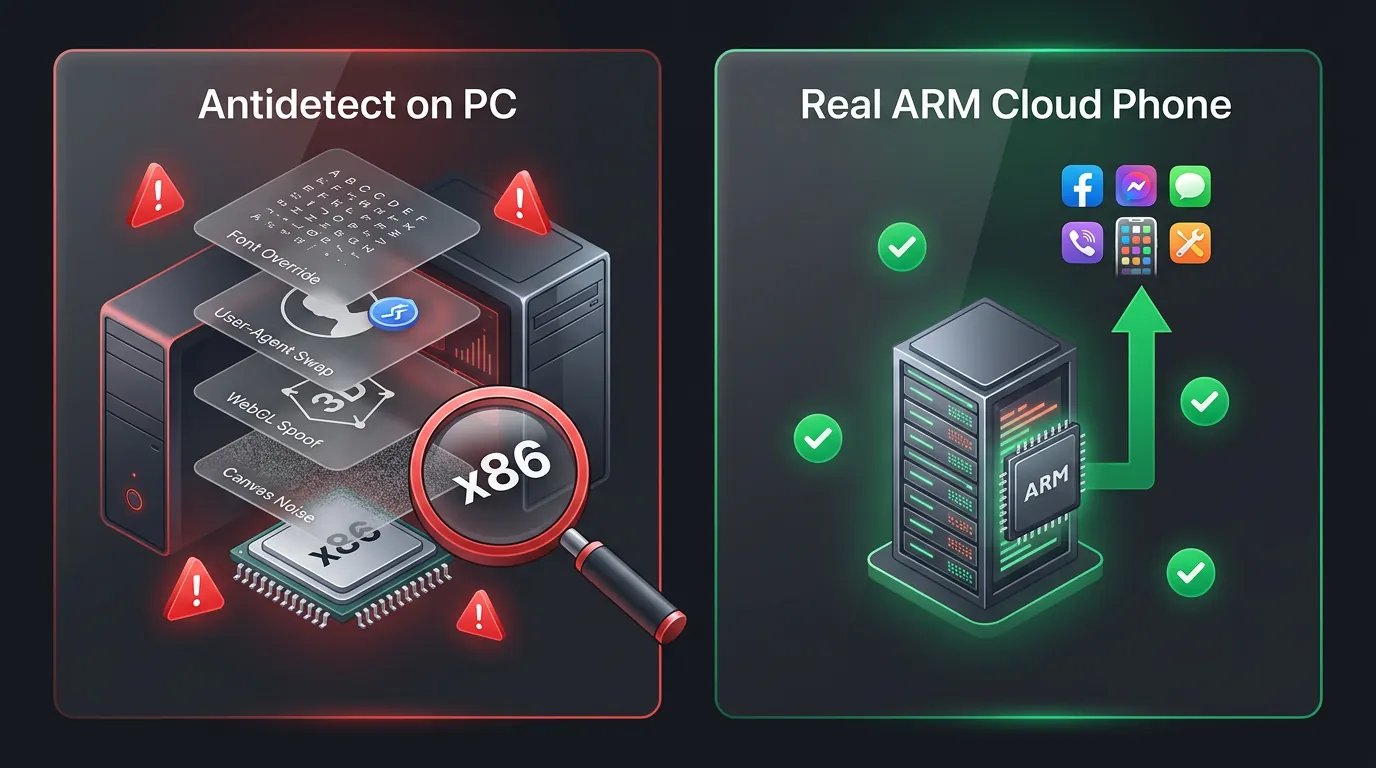
Antidetect on PC uses a masking strategy — hiding symptoms by replacing fingerprint values. ARM cloud phone uses authenticity — real hardware, real fingerprints, nothing to hide. Antidetect = masking → 30-70% ban rate in week 1. ARM Cloud Phone = authenticity → ban rate under 5%.
The fundamental difference lies in philosophy: antidetect attempts to "pretend" to be a real device through software — ARM cloud phones already ARE real devices. The comprehensive cloud phone vs emulator comparison analyzes in detail why real ARM architecture determines fingerprint quality and ban rates.
When Does Antidetect Still Make Sense — And When Do You Need Cloud Phone?
Antidetect remains viable for specific scenarios, but ARM cloud phones are mandatory for the majority of modern farming operations.
Antidetect works when:
- Farming web-based platforms only (forums, websites, web social) — no mobile apps involved
- Short-term campaigns under 30 days — not enough time for platforms to build behavioral profiles
- Platforms don't check app SDK (Play Integrity) — browser fingerprint checks only
- Budget under $50/month — need free tier with 5-10 profiles
ARM cloud phone is required when:
- Farming mobile app accounts: TikTok, Instagram, Facebook — app SDK checks are mandatory
- Long-term operations exceeding 90 days — stable fingerprints needed, no degradation
- 24/7 AFK gaming — games use Play Integrity API, anti-cheat checks hardware
- Scaling beyond 20 accounts — consistency and centralized management matter more
Decision rule: Platform detection level determines the right tool. Web-only → antidetect works. Mobile app → cloud phone only.
XCloudPhone provides real ARM hardware, passes all 5 detection layers, ~$10/device/month. Sign up at app.xcloudphone.com.
FAQ
"Can Antidetect Browsers Bypass TikTok?"
No. TikTok uses app SDK checks via Google Play Integrity API combined with behavioral AI — antidetect browsers only cover layer 1 (browser fingerprint), while TikTok checks at layer 4 (behavioral) and layer 5 (app SDK). Real ARM cloud phones pass all 5 layers.
"Is $99/Month for Antidetect Worth It?"
Only for web-based platform farming. If you farm forums, web social, or e-commerce platforms that only use browser fingerprint checks → antidetect is effective. For mobile app farming (TikTok, Instagram, games) → not worth it because 30-70% ban rates destroy ROI.
"Does Canvas Noise Help Avoid Detection?"
Partially — but not enough. Canvas noise covers 1 of 5 layers. Modern platforms render Canvas 3 consecutive times to detect noise injection: if output differs → flagged. The sustainable solution is real hardware (ARM Cloud Phone), where Canvas output is stable and consistent.
Masking or Authenticity: Which Strategy Is Sustainable?
Antidetect on PC exploits a masking strategy — hiding real fingerprints behind fake values. This strategy was effective during 2018-2022 when platforms only checked 1-2 layers. However, with the introduction of Google Play Integrity API, behavioral AI, and TLS fingerprinting in 2024-2026, masking is no longer sufficient.
Real ARM cloud phones represent the authenticity strategy — nothing to hide because everything is real. This is the only sustainable path for large-scale, long-term farming operations.