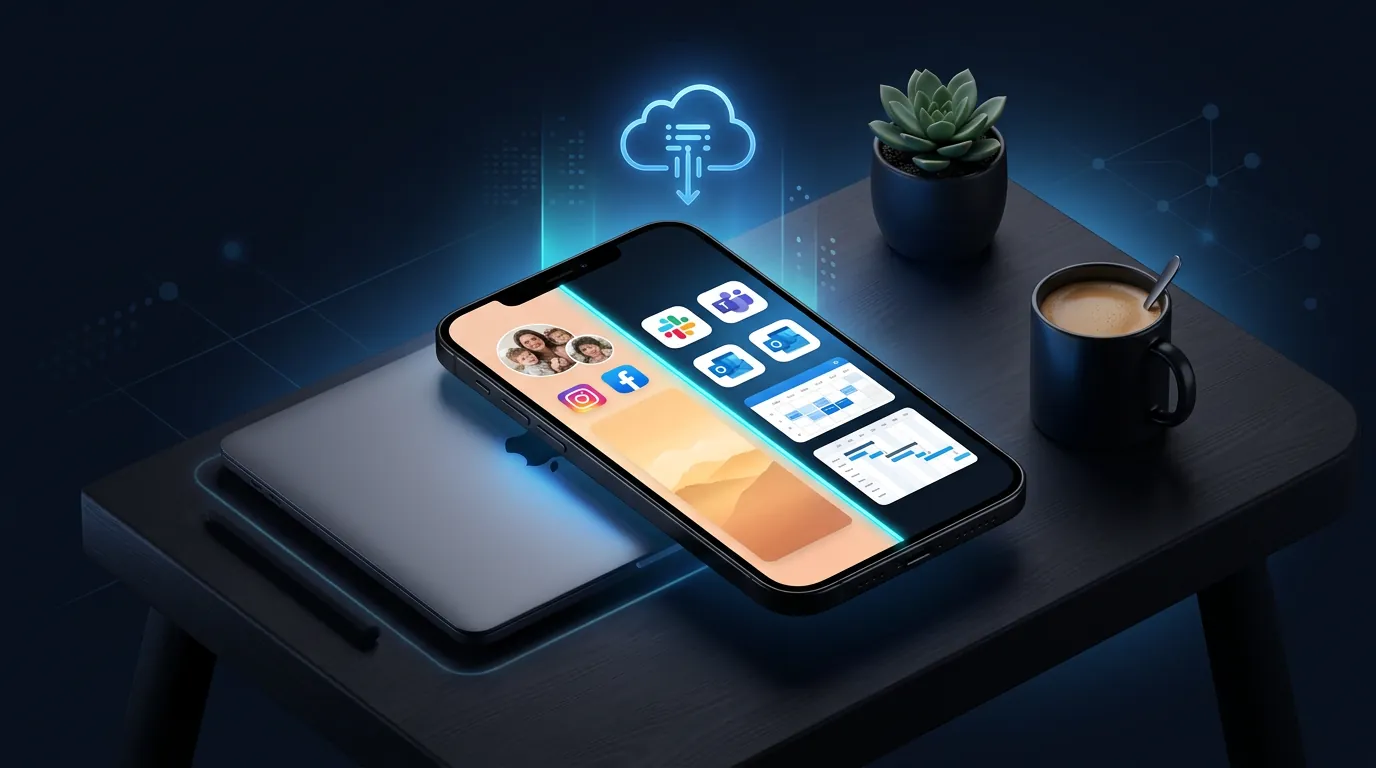
1 Phone for Everything — 3 Practical Risks
Relying on a single phone for both work and personal use introduces 3 severe risks: data leaks (sending the wrong files), always-on stress (inability to mute work notifications), and security gaps (IT departments lacking control over data stored on personal devices).
Data Leaks — Sending Personal Photos to Clients
23% of employees accidentally send personal messages or files to colleagues or clients annually, according to Statista. The core issue: personal photos and work documents reside in the identical gallery folder. When attaching files via WhatsApp or email, vacation photos appear right next to client proposals.
Separating the device equals separating the gallery. Personal photos stay on your physical phone, while work visuals remain strictly on the work phone—never mixing.
Always-On Stress — The Boss Calling at 11 PM
When your personal number doubles as your work number, boundaries vanish. Clients call at 10 PM, and colleagues send Slack messages at 6 AM on Sundays—notifications endlessly push to your personal device.
A dedicated work phone means shutting it down when clocking out. Closing the cloud phone application equals zero work notifications reaching your personal device.
Security Gaps — IT Cannot Control Personal Device Data
The BYOD (Bring Your Own Device) trend is surging—employees install Slack, Teams, and Jira directly on personal phones. When an employee resigns, proprietary company data remains on their personal device. IT departments possess no legal authority to wipe an ex-employee’s personal phone.
Cloud phones resolve this: IT manages the cloud phone remotely. If an employee resigns, IT wipes the remote device within 30 seconds. While 72% of companies permit BYOD, only 34% enforce adequate MDM (Mobile Device Management) policies, per Zippia Workplace Statistics 2024.
The 3 Popular Solutions — Honest Pros and Cons
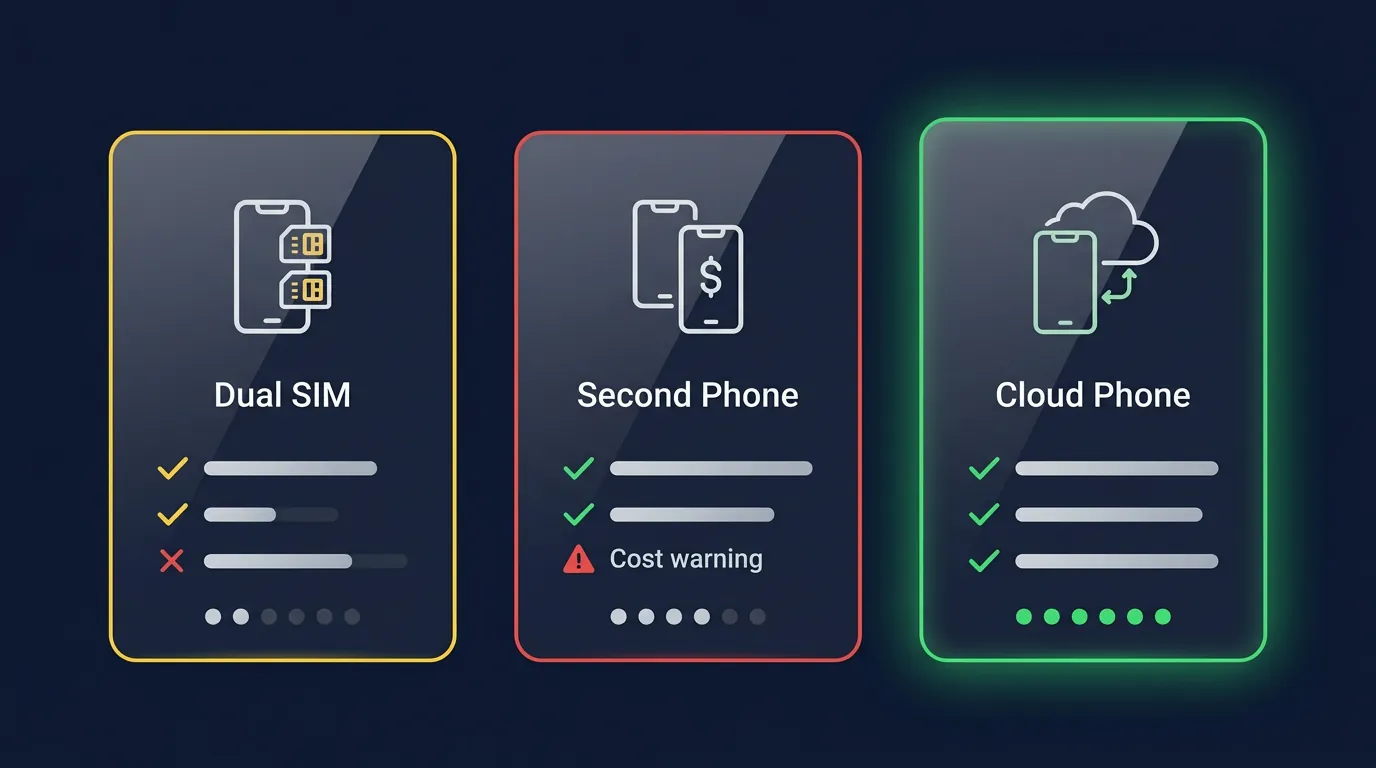
An honest comparison of the 3 most popular work separation solutions based on efficiency, cost, and convenience: Dual SIM setups, buying physical secondary phones, and deploying cloud phones.
Dual SIM — Separating Numbers, Not Environments
Dual SIMs successfully separate phone numbers—but two SIMs sharing one physical device means sharing a single gallery, contact list, and notification architecture. Personal photos still mix with work files. Slack will still push notifications at 11 PM.
Buying a Second Phone — 100% Separation, High Inconvenience
Purchasing a new phone achieves 100% environmental isolation—but introduces 3 major inconveniences: a steep $300-800 upfront cost, the physical burden of carrying two devices everywhere, and charging two batteries daily.
Cloud Phones — Full Android Environment, No Hardware Needed
A cloud phone acts as a genuine Android device running on a remote server, which you access via an app or browser. It isolates apps, contacts, galleries, and storage 100%—mirroring the benefits of a second physical phone but eliminating hardware requirements. Monthly costs sit at approximately $10.
Cloud Phones = Virtual Work Phones — How Do They Differ from VoIP?
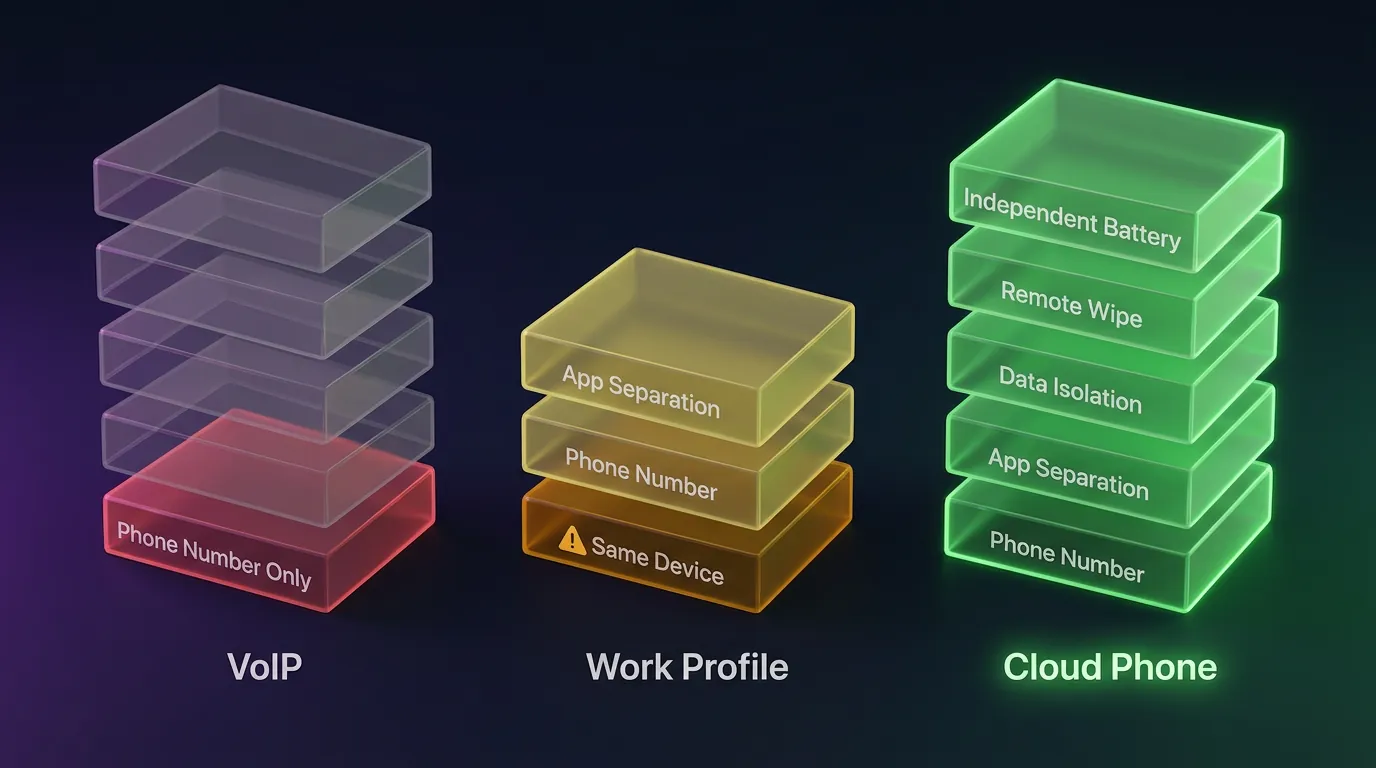
Cloud phones are not VoIP applications (like Skype or Google Voice) or Android Work Profiles. A cloud phone is a standalone Android device running on a physical server that you control remotely via a video stream on your personal screen.
Many users confuse cloud phones with VoIP (RingCentral, Grasshopper) or Work Profiles (Samsung Knox, Android Enterprise). These 3 solutions differ fundamentally:
VoIP simply provides a virtual phone number for calling and texting—it does not separate the application environment. Slack, Teams, and galleries remain on your personal device. There is no remote wipe capability.
Work Profiles split applications into two profiles on the identical physical device—but they share the same battery, the same screen, and IT only wipes the work profile, not the entire device.
Cloud Phones deliver a fully separate Android environment hosted on a server. Close the cloud phone app, and the device functionally turns off—no notifications reach your physical phone. IT administrators execute a remote wipe in 30 seconds.
Cloud phones run on genuine ARM hardware (e.g., Samsung Exynos)—they are not x86 emulators. The Play Store is installed natively, and all applications execute exactly as they would on a physical smartphone. Streaming latency stays under 100ms via WebRTC protocols. The High-Trust Farming guide details the mechanics of ARM hardware deeply.
The 4 Professionals Who Desperately Need Virtual Work Phones
Four demographics benefit exponentially from acquiring a dedicated work phone: sales professionals, freelancers, remote workers under BYOD policies, and small business owners.
Sales Professionals
Salespeople require dedicated customer-facing numbers—WhatsApp Business or Viber Business operating on a work phone. Product image galleries must remain separate. Customer contacts never mix with personal contacts. If a salesperson resigns, IT recalls all customer data instantly via a remote wipe.
Freelancers
Every freelance project demands a dedicated "office": a unique phone number, a specific Slack workspace, and isolated project documents. When a project concludes, archive the cloud phone; when a new project begins, provision a fresh device. This guarantees zero cross-contamination between varying clients.
Remote Workers (BYOD)
Companies utilizing BYOD policies desperately need management solutions: employees install Slack, Teams, and Jira on cloud phones rather than their personal devices. IT manages deployments remotely via a dashboard. If an employee departs, IT wipes the cloud device within 30 seconds—leaving zero company data lingering on personal hardware.
Small Business Owners
Small business owners need dedicated business lines to separate their professional and personal lives entirely. They attach the work phone number to their Google Business Profile. When customers call the work phone, owners simply close the app after business hours.
Yearly Cost Comparisons — Cloud Phones vs Second Physical Phones
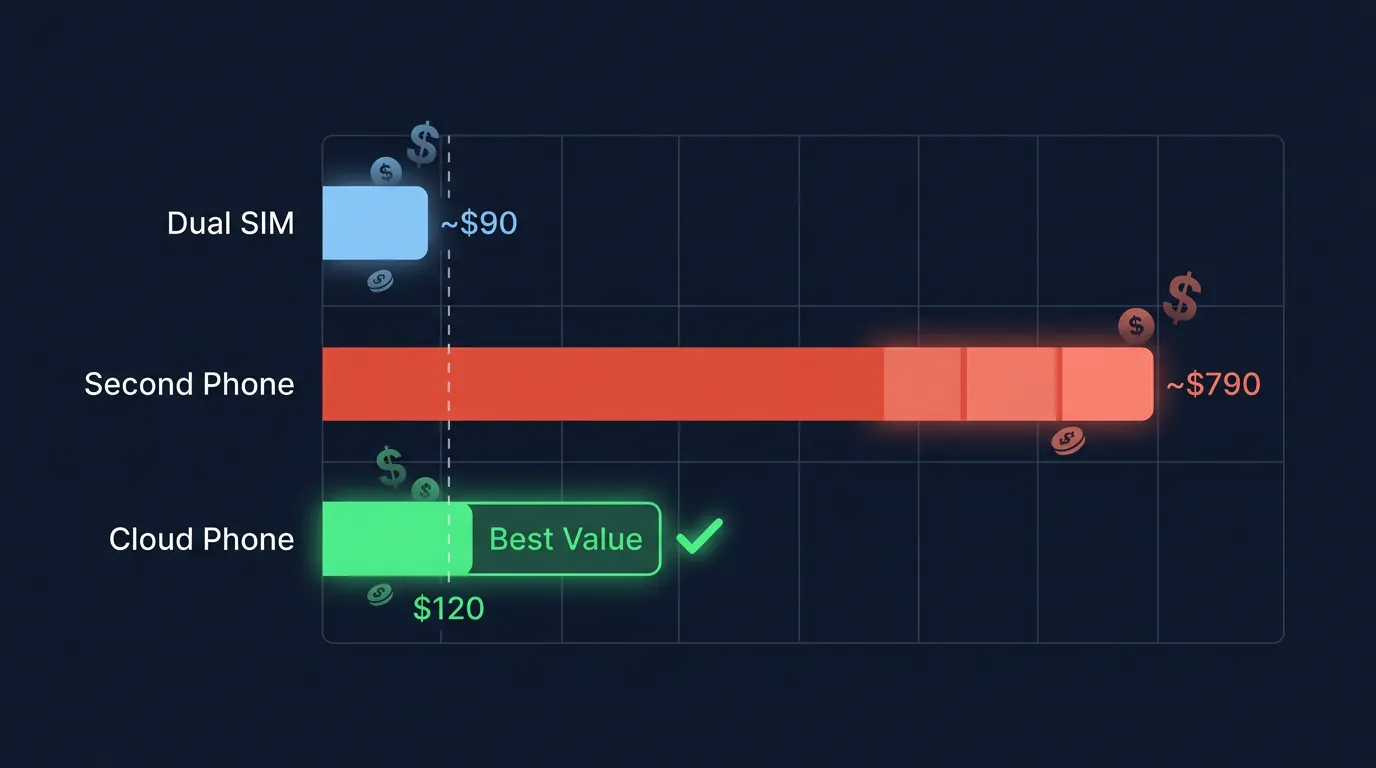
An honest breakdown of the Total Cost of Ownership (TCO) across a 1-year operational timeline:
Cloud phones generate savings from month one compared to buying physical devices—$0 in upfront costs versus shelling out $300-800 for fresh hardware.
Hidden costs are rarely calculated: buying a second physical phone necessitates buying cases ($15-30), chargers ($10-15), and extended warranties ($30-50/year). Cloud phones entail exactly $0 in hidden costs.
Scaling for teams: Equipping 5 employees costs 5 × $10/month = $50/month for cloud phones. Compare this to 5 × $500 = $2,500 in upfront hardware purchases, excluding the logistical costs of management, warranties, and replacement units.
7-Minute Setup Workflow for Cloud Phones
Deploying a work phone via a cloud phone takes roughly 7 minutes—registering the device, installing professional applications, syncing contacts, and muting notifications on your physical phone.
- Register for a cloud phone trial at app.xcloudphone.com → Select a "Work" configuration (2GB RAM handles Slack, Teams, and WhatsApp Business flawlessly).
- Launch the cloud phone via either the mobile app or PC browser → Access the full Android interface.
- Install essential work applications: Slack, Microsoft Teams, WhatsApp Business, and Google Workspace—all available natively via the Play Store.
- Import professional contacts utilizing a CSV file or Google Contacts sync—ensure you only import work contacts, leaving personal contacts behind.
- Configure a work phone number: attach an eSIM or install a VoIP application (Grasshopper, Talkroute) directly onto the cloud phone.
- Mute work notifications on your personal device—only check messages when you explicitly open the cloud phone application. Closing the app means clocking out.
- Pin the cloud phone app to your personal homescreen—one tap enters the "office." One tap exits back "home."
📌 Pro Tip: Set up automated notification muting parameters after 6 PM—many VoIP applications natively support scheduled Do Not Disturb modes. The XCloudPhone team utilizes this workflow, reducing after-hours work messages by 85%.
FAQ
"Do Cloud Phones Run Teams, Slack, and WhatsApp Business?"
Yes. Cloud phones operate on full Android operating systems. Install Microsoft Teams, Slack, WhatsApp Business, and Google Workspace directly from the native Play Store. Every application runs natively, not through restrictive browser interfaces.
"Do IT Administrators Perform Remote Data Wipes?"
Yes. The XCloudPhone dashboard grants IT administrators the authority to manage, lock, and wipe devices remotely. If an employee resigns, IT securely wipes the device within 30 seconds, guaranteeing company data safety.
"Does Closing the App Erase My Data?"
No. Data is stored persistently on secure servers. Closing the app and reopening it later returns you to the exact state you left off. It functions identically to pressing the sleep button on a physical smartphone.
"Are Cloud Work Phones Different from Emulators Like BlueStacks?"
Drastically different. Cloud phones operate on authentic ARM hardware (Samsung Exynos architecture)—they are not x86 software emulators. The Play Store is installed natively, meaning zero Virtual Machine (VM) detection algorithms are triggered. Applications run exactly as they would on physical smartphones.
"Do Regular Phone Calls Route to a Cloud Phone?"
Yes. There are two primary workflows: installing a VoIP application (like Viber or Telegram) directly on the cloud phone, or setting up call forwarding from your personal phone (housing the physical SIM) to a recognizable VoIP application. The cloud phone acts as the independent sandbox for managing these communications.
"When is a Dedicated Work Phone Unnecessary?"
When your role demands zero communication outside standard business hours, if you operate in a micro-team under 3 people, or if your company mandates comprehensive BYOD policies equipped with strict MDM frameworks. If you do not face the 3 core risks (data leaks, always-on stress, security gaps), a single device remains sufficient.
[Special Issue] Work Phones — No Longer a Luxury, But the New Standard
Separating your professional obligations from your personal life is not a luxury—it establishes a mandatory boundary crucial for sustaining productivity and protecting mental health.
This guide highlighted 3 severe risks: data leaks (accidentally sending personal files), always-on stress (the inability to mute notifications), and security gaps (IT's inability to govern data). Cloud phones resolve all three inherently:
- Data Leaks → Galleries, contacts, and storage remain 100% isolated—never sharing environments with personal files.
- Always-On Stress → Closing the cloud phone application guarantees zero work notifications breach your physical device.
- Security Gaps → IT gains the ability to remotely wipe devices in 30 seconds when personnel changes occur.
The cost: $10/month—which calculates to 3-8× cheaper than purchasing a physical secondary phone. The setup requires 7 minutes. Subscriptions cancel anytime.
👉 Deploy a dedicated cloud work phone today—start your free trial at app.xcloudphone.com
References
- Buffer — State of Remote Work 2024, 67% check emails outside work hours (buffer.com)
- Statista — Workplace Communication Survey 2024, 23% send personal messages mistakenly (statista.com)
- Zippia — BYOD Statistics 2024, 87% of companies permit BYOD (zippia.com)
- Gartner — Forecast: Enterprise Mobile Device Spending 2024, average device costs (gartner.com)
- XCloudPhone — ARM Hardware Specification, Samsung Exynos Baseband Architecture (xcloudphone.com)