![Residential Proxy + Cloud Phone: Clean IP for Phone Farms [2026]](https://cdn-h.xcloudphone.com/posts/hero-proxy-cloud-phone-1772701090588.webp)
One "dirty" IP can kill 50 accounts overnight — even if you are running real devices. A real ARM cloud phone solves the device fingerprint problem, but IP reputation is the second layer of defense that matters just as much.
Combining residential proxy with a real ARM cloud phone creates "double layer trust" — clean device fingerprint + high IP reputation — reducing checkpoint rates below 5% on Facebook and TikTok.
This guide covers choosing the right proxy type, setting up on a cloud phone in 5 minutes, preventing WebRTC leaks, and proxy costs for 10 to 1,000 accounts.
Why IP Matters — 5 Factors Platforms Check
IP address determines your initial trust score — Facebook and TikTok classify IPs into 3 trust levels: Residential (high), Mobile (very high), and Datacenter (low).
IP is 1 of 5 factors that make up the overall trust score. Facebook reports removing 2.2 billion fake accounts every quarter — IP reputation is signal #2 after device fingerprint in their detection system. When device fingerprint is clean (real ARM) but IP is dirty, the overall trust score still drops.
5 things platforms check through IP:
-
IP type — Residential, datacenter, or mobile? Datacenter IPs get automatically flagged on many platforms because no real user browses Facebook from a datacenter IP.
-
IP reputation history — How many previous accounts using this IP got banned? IPs with a spam/scam history carry a trust score near 0.
-
Geographic consistency — IP location must match timezone, language, and location settings on the device. An IP in Vietnam but timezone UTC+0 is a red flag.
-
Subnet patterns — Multiple accounts on the same subnet (e.g., 103.123.45.x) signal to the platform that these are farms operated by a single entity.
-
IP switching frequency — Jumping from a Vietnam IP to a US IP within 30 minutes triggers impossible travel detection.
Real ARM cloud phone + residential proxy IP creates a "double layer defense": the hardware layer protects device identity, the network layer protects IP reputation. Missing either layer means the anti-fraud system can still flag accounts.
3 Proxy Types for Account Farming — Choose the Right One, Save Money
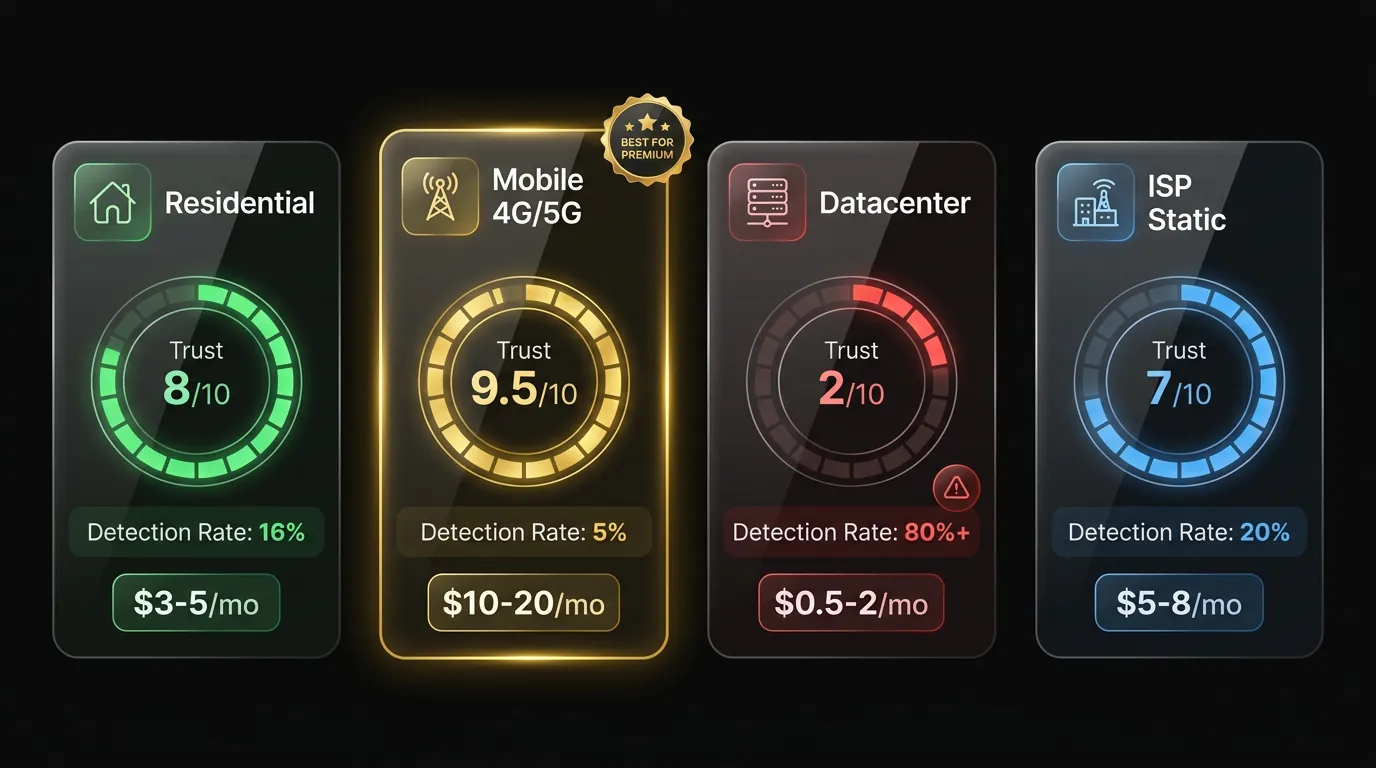
3 common proxy types for account farming are Residential, Datacenter, and Mobile (4G/5G) — each with distinct trust levels, costs, and use cases.
Residential Proxy — The Balanced Choice
Residential proxies use IPs from real ISP households — Comcast, AT&T, Verizon in the US, or local providers in any target country. High trust score: 84% of websites cannot detect residential proxies, according to Oxylabs research in 2025.
Average cost: $3-5/IP/month.
2 types of residential proxy:
- Static residential — Fixed IP that does not change. Best for the warm-up phase (days 1-14) when you need to log in daily from the same IP, creating a pattern that mimics a real user.
- Rotating residential — IP rotates per session or timer. Best for the farming phase when you need interactions from multiple sources.
Best for: Most account farming use cases — Facebook, TikTok, Instagram, X (Twitter).
Mobile Proxy (4G and 5G) — The Gold Standard
Mobile proxies use IPs from real mobile carrier networks — the highest trust score among all 3 types. The reason: mobile ISPs assign IPs to thousands of real users simultaneously (CGNAT), so Facebook treats mobile IPs as "naturally shared" — no flags.
Cost: $10-20/IP/month.
Best for: Premium accounts running high-budget ads, agency VIP clients, crypto accounts requiring maximum trust scores. 3-4× more expensive than residential but trust score is nearly unbreakable.
Datacenter Proxy — Cheap but High Risk
Datacenter proxies use IPs from servers in data centers — Facebook and TikTok AI anti-fraud detects them easily because no real user browses social media from a datacenter IP.
Cost: $0.5-2/IP/month.
Trust score is low — commonly blacklisted. Not recommended for account farming. Only suitable for web scraping, data collection, and testing environments.
Setting Up Proxy on Cloud Phone — 5-Minute Guide
Setting up a proxy on a cloud phone takes 3 main steps: buy a proxy, assign it to a device, and verify the connection — all completed in 5 minutes through the dashboard.
Step 1: Buy a Residential Proxy
Choose a reputable provider with a large IP pool. 3 popular providers: BrightData (72M+ IPs), Smartproxy (55M+ IPs), IPRoyal (8M+ IPs). Selection criteria:
- Location matches your target market — farming US accounts needs US IPs, EU accounts need EU IPs.
- Authentication format: IP:Port:Username:Password or IP whitelist.
- Bandwidth quota that fits — account farming uses ~500MB-1GB/account/month.
Step 2: Assign Proxy to Cloud Phone
On XCloudPhone (1-click setup): Dashboard → select Device → Proxy Settings → paste IP:Port → enter Username/Password → Save. Proxy applies immediately, no device restart needed.
Manual setup on Android: Settings → Wi-Fi → Modify Network → Show Advanced → Proxy: Manual → enter Host (IP) + Port. For authenticated proxies, install ProxyDroid or similar app.
Step 3: Verify the Connection
3 mandatory checks after proxy setup:
- Open browser on cloud phone → visit whatismyip.com → confirm displayed IP matches the purchased proxy IP.
- Check timezone — device timezone must match the proxy IP location. IP in New York → timezone EST (UTC-5).
- Test for WebRTC leak — visit browserleaks.com/webrtc → if it shows an IP different from your proxy IP = leak → enable WebRTC protection.
XCloudPhone includes built-in WebRTC leak protection — proxy IP is consistent across all layers (HTTP, HTTPS, WebRTC STUN/TURN). No additional configuration needed.
WebRTC Leak — The Security Hole Most People Miss
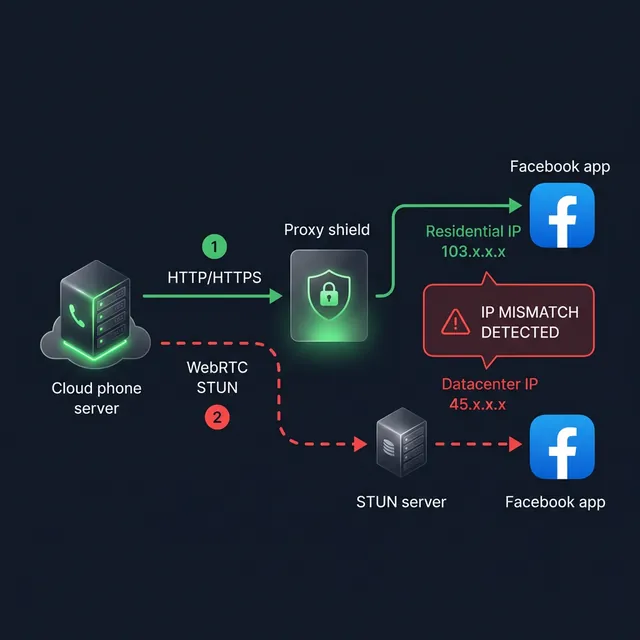
WebRTC leak exposes the real IP of your cloud phone even with proxy enabled — this is the most common vulnerability causing account checkpoints even when using residential proxies.
WebRTC (Web Real-Time Communication) is a protocol enabling peer-to-peer connections in browsers and apps. When an app or browser initiates a WebRTC connection, a STUN request is sent to determine the public IP — and this request bypasses proxy settings, revealing the real IP of the cloud phone server.
The consequence: Facebook and TikTok check WebRTC IP. If WebRTC returns a datacenter IP (the real cloud phone server IP) while HTTP traffic goes through a residential proxy — the 2 IPs do not match → red flag → checkpoint.
3 solutions to prevent WebRTC leak:
-
Disable WebRTC in browser — Open about:config → find
media.peerconnection.enabled→ set tofalse. Downside: some apps need WebRTC to function (video calls, live streaming). -
WebRTC blocking extension — Install WebRTC Leak Shield or WebRTC Control. Downside: only works in browser, does not cover app-level WebRTC.
-
XCloudPhone proxy integration — Proxy IP is consistent across all layers including WebRTC STUN/TURN requests. When proxy is enabled on the dashboard, all traffic — HTTP, HTTPS, DNS, WebRTC — routes through the proxy IP, with no real IP leaks. No extra configuration, no extensions needed.
Cloud phone network architecture and how WebRTC operates in a cloud phone environment — including latency optimization and STUN/TURN fallback — are analyzed in the cloud phone network infrastructure article.
Proxy Cost for 10, 100, and 1,000 Accounts — Detailed Breakdown
Proxy cost for 100 accounts runs approximately $300-500/month on residential proxies — accounting for 30-50% of total operating costs for an account farming operation.
Cost Optimization Strategy
Not every account needs expensive mobile proxies. Segment by account value:
- Standard accounts (80% of fleet): Residential proxy $3-5/IP — sufficient trust for farming, engagement, and posting.
- VIP accounts — running ads, agency clients (15% of fleet): Mobile proxy $10-20/IP — maximum trust score, virtually undetectable.
- Test/warm-up accounts (5% of fleet): Shared residential — lowest cost, acceptable for the testing phase.
Batch management details, account tiering, and IP allocation strategy for 1,000+ account farms are covered in the Facebook phone farm scaling guide.
IP Rotation Strategy — When to Use Static vs Rotating
Use static proxy during the warm-up phase (days 1-14) and rotating proxy for scaled automation (day 15+) — combining both creates the most natural IP behavior.
Warm-up Phase (Days 1-14): Static Residential
A static residential IP simulates "logging in from home" behavior — the IP stays consistent across sessions, just like a real user on stable Wi-Fi. Facebook records consistency patterns: same IP, same timezone, same device → trust score increases gradually.
Farming Phase (Day 15+): Rotating Residential
Switch to rotating residential to simulate "mobile browsing" behavior — IP changes naturally every 10-30 minutes (sticky session). Pattern: login from home (static) → activity outside (rotating) → back home (static) — identical to real user behavior.
IP Rotation Rules
- Sticky session: Keep each IP for 10-30 minutes per session. Not too short (2 minutes = suspicious), not too long (24h static then sudden change = suspicious).
- Subnet rotation: Do not run more than 5 accounts on the same subnet (103.123.45.x) — platforms detect cluster patterns.
- Geographic lock: All IP rotation must stay within the same country, ideally the same city.
Staggered warm-up scheduling and batch management for 100+ account farms — including IP assignment matrices — are described in the Facebook phone farm scaling guide.
FAQ — Proxy + Cloud Phone
"Should You Share 1 IP Between 2 Accounts?"
No. Each account should have its own IP. Sharing an IP means 2 accounts "live" at the same address. Facebook cross-checks device + IP + behavior — 2 accounts on the same IP with different devices = farm indicator → both get checkpointed.
"Can Free Proxies Work for Account Farming?"
No. Free proxies carry 3 risks: IPs already blacklisted (used by thousands of spammers before you), slow speeds (affecting session time), and poor security (proxy owners can intercept traffic). The $3-5/IP/month cost for residential proxy is not worth saving with free alternatives.
"How Do You Check IP Trust Score Before Assigning It?"
Use IPQualityScore.com or Scamalytics.com — enter the IP in the search field and the system returns a fraud score from 0-100. A trust score below 25/100 means a clean IP suitable for premium accounts. Above 75/100 means the IP has been flagged by anti-fraud systems and should not be used for any account.
"What Happens If the Proxy Dies Mid-Session?"
The account does not get banned immediately, but you need to act fast within minutes. When a proxy dies, traffic falls back to the server's real IP (datacenter IP) → Facebook sees an abnormal IP jump → triggers review. Solution: set up a backup proxy or use XCloudPhone auto-failover — if the proxy dies, the device disconnects automatically instead of leaking the datacenter IP.
Clean IP + Clean Device — The "Double Layer Trust" Formula
Modern anti-fraud systems check 2 layers simultaneously: device fingerprint and network identity. A real ARM cloud phone handles the device layer — real IMEI, real sensor data, Play Integrity pass. Residential proxy handles the network layer — high IP reputation, geographic consistency, no blacklisting.
Each layer protects one surface: device trust blocks hardware detection, IP trust blocks network detection. Combining both creates "double layer trust" — checkpoint rates below 5% on Facebook and TikTok, based on 6 months of operational data across 500+ accounts.
→ Try XCloudPhone — 1-click proxy setup, built-in WebRTC leak protection, from $10/device/month