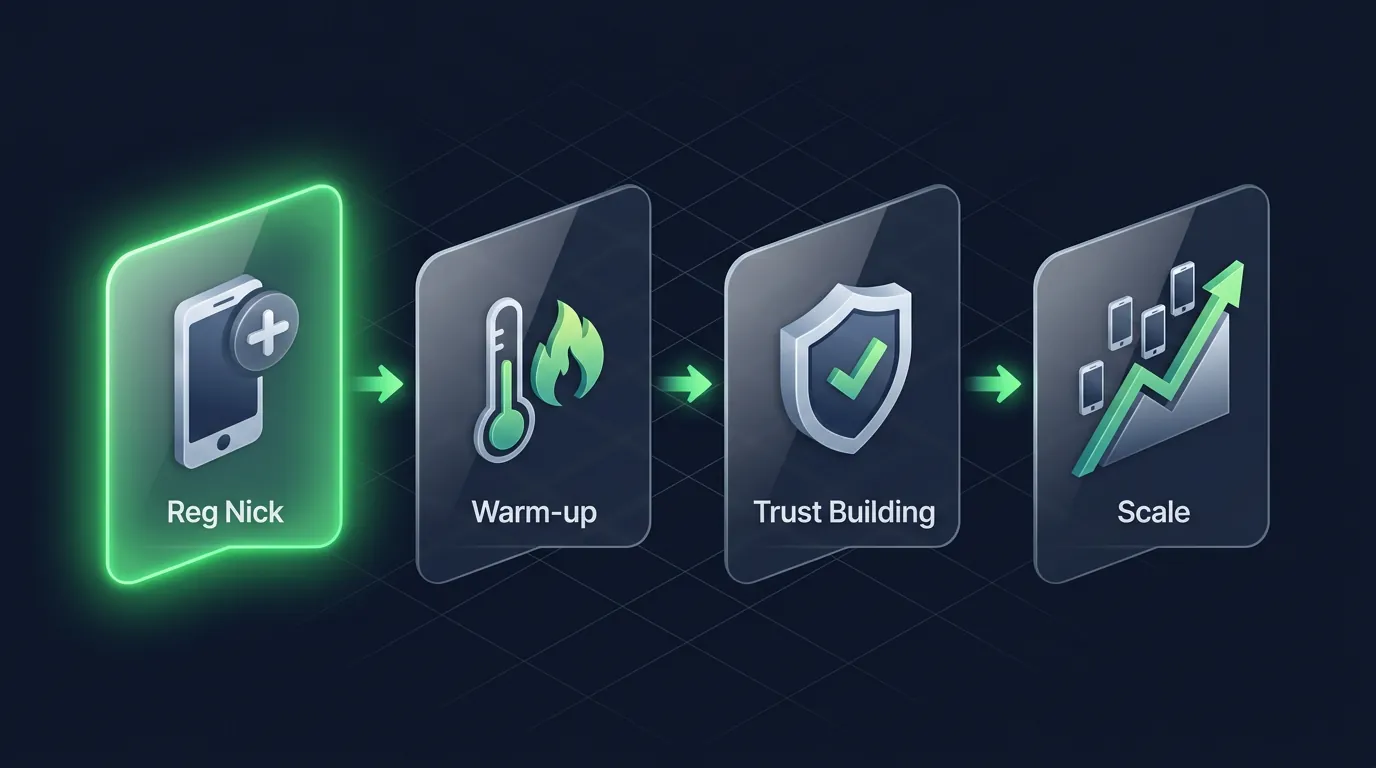
Why Mass Registration on PCs and Emulators Fails
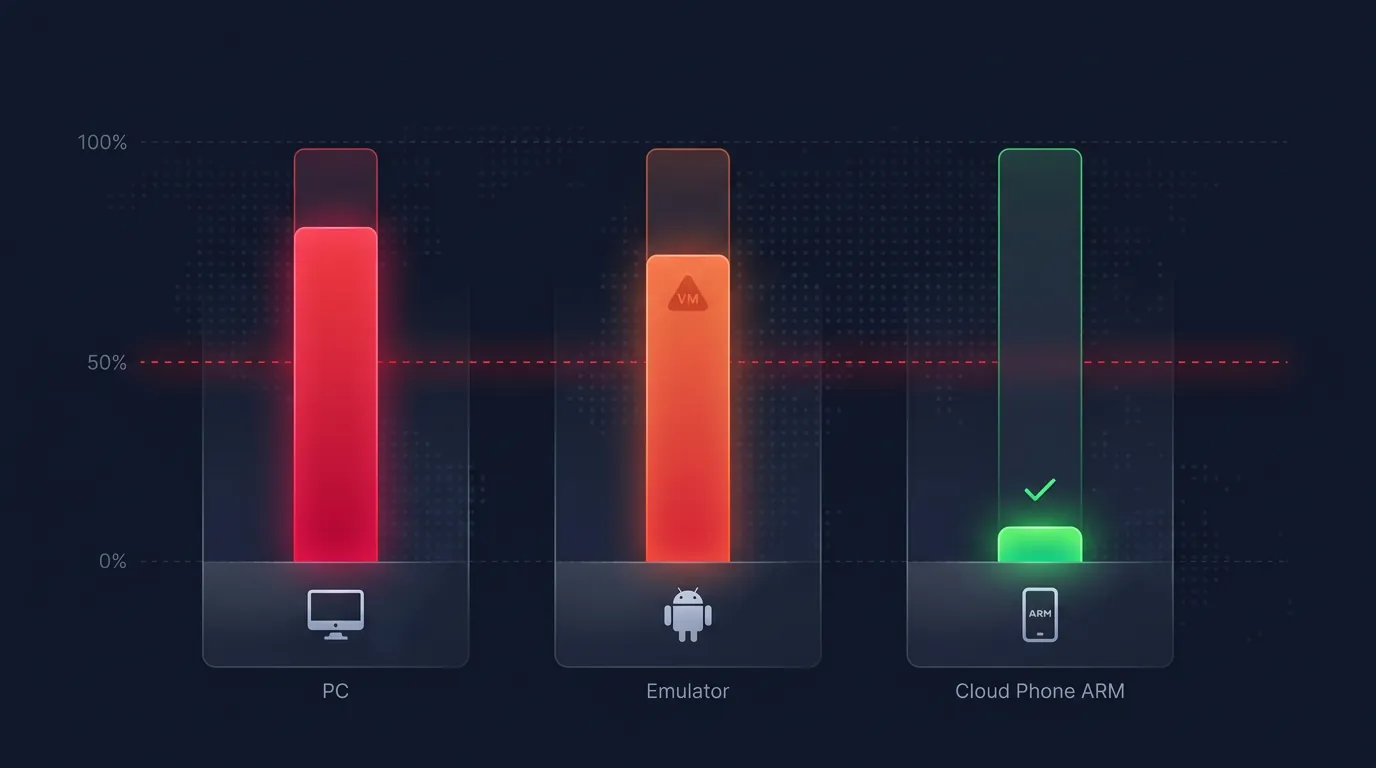
Mass registration on a single PC or emulator routinely fails because 3 critical elements overlap: identical device fingerprints across accounts, shared IPs across sessions, and cookie/cache leaks linking the accounts.
Facebook removes over 2.2 billion fake accounts quarterly, according to the Facebook Transparency Report. Google verifies Play Integrity at the hardware level. Both platforms continuously tighten algorithms to detect mass registrations. The following 3 errors are the most common reasons fresh accounts hit checkpoints:
Identical device fingerprints occur when registering 10 accounts on 1 PC—all 10 share the same canvas hash, WebGL renderer, and screen resolution. Platforms detect this overlap and flag the entire batch.
Shared datacenter IPs or VPNs act as the second strongest signal. An IP's ASN reveals its type—datacenter ASNs (AWS, DigitalOcean, Google Cloud) get flagged instantly upon registration. VPNs utilize shared IP pools where the same IP carries a high probability of previous flagging.
Emulators leave VM indicators that Google and Facebook detect within hours, leading to a 60-90% checkpoint rate. The Goldfish kernel, generic_x86 boards, and QEMU processes are the 3 most common fingerprints left by emulators (LDPlayer, NoxPlayer, BlueStacks) deep within system properties.
The High-Trust Farming guide details the 5 metrics Facebook and TikTok use to evaluate accounts, noting that device fingerprinting carries the highest algorithmic weight.
The 3 Pillars of Safe Mass Registration — Device, IP, and SIM
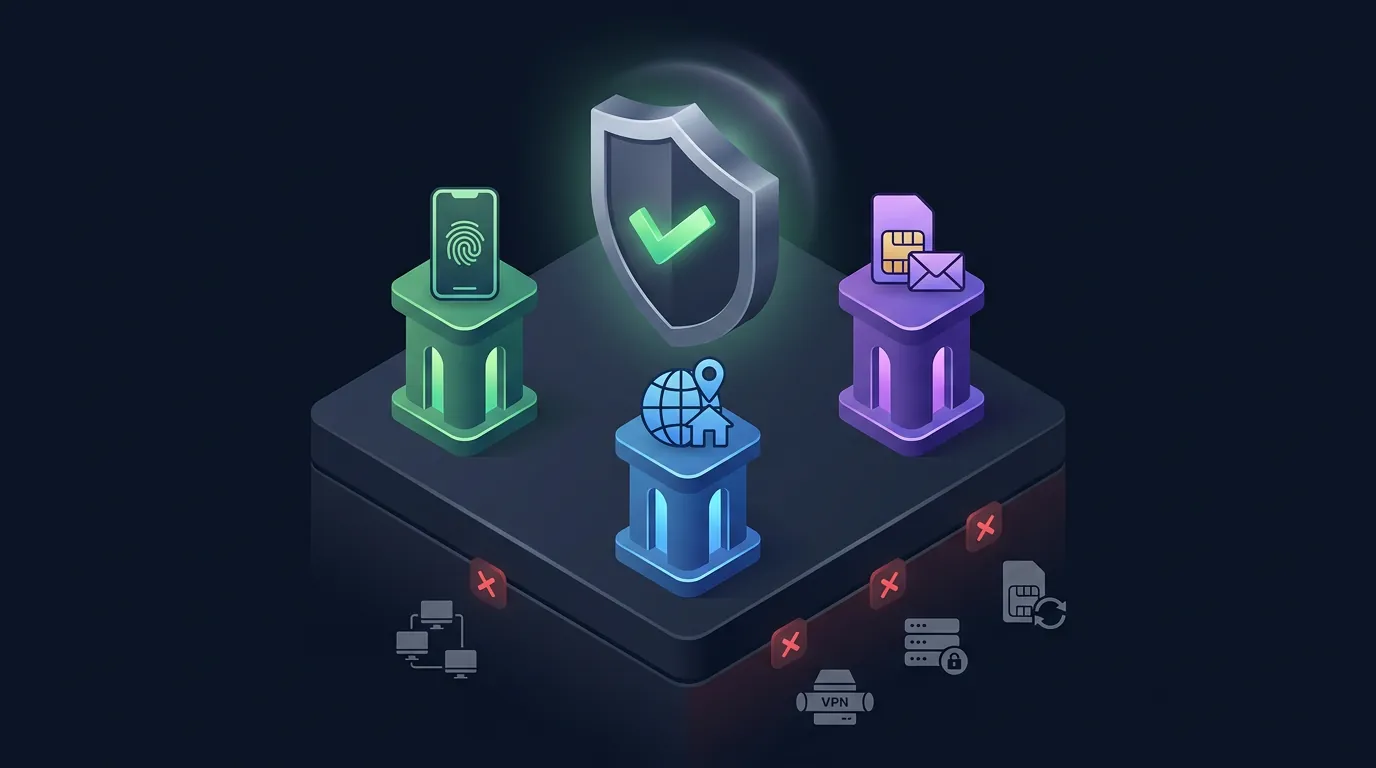
The 3 pillars of safe mass registration include: an isolated device for each account (device isolation), a dedicated residential IP (IP uniqueness), and a SIM or email never associated with a flagged account (identity freshness).
Missing 1 of the 3 pillars guarantees a checkpoint. Securing all 3 pillars keeps the checkpoint rate below 5%.
Pillar 1 — Real Devices: 1 Account = 1 Isolated Device
1 account = 1 Cloud Phone = 1 unique fingerprint. Each cloud phone runs on a genuine ARM chip (Samsung Exynos), carrying authentic IMEIs and Android IDs directly from the manufacturer. Google Play Integrity checks hardware-level attestation—real ARM chips pass 100%, whereas emulators fail 70-90% of the time.
On XCloudPhone, users rotate IMEIs and Android IDs with a single dashboard click. Each device acts as a separate Android ecosystem—sharing no kernels, processes, or storage.
Pillar 2 — Dedicated Residential IPs
Residential IPs possess ASNs belonging to consumer ISPs (like AT&T or Comcast), which platforms recognize as real human users. Datacenter IPs (AWS, Azure) carry ASNs tagged as "hosting"—registering an account with a datacenter IP triggers an immediate flag.
Ideally: 1 account per IP. On a strict budget: maximum 3-5 accounts per IP. Exceeding 5 accounts per IP significantly increases risk profiles. XCloudPhone natively integrates proxy routing—input the proxy via the dashboard, and the device connects securely, preventing WebRTC leaks automatically.
Pillar 3 — Unique, Unrecycled SIMs or Emails
The SIM or email assigned to an account must never have been tied to a previously flagged account. Aged emails (over 30 days old with activity) outperform fresh emails. Brand new physical SIMs severely drastically outperform recycled SIMs used in previous registrations.
The Virtual Numbers for SMS OTP guide explains VoIP detection mechanics and 5 secure methods for receiving OTPs.
Step-by-Step Mass Gmail Registration on Cloud Phones
Registering Gmails on a cloud phone requires 5 steps: creating a new device instance, assigning a proxy, opening the native Chrome browser, registering with a recovery email, and warming up for 3-5 days before heavy usage.
Pre-Registration Checklist
Before beginning, prepare 3 components:
- Fresh Cloud Phone — Create a new device via the XCloudPhone dashboard and rotate the fingerprint (IMEI, Android ID).
- Residential Proxy — Assign a dedicated proxy to the device. Utilize 1 IP for a maximum of 5-10 Gmails.
- Recovery Email — Prepare a recovery email (phone numbers are optional here). Sharing 1 recovery email across 5-10 Gmail accounts remains safe.
The 5-Step Gmail Workflow
- Launch Chrome on the cloud phone → navigate to
accounts.google.com/signup. - Input diverse personal details: name, birth date, and addresses must vary for each Gmail—never use repetitive templates.
- Select the recovery email option instead of a phone number. Platforms only force phone verification if they detect suspicious registration behaviors—in that case, utilize a premium virtual number.
- Complete registration → log into YouTube → watch 1-2 videos → subscribe to 1 channel. Establishing a "real user" footprint in the first 5 minutes is crucial.
- Warm-up the Gmail for 3-5 days: visit YouTube, read incoming emails, and subscribe to newsletters before using it to register Facebook accounts.
Safety Limit: 5-10 Gmails/day/IP, staggered by 30-60 minute intervals. Registering 50 Gmails in 1 hour on a single IP results in an immediate batch ban.
📌 Note: This guide is intended for legitimate business purposes—agencies, software testing, and marketing. Adhere to Google Terms of Service.
Step-by-Step Mass Facebook Registration on Cloud Phones
Registering Facebook accounts on cloud phones is far more complex than Gmail—each account demands a unique phone number or email, a unique profile picture, and immediate Phase 1 warm-up post-creation.
Facebook Registration: Gmail vs Phone Number Decision Tree
Account trust levels depend heavily on the registration method:
- Warmed-up Gmail (>7 days old, active) → Highest trust. Examples include Gmails warmed up with YouTube history and newsletter subscriptions.
- Fresh Gmail (Newly created, zero activity) → Medium trust. Examples include Gmails created yesterday.
- Virtual Number (SMS-Man, TextVerified) → Low trust. These numbers cost $0.1-0.5/OTP and are frequently recycled.
- Burner SIM → Lowest trust. Highly susceptible to immediate flagging.
Warmed-up Gmails yield the highest trust. Register Gmails 5-7 days prior → warm them up → use them for Facebook registration later.
The 5-Step Facebook Workflow
- Download the native Facebook app from the Play Store on the cloud phone—do not use the browser.
- Register using a warmed-up Gmail (created in the previous workflow). Never use temporary email services.
- Complete the profile: upload a unique profile picture (AI-generated or heavily filtered stock photo), add a bio, location, and birth date.
- Enable 2FA immediately—this acts as a potent trust signal. Use an authenticator app, not SMS.
- Initiate Phase 1 warm-up: scroll the feed for 5-10 minutes, like 2-3 posts, and watch 1-2 videos. Perform zero outbound actions (no friend requests, no group joins, no posts).
Profile Pictures: Every account requires a unique image. Use AI generators or stock photos vetted via reverse image search. Never use celebrity photos or reuse the same image across multiple accounts.
Limits: 3-5 Facebook accounts/day/operator, spaced 2-4 hours apart. Facebook monitors registration frequencies from identical IP clusters much strictly than Google.
Virtual SIMs vs Real SIMs — Which Fits Mass Registration?
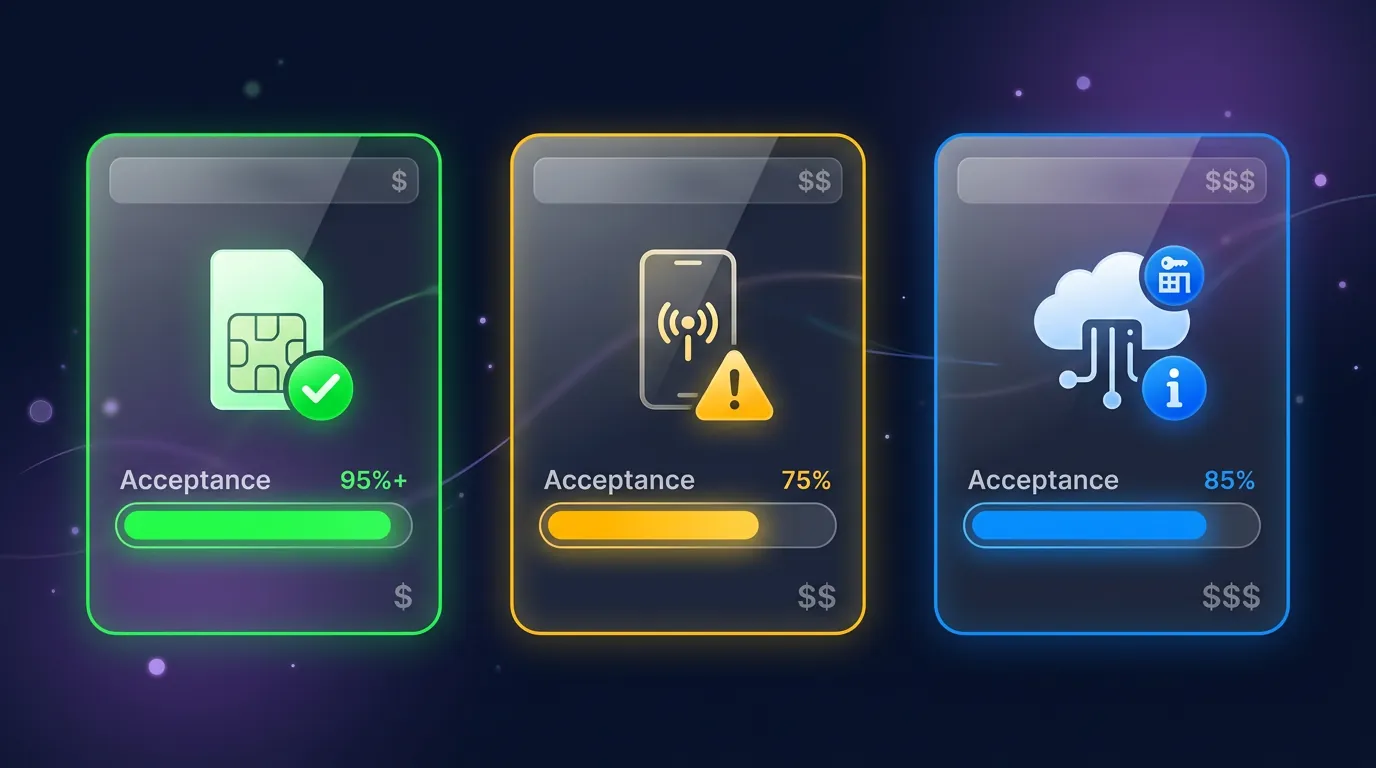
The ideal SIM depends on your volume and budget: real SIMs for VIP accounts (95%+ acceptance), virtual SIMs for expendable accounts (70-85% acceptance), and rental SIMs for accounts requiring long-term access.
Real SIM acceptance rates exceed 95%—virtual SIMs plateau at 70-85%, and Google has blacklisted vast swaths of virtual numbers since Q3 2025.
Rule: Allocate real SIMs for Tier 1 monetization accounts and virtual SIMs for Tier 3 expendable accounts. Use rental SIMs for accounts needing periodic OTP reception (password changes, 2FA verifications).
This section focuses strictly on SIM usage in registration contexts. To understand VoIP detection mechanics deeply, refer to the Virtual Numbers for SMS OTP guide.
The Critical 48-Hour Gap: From Registration to Survival
For the first 48 hours post-registration, platforms monitor fresh accounts 3-5 times more aggressively—any outbound action during this window serves as a massive red flag.
The initial 48 hours dictate whether an account survives. Platforms apply intensified monitoring algorithms to all fresh registrations—sending friend requests, joining groups, posting content, or sending messages will trigger an immediate checkpoint.
The 48-Hour Rule: strictly scroll feeds, like posts, and watch videos—zero outbound interaction. After 48 hours, proceed with the warm-up best practices detailed below.
So, how do you navigate the first 48 hours safely? The next section outlines the 5 golden rules for protecting accounts from the 48-hour mark through Day 7 and Day 30.
Best Practices — 5 Golden Rules for Mass Registration
These 5 golden rules reduce checkpoint rates below 5% during batch registrations: stagger timing, diversify profiles, warm up before automation, document everything, and isolate completely.
- Stagger — Register 3-5 accounts/day, spaced 2-4 hours apart. Never register 50 accounts simultaneously on a single IP cluster—Facebook detects burst registration patterns instantly.
- Diversify — Profile data must vary: names, birth dates, and locations. Avoid repetitive templates or sequential naming conventions (e.g., "john smith 1," "john smith 2").
- Warm-up — Post-registration, do not run automation scripts immediately. Warm up the account for 3-7 days following the High-Trust Farming Workflow Phase 2 before assigning automated tasks.
- Document — Record everything: Device ID, assigned IP, SIM/Email, and registration date in a spreadsheet. If an account hits a checkpoint, this data isolating the failure point.
- Isolate — 1 account = 1 device, 1 IP, and 1 SIM/Email. Never share assets across accounts. Refer to the 5 Levels of Multi-Accounting Isolation guide for deep architectural breakdowns.
Regarding IPs, the Residential Proxy Integration guide details the exact workflow for assigning dedicated proxies to individual cloud phones.
FAQ
"Post-Registration Warm-up Duration"
A minimum of 7 days of warm-up is required before executing any automation tasks. Warm-up consists of 3 phases: feed scrolling (Days 1-3), liking and reacting (Days 3-5), and short commenting (Days 5-7). Accounts are ready for automation only after Day 7.
"Are Automated Registration Tools Safe?"
High risk. Automation tools leave 3 distinct fingerprints: Selenium WebDriver flags, headless browser markers, and robotic timing patterns. Platforms detect automation artifacts much faster than manual registrations. Cloud phones + manual registration are vastly safer because the input arrives via a genuine WebRTC touchscreen stream—featuring zero automation artifacts.
"How Many Accounts Per IP is Safe?"
1 account/IP is ideal, with a maximum of 3-5 accounts/IP for tighter budgets. Exceeding 5 accounts on a single residential IP exponentially increases the risk of the entire batch being linked and banned.
"Is Registering via Email or Phone Number Better?"
Warmed-up Gmails perform best—Gmails boasting 7+ days of activity, newsletter subscriptions, and YouTube watch histories. Next best are Real phone numbers—physical 4G SIMs purchased from carriers. Lastly, Virtual numbers—services like SMS-Man and TextVerified experience acceptance rates 15-25% lower than physical SIMs.
"Do Google and Facebook Detect Cloud Phones?"
No. Cloud phones run on genuine ARM hardware, pass Play Integrity 100%, and trigger 0% VM detection. When Facebook queries parameters like Build.getSerial() or /proc/cpuinfo, the system returns authentic Samsung/Xiaomi hardware values. There are no goldfish kernels, generic_x86 strings, or vbox86p artifacts present.
[Special Issue] Post-Registration: The 3 Pillars Deciding Account Survival
Most users fail at mass registration because they miss 1 of the 3 pillars—overlapping device fingerprints, flagged datacenter IPs, or recycled SIMs/emails. This article explains why emulator-based registrations constantly fail, details the 3-pillar framework (Device + IP + SIM), and provides step-by-step workflows for Gmail and Facebook.
Applying the 3 pillars correctly drops checkpoint rates from 60-90% to under 5%.
Registration is merely step one—the following steps dictate long-term survival:
- 7-Day Warm-up → High-Trust Farming Workflow Phase 2
- Environment Isolation → The 5 Levels of Multi-Accounting Isolation
- Static Proxy Assignment → Integrating Residential Proxies on Cloud Phones
👉 Experience undetectable mass registration on real ARM cloud phones—start your free trial at app.xcloudphone.com — starting at ~$10/month, pay-as-you-go, cancel anytime.
References
- Facebook Transparency Report — 2.2 Billion Fake Accounts Removed Quarterly, Q4 2024 (transparency.fb.com)
- Google Account Policy — Account Creation Guidelines and Anti-Abuse Policies (support.google.com)
- IPQualityScore — IP Fraud Score Database, Proxy Detection API (ipqualityscore.com)
- MaxMind GeoIP — ASN Lookup, IP Type Classification (maxmind.com)
- Telesign — Phone Number Intelligence, SIM Type Detection API (telesign.com)