You want to farm Blox Fruits on 10 accounts simultaneously, but your PC handles only 3-4 instances using MultiBloxy before aggressive lag kicks in. Roblox flags the entire batch because they all share a single IP address. With over 70 million Daily Active Users (DAU), the demand for running multiple Roblox accounts for AFK farming, trading, group management, and game testing is massive.
An undetectable cloud phone allows you to run each Roblox account on a dedicated, physical ARM device with isolated IPs and unique hardware fingerprints, making 10 accounts appear as 10 real players on 10 different smartphones.
This guide covers:
- 4 methods for Roblox multi-instancing: PC Tools, Emulators, Multiple Phones, and Cloud Phones
- Fingerprint isolation: why each cloud phone gets a unique IMEI, Android ID, and IP address
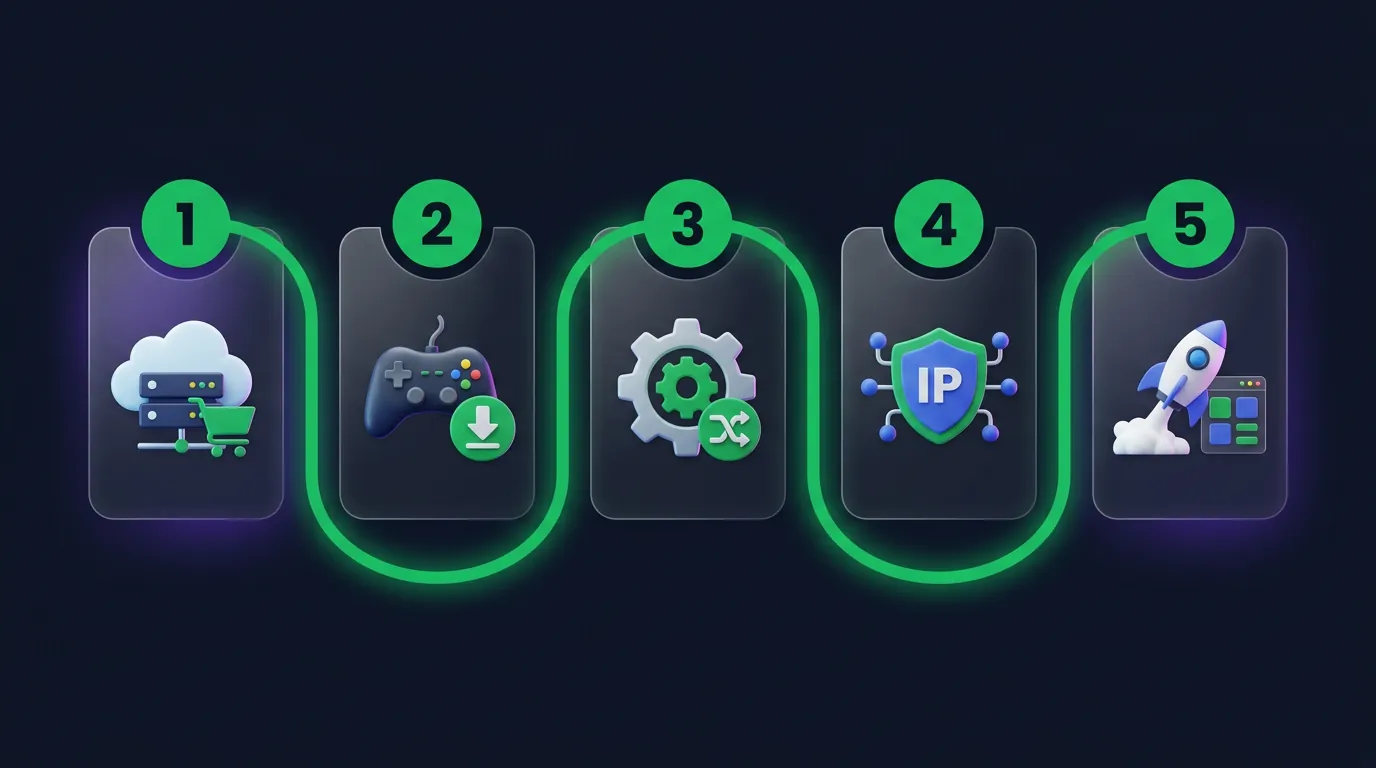
- 5-step setup at under 5 mins/account: rent, install, macro, proxy, and launch
- 3 signals Roblox uses to detect alts: IP clustering, fingerprinting, and behavior
- 4 highly profitable use cases: Blox Fruits AFK, Pet Simulator X hatching, Robux earning, and game testing
- Cost breakdown at $10/account/month: linear scaling natively from 5 to 50 accounts
4 Ways To Run Multi-Instance Roblox: Pros And Cons
There are four primary ways to run multiple Roblox accounts, each carrying vastly different pros and cons regarding cost, ban risk, and scalability.
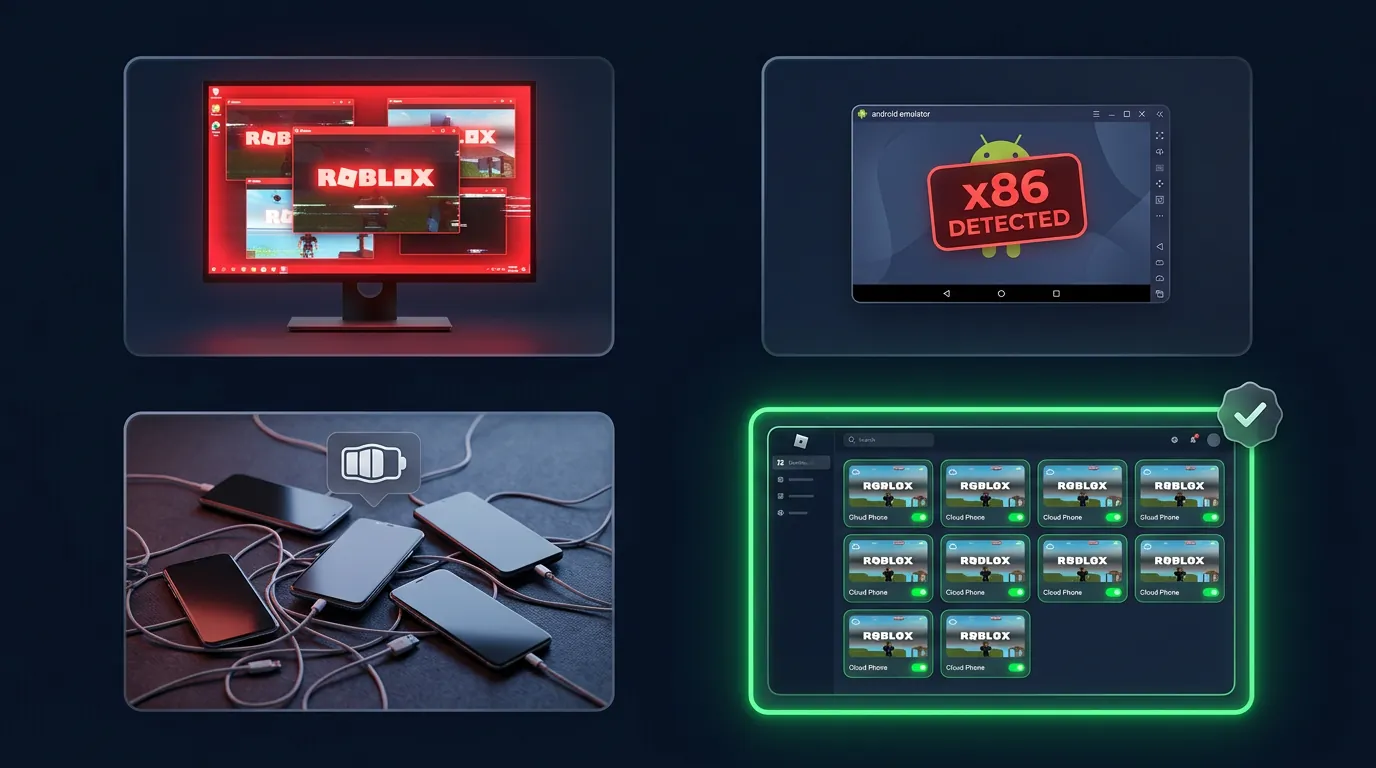
PC Tools (like MultiBloxy or Process Explorer) allow you to open several Roblox clients on the same PC, usually maxing out around 4-5 instances before RAM and CPU bottleneck. The critical flaw is that all instances share one IP address and one device fingerprint, so Roblox instantly flags this as multi-accounting.
Emulators (LDPlayer, BlueStacks) run the Android version of Roblox on an x86 PC. However, Roblox's hardware attestation APIs easily detect the x86 architecture. BlueStacks specifically faces ongoing hardware bans by Roblox. Furthermore, each emulator instance devours 2-6GB of your PC's RAM.
Multiple physical phones: Buying 10 used phones requires a massive $600-$1,200 upfront investment. You must manage them manually, and the batteries often swell after 3-6 months. The ban risk is low because they are real ARM devices, but the system is completely unscalable and a logistical nightmare to maintain.
Cloud Phones: Every single device is a completely independent ARM motherboard. At $10/account/month, you supervise 100 accounts from a single dashboard, running 24/7 without needing to leave your PC on. This is the only solution that provides massive scalability and native hardware anti-ban protection.
Cloud Phone Farm Mechanism: "One Device Equals One Real Person"
Every cloud phone operates as a distinct physical device: Roblox's security systems cannot differentiate it from a genuine user holding a real smartphone.
Fingerprint Isolation: Independent IMEI, Android ID, And IP
Every cloud phone is assigned a wholly unique hardware fingerprint: a genuine manufacturer IMEI, a distinct Android ID, a unique MAC address, and localized Build.prop data (model, brand, firmware). Roblox scans these metrics during login to identify the hardware. 10 cloud phones register perfectly as 10 completely different Samsung Galaxy devices.
Each cloud phone receives a dedicated IP address from a different ISP (US, EU, or SEA depending on your target server) when paired with residential proxies. 10 accounts routing through 10 distinct residential IP addresses completely eliminates the risk of IP clustering bans.
Real ARM Chips: Roblox Sees A Valid "Samsung"
A real cloud phone utilizes authentic Samsung Galaxy server motherboards, specifically running on ARM Exynos 8895 chips and Mali-G71 MP20 GPUs. When the Roblox app performs a hardware attestation check (via Google Play Integrity API), the response is perfectly valid: genuine ARM hardware, stock Android, unrooted, and not an emulator.
In stark contrast, PC emulators return x86 Intel/AMD CPU strings and "Unknown" or "generic_x86" device models, so Roblox rejects or flags the session immediately. This architectural difference is why emulators suffer from significantly higher ban rates.
5 Steps To Set Up A Roblox Cloud Phone Farm
Setting up a phone farm for Roblox requires just 5 steps, taking under five minutes per account: from renting the devices to launching a parallel farming operation.
Step 1: Rent Cloud Phones Based On Account Quantity
Navigate to app.xcloudphone.com, and rent the exact number of cloud phones to match the number of accounts you intend to farm. Simply rent 10 devices if you want to farm 10 accounts.
Roblox requires a minimum of 2GB RAM. The standard XCloudPhone configuration provides 6GB RAM and 64-256GB storage at $10/month, which is more than enough. Total cost: 10 × $10 = $100/month.
Step 2: Install Roblox And Log Into Different Accounts
On each cloud phone, open the Google Play Store, install Roblox (~200MB), and log into a separate account. Strict Rule: One Cloud Phone = One Account. Never share devices among alt accounts.
Downloading takes 1-2 minutes on the data center's gigabit connection. You can repeat this manually for 5 phones, or utilize the dashboard’s batch-install feature to deploy Roblox across 50 devices simultaneously with a single click.
Step 3: Install Auto-Clickers And Configure Macros
Install your preferred auto-clicker (OP Auto Clicker or Clickmate work perfectly) on each cloud phone, and map your macro to your specific farming loop:
- Blox Fruits: Macro the attack button, auto-collect drops, and create a movement pattern between mob spawn points.
- Pet Simulator X: Set an auto-hatcher to loop indefinitely, auto-collect coins, and use teleport scripts.
- XCloudPhone Automation: Use the built-in, no-code flow builder to establish crash recovery: auto-restart app, log back in, and resume macro if the game shuts down.
Step 4: Set A Dedicated Proxy IP For Each Device
Input your residential proxy credentials via the XCloudPhone web dashboard, and each cloud phone routes through an isolated IP from a unique ISP. There are 3 highly effective proxy strategies:
- Residential proxy pools: Buy GB traffic from providers like BrightData or SmartProxy, input credentials into the dashboard, and the system auto-rotates clean IPs.
- Static residential: Assign one fixed IP to each cloud phone. This is ideal for main accounts that need geographic consistency to avoid security lockouts.
- Mobile proxies: Use 4G/5G carrier IPs. This is the most organic and lowest ban-risk option available, though more expensive.
XCloudPhone features native WebRTC leak protection. Roblox only detects the proxy IP, completely masking the core data center IP.
Step 5: Launch Parallel Farming And Monitor Dashboard
Launch Roblox across all your cloud phones, activate the macros, and manage the entire farm from one unified dashboard.
The dashboard displays real-time metrics: individual device status, CPU/RAM usage, and active app screens. You receive email or Telegram alerts if any specific machine crashes. By enabling batch restarts, mass proxy updates, and batch app installations, managing 50 accounts requires the exact same effort as managing one.
Roblox Multi-Account Detection Mechanisms And Cloud Phone Bypasses
Roblox anti-cheat relies on three primary signals to flag botting and alt-farming: IP clustering, device fingerprinting, and behavioral patterns. A real cloud phone inherently neutralizes all three.
IP Clustering: Same IP Means Red Flag
Roblox immediately flags game sessions when 10+ accounts log in from the exact same IP address within a short timeframe. Because PC tools like MultiBloxy share your home IP, all instances are intrinsically linked.
The Cloud Phone Solution: Each device integrates a dedicated residential proxy. Thus, 10 accounts route through 10 distinct IPs from 10 different ISPs. Roblox registers 10 unrelated players in 10 different cities.
Device Fingerprint: Android ID, Build.prop, And SafetyNet
To stop hardware spoofers, Roblox pulls extreme device fingerprint data: Android ID, Build.prop (model constraints, brand, firmware strings), and Play Integrity API tokens. x86 PC emulators inevitably return generic flags like "generic_x86_64," resulting in an instant shadowban or lockout.
The Cloud Phone Solution: Because every device is a physical Samsung Galaxy motherboard, the hardware fingerprint is 100% authentic. The hardware attestation passes seamlessly because there are zero traces of emulation.
Behavioral Patterns: Bot-Like Actions Mean Ban
Roblox AI aggressively analyzes bot-like behavior: click timings accurate to the exact millisecond, 100% repetitive movement routes, and a complete lack of mouse cursor variance. This is the strongest detection vector.
The Cloud Phone Solution: While cloud phones eliminate device and IP bans, behavioral bans occur if your macro is overly robotic. The fix is strictly operational: add a randomized 0.5-2 second delay between actions within your macro builder, randomize your spawn patrol routes, and force intermittent 5-minute AFK breaks to simulate human stamina.
⚠️ Important Note: A real cloud phone drastically reduces hardware-level bans, but it does not grant immunity for violating the Terms of Service. Blatant exploiting, speed hacking, or script injection absolutely results in an account ban regardless of the hardware.
What To Farm On Roblox: Top 4 Profitable Use Cases
The four most profitable use cases for deploying a cloud phone farm include Blox Fruits, Pet Simulator X, Robux earning, and game testing.
Blox Fruits: AFK Mastery And Fruit Drops
With over 28 billion visits, Blox Fruits is the most popular farming game on the platform. A cloud phone farm creates massive leverage:
- Mastery Grinding: Have each alt account grind a different fruit or sword to complete your collection 5-10 times faster than a solo player.
- Fruit Spawns: Fruits spawn randomly every 1-2 hours. You have 10 times the chances of finding high-tier drops (Dragon, Leopard, Venom, or Kitsune) if you have 10 accounts idling on different servers.
- Raid Rushing: Multibox your accounts to solo-clear raids, and secure higher drop rates without needing an organized party.
Pet Simulator X: Hatching And Trading Pets 24/7
The core loop of Pet Simulator X requires endless egg hatching to roll cosmic or huge pets. A cloud phone pushes this to the absolute limit by running 24/7.
- Auto-Hatching: Set up an endless macro loop to comfortably hatch thousands of eggs per day per account.
- Trading Networks: Have 9 alts exclusively farm eggs and roll pets, then transfer all high-tier drops to your main account to sell for massive Robux profits.
- Multi-Server Coverage: Inject each cloud phone into a different server to aggressively diversify your hatching pools.
Robux Earning: Game Pass Sales And Group Payouts
The Roblox Developer Exchange (DevEx) allows creators to cash out Robux for real USD. A cloud phone farm can ethically drive initial traffic to your created games:
- Develop a new game, have 10-50 alts continuously join and play to boost the concurrent player count, and trigger the algorithm to push your game to organic users.
- Group Payout Farming: Establish a development group, distribute clothing or accessories, and earn passive Robux through legitimate user commissions.
- Note: Roblox explicitly prohibits artificial metric manipulation. Use a phone farm to supplement testing and baseline activity, not to fully replace organic community building.
Game Testing: QA Multiple Accounts On The Same Server
Roblox developers constantly need to stress-test multiplayer features across dozens of accounts simultaneously. Cloud phones offer the ultimate QA environment:
- Test core mechanics with 5-10 accounts interacting in the same live instance: spawn logic, PvP combat, latency sync, and trading windows.
- Accurate QA performance: measure actual FPS, network latency, and memory crash rates on genuine lower-end ARM hardware (which represents the majority of the Roblox player base).
Roblox Multi-Instance Cost Breakdown: 5, 10, 50 Accounts
Cloud phone farm costs scale completely linearly, at exactly $10 per account per month, with absolutely zero hidden infrastructure fees.
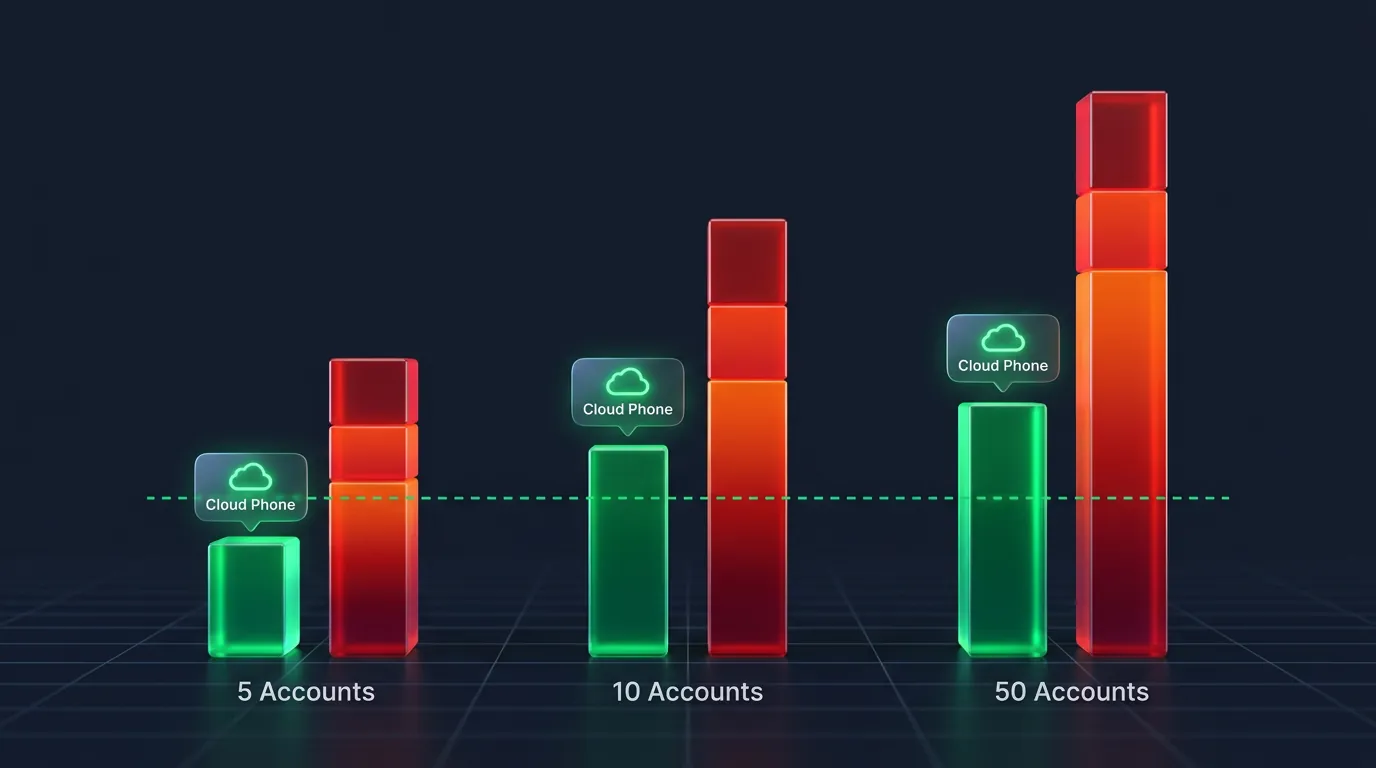
Direct comparison for a 10-account setup over a year:
- Buying 10 used phones: $600-$1,000 upfront, $15-$20/month in electricity, swapping 10 swollen batteries every 6 months ($150), and staring at a wall of 10 glowing screens.
- 10 Cloud Phones: Flat $100/month. Zero hardware purchases, zero electricity costs, and zero battery hazards, all managed from one dashboard.
After 12 months, the cloud phone farm costs $1,200. The physical phone farm costs loosely $930-$1,390, making the pricing nearly identical, except the cloud phone completely eliminates hardware failure risks and manual administration labor.
Risks Of Multi-Accounting: Limitations To Know
Multi-accounting on a cloud phone structurally removes hardware bans, but you must understand three core limitations: Terms of Service constraints, competitive PvP disadvantages, and behavioral detection risks.
Roblox TOS: The Roblox Terms of Service do not explicitly prohibit owning multiple accounts. However, they strictly prohibit using unauthorized automation to exploit gameplay. Using a basic screen-tapping auto-clicker sits in a gray area, whereas injecting executor scripts is a blatant violation. The cloud phone masks your device identity; what you do inside the game is still your liability.
Competitive PvP Limitations: Cloud phones are explicitly designed for farming, trading, and AFK idling, not hardcore competitive play. The WebRTC streaming latency of 30-50ms is unnoticeable for Blox Fruits mob grinding or Pet Sim X hatching, but it puts you at a severe disadvantage in high-ELO arena PvP. Fortunately, 99% of phone farming requires zero fast-twitch reflexes.
Behavioral Detection is King: An undetectable cloud phone solves the IP and device fingerprint problem, but behavioral analysis never sleeps. The AI bans the accounts if you have 10 accounts executing the exact same movement path, with identical click intervals, for 48 hours straight without pausing. The solution is smart automation: randomize your macros, vary your delays, and take periodic breaks.
⚠️ Disclaimer: This article provides technical guidance for legitimate cloud phone usage. XCloudPhone does not endorse or encourage violating the Terms of Service of any game. Users bear full responsibility for how they utilize the service.
FAQ: Roblox Multi-Instance On Cloud Phone
"Does Roblox Lag On A Cloud Phone?"
No, Roblox does not lag on a cloud phone. Latency ranges between 30-50ms via WebRTC, which is incredibly smooth for farming and AFK activities. Massive PvE games like Blox Fruits or Pet Simulator X do not require 144 FPS or instantaneous reaction times. A standard 4G/LTE connection is plenty stable for monitoring your farm on the go. This latency is also remarkably lower than legacy remote tools like VNC (150-300ms) or TeamViewer (80-150ms).
"How Many Roblox Accounts Can One Cloud Phone Run?"
One cloud phone can strictly run ONE Roblox account. Each device runs a single instance of Roblox to guarantee that the hardware fingerprint remains unique to that specific account. Attempting to dual-app two accounts on one cloud phone shares the fingerprint across both, entirely defeating the purpose of anti-detection. Want 10 accounts? Rent 10 cloud phones.
"Is The Mobile Version Of Roblox Different From The Desktop Version For Farming?"
Yes, the mobile (ARM) version of Roblox passes hardware attestation significantly better than the desktop x86 version. From a gameplay perspective, almost all top-tier Roblox games are fully optimized for mobile touch controls, which means standard macro-clicker apps work flawlessly without needing complex keyboard mapping.
"Do You Need To Root The Cloud Phone To Multi-Instance Roblox?"
No, you do not need to root the cloud phone to multi-instance Roblox. Root access is completely unnecessary. The cloud phone provides a full, unlocked Android OS right out of the box. You install Roblox directly from the Google Play Store normally. Popular auto-clickers and macro recorders leverage Android Accessibility Services and run perfectly without root permissions.
"Are There Any Free Cloud Phones That Can Run Roblox?"
No, free or trial-tier cloud phones strictly limit usage to 30-60 minutes a day, rendering them useless for 24/7 farming. Profitable Roblox AFK farming requires continuous uptime. A paid tier starting at $10/month is the minimum baseline. Consider the ROI: $10 a month for 720 hours of continuous Roblox farming equals out to $0.013 per hour.
From 1 Account To A 50-Account Farm: Roblox x Cloud Phone
Out of the 4 methods for multi-instancing, an undetectable cloud phone is the only solution that provides unlimited scalability coupled with genuine ARM hardware anti-ban. Implementing a 5-step setup at under 5 minutes per account allows you to farm Blox Fruits, Pet Simulator X, and generate Robux 24/7, with costs scaling cleanly at $10/account/month.
This same fingerprint isolation strategy applies universally to our general guide on 24/7 cloud phone gaming, MMORPGs like AFK Black Desert Mobile, and even large-scale social media automation. Detailed benchmarks isolating cloud phone performance against old hardware over 30 continuous days confirm its dominance.
Start your Roblox multi-instance farm today, starting at $10/account/month.
References:
- Roblox Community Standards — Terms of Service & Multi-account policy
- Roblox Developer Hub — DevEx program, game analytics
- Google Play Integrity API — Hardware attestation documentation
- XCloudPhone — Exynos 8895, fingerprint isolation, proxy integration
- WebRTC Standards — W3C / IETF RFC 8825