![Optimize Cloud Phone Settings for Genshin and Honkai [2026]](https://cdn-h.xcloudphone.com/posts/hero-genshin-honkai-cloud-phone-1773395091231.webp)
Genshin Impact consumes 80GB+ of storage, Honkai: Star Rail requires a powerful GPU, and both games turn your personal device into a heater within 30 minutes—an undetectable cloud phone solves all three problems instantly. XCloudPhone (Exynos 8895 with Mali-G71 MP20 GPU) runs Genshin Impact at a stable 30 FPS on Medium settings, and Honkai: Star Rail at 30-45 FPS on Medium-High—with zero thermal throttling and 24/7 AFK resin farming capabilities.
The core architecture and overall benefits of 24/7 cloud gaming are detailed in our comprehensive guide; this article focuses entirely on the optimal settings for these two heavy-duty titles.
This guide covers:
- Real-world FPS benchmarks for Genshin Impact and Honkai: Star Rail on a real cloud phone
- Detailed configuration tables—12 Genshin settings and 10 Honkai settings
- FPS comparison: Cloud phone vs. x86 emulators (BlueStacks, LDPlayer) vs. old phones
- 24/7 AFK resin and stamina farming mechanics
- Selecting the right device plan based on RAM and storage needs
Can Cloud Phones Run Genshin Impact and Honkai? — Real FPS Benchmarks
XCloudPhone utilizes the Exynos 8895 chip (Mali-G71 MP20 GPU)—performing identically to a Samsung Galaxy S8 or Note 9—running both Genshin Impact and Honkai: Star Rail natively without any binary translation. This GPU directly processes OpenGL ES 3.2 and Vulkan 1.0 commands from the games, completely bypassing the emulation overhead found in x86 platforms.
Mali-G71 GPU — Real Hardware for Native Game Rendering
The Exynos 8895's Mali-G71 MP20 features 20 shader cores, fully supporting OpenGL ES 3.2 and Vulkan 1.0—delivering native mobile game rendering without any translation layers.
The Mali-G71 provides 3 distinct technical advantages for cloud gaming:
- Native GPU rendering: The game calls OpenGL ES → Mali processes it directly → zero API translation overhead
- Vulkan 1.0 support: Both Genshin Impact and Honkai: Star Rail support Vulkan—reducing CPU overhead by 15-20% compared to OpenGL on identical hardware
- Parallel shader processing: 20 cores process rendering concurrently—plenty for the particle effects, shadow mapping, and post-processing heavily utilized by HoYoverse games (Genshin Impact, Honkai: Star Rail, and Zenless Zone Zero)
For comparison: x86 emulators like BlueStacks or LDPlayer must force the data through two translation layers: API Translation (10-20% overhead—translating OpenGL ES commands from ARM to x86) and Binary Translation (15-30% overhead—converting ARM binaries into the x86 instruction set). A real cloud phone built on ARM architecture skips both entirely.
The 5-step pipeline from vertex processing to pixel output works natively on ARM—our deep dive on GPU hardware rendering explains this architecture in detail.
FPS Benchmarks — Genshin and Honkai on Real Cloud Phones
Genshin Impact reaches a stable 30 FPS at Medium settings on XCloudPhone—the benchmark table below details performance across various preset levels.
Below is the FPS benchmark table for both games on Cloud Phone, measured across 3 scenarios: open-world exploration, combat, and densely populated city areas:
Medium represents the sweet spot—perfectly balancing visual fidelity with a stable framerate. High settings cause significant FPS fluctuation (20-25 FPS), which is unsuitable for AFK farming as the game is prone to crashing when the GPU sustains maximum load continuously.
📌 Pro Tip: Select Medium settings and cap the FPS target at 30—the game will run flawlessly 24/7 without manual intervention. Only push it to High if you are actively navigating a short exploration session.
Why Do Cloud Phones Avoid Thermal Throttling?
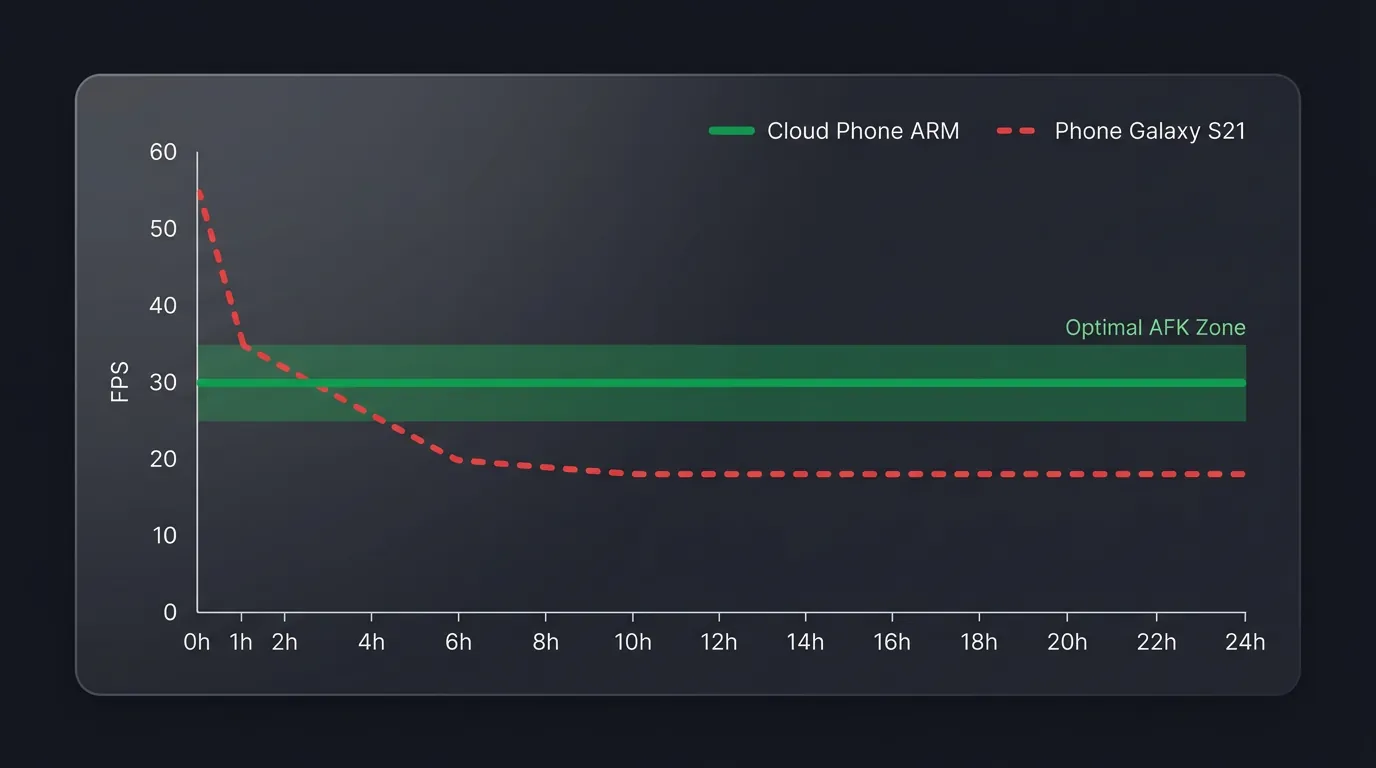
Cloud phones maintain a consistent chip temperature of 32-38°C (90-100°F)—which is roughly 30°C cooler than a personal smartphone running heavy games.
Data center cooling systems meticulously regulate the server room environment at 18-24°C (64-75°F)—completely eliminating thermal throttling. Tracked FPS metrics over time prove this:
- After 1 hour: FPS remains at 30 Medium—zero degradation
- After 6 hours: FPS remains at 30 Medium—chip temperature at 34°C (93°F)
- After 24 hours: FPS remains at 30 Medium—chip temperature at 36°C (97°F)
For comparison: a personal device running Genshin Impact begins to thermal throttle after just 30-60 minutes—FPS plummets from 60 down to 30-35 FPS, dropping further to 20-25 FPS after 2 hours. Cloud phones completely bypass this limitation because the chip never exceeds 38°C (100°F).
Optimal Genshin Impact Settings on Cloud Phone: Detailed Breakdown
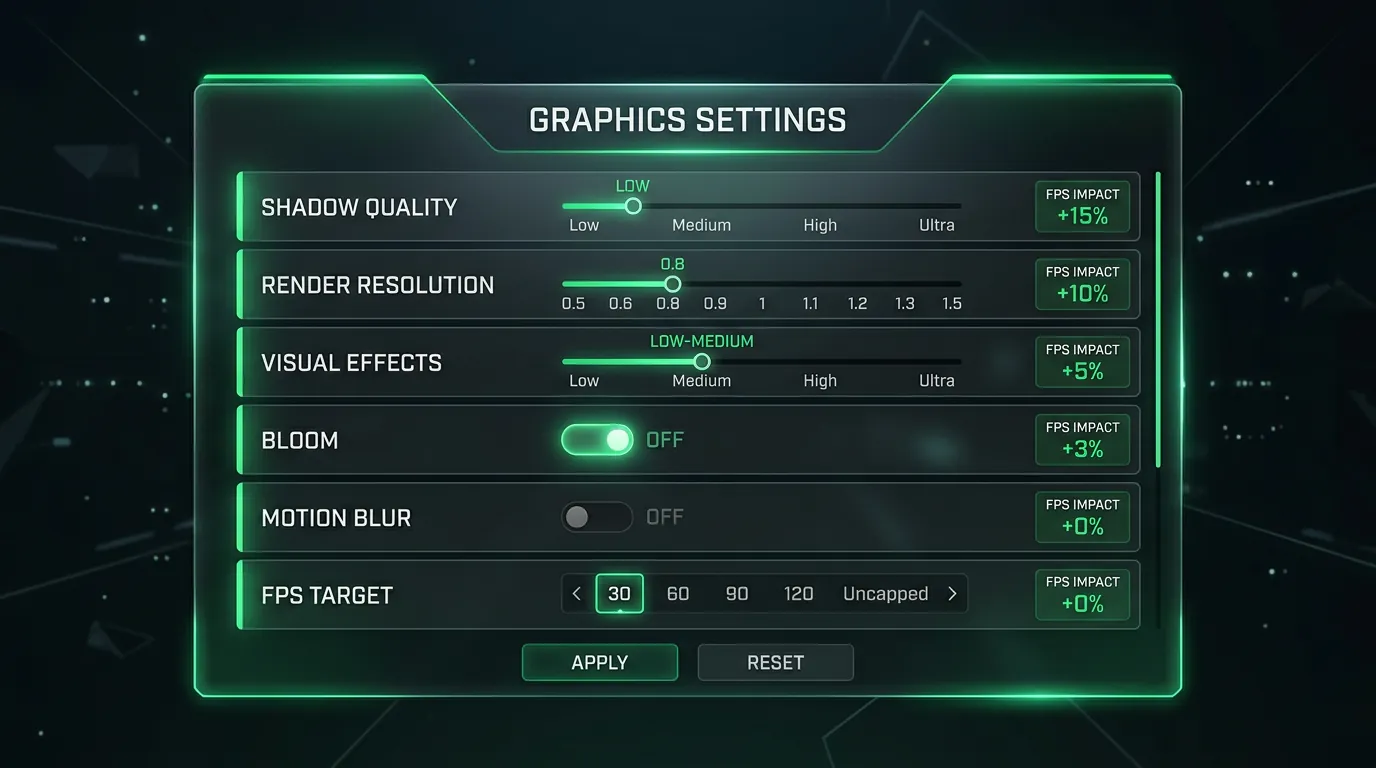
The optimal configuration for Genshin Impact on XCloudPhone (Exynos 8895) is detailed in the table below—each setting is tuned to achieve a stable 30 FPS at the highest possible visual quality supported by the Mali-G71 GPU.
The table below lists the 12 Genshin Impact settings you should adjust, ordered by their impact on FPS from highest to lowest:
Alternative 60 FPS Preset: Lower all settings to Low if your goal is an unwavering 60 FPS—visual quality drops significantly, but gameplay becomes highly responsive for short exploration bursts.
Storage Warning: Genshin Impact v6.x occupies 80GB+ of storage—a standard 64GB device is insufficient. Opt for a 128GB+ package, or aggressively delete unused Voice-Over Packs (saving 10-15GB per language).
Here are 3 tested gameplay scenarios running Medium settings on XCloudPhone:
- Teyvat overworld exploration: Medium settings lock a stable 30 FPS—no drops occur while sailing the Waverider or sprinting across the vast Sumeru map.
- Spiral Abyss combat: FPS hovers between 25-30 when multiple elemental reactions trigger simultaneously—highly acceptable for standard PvE content.
- City areas (Sumeru/Fontaine): Setting Crowd Density to Low prevents framerate drops in NPC-heavy cities—boosting performance from an erratic 22 FPS (default Medium) to a stable 28-30 FPS.
📌 Pro Tip: Shadow Quality is the most demanding setting on the Mali GPU—dropping it from Medium to Low instantly boosts FPS by 15-16% with almost zero noticeable visual downgrade during standard gameplay.
Honkai: Star Rail Settings on Cloud Phone: Lighter and Smoother
Honkai: Star Rail demands significantly lower hardware specs than Genshin Impact—the turn-based nature of the game doesn't require high continuous FPS, allowing the Mali-G71 GPU to maintain a stable 30-40 FPS at Medium settings.
Honkai is lighter than Genshin in 3 key areas:
- 30% lower GPU load: Honkai doesn't render massive open-world environments—each zone is compartmentalized with fewer background objects.
- Turn-based combat: High continuous FPS is unnecessary—30 FPS is more than enough since the game waits for your turn and never requires twitch reflexes.
- WebRTC latency is irrelevant: The 30-80ms streaming delay inherent to cloud phones has absolutely zero impact on turn-based gameplay—unlike competitive PvP action titles.
The table below details the 10 Honkai: Star Rail settings you must adjust, ranked by FPS impact:
A 60 FPS target is only recommended when actively playing through story cutscenes—AFK farming should always be capped at 30 FPS to reduce GPU load and ensure session longevity.
📌 Pro Tip: Honkai: Star Rail features an option to automatically lower graphics when chip temperature rises—since cloud phones maintain a cool 32-38°C (90-100°F), this feature never triggers, guaranteeing rock-solid FPS 24/7.
FPS Comparison: Cloud Phone vs Emulators vs Old Phones
Real ARM cloud phones vastly outperform x86 emulators across 5 heavy-duty games thanks to native GPU rendering—eliminating API translation, binary translation, and thermal throttling entirely.
The table below contrasts real-world FPS for 5 demanding games across 3 platforms, measured at Medium settings after 1 hour of continuous gameplay:
Old Phone: Samsung Galaxy S8 (sharing the Exynos 8895 chip)—initial FPS matches the cloud phone but drops 20-40% after 1 hour due to thermal throttling.
There are 3 specific reasons x86 emulators fall behind real ARM cloud phones when running heavy games:
- 10-20% API Translation Overhead: OpenGL ES commands written for ARM must be translated into DirectX/OpenGL for desktop processors—wasting 10-20% of GPU performance.
- 15-30% Binary Translation Overhead: ARM binaries must be translated into the x86 instruction set—sacrificing another 15-30% of CPU efficiency.
- Software rendering fallback: When Vulkan drivers conflict (a common issue on emulators like BlueStacks), the game defaults to software rendering—resulting in a catastrophic 50-70% FPS drop.
Cloud phones sustain peak FPS for 24 hours straight because the ARM chip runs natively inside a climate-controlled 18-24°C data center. Old phones suffer massive degradation after just one hour—this performance degradation over time is explored further in our 24/7 AFK gaming performance analysis.
A real ARM device protects your gaming account far better than any x86 emulator if it holds significant value.
Beyond FPS: Cloud Phones for AFK Farming and Multi-Accounting
Beyond stable FPS without thermal throttling, cloud phones offer 2 massive advantages that emulators and personal devices cannot replicate: true 24/7 automated AFK resin/stamina farming, and multi-account gacha rerolling across dozens of parallel devices. These 2 specific use cases transform the cloud phone from a simple gaming accessory into an automated phone farm powerhouse—especially for heavy games (Genshin Impact, Honkai: Star Rail, and Wuthering Waves) where daily resources are strictly time-gated.
AFK Farming Genshin and Honkai on Cloud Phones: Resin, Stamina, Gacha
An undetectable cloud phone enables 24/7 AFK daily farming for Genshin Impact and Honkai: Star Rail—the game runs securely on physical ARM hardware in a data center while your laptop is powered off.
Daily Farming — Automated Resin and Stamina Burn
Genshin Impact caps Original Resin at 180 per day—a cloud phone ensures you never waste capped resin because you forgot to log in.
The daily AFK farming strategy for both games:
Genshin Impact requires 4 primary daily farming tasks to maximize resin efficiency:
- Daily Commissions (via Encounter Points) — 4 quests, taking 10-15 minutes
- Condensed Resin — craft 5 condensed units to burn instantly in a domain/boss run
- Expedition auto-collect — 8 expeditions running on 20-hour cycles
- The cloud phone keeps the game active 24/7 → you log in each morning → finalize dailies → disconnect
Honkai: Star Rail involves 4 daily activities to fully optimize Trailblaze Power:
- Trailblaze Power expenditure — 240 TB Power daily, regenerating at 1 unit per 6 minutes
- Assignment missions — 3 slots running on 20-hour cycles
- Daily quests — Echo of War, Simulated Universe weekly resets
- The cloud phone keeps the application suspended → you log in to claim rewards → maximizing stamina usage
⚠️ CRITICAL WARNING: The cloud phone only keeps the game running—you must still log in and perform the actions yourself. Utilizing unsanctioned third-party macros to automate gameplay violates HoYoverse's Terms of Service and invites account bans.
Multi-Account Gacha Rerolling on Parallel Cloud Phones
A full gacha reroll in Genshin Impact takes 20-30 minutes per account—a phone farm setup allows you to run 5-10 reroll sessions simultaneously across completely isolated cloud devices.
The gacha reroll workflow on cloud phones:
- Create a fresh account → clear the Prologue (~20 minutes) → collect free initial Primogems
- Pull the gacha → review results → if the desired character doesn't drop → discard and create a new account
- Parallel Cloud Phones: Launch 5-10 distinct reroll sessions simultaneously on separate cloud phones—accelerating the process 5-10 times over
- Isolated Fingerprints: Every cloud phone possesses a unique IMEI, Android ID, and dedicated proxy IP—preventing the game from detecting linked multi-accounting
Rerolling economics: A standard cloud phone costs $10/device/month × 5 devices = $50/month—granting you the capability to speed-run rerolls until you hit the exact banner character you want, which is exponentially cheaper than buying Primogems directly (where 1 pull = $2, 10 pulls = $20, and hard pity at 90 pulls = $180).
Which Cloud Phone Plan Fits Genshin and Honkai?
Selecting the optimal cloud phone plan for heavy games hinges on 3 main criteria: RAM, total storage, and whether you need 24/7 AFK capabilities versus short daily sessions.
The table below outlines the universal configuration for XCloudPhone—which is already heavily optimized out-of-the-box for demanding graphical games:
Storage Consideration: Genshin Impact v6.x occupies 80GB+ of storage. You can install everything without worry if you dynamically rent a device that pulls a 256GB ROM out of the device pool. You must delete unused Voice-Over Packs (saving 10-15GB per language) to properly fit both Genshin and Honkai if your assigned device has a 64GB ROM. 6GB of RAM is more than sufficient to run these titles flawlessly.
FAQ — Frequently Asked Questions
"Can a cloud phone run Genshin Impact at max graphics?"
A stable 30 FPS on Medium is the optimal configuration for XCloudPhone (Exynos 8895). High settings only reach 20-25 FPS and are not recommended for AFK farming, as pushing the GPU near its absolute limit induces micro-stuttering during prolonged sessions.
"Does Honkai: Star Rail lag during combat on a cloud phone?"
No lag occurs—Honkai: Star Rail is a turn-based title. 30 FPS is perfectly adequate for all combat sequences because the game waits for your input and does not demand split-second reflexes. The inherent 30-80ms WebRTC streaming latency has zero impact on turn-based gameplay.
"With Genshin ballooning over 80GB, is there enough storage?"
A standard 64GB plan can accommodate 1 heavy game if you actively delete unused Voice-Over Packs (saving 10-15GB per language). Upgrading to a 128GB+ premium tier is required to install multiple 80GB+ games simultaneously.
"Do I need a controller to play Genshin on a cloud phone?"
It is not mandatory—on-screen touch controls routed through WebRTC are perfectly responsive for daily farming and overworld exploration. However, cloud phones fully support Bluetooth controller mapping (Xbox, PlayStation, or generic gamepads) if you prefer a console-like experience for difficult content like the Spiral Abyss.
"Will my Genshin/Honkai account get banned for using a cloud phone?"
The ban risk is negligible—real ARM cloud phones successfully pass the Play Integrity API (hardware attestation). HoYoverse does not ban users simply for playing on cloud devices; they ban third-party macro automation scripts, according to official Play Integrity API documentation. Keep your gameplay inputs organic and manual, and the risk drops to near zero.
"When is a cloud phone NOT sufficient for heavy games?"
Cloud phones are not suitable for next-generation GPU-crushing titles—such as Zenless Zone Zero at Ultra settings, or unoptimized AAA PC ports. They are designed exclusively for native mobile titles optimized for ARM—running Genshin Impact on Medium, Honkai: Star Rail on Medium-High, Night Crows, or Tower of Fantasy.
From Benchmarks to AFK Farming: Start with Cloud Phones
XCloudPhone's Exynos 8895 runs Genshin Impact at a stable 30 FPS Medium, and Honkai: Star Rail at 35-40 FPS, delivering zero thermal throttling and 24/7 AFK resin farming—the benchmark tests and detailed settings tables provided above give you everything you need to optimize both titles instantly. x86 emulators lose 25-50% of their performance strictly to binary translation, while old personal phones thermal throttle into unplayable framerates after 30-60 minutes—a real ARM cloud phone eliminates both bottlenecks.
Start playing Genshin and Honkai on a real cloud phone — from $10/month.
References:
- Genshin Impact System Requirements v6.0 — HoYoverse Official
- Play Integrity API — Android Developer Documentation
- Mali-G71 GPU Specifications — ARM Holdings Developer Documentation
- Cloud Gaming Market Forecast — Allied Market Research ($3.3B USD, 28.9% CAGR)
- XCloudPhone — Product Documentation