![What is Cloud Phone? Complete Guide to Cloud Phone Technology [2026]](https://cdn-h.xcloudphone.com/posts/hero-cloud-phone-guide-1772020002489.webp)
The global cloud phone market is projected to reach $3.3 billion by 2031, growing at a CAGR of 28.9%, according to Allied Market Research. This growth is driven by demand for AFK gaming, multi-account social media management, and mobile automation at scale.
A cloud phone is a real Android device hosted in a data center that you access and control remotely over the internet — not a software emulator, not a VoIP phone system. Each cloud phone runs on a physical ARM processor identical to the one inside your smartphone, but operates 24/7 in a professional server environment without battery drain or overheating.
Important clarification: the term "cloud phone" causes frequent confusion. A Google search returns two entirely different product categories — VoIP business phone systems and Android cloud phones for gaming and automation. This guide focuses exclusively on Android Cloud Phone.
In this guide, you'll learn:
- What a cloud phone is — precise definition and VoIP disambiguation
- How it works — Server-Client architecture and WebRTC streaming
- 6 core features — from anti-detect to visual automation
- 5 popular use cases — AFK gaming, account farming, crypto
- 7 key benefits — compared to physical phones
- Cloud phone vs emulator — why ARM hardware beats x86
- Market categories — VMI, VPS Android, and Real Cloud Phone
- Getting started — 3 steps to your first cloud phone
What Is a Cloud Phone? Precise Definition and VoIP Disambiguation
A cloud phone is a real Android device hosted and operated in a data center, accessible remotely through a web browser or dedicated app. This is not software emulation running on your computer — it is actual physical hardware operating inside a professional server facility.
Android Cloud Phone — Technical Definition
An Android Cloud Phone uses the actual mainboard from a real smartphone mounted inside a dedicated server rack. Providers remove the battery and screen — keeping only the mainboard with its ARM processor (e.g., Samsung Exynos 8895). Each mainboard functions as an independent Android device with its own IMEI, MAC address, and Android ID.
You access the cloud phone through any browser — Chrome, Safari, and Firefox all work. Every tap, swipe, and keystroke transmits to the physical device in the data center. The device screen streams back to you in real time.
3 technical characteristics distinguish cloud phones from other solutions:
- Physical hardware — Real ARM chips, not virtualization on x86
- Unique device identity — Independent IMEI, MAC address, and Android ID per instance
- Continuous operation — Runs 24/7 in a data center with industrial cooling and backup power
Cloud Phone vs "Business Phone System" (Cloud PBX/VoIP)
Searching "cloud phone" on Google returns two completely different products. A Cloud Phone System (or Cloud PBX) is an IP-based business phone system — used for making and receiving calls over the internet. Providers include Nextiva, RingCentral, and 8x8.
An Android Cloud Phone is a real Android device in the cloud — used for AFK gaming, account management, and automation. Providers include XCloudPhone, Redfinger, and UgPhone.
📌 Note: This guide covers Android Cloud Phones exclusively. VoIP and business phone systems are outside the scope of this article.
How Does a Cloud Phone Work? Server-Client Architecture
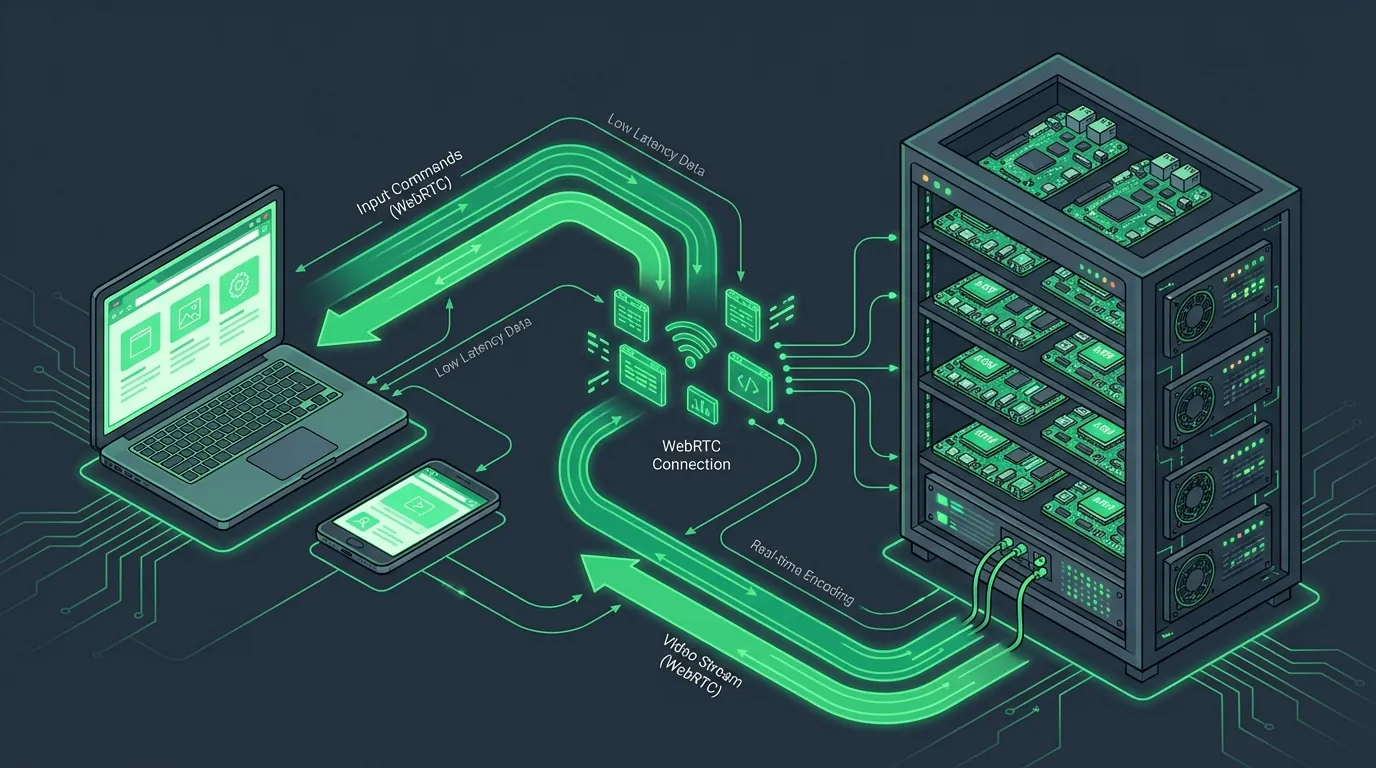
A cloud phone operates on a Server-Client model: the real Android device (server) runs in a data center, while you (client) access and control it remotely through a web browser. All processing happens on the physical hardware — your browser only displays the video stream and sends commands.
Hardware Infrastructure — Real Devices in Data Centers
Inside the data center, hundreds of phone mainboards sit in dedicated server racks. Each mainboard retains its ARM processor (e.g., Samsung Exynos 8895), 6GB RAM, and 64GB storage — equivalent to a Samsung Galaxy S8 configuration.
The core difference: cloud phones do not use Binary Translation. Android apps are compiled for the ARM architecture — designed by ARM Holdings Ltd. — and cloud phones run directly on ARM with zero translation layers. The result is native performance, identical to running apps on the phone in your hand.
Data center infrastructure provides 3 capabilities that personal phones cannot match:
- Industrial cooling — Stable temperature at 22-24°C (72-75°F), zero risk of overheating
- Continuous power — UPS backup, zero risk of battery drain
- Stable connectivity — Server-grade network, 99.9% uptime
Streaming Technology — WebRTC Real-Time Video
WebRTC (Web Real-Time Communication) is the protocol for real-time video and audio transmission between the data center device and your browser — standardized by W3C and IETF. This is the same technology Google Meet and Discord use for video calls.
The streaming process runs in 3 steps:
- Capture — MediaProjection API records the Android device screen in the data center
- Encode & Stream — Video compresses and transmits via WebRTC to your browser
- Input Relay — Accessibility Service forwards every tap and swipe from your browser to the physical device
The result: latency under 100ms (~0.1 seconds), Full HD image quality at 60 FPS. For reference, 100ms is faster than a single eye blink (average 150-400ms) — smooth enough for real-time gaming. No software installation required — everything runs directly in the browser.
GPU hardware rendering on cloud phones uses a real Mali GPU (integrated in the ARM chip) — not software-virtualized graphics. 3D games like Genshin Impact and PUBG Mobile render graphics directly on the physical GPU, ensuring stable frame rates and full OpenGL ES 3.2 compatibility.
📌 Pro Tip: Minimum 10 Mbps download for a stable experience. We recommend 20+ Mbps for 60 FPS at Full HD — especially important for games requiring fast reflexes.
6 Core Features of Modern Cloud Phones
Modern cloud phones provide 6 core features that enable more efficient operations compared to physical phones or software emulators. Each feature is designed for specific needs — from gaming to large-scale account management.
1. Multi-Instance Control
Multi-Instance Control lets you manage dozens to hundreds of cloud phones from a single browser tab. View all devices on one dashboard, switch between them with a single click.
Sync Control synchronizes actions across device groups — perform one action on one device, and all devices in the group replicate it automatically. Ideal for account management operations requiring identical interactions.
2. Visual Automation Builder — No-Code Workflows
The Visual Automation Builder is a no-code automation tool that works through drag-and-drop, similar to n8n and Make. Drag action blocks — tap, swipe, wait, screenshot — and connect them into workflows. Creating a complete flow takes under 5 minutes — compared to 2-3 hours writing ADB scripts manually.
AI assists workflow creation from text descriptions: type "open TikTok, scroll 10 videos, like 3 random videos" and the system generates the corresponding flow. No ADB or programming knowledge required.
3. Anti-Detect Technology
Anti-Detect Technology lets you change IMEI, Android ID, and device information with a single click. Each cloud phone carries a unique hardware identity — Google, Facebook, and other platforms identify each device as an independent real phone.
Fingerprint protection includes: Canvas fingerprint, WebGL fingerprint, and device model spoofing. Combined with real ARM hardware, this makes cloud phones virtually undetectable compared to x86 emulators — significantly reducing detection risk. Based on community data, social media checkpoint rates decrease by over 80% when switching from emulators to real cloud phones.
4. Integrated Proxy and IP Management
Proxy Integration lets you input proxies directly through the web interface — supporting HTTP, SOCKS5, and residential proxies. The system automatically connects proxies at the device level, ensuring all traffic from the cloud phone routes through your desired IP.
WebRTC IP leak protection prevents real IP exposure when using proxies — a common issue software emulators frequently encounter.
5. File Transfer and Remote Access
File Transfer supports uploading and downloading files via the WebRTC channel — fast, secure, no middleware required. Drag and drop files between your computer and cloud phone in both directions.
Remote Screen Access lets you reach your cloud phone from anywhere with internet — cafes, airports, or your personal phone.
6. Root Access and System Customization
Root Access provides the highest administrative privileges on the device — enabling Xposed Framework, Magisk modules, and system file modifications. Root is available on-demand — enable or disable through the dashboard.
Cloud phones support Android 10 and Android 13 with flexible hardware configurations: 4-8GB RAM, 32-128GB storage. The operating system runs Android Clean OS — an unmodified stock ROM that retains the original Carrier Config and Baseband identical to the manufacturer's device. Clean OS reduces detection risk since custom ROMs typically leave traces in build.prop and system properties.
What Is Cloud Phone Used For? 5 Most Popular Use Cases
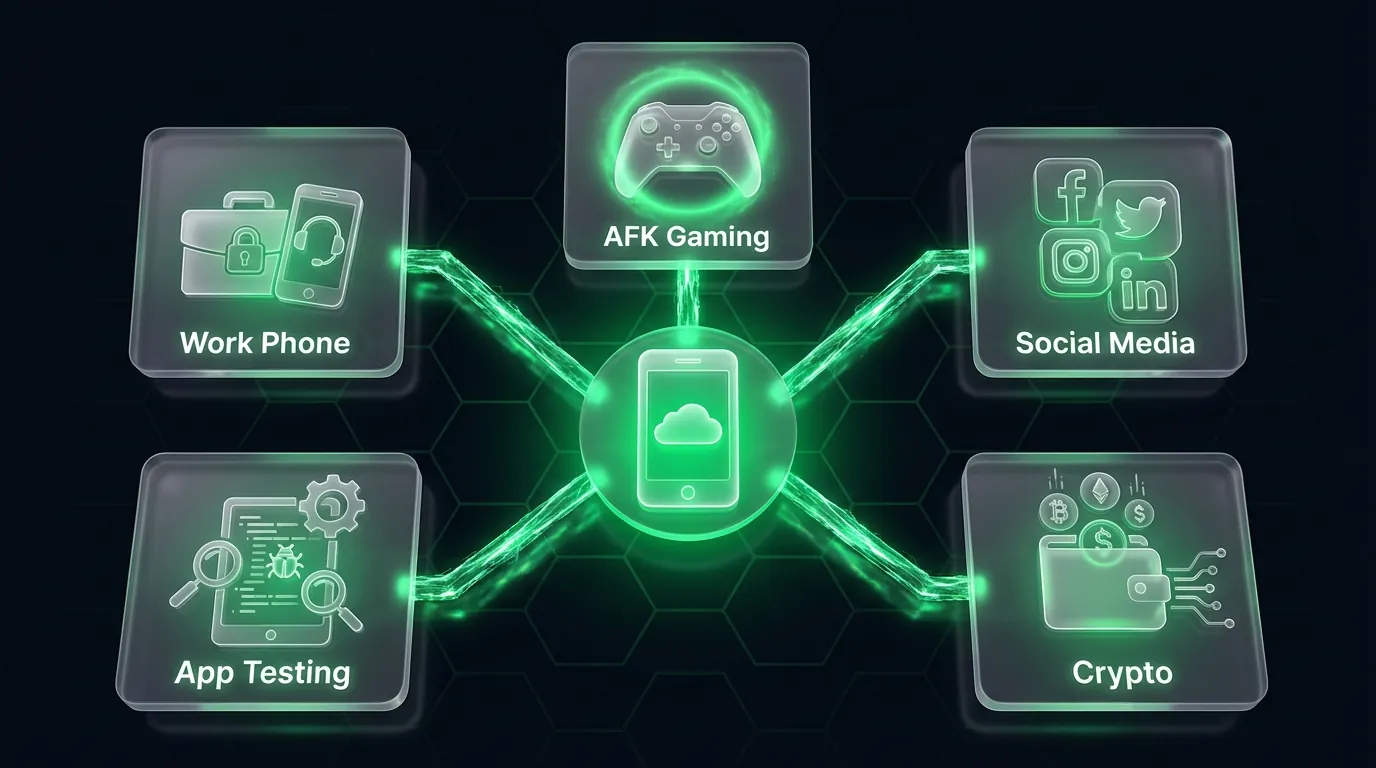
Cloud phones serve 5 primary use case categories, from mobile gaming to online business operations. Each category leverages different cloud phone capabilities — but all benefit from 24/7 operation and multi-device management.
1. AFK Gaming 24/7 Without Hardware Wear
AFK gaming (Away From Keyboard) is the most popular cloud phone application. Leave your game running continuously on the cloud phone — farm EXP, gather resources, auto-click — while your personal phone and computer remain completely free.
3 most popular AFK games on cloud phones: Ragnarok Origin, MIR4, and Night Crows. Additionally, games like Roblox, Idle Heroes, Genshin Impact, and Black Desert Mobile run stably on ARM cloud phones.
Specific benefits for gamers:
- Zero battery drain — Cloud phones run on data center power, zero drain on your personal device
- Zero overheating — Industrial cooling maintains stable 22-24°C (72-75°F)
- Zero hardware wear — No degradation to your personal device, no reduced lifespan
- Reduced ban risk — ARM hardware generates fingerprints identical to real phones, significantly lowering anti-cheat detection probability
📌 Pro Tip: Choose 6GB+ RAM configurations for heavy 3D games. 2D and idle games run well on 4GB RAM, helping you save costs.
2. Multi-Account Social Media Management
Managing multiple social media accounts is the highest commercial-value application of cloud phones. Operate 50, 100, or even 500+ Facebook, TikTok, Instagram, and X (Twitter) accounts — each account on a separate physical device.
Each cloud phone carries an independent hardware identity — IMEI, MAC address, Android ID, and device fingerprint. Social media platforms identify each device as a different real phone. The result: significantly higher Trust Scores compared to running multiple accounts on emulators or app clones.
Standard account management workflow on cloud phones:
- Account creation — One account per cloud phone + one proxy per device
- Warm-up — Natural activity for 7-14 days (browse, like, comment) via Visual Automation
- Operation — Post content, engage, grow accounts according to scripts
3. Airdrop Farming, Crypto, and Passive Income (MMO)
Crypto farming and MMO (Make Money Online) operations require large numbers of devices with unique identities. Cloud phones address this need precisely — each device represents one crypto wallet, one independent farming account. Operating 100 cloud phones for MMO costs approximately $1,000/month — 5-10x cheaper than purchasing 100 physical phones.
3 popular MMO activities on cloud phones:
- Airdrop farming — Create hundreds of unique crypto wallets, participate in airdrops across multiple accounts
- Task farming — Micro-tasks on earning platforms (ySense, Toloka, Clickworker)
- Tap-to-earn games — Farm Telegram games like Hamster Kombat, Catizen, and Not Pixel
4. App Testing on Real Devices
Cloud phone app testing enables developers to test across hundreds of real device configurations without purchasing physical hardware. QA teams run regression tests, compatibility tests, and performance tests across multiple Android versions and ARM chips. 50 cloud phones for testing cost approximately $500/month — saving $5,000-10,000 compared to purchasing test devices.
Remote debugging through Android Studio (ADB over network) works directly on cloud phones — view logcat, inspect UI, profile performance as if connecting a physical phone via USB.
5. Virtual Work Phone
Cloud phones function as virtual work phones — completely separating work and personal applications. Install Slack, Zoom, and company email on a cloud phone and access them from your laptop through the browser. This solution is particularly popular with freelancers and remote workers managing 2-3 phone numbers for different projects.
Receive SMS and OTP on virtual phone numbers linked to your cloud phone — suitable for two-factor authentication without carrying an additional physical device.
7 Key Benefits of Cloud Phones Over Physical Devices
Cloud phones deliver 7 core benefits that traditional physical phones cannot provide — from cost savings to instant scalability. Each benefit below is compared directly against using physical devices.
- Reduced detection risk — Cloud phones run on real ARM hardware with fingerprints identical to personal smartphones. Games and social media platforms identify cloud phones as real devices, significantly reducing checkpoint and account suspension risk.
- Lower hardware costs — 10 cloud phones cost approximately $100/month at ~$10/device. Comparison: 10 Samsung Galaxy A15 phones cost approximately $2,000 upfront + electricity, charging, and monthly maintenance.
- Continuous 24/7 operation — Cloud phones have no batteries to drain, no components to overheat, and no hardware to degrade. Data centers provide continuous power with UPS backup, ensuring 99.9% uptime.
- Instant scalability — Adding 10 new cloud phones takes approximately 5 minutes. No ordering, no shipping, no physical setup. Scaling down is equally fast — you only pay for what you use.
- Sandboxed data security — Each cloud phone operates in an isolated sandbox environment. Data does not leak between devices. Wipe an entire device with a single click — ideal for quick resets.
- Anywhere access — All you need is a web browser and internet connection. Manage your cloud phones from a laptop at home, a phone at a cafe, or an iPad at the airport — no physical devices to carry.
- No-code automation — Visual Automation Builder enables drag-and-drop workflow creation. AI generates scripts from text descriptions. No ADB, Python, or programming knowledge required.
📌 Pro Tip: Start with 1-2 cloud phones to test your workflow, then scale to 10, 50, or 100+ devices after confirming ROI. The pay-as-you-go model ensures you only pay for what you actually use.
Cloud Phone vs Android Emulator: Detailed Comparison
Cloud phones and Android emulators differ fundamentally in hardware architecture and safety level. Cloud phones use physical ARM chips — the same architecture as real phones. Emulators run on your PC's x86 chip and require Binary Translation to convert ARM instructions to x86.
Comprehensive Comparison Table
Why Do Games and Platforms Detect Emulators?
Anti-cheat systems and social media platforms detect emulators through 3 primary methods:
- Binary Translation detection — When an ARM app runs on x86, the system detects the translation layer. Cloud phones lack this layer because they run native ARM
- CPU instruction set — Emulators report x86 (Intel HD Graphics, AMD CPU) instead of ARM (Mali GPU, Snapdragon). Games check
ro.hardwareandro.product.cpu.abifor detection - Fingerprint analysis — Canvas fingerprint, WebGL fingerprint, and sensor data (accelerometer, gyroscope) on emulators differ from real devices
Emulators get detected because they run on x86 CPU architecture instead of ARM. This is a hardware-level difference — impossible to mask with software alone.
When to Use Cloud Phone vs Emulator?
Cloud phones are the right choice when you need to protect valuable accounts: long-term social media accounts, 24/7 AFK gaming, large-scale account operations, or any activity where getting banned causes financial damage.
Emulators are sufficient when you only need to casually test a game on PC, don't require high security, have a powerful PC available, and aren't concerned about detection.
Simple rule: valuable accounts → choose cloud phone. Throwaway or test accounts → free emulators are adequate.
Cloud Phone Market Categories: VMI, VPS Android, and Real Cloud Phone
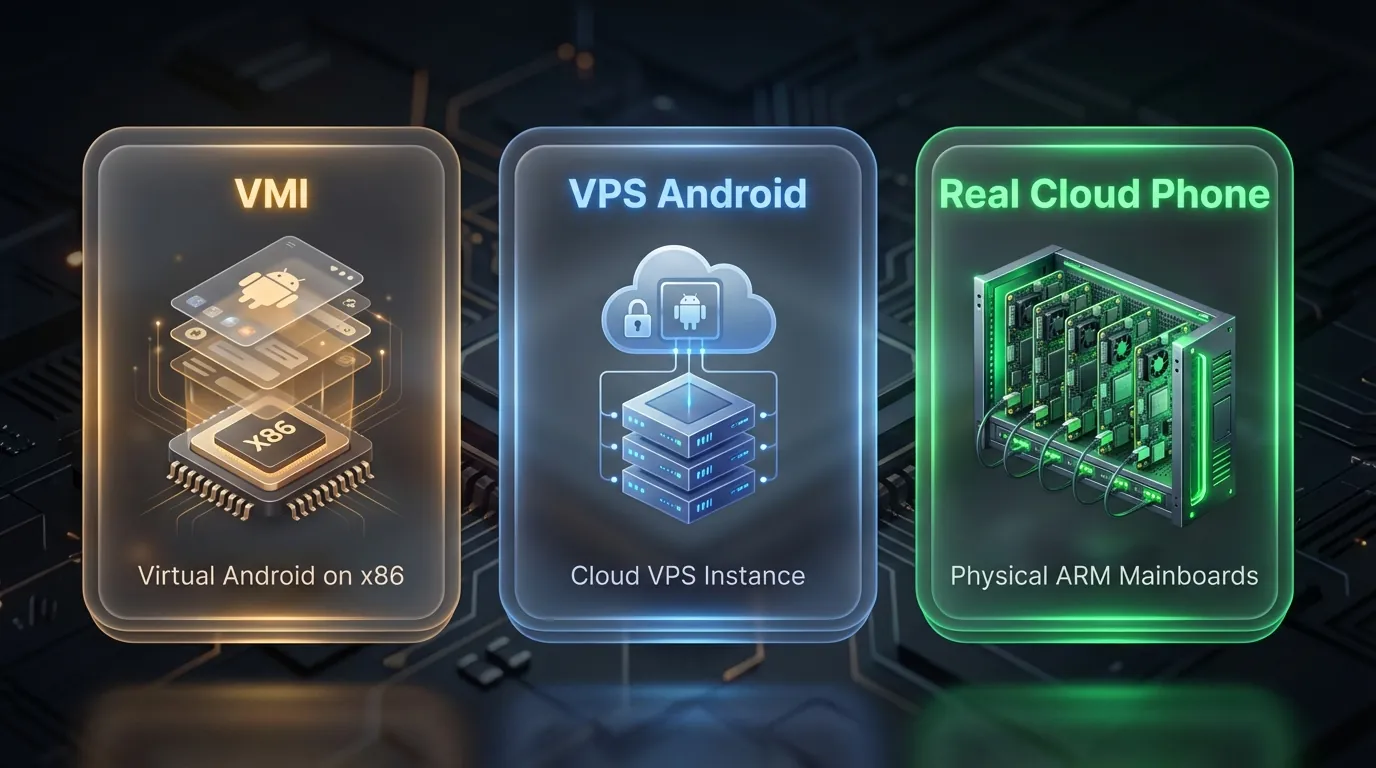
The cloud phone market currently contains 3 main types, each using different technology with distinct advantages and limitations. Understanding these differences helps you select the right solution for your specific needs.
VMI virtualizes Android on x86 hardware — creating multiple virtual Android instances on a single physical server. Advantages: low cost and easy scalability. Disadvantages: fingerprints don't match real devices because it runs on x86, leading to higher detection risk.
VPS Android is similar to VMI but provides a more complete Android environment on a Virtual Private Server. Developers commonly use it for testing and CI/CD pipelines. Disadvantage: Binary Translation reduces performance and creates detection signatures.
Real Cloud Phone uses actual ARM mainboards mounted in server racks — the same hardware as the phone in your hand. No virtualization, no Binary Translation, no x86. Each instance is an independent physical device.
XCloudPhone belongs to the Real Cloud Phone category — using real ARM hardware (Samsung Exynos 8895, 6GB RAM), not virtualization.
How Safe Are Cloud Phones? Addressing Every Concern
Cloud phones are safe when you use a real device platform — but safety levels depend on the type of cloud phone you choose. Real Cloud Phones (ARM hardware) provide the highest safety level because their fingerprints match real devices. VMI and VPS Android carry higher detection risk due to running on x86 architecture.
Ban risk: ARM hardware cloud phones significantly reduce ban risk compared to emulators — because games and platforms identify the device as a real ARM device with authentic fingerprints. However, no platform guarantees 0% ban. Ban risk also depends on usage behavior, account creation speed, and each platform's individual policies.
Sensor data & Trust Score: ARM cloud phones also provide real sensor data — gyroscope, accelerometer, and GPS function identically to handheld phones. Platforms use sensor data consistency to calculate Trust Scores: devices with real gyroscopes receive higher trust ratings than emulators lacking sensors entirely. Network fingerprinting plays a critical role as well — Baseband version and Carrier Config on cloud phones match real devices, while emulators typically lack mobile network information entirely.
Data privacy: Each cloud phone operates in an isolated sandbox — data is not shared between devices. Device identity (IMEI, Android ID) is independent per instance. You maintain full control and can delete data at any time.
Legality: Cloud phones are a service for renting real Android devices — completely legal, similar to renting a VPS or cloud server. How you use the device determines legality — the cloud phone service itself does not violate laws in any jurisdiction.
📌 Transparency from XCloudPhone: "Reduced ban risk" does not mean "0% ban." Violating a game's or platform's Terms of Service always carries risk, regardless of what device you use.
Getting Started with Cloud Phone — 3 Steps
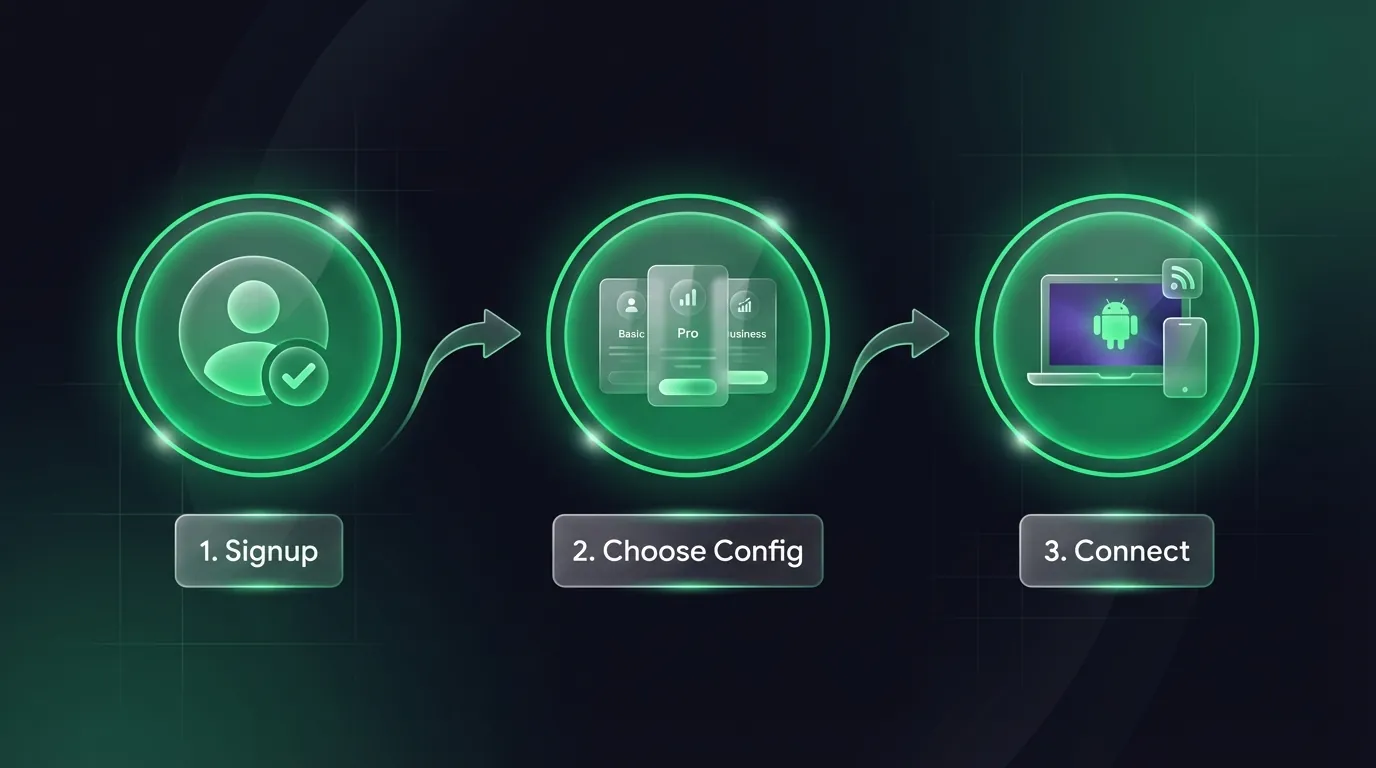
To start using a cloud phone, you need to complete 3 simple steps — from sign-up to connecting your first device takes approximately 5 minutes.
Step 1: Create an Account
Visit your cloud phone provider's website (e.g., XCloudPhone.com) and create an account. Sign-up requires only an email and password — no credit card needed for this step.
Step 2: Choose Your Device Configuration
Select a configuration that matches your use case:
Step 3: Connect and Start Using
Open your browser, select a device from the dashboard, and start using it. The interface displays a real Android screen — tap, swipe, and type exactly like a phone in your hand. Install apps from Google Play Store or sideload APKs.
Try Cloud Phone today — starting at just $10/device per month.
→ Get Started with XCloudPhone | Join the community on Telegram, Discord, and YouTube
Frequently Asked Questions About Cloud Phones
"Are cloud phones free?"
Some providers offer free trials with limited time. Cloud phone costs typically start at $10/device/month depending on provider and configuration. The pay-as-you-go model ensures you only pay for actual usage time.
"Can I get banned while using a cloud phone for gaming?"
Real ARM hardware significantly reduces ban risk compared to x86 emulators — because anti-cheat systems identify cloud phones as real devices. However, no provider guarantees 0% ban. Ban risk depends on usage behavior and each game's specific policies.
"Are cloud phones legal?"
Cloud phones are a rental service for real Android devices — completely legal, similar to renting a VPS or cloud server. The service operates legally in all jurisdictions. Legality depends on how you use the device, not the service itself.
"Is a cloud phone the same as a VPN?"
No — these are completely different products. A VPN only changes your network IP address. A cloud phone provides an entire Android device with its own IMEI, MAC address, and unique fingerprint. Cloud phones include IP management (via integrated proxy), but a VPN does not provide a device.
"What internet speed do I need for a cloud phone?"
Minimum 10 Mbps download for a stable experience. We recommend 20+ Mbps for 60 FPS at Full HD quality — particularly important for games requiring fast reactions. Standard 4G LTE and WiFi connections are sufficient.
"Can a cloud phone run every Android app?"
Cloud phones support most popular Android applications — including games, social media, and productivity apps. If you encounter a "Device Not Compatible" error on Google Play, this is typically a device model configuration issue — resolvable by switching the device profile on the dashboard. True exceptions: apps requiring a physical SIM card (GSM calls), NFC (tap payments), or dedicated sensors (capacitive fingerprint) do not work on cloud phones.
"Does a cloud phone come pre-rooted?"
It depends on the provider. XCloudPhone offers optional root — enable or disable root access through the dashboard. Root enables Xposed Framework, Magisk modules, and system file access. Some game anti-cheat systems detect root access — disable root for devices running sensitive games.
"Which cloud phone should I choose for gaming?"
Prioritize Real Cloud Phone (ARM hardware) to minimize ban risk. Compare these 3 criteria when selecting: latency (under 100ms), stream quality (60 FPS, Full HD), and pricing (~$10/device/month). Avoid VMI and VPS Android for serious gaming due to higher anti-cheat detection risk.
"Can a cloud phone replace my physical phone?"
Cloud phones replace physical devices for most use cases: gaming, farming, automation, account management, and app testing. Exceptions: GSM voice calls, NFC payment, real-world camera photography, and offline usage — these capabilities require physical hardware in your hand.
"Can I use a cloud phone from iPhone and iPad?"
Yes — you access cloud phones through a web browser (Safari, Chrome, Firefox). No app installation required. The cloud phone runs Android in the data center; you only need a browser to view and control it — regardless of whether your device is an iPhone, iPad, or MacBook.
The Future of Cloud Phones — From Platform Technology to Global Trends in 2026
Cloud phone — real hardware in the cloud as explained throughout this guide — is evolving along 3 major trends in 2026 and beyond.
AI-powered Automation is transforming cloud phones into self-operating platforms. Instead of manually building drag-and-drop workflows, you describe scenarios in natural language — AI creates, optimizes, and debugs flows automatically. This capability reduces setup time from hours to minutes.
5G Infrastructure is pushing latency below 50ms — twice as fast as the current 100ms standard. Combined with data centers in Southeast Asia, cloud phone experiences for users across the region increasingly approach native device performance.
Edge Computing brings servers closer to users. Instead of connecting to data centers in the US or Europe, cloud phones leverage edge nodes in Singapore, Ho Chi Minh City, and Bangkok — minimizing latency for the Southeast Asian market.
The cloud phone market is projected to reach $3.3 billion by 2031 at a CAGR of 28.9%, according to Allied Market Research. This is no longer a niche technology — it is becoming standard infrastructure for gaming, marketing, and mobile automation.
Experience Real Cloud Phone today — starting at just $10/device per month.