![Antidetect Browser vs Cloud Phone: Which Is Safer? [2026]](https://cdn-h.xcloudphone.com/posts/hero-antidetect-vs-cloudphone-1772098337482.webp)
Running 100+ social media accounts: antidetect browser or Cloud Phone? #Multilogin says pick them, #AdsPower says pick them — but the real answer depends on something neither will tell you.
Antidetect browsers spoof fingerprints at the browser layer (software), while Cloud Phone provides fingerprints at the hardware layer (physical device) — this difference in OPERATING LAYER determines how safe each solution is for different platforms. Social media platforms are getting smarter — antidetect browsers face increasing detection, cloud phones are rising — but which one fits your use case?
In this article, you will learn:
- The fundamental difference — which layer antidetect browsers and cloud phones operate on
- The 3-tier fingerprint model — Browser → VMI → Real ARM (exclusive framework)
- 8-criteria comparison — from fingerprint authenticity to cost and automation
- 3 top antidetect browsers reviewed — AdsPower, Multilogin, and GoLogin
- Why mobile apps are "immune" to antidetect — how app SDK detection works
- Real TCO analysis — for 100 accounts, including account loss costs
- The Combo strategy — when to use antidetect, when to use cloud phone, when to use both
Antidetect Browser and Cloud Phone: Two Fundamentally Different Approaches
An antidetect browser changes how websites see your browser, while a Cloud Phone changes how apps see your device — the operating layer (browser vs hardware) is the core difference between these two solutions.
Antidetect Browser — Browser-Layer Fingerprint Spoofing
An antidetect browser creates multiple browser profiles, each carrying a unique fingerprint. Each profile spoofs parameters like User-Agent, Canvas, WebGL, AudioContext, Fonts, Timezone, and Screen Resolution. Combined with a unique proxy per profile, web platforms see each profile as a different "user."
The most popular antidetect browsers include #AdsPower, #Multilogin, #GoLogin, Incogniton, and Dolphin Anty — all operating on the same principle.
Core limitation: Antidetect browsers only modify the BROWSER layer — they do not change hardware parameters. When a mobile app checks hardware directly (CPU info, Sensor data, App runtime environment), browser fingerprint spoofing is completely ineffective.
Cloud Phone — Hardware-Layer Fingerprinting
A Cloud Phone is a real Android device running on a server. Each instance is a separate device with its own IMEI, MAC Address, Android ID, Build.MODEL, Sensor Data (Gyroscope, Accelerometer), and Carrier Info — all real.
Cloud phones run native mobile apps — not through a browser. When TikTok, Instagram, or WhatsApp checks hardware via its app SDK, a cloud phone returns data from real hardware, not spoofed values.
Cloud phone services include XCloudPhone (real ARM hardware), #Geelark (VMI — virtualized), VMOS Cloud (VMI), and LDCloud (VMI) — but not all cloud phones use real hardware.
The 3-Tier Fingerprint Model: Browser → VMI → Real ARM
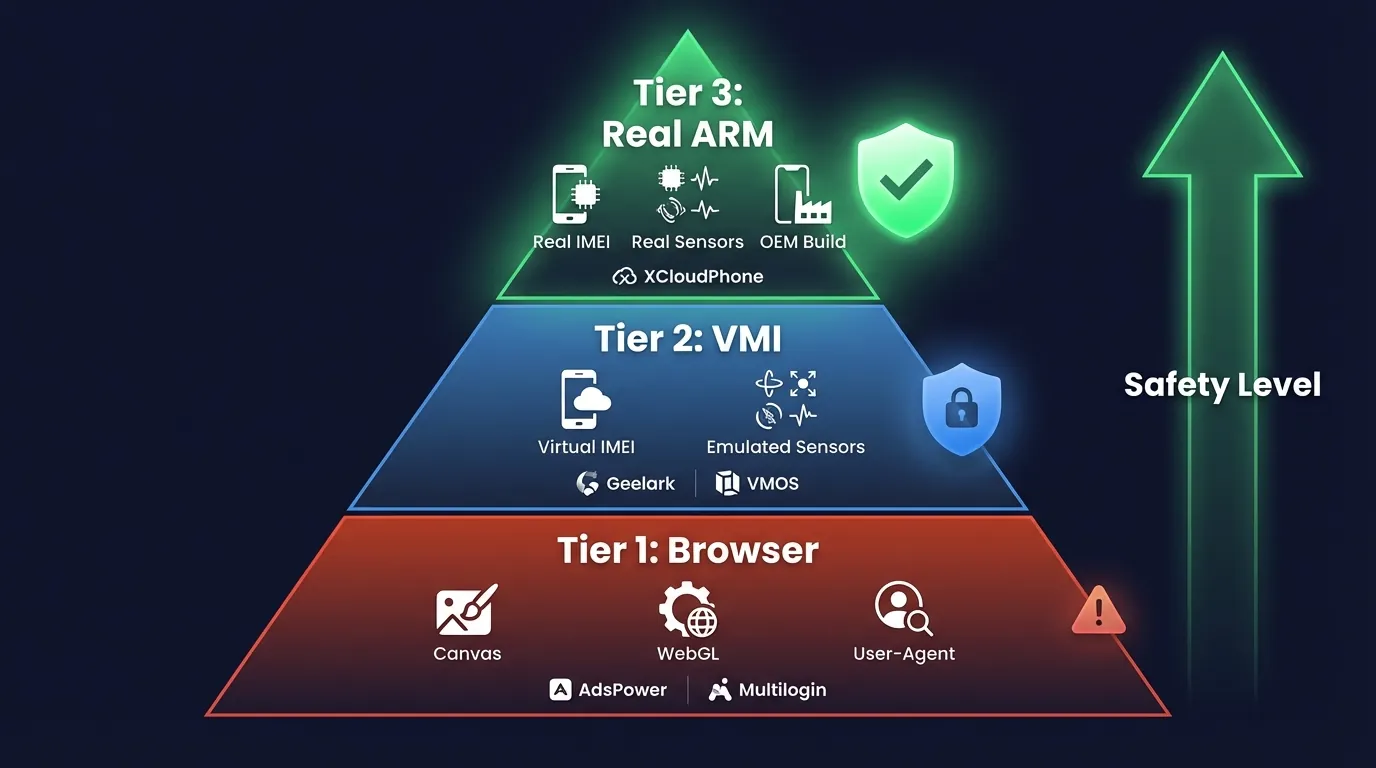
Not all fingerprints are created equal — there are 3 distinct protection tiers, with safety increasing from browser spoofing to real ARM hardware. This framework is something no competitor (Multilogin, AdsPower, or GoLogin) discusses — because it exposes the limits of their own products.
Tier 1: Browser Fingerprint (Antidetect Browser)
Tier 1 spoofs browser-level parameters: Canvas rendering, WebGL hash, User-Agent string, Font enumeration, AudioContext fingerprint, and Screen Resolution.
Effective for: Web platforms — Facebook Business Manager, Amazon Seller Central, and Google Ads Manager. These platforms check fingerprints primarily through the browser, so antidetect browsers are sufficient to bypass detection.
Limitation: App SDKs bypass browser fingerprints entirely. When the TikTok app checks hardware directly via Android API, browser fingerprint spoofing is meaningless — because the user is running a web browser pretending to be a mobile app, not running the real app.
Safety rating: ⭐⭐⭐ (web platforms) / ⭐ (mobile apps)
Tier 2: Virtual Device Fingerprint (VMI Cloud Phone)
Tier 2 simulates fingerprints at the virtual device layer: Virtual IMEI, Virtual MAC, Emulated sensors, and Virtual carrier info. VMI cloud phones (Geelark, VMOS Cloud, and LDCloud) create virtual Android devices on x86 servers or virtualized ARM environments.
Effective for: Basic mobile apps — applications that do not perform deep hardware attestation checks.
Limitation: Virtualized hardware triggers #PlayIntegrityAPI detection. Virtual sensor data lacks natural jitter (gyroscope and accelerometer return values that are too "perfect"). Google SafetyNet (now Play Integrity) fails hardware attestation for virtualized devices.
Safety rating: ⭐⭐⭐ (basic apps) / ⭐⭐ (advanced detection)
Tier 3: Real Hardware Fingerprint (Real ARM Cloud Phone)
Tier 3 provides fingerprints from real physical hardware: OEM-issued IMEI, real MAC address, real Sensor data (Gyroscope: ±0.003 rad/s natural jitter, Accelerometer: ±0.01 m/s² noise), real Carrier info, and Build.FINGERPRINT from original Samsung or Xiaomi ROM.
Effective for: Every platform — app SDKs see a real phone, not emulation software or a virtual device.
Limitation: Higher cost than VMI (~$10/device/month vs $3-5/device for VMI).
Examples: XCloudPhone (Real ARM — Exynos 8895, Snapdragon 845), and Genfarmer.
Only Real ARM Cloud Phone provides fingerprints at the physical hardware level — this is why it is safer than both antidetect browsers AND VMI cloud phones.
Detailed Comparison: Antidetect Browser vs Cloud Phone (8 Criteria)
Below is a comparison across the 8 most important criteria when choosing between an antidetect browser and a cloud phone for multi-accounting.
3 Decisive Criteria
Three criteria determine which solution to choose:
- Fingerprint authenticity: Real ARM > VMI > Browser spoofing. App SDKs check hardware directly — only Real ARM passes every detection layer
- Mobile app compatibility: Cloud Phone runs native apps. Antidetect browsers run web versions pretending to be mobile — TikTok and Instagram detect this difference
- Cost at scale: Antidetect is cheaper at 10-50 accounts ($200-500/month including proxy). Cloud Phone is cheaper at 100+ accounts when you factor in proxy cost plus account loss cost (antidetect checkpoint rate ~20-30% for mobile apps vs ~5% for cloud phone)
The 3 Most Popular Antidetect Browsers Reviewed: AdsPower, Multilogin, and GoLogin
The three leading antidetect browsers in 2026 — #AdsPower, #Multilogin, and #GoLogin — each serves a different user segment.
AdsPower — Automation King, Best for Large Teams
#AdsPower is the antidetect browser with the strongest automation capabilities, featuring built-in RPA (Robotic Process Automation) no-code tools. Supports 1,000+ profiles per device, iOS fingerprint simulation, and a free plan for beginners.
3 strengths: No-code RPA automation, team management with role-based access, and a free tier for 5 profiles.
Weakness: Advanced features (API access, bulk operations) require paid plans starting at $9.9/month.
Multilogin — The Gold Standard, Highest Price
#Multilogin is the most premium antidetect browser on the market with 55+ fingerprint parameters, 2 proprietary browser engines: Mimic (Chromium-based) and Stealthfox (Firefox-based). Built-in proxy marketplace and cloud phone integration (added in 2025).
3 strengths: Highest fingerprint accuracy (55+ parameters), 2 browser engines to avoid pattern detection, and built-in proxy purchasing.
Weakness: Plans start at $99/month — the most expensive on the market. Overkill for solo users or teams with fewer than 20 profiles.
GoLogin — User-Friendly, Best Value
#GoLogin is the most balanced antidetect browser between features and price. Offers 50+ fingerprint customizations, cloud profile sync, free proxy included, and a web-based interface.
3 strengths: Competitive pricing ($24/month for 100 profiles), web interface accessible from anywhere, and built-in free proxies.
Weakness: Limited team permissions compared to AdsPower, no built-in RPA, and free proxy quality is average.
All three are antidetect browsers — meaning they only spoof at the browser layer. For hardware-layer fingerprinting, you need a Cloud Phone. This is a fundamental limitation that no antidetect browser can overcome, regardless of price or features.
Why Mobile Platforms Are Increasingly "Immune" to Antidetect Browsers
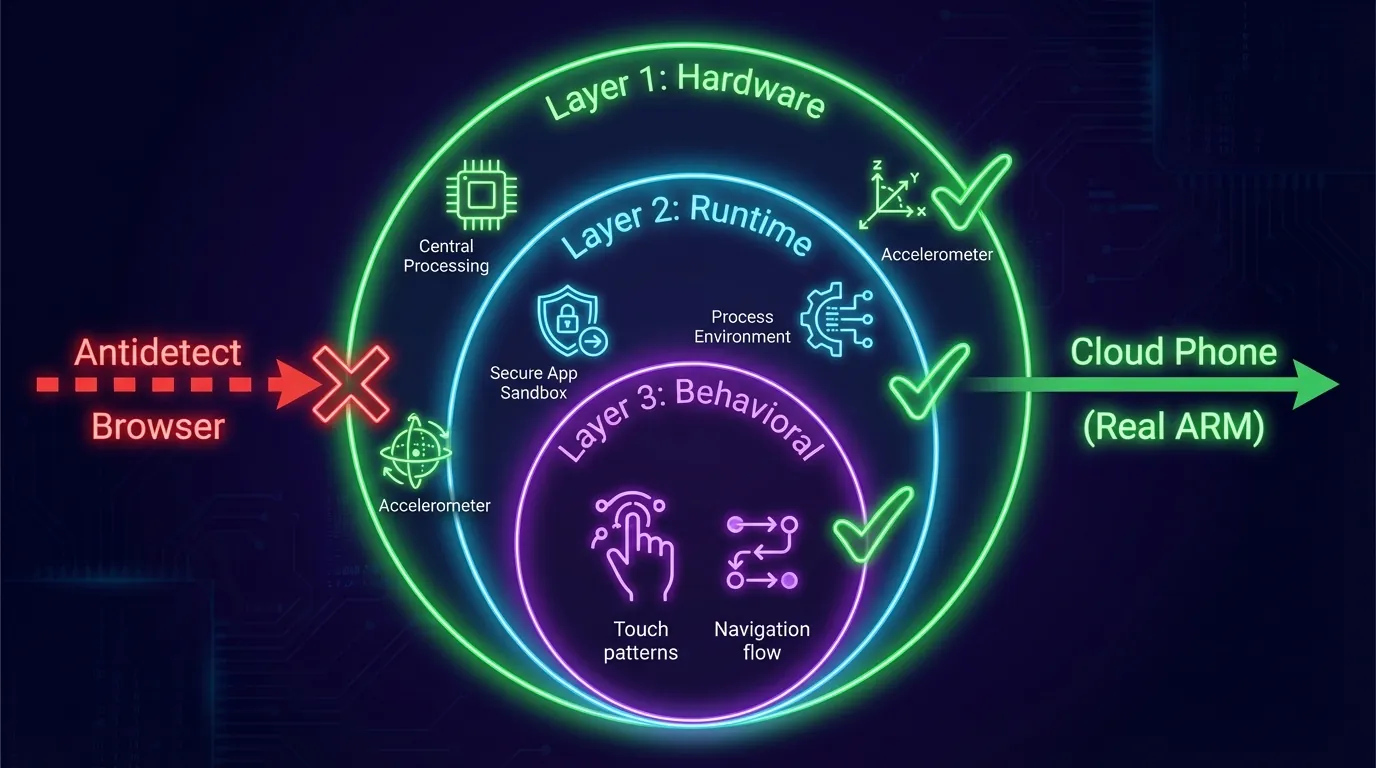
TikTok, Instagram, and WhatsApp use app-level SDK detection — a mechanism that antidetect browsers cannot bypass, because the SDK checks hardware and runtime environment directly, not through the browser.
TikTok, Instagram, and WhatsApp are mobile-first platforms — designed with app-native experiences as the priority. Their app SDKs (TikTok's anti-fraud SDK, Meta's Security SDK, and WhatsApp's device verification) check 3 layers:
- Hardware layer: CPU info, real Sensor data (gyroscope and accelerometer values must show natural jitter)
- Runtime layer: App process environment — running in a browser or a native app? WebView or a real application sandbox?
- Behavioral layer: Touch patterns, interaction speed, and navigation flow — mouse interactions from a PC desktop look entirely different from finger touches on a touchscreen
Antidetect browser: Opens TikTok in a browser (or mobile web version) → SDK detects "user is in a browser pretending to be a mobile app" → flags the account → checkpoint or shadow ban.
Cloud Phone: Runs the real TikTok app on real Android → SDK checks hardware = Exynos 8895, Gyroscope = ±0.003 rad/s jitter, Process = native app sandbox → passes every check.
App SDK detection operates at the hardware and runtime layers — completely outside the reach of any browser fingerprint spoofing. This is why antidetect browsers are becoming less effective for TikTok farming, Instagram growth, and WhatsApp mass messaging.
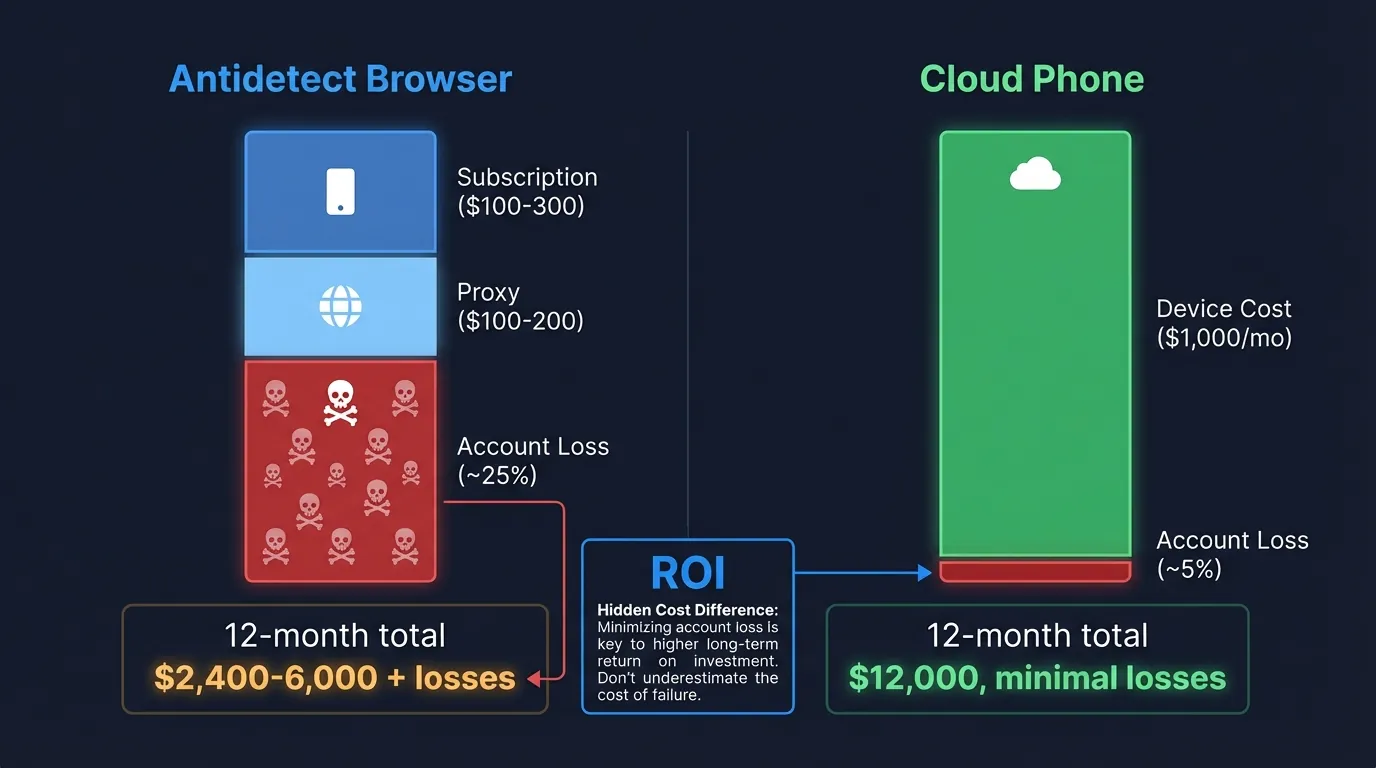
Real TCO Comparison: Antidetect vs Cloud Phone for 100 Accounts
Cost is more than just subscription fees — total cost includes proxy, supplementary tools, and account loss due to bans. The table below breaks down TCO for 100 accounts over one month.
Hidden Cost Analysis: Account Loss
The largest hidden cost of antidetect browsers for mobile apps is account loss:
- Every checkpointed account means lost SIM or email ($1-3), lost 30-day warm-up period, and lost friends or followers already built
- Antidetect checkpoint rate for mobile apps: ~20-30% → 100 accounts × 25% loss × $5/account value = $125 per ban wave
- Cloud Phone checkpoint rate: ~5% → 100 accounts × 5% loss × $5/account = $25 per ban wave
- Difference: $100/wave → 3-4 waves/year = $300-400 in hidden costs
Bottom line: Antidetect is clearly cheaper for web-based operations (FB Ads, Amazon, and affiliate). Cloud Phone has a higher sticker price but delivers higher ROI for mobile app operations (TikTok, IG, and WhatsApp) when you account for account losses and proxy costs.
The "Combo" Strategy: When to Use Antidetect, When to Use Cloud Phone, When to Use Both
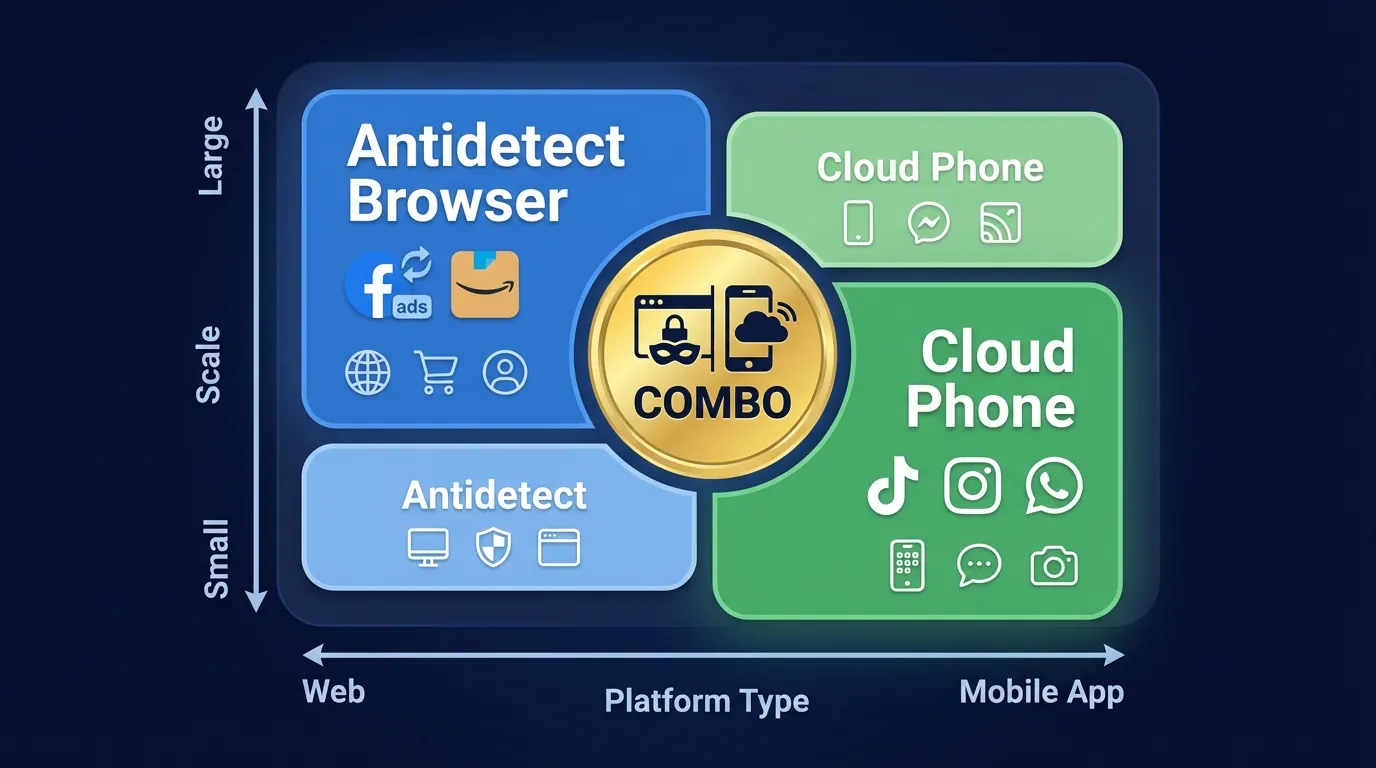
Many professional agencies do not choose a single tool — they use antidetect browsers for web operations and cloud phones for mobile app operations. This is the optimal strategy for multi-platform agencies.
3-Step Decision Framework
Identify your PRIMARY target platform → choose the corresponding tool:
- Web-only (FB Ads Manager, Google Ads, and Amazon) → Antidetect browser is sufficient
- Mobile-only (TikTok app, IG app, and WhatsApp) → Cloud Phone is required
- Multi-platform (web + app) → Combo strategy: Antidetect for web, Cloud Phone for app
For a detailed guide on building high-trust accounts across both web and mobile platforms — including warm-up timelines, IP strategies, and behavioral mimicking — see our multi-account farming guide.
FAQ — Frequently Asked Questions
"Can an antidetect browser bypass TikTok detection?"
Antidetect browsers struggle to bypass TikTok — TikTok uses app-level SDK detection that checks hardware parameters (CPU, Sensor data, and App runtime) directly, outside the reach of browser fingerprint spoofing. Running TikTok via a web browser instead of the native app also significantly limits features and reach.
"What is the difference between Real ARM and VMI cloud phones?"
Real ARM cloud phones (e.g., XCloudPhone) run on real ARM hardware — Exynos 8895, Snapdragon 845 chips. VMI cloud phones (e.g., Geelark, VMOS) run on virtual machines — and fail #PlayIntegrityAPI detection because they lack real hardware attestation. The difference: Real ARM passes all hardware checks; VMI fails at advanced detection.
"Which is cheaper: antidetect or cloud phone?"
Antidetect is cheaper upfront: $2-5/account (subscription split across profiles). But you also need residential proxy, adding $100-200/month. Cloud Phone costs ~$10/device/month including the device and management. At 100+ accounts for mobile apps, Cloud Phone has lower TCO when you factor in account loss costs.
"Can you use both antidetect browser AND cloud phone?"
Yes — many professional agencies use a combo: antidetect browser for Facebook Ads, Amazon, and affiliate marketing (web-based) + cloud phone for TikTok, Instagram, and WhatsApp (app-based). This is the optimal strategy for multi-platform operations.
"Is AdsPower better than Multilogin?"
AdsPower is better for automation and large teams — free no-code RPA, robust team management. Multilogin is better for premium fingerprint security — 55+ parameters, 2 proprietary browser engines. Both only spoof at the browser layer — the difference lies in spoofing quality and supplementary features, not operating layer.
"Can Cloud Phone run Facebook Ads Manager?"
Yes — XCloudPhone runs real Android → open Chrome → access FB Ads Manager or install the Facebook Ads app. However, an antidetect browser is more convenient for web-based workflows: 30-second profile creation, quick copy/paste, and multi-window on a large screen. Cloud Phone is better suited for the Facebook app (account nurturing, posting, and engagement).
"Which platforms detect antidetect browsers most easily?"
TikTok and Instagram — both use advanced app SDK combined with AI behavioral analysis that checks hardware parameters directly. WhatsApp also has strong detection because it requires device verification tied to a real SIM. Facebook web has weaker detection — antidetect browsers remain effective for FB Ads Management and business operations.
"Is Cloud Phone 100% safe?"
No — no solution is 100% safe. Real ARM Cloud Phone significantly reduces ban risk through real hardware fingerprinting — passing all hardware detection checks. However, bot-like behavior (excessive posting, rapid liking, and unnatural navigation patterns) will still be detected by AI behavioral analysis, regardless of the tool being used.
Real Fingerprints — An Advantage That Cannot Be Spoofed
The race between anti-fraud AI and fingerprint spoofing is tilting toward detection — and antidetect browsers are on the defensive.
Recall the 3-tier fingerprint model from earlier: Browser Spoofing → VMI → Real ARM. Three trends in 2026 are accelerating this shift:
- AI fraud detection is getting smarter — Meta, TikTok, and Google are investing billions into AI that identifies spoofed fingerprints. Browser fingerprints are detected more frequently every quarter — antidetect browsers must constantly update to keep pace
- Mobile-first platforms dominate — TikTok, Instagram, and WhatsApp all prioritize native apps. App SDK detection is reaching deeper into the hardware layer — a layer that antidetect browsers cannot touch
- Real ARM Cloud Phone is the "foundation layer" — real hardware requires no spoofing, no emulation, and no updates to match detection changes. This is an architectural advantage — not a software advantage that can become obsolete
If your accounts have value — move to real hardware fingerprinting. Antidetect browsers remain effective for web platforms, but the future of multi-accounting on mobile apps belongs to Real ARM Cloud Phone.
References:
- AdsPower — Anti-detect Browser — Product Documentation
- Multilogin — Antidetect Browser — Product Documentation
- GoLogin — Browser Profiles — Product Documentation
- Play Integrity API — Android Developer Documentation
- XCloudPhone — Product Documentation