🚧The website is under construction — Please visit the Dashboard to register your email and receive a notification when it's completed.🚧
Banner for Delta Force optimized for XCloudPhone cloud gaming
Action

Delta Force

Icon for Delta Force
Delta Force

Level Infinite

Action
Play on XCloudPhone

Game Information

Released

December 4, 2024

Developer

Level Infinite

Package

com.proxima.dfm

Status

Active

Discover Delta Force by Level Infinite on Cloud Phone. Play Delta Force smoothly on Cloud Phone without lag.

Optimized For

99% Ban-Safe

24/7 AFK Gaming

Multi-Account

Goodbye Lag

Media Gallery

Explore 18 images and videos of Delta Force

Thumbnail 1
1
Thumbnail 2
2
Thumbnail 3
3
Thumbnail 4
4
Thumbnail 5
5
Thumbnail 6
6
Thumbnail 7
7
Thumbnail 8
8
Thumbnail 9
9
Thumbnail 10
10
Thumbnail 11
11
Thumbnail 12
12
Thumbnail 13
13
Thumbnail 14
14
Thumbnail 15
15
Thumbnail 16
16
Thumbnail 17
17
Thumbnail 18
18

The mobile FPS tactical revolution has officially begun with the launch of Delta Force. For the first time in mobile gaming history, you can experience large-scale battles with 48 players facing off on land, sea, and air in a fully destructible battlefield. More than just a shooter, Delta Force redefines modern warfare on mobile devices, delivering a multidimensional tactical experience previously only found on PC and consoles. With a perfect blend of advanced technology and deep gameplay, the game promises to set a new standard for the tactical mobile FPS genre.

Gameplay and Game Mechanics

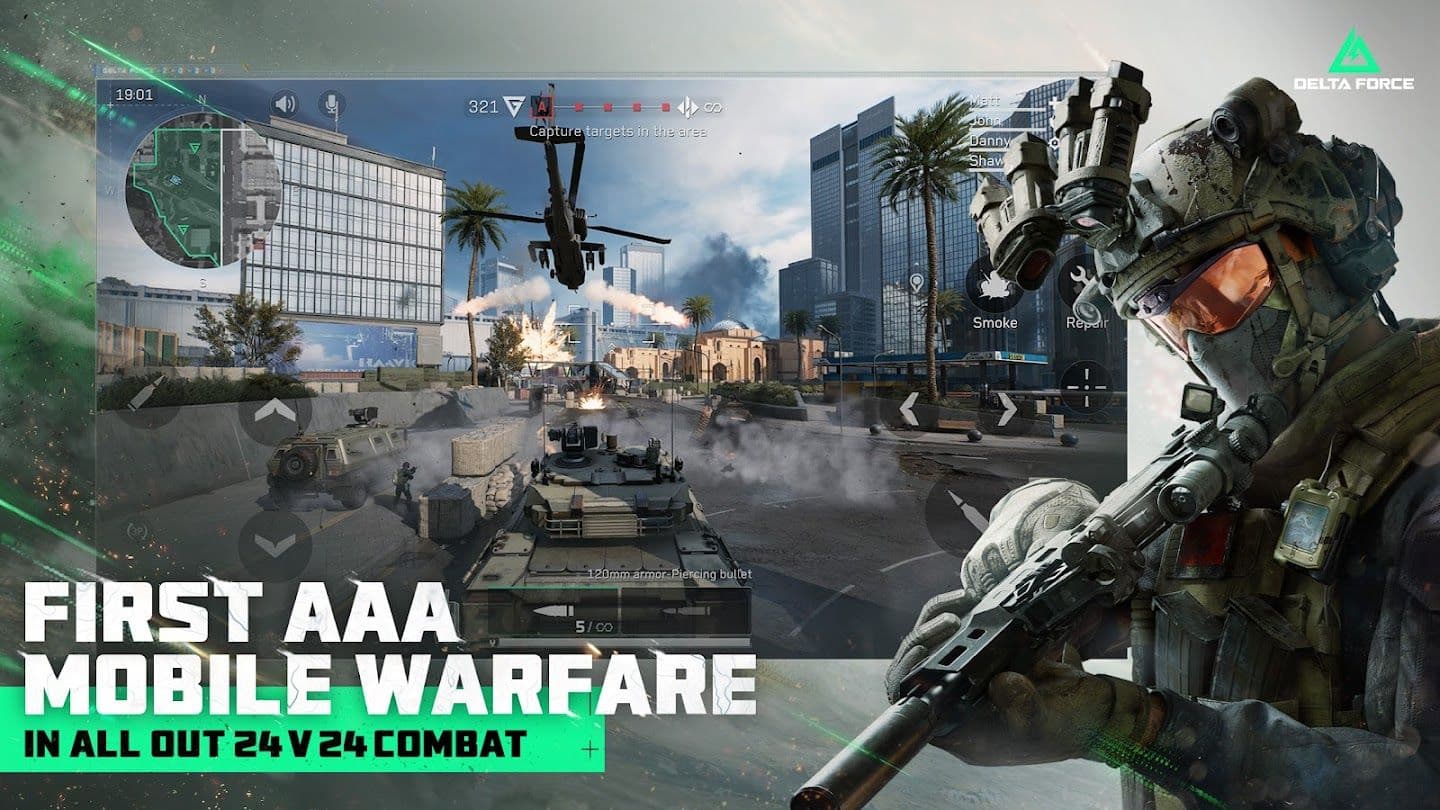
Delta Force offers a groundbreaking gameplay experience with a unique multi-layered combat system. In Warfare mode, 48 players split into two teams engage in epic battles featuring tanks, Black Hawk helicopters, and a variety of combat vehicles. The standout feature is the fully destructible environment system – everything from house walls, bridges, to defensive structures can be destroyed, creating unexpected tactical opportunities and dynamically changing the map in real time.

The core gameplay loop revolves around three pillars: Plan - Deploy - Adapt. Players start by selecting the right Operator from over 10 specialized characters, customize loadouts from a weapon arsenal of 100+ guns, then coordinate with teammates to accomplish complex tactical objectives. The day/night cycle and dynamic weather directly affect visibility and strategy, forcing players to flexibly adjust their approach.

Notably, the PvE Campaign mode based on the blockbuster "Black Hawk Down" offers solo or cooperative play against intelligent AI. The AI not only reacts according to scripted scenarios but also learns and adapts to player behavior, creating fresh and surprising challenges.

Key Features

Extraction Shooter - A pioneering genre: Delta Force is one of the few mobile games to successfully implement the extraction shooter mechanic. In this mode, players must balance risk and reward – collecting valuable gear, fighting AI and other teams, then finding a way to escape the safe zone before time runs out. Every decision is life-or-death, from whether to engage in combat for better loot or choose a safer exit route.

Comprehensive Weapon Customization System: With over 100 weapons and thousands of accessory options, players can create completely unique gun builds. From adjusting barrel length affecting long-range accuracy to selecting optimal grip patterns for recoil control, every detail impacts actual combat performance.

Cross-Platform Progression: One of the most valuable features is the ability to synchronize progress across all platforms. You can start playing on mobile in the morning, continue on PC at noon, and finish the day with a console session – all with the same account and progression.

Fair Model: Delta Force commits to "No Pay-to-Win" with a free 3x3 Safe Box system, ensuring new players can access high-quality weapons without spending money.

Player Experience

Delta Force is designed to serve a wide spectrum of the gaming community, from casual gamers to hardcore enthusiasts. Session lengths are flexible from 15 minutes (quick mode) to 45 minutes (full-scale Warfare), fitting the busy lifestyle of modern gamers.

The intelligent matchmaking system ensures new players are not "thrown" into overly difficult matches while still providing enough challenge for veterans. Detailed tutorials and training modes help players gradually familiarize themselves with complex mechanics.

Social elements are deeply integrated with squad formation, in-game voice chat, and guild leaderboards. This not only encourages teamwork but also builds a sustainable community around shared tactical experiences.

Why Play Delta Force?

Delta Force is not just an FPS game but a complete tactical ecosystem. Compared to competitors like Call of Duty Mobile or PUBG Mobile, it offers superior gameplay depth with a complex combat system and multi-layered strategic elements.

The game’s long-term value lies in its ability to continuously deliver new metas through regular updates, expanded maps, and seasonal events. Community-driven content with player-organized tournaments creates a vibrant competitive environment.

Importantly, the lack of mandatory grinding to unlock high-quality weapons allows players to focus on skill development rather than time investment, creating a significantly fairer playing field compared to many games in the genre.

Optimized Multi-Account Experience: For gamers who want to manage multiple accounts to try different Operator builds or join multiple guilds, using the cloud phone solution streamlines this process efficiently while ensuring a stable connection for the high-intensity combat Delta Force demands.

Delta Force Performance on XCloudPhone

See how XCloudPhone's real hardware delivers superior performance compared to traditional emulators

FPS (Frames Per Second)

Consistent frame rate ensures smooth gameplay without stuttering

XCloudPhone
95%

Stable 60 FPS

Traditional Emulator65%

45-55 FPS, Unstable

CPU Usage (Local PC)

Keep your PC free for other tasks while gaming runs on cloud

XCloudPhone
100%

0% CPU

Traditional Emulator55%

45% CPU

Ban Risk

Real hardware means undetectable gameplay and account safety

XCloudPhone
99%

Near 0%

Traditional Emulator30%

High Risk

Uptime Reliability

24/7 continuous gaming without interruptions or crashes

XCloudPhone
99%

99.9% Uptime

Traditional Emulator85%

85% Uptime

98%
Average Performance Score
0%
Local CPU Usage
24/7
AFK Gaming

How to Play Delta Force on XCloudPhone

Follow these simple steps to start playing your favorite games on our cloud platform

1

Create Account

Sign up for an XCloudPhone account to begin your experience

2

Choose Service Plan

Select the cloud phone package that suits your gaming needs

3

Access Device

Connect to your personal Android cloud device instantly

4

Browse Games

Search for Delta Force in the Play Store search bar

5

Install & Setup

Tap to Install Delta Force on your cloud phone

6

Start Playing

Tap the Delta Force icon on the home screen to start playing and farm 24/7

Expert Guides for Delta Force

Discover comprehensive guides, strategies, and tips to master Delta Force on XCloudPhone

Related Games in Action

Discover more amazing games in the Action category, all optimized for XCloudPhone.

More Games by Level Infinite

Explore other fantastic games developed by Level Infinite, all available on XCloudPhone.

Delta Force - Frequently Asked Questions

Get answers to the most common questions about playing Delta Force on XCloudPhone

Traditional methods include playing directly on your phone or using PC emulators. However, both have drawbacks: playing on phone causes overheating and battery drain, while emulators often encounter errors, lag, and risk detection by the game's security system. The smartest and most effective solution is using XCloudPhone. You can run your Delta Force account 24/7 on a real Android device from the cloud, ensuring stable performance and absolute safety, all accessible through just a web browser.
This is XCloudPhone's superior advantage over emulators. XCloudPhone provides you access to a 100% real Android phone with standard hardware and operating system. To Delta Force's system, you're simply logging in from another mobile device. This minimizes the risk of detection and account bans compared to using emulator software that's easily recognizable. The safety and security of your account is our top priority.
Absolutely not. This is a real revolution. Since all Delta Force game processing happens on our powerful devices in the data center, your computer or laptop only serves as a remote control screen. You just need a computer that can run a web browser (like Chrome, Firefox) and a stable internet connection. You don't need to worry about RAM, graphics card, or hard drive space. XCloudPhone handles all the heavy lifting.
Yes, and this is XCloudPhone's core strength. Instead of investing in multiple physical phones or installing complex emulator versions, you can easily rent and manage a fleet of cloud phones. With features like synchronous control, you can perform the same action on all accounts with just one click. This is the optimal solution for building alt account armies, farming resources, or executing large-scale strategies in Delta Force.
4
Questions Answered
24/7
Support Available

Ready to Dominate in Delta Force?

Stop risking bans with emulators. Use XCloudPhone's real hardware for the ultimate performance and security. Manage all your accounts and automate your farming effortlessly.

24/7 AFK Farming

Never stop progressing, even while you sleep

99% Ban-Safe

Real hardware means zero detection risk

Multi-Account Support

Manage multiple accounts simultaneously

Zero Lag Gaming

Experience perfect performance on cloud

No setup feesCancel anytime

+500%
Avg. Power Growth Rate
10x
Farming Efficiency
24/7
Alliance Activity